All it takes is a leaked email or a forgotten password for scammers to piece together your identity, and that’s why having a reliable identity protection app is so important these days.
Aura’s security platform was built to catch these threats before they reach your SSN or bank account, and this guide by Insiderbits shows you how easy staying protected feels. Read on!

Which is the best identity protection app?
Aura (Android | iOS) offers credit monitoring, dark web scanning, and a digital vault in one dashboard that watches your accounts, passwords, and personal details around the clock.
A team of fraud specialists backs the platform, stepping in fast when something looks wrong, and that speed makes this identity protection app stand apart from monitoring tools.
Every alert lands on your phone the instant something unusual happens, replacing hours of manual account checking with one glance at a single organized screen inside the app.
Key features within the Aura Digital Security platform
- Credit lock: freeze your Experian credit file the second fraud alerts pop up, keeping thieves from opening new cards or loans in your name;
- Dark web scanning: track your Social Security number across breach databases and shady forums, catching exposure well before criminals can ever act on it;
- VPN and antivirus: browse, bank, and shop through encrypted connections while built-in malware protection blocks phishing sites well before they reach your screen;
- Password manager: generate and store strong, unique passwords for every account you hold online, then see an alert the moment any account is breached.
One app covers your entire family
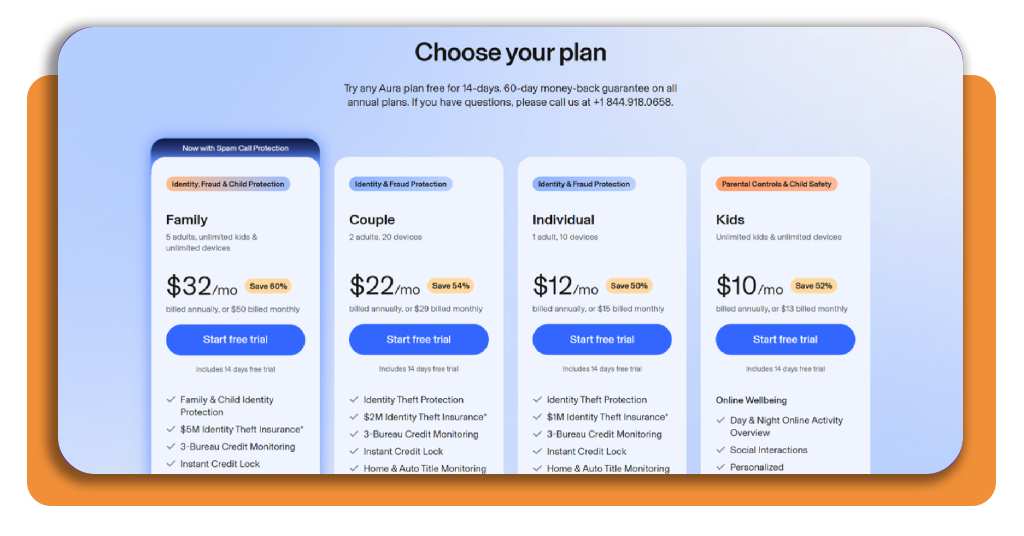
Aura’s family plan brings every member of your household under one shield, covering up to 5 adults along with unlimited children across select higher coverage tiers.
Kids on the family plan receive account monitoring paired with strong parental controls, and this identity protection app keeps their information guarded while you manage daily screen time.
Coverage and guarantees that back you up
Every adult member on the plan receives up to $1,000,000 in coverage for lawyers, lost wages, notary fees, and costs tied to resolving a genuine identity theft case.
Cancel within 60 days of signing up and receive a full refund, no lengthy explanations required, plus round-the-clock support from identity restoration experts ready to help.
Step-by-step: how to monitor your SSN and lock your credit on your phone
Nine digits control access to your bank accounts, tax records, and medical history, and Aura (Android | iOS) sees threats tied to those digits long before you’d ever notice.
Fraud rings trade personal details across hidden forums, building full profiles from scattered breach data, and this identity protection app catches red flags before damage spreads.
Turning your phone into a full-time credit watchdog takes just a handful of taps, and every piece of information you enter stays encrypted starting with the first screen.
Step 1: download the app or use the website
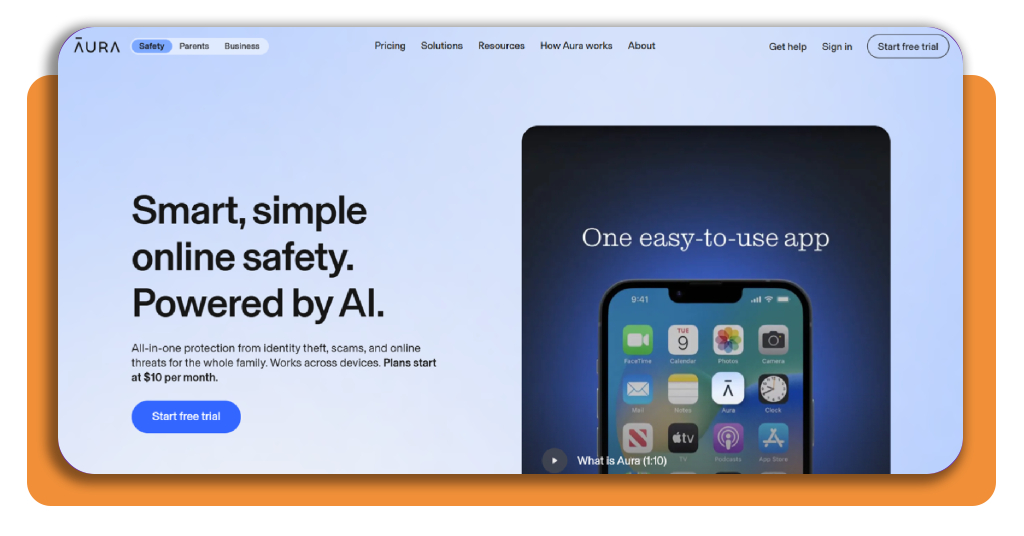
You can easily grab Aura from the App Store or Google Play or open a browser and head straight to the official website instead, whichever feels easier for you.
Both options show every available plan side by side, letting you compare pricing, coverage levels, and included features before you ever enter any personal banking information at all.
Step 2: choose your plan and create an account
Pick the plan matching what you and your family need most right now, whether that means simple monitoring or the full suite covering credit, VPN, and antivirus tools.
Creating your account only takes an email address, a password, and a bit of basic contact information; then your dashboard opens right up, ready for the next part.
Step 3: enter your SSN during setup
The setup wizard walks you through adding personal details one field at a time, starting with your full legal name, home address, phone number, and date of birth.
Once you reach the Social Security field, entering it lets this identity protection app begin scanning breach databases and dark web listings for matches tied to your number.
Step 4: lock your credit with one tap
Locking your credit means blocking lenders and creditors from viewing your credit file, which stops thieves from opening new cards, loans, or credit lines under your name.
Open the ‘Credit’ section inside the app and tap the ‘Lock’ button, then unlock it again just as fast whenever you need to apply for new personal financing.
Top identity theft protection services
Aura (Android | iOS) isn’t the only name worth knowing when fraud protection comes up in conversation, and plenty of other services fight for a spot in your monthly budget too.
Each platform brings its own mix of credit monitoring, dark web scans, and insurance coverage, so comparing them side by side helps you figure out what actually fits.
You might want backup options beyond this identity protection app, whether that means better family pricing, higher payout limits, or specific coverage details that matter to you.
LifeLock
Norton developed LifeLock around three coverage tiers, starting with Core and moving up through Advanced and Total, each adding broader monitoring across more of your accounts.
Total members get coverage reaching $3,000,000 for identity theft-related costs, plus home title monitoring and alerts tied to 401k or investment accounts you hold elsewhere.
Coveron
Built by the team behind NordVPN, Coveron bundles dark web monitoring, credit tracking, and cyber extortion coverage into plans reaching $2,000,000 in identity theft protection.
Subscribers also get access to NordVPN and Incogni’s data removal tools at no extra charge, stretching your subscription well past basic monitoring most competitors offer alone.
Identity Guard®
More than 25 years in the industry gives Identity Guard® a track record most competitors can’t match, with plans monitoring your name, SSN, and driver’s license number.
Family plans start around $12.50 a month and stretch coverage to 5 adults plus unlimited kids, backed by $1,000,000 in identity theft insurance for every member.
Best privacy tools to protect your identity
Data brokers collect your full name, home address, phone number, email, and browsing habits, then package that profile and sell it to whoever pays the highest asking price.
Credit monitoring catches fraud once it happens, but a lot of your exposure starts years earlier through data broker listings that this identity protection app can’t erase alone.
Privacy tools take a different approach, targeting the data brokers themselves and stripping your personal details from hundreds of databases you never even knew held any information.
Incogni
Incogni scans data broker sites using your name, address, and phone number, then sends removal requests to each one without requiring you to lift a finger.
Independent audits from Deloitte confirm Incogni has processed over 245,000,000 removal requests, giving you solid proof this service delivers results instead of empty promises.
Optery
Optery starts by scanning Google search results along with a wide range of data broker sites, showing you where your home address and phone number remain exposed online.
Upgrading to a paid plan unlocks automated removals across 635 plus additional sites, giving you broader protection than this identity protection app handles through its built-in feature.
PrivacyHawk
PrivacyHawk uses an AI-powered agent to unsubscribe you from spam lists automatically, cutting down on the flood of promotional emails and texts clogging up your daily inbox.
Beyond spam control, the app tracks a personal privacy score based on your exposure level, then works behind the scenes to lower that score with each passing month.
Don’t wait for a breach to act
Aura (Android | iOS) watches your back around the clock, but the real win comes from knowing exactly which weak spots let scammers in and how to close them.
In this guide, Insiderbits showed you how this identity protection app compares against other services and privacy tools built to keep your identity locked down.
Hit the “favorites” button and come back to Insiderbits, where new guides drop regularly to help you stay a step ahead of anyone hunting for your information.