Sometimes a favorite album is all it takes to rescue a rough day, and having access to offline music keeps that comfort in your pocket when a subscription or a dead signal stands in the way.
In this guide, Insiderbits shows you how VLC turns the songs stored on your phone into a jukebox that plays anywhere for free, and getting it running is easier than you think. Read on!

3.7/5
What is the free app to play local music files offline?
VLC (Android | iOS) is a free media player that opens the songs stored on your phone, from the albums you ripped off old CDs to the demo tracks a friend emailed you.
Once the files land on your device, the app needs no internet to play them, and your stash of offline music keeps rolling on a plane or even on a subway platform.
The same app handles video, giving your concert recordings and downloaded clips a spot next to your albums, and your phone won’t need a second player eating up storage.
Key features within the VLC media player app for mobile
- Sound equalizer: boost the bass on a hip hop track or soften harsh vocals with presets and audio filters that you adjust by ear;
- Smart media library: song tags sort your collection by artist and album, letting you jump from a classic rock record to a jazz compilation;
- Home screen widget: skip or replay a song while you’re cooking dinner or folding laundry without opening the app or hunting for the track;
- Headset controls: press the button on your wired or Bluetooth earbuds to pause a podcast or jump ahead to the next song in line.
Play rare audio formats without extra downloads
Lossless FLAC rips and less common formats like WV or Ogg can stump some players, and VLC (Android | iOS) opens them with native codecs, sparing you a frustrating plugin hunt.
The same goes for AAC files and audio tucked inside MKV videos, giving you an offline music lineup where every track keeps the full detail of the original studio recording.
Enjoy your music with zero ads or subscriptions
A team of volunteers built VLC (Android | iOS) and shared its source code, and that’s what keeps commercials from cutting into a soaring chorus while your credit card stays in your wallet.
There’s no premium feature to unlock with a payment in the app, and it doesn’t collect or share your listening data, keeping your music habits between you and your headphones.
Step-by-step: how to import and play MP3 and FLAC files
Before opening VLC (Android | iOS), make sure your MP3 and FLAC files are on your phone, like the Download or Music folder you stocked with songs from your computer.
FLAC files take up more room than MP3s, and checking your free storage first saves you from an incomplete collection of offline music when your phone runs out of space.
Giving your files readable names helps as well, letting you spot a song by its real title in the music app rather than squinting at a string of letters and numbers.
Step 1: download the app on your device
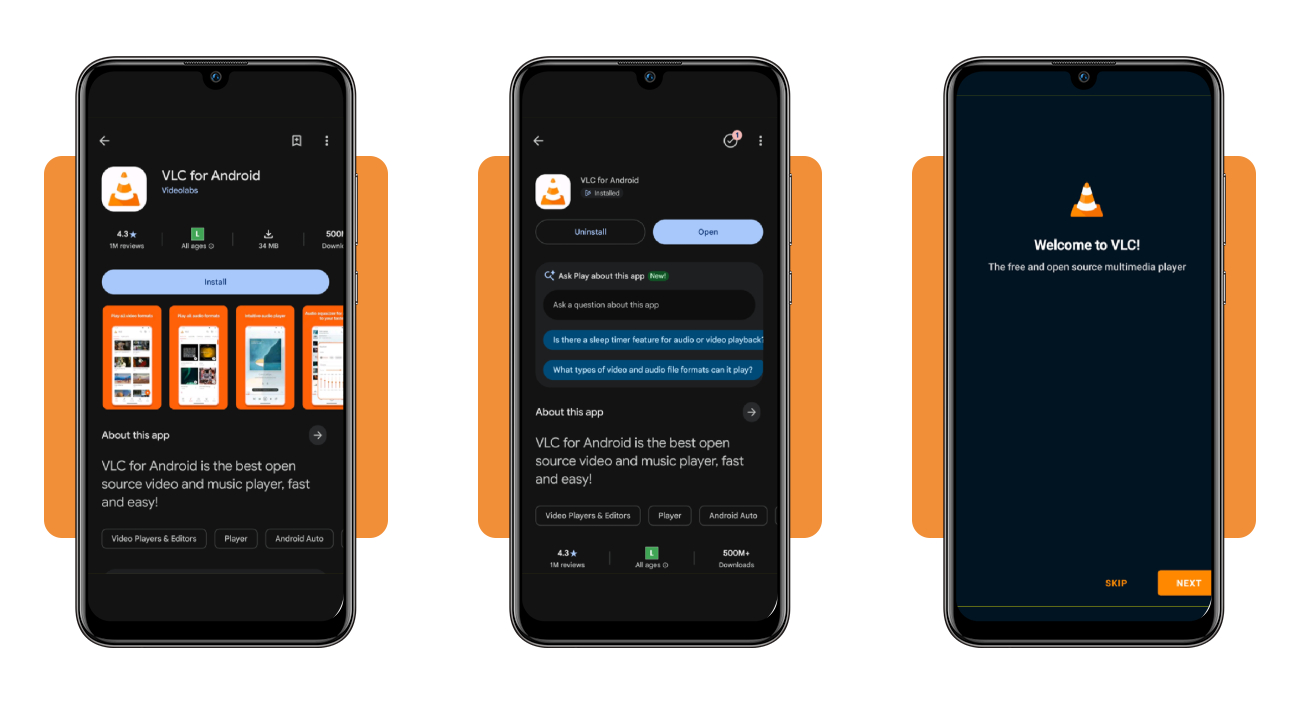
Search for ‘VLC media player’ in the Google Play Store on Android or the App Store on iPhone, and look for the orange traffic cone icon before you tap ‘Install’ or ‘Get’.
When the download finishes, open the app and tap ‘Next’ on the welcome screen rather than ‘Skip’, letting the setup guide you through the permissions it needs for your songs.
Step 2: allow access to your media files
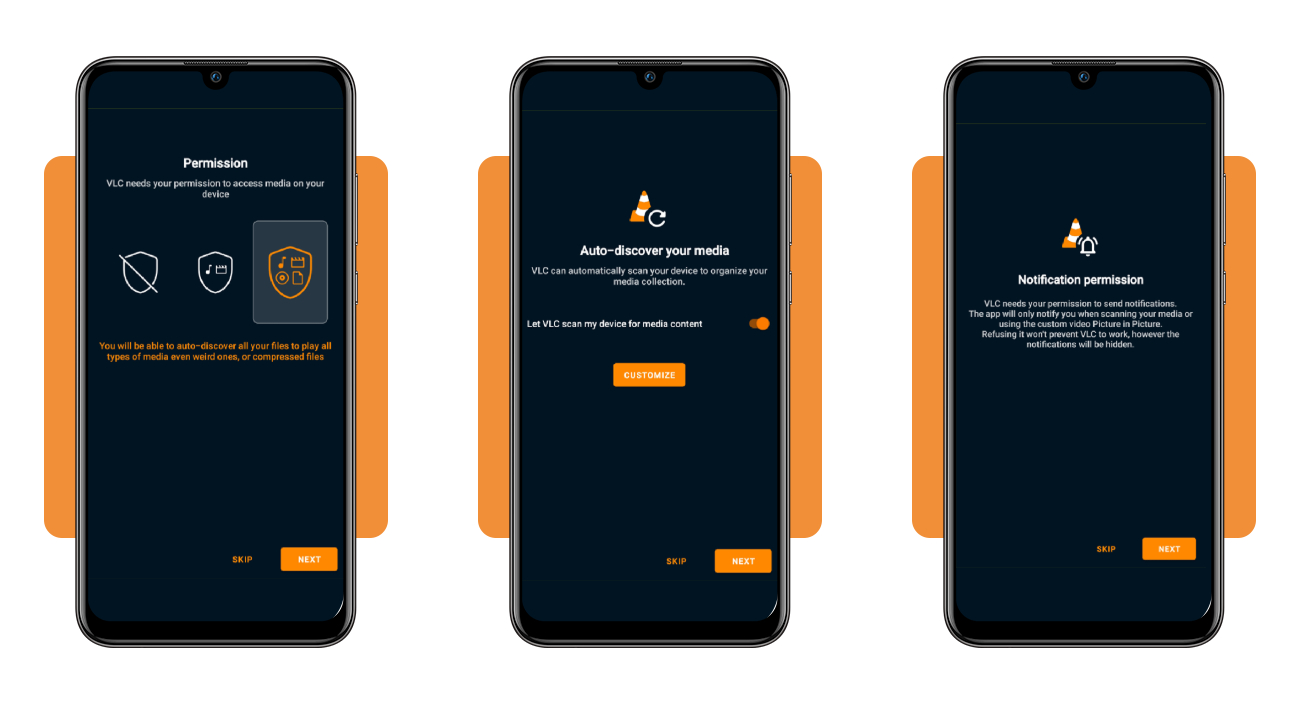
On the permission screen, pick the option that grants full access to your files and tap ‘Next’, letting the app find songs tucked inside any folder on your phone’s storage.
Leave the scan toggle on, letting the app pull your music into its library, and tap ‘Customize’ to skip folders holding voice memos or call recordings before you allow notifications.
Step 3: open your music folder and press play
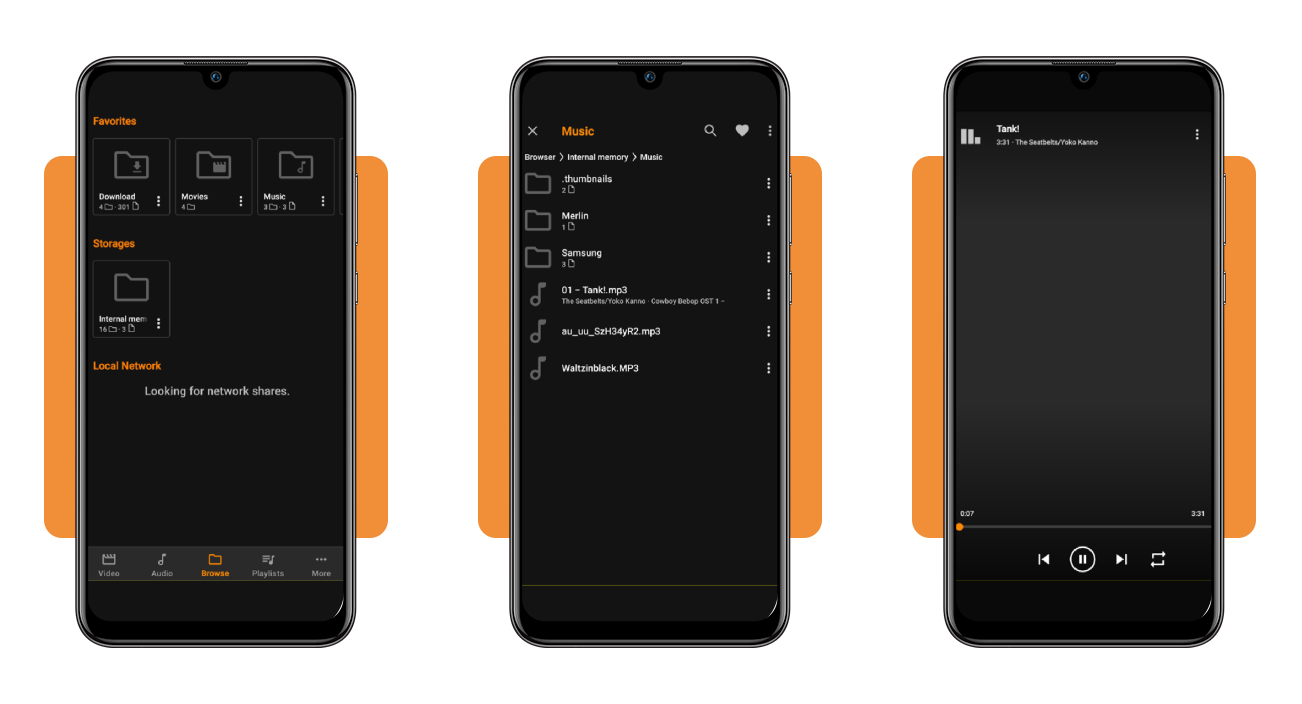
Tap ‘Browse’ at the bottom and choose ‘Internal memory’, then open the ‘Music’ or ‘Download’ folder, where your MP3 and FLAC files show up with their artist and album names.
Tap a song to start it or press the orange play button to hear everything in order, and the heart icon up top pins your offline music folder to ‘Favorites’.
How to transfer music wirelessly from a PC to your phone
Getting songs onto your phone without a cable takes a different route depending on your gear, and a Windows laptop paired with an iPhone follows other rules than an Android.
These options cost nothing, and the cloud route is the only one that needs the internet, with the rest moving files between devices that share a room or a router.
With any method on Android, VLC (Android | iOS) picks up the songs on its next scan, putting fresh tracks into your offline music rotation before your next drive across the state.
Send songs through your browser on home WiFi
Connect your PC and phone to the same WiFi network, then open PairDrop in a browser on both devices, where both machines show up as icons with quirky random nicknames.
Click your phone’s icon on the computer and choose the music files you want to send, then accept the download prompt that pops up on your phone to keep them.
Drop tracks onto Android with Quick Share
Install Quick Share on your Windows PC if it didn’t come preloaded, then drag your music files or album folders into the app’s window to line them up for sending.
Pick your Android phone from the nearby devices list with Bluetooth switched on for both devices, and the files start moving once you tap ‘Accept’ on the incoming transfer alert.
Grab your music from a cloud drive
When your PC and phone aren’t on the same network, upload your music to Google Drive, iCloud, or OneDrive from the computer’s browser and wait for the progress bar to fill.
Sign in to the same cloud app on your phone and download the tracks to your device’s storage, giving you offline music that keeps playing after you lose your signal.
Tips to organize local playlists
VLC’s ‘Playlists’ tab gives your songs a home beyond the folders on your phone, and a few smart habits there keep a growing collection from turning into a cluttered mess.
Tap the three dots next to any song and choose ‘Add to playlist’, where you drop it into an existing list or start a fresh one for a new mood.
Once your offline music folder grows past a few hundred songs, sorted playlists let you find the right tracks for your leg day without scrolling through a pile of loose files.
Give every playlist a clear descriptive name
Name your playlists after the moment you plan to play them, like ‘Sunday Morning’ or ‘Late Shift Drive’, and you’ll know the vibe inside before you tap to open it.
Skip names like ‘Mix 2’ or ‘New Playlist’, and stick to one naming style across your library, letting the app’s alphabetical order group your road trip lists side by side.
Keep a new finds playlist as your inbox
Create a playlist called ‘New Finds’ and toss every song you download or transfer into it, giving you one landing spot for tracks still waiting to join a permanent playlist.
Sort that inbox when it hits around twenty songs, moving keepers into your themed lists and deleting the duds to keep your offline music playlists fresh and easy to browse.
Clear out duplicate tracks and extra versions
Sort your songs by title in the ‘Audio’ tab to spot the same track showing up twice in a row, then delete the extra file through the menu beside it.
Watch for live cuts and remastered versions of songs you already own, keeping the take you love most and freeing up storage for the albums still waiting on your computer.
3.7/5
Your library goes wherever the WiFi doesn’t
Your music belongs to you, and keeping it on your own phone means a canceled plan or a quiet mountain cabin won’t stand between you and the songs you love.
In this article, you saw how VLC (Android | iOS) turns the files on your phone into offline music you can enjoy, plus the handy ways to move songs from your computer and keep them sorted.
Keep browsing Insiderbits and you’ll pick up fresh tricks for enjoying movies and music on or off the internet, saving you money and frustration with the apps on your phone.