

That phone or internet bill landing in your inbox keeps chipping away at cash meant for groceries and rent, and a Lifeline discount could shave a portion off that charge if you qualify.
This Insiderbits guide shows you the official route to sign up and the household rules that matter. Stick around, and a few minutes could knock dollars off a service you can’t live without.
Lifeline discount: understand the application process
Lifeline is a federal program built to make phone or internet service more affordable, and if you qualify, the Lifeline discount comes off the price of a plan you pick.
You start by proving you’re eligible through the official application, and after approval, you sign up with a participating phone or internet company that applies the savings to your bill.
The review compares your answers with official records to confirm you meet the rules, and checking your eligibility this way won’t leave any mark on your credit history or score.
What Lifeline takes off from your monthly bill
With standard support, you can take up to $9.25 a month off internet or bundled service, and plans with phone service alone carry a smaller cut of up to $5.25.
If you live on qualifying Tribal lands, your ceiling climbs to $34.25 a month on eligible plans, and the official site lists the current figures to confirm before signing up.
The agencies running the program behind the scenes
The FCC writes the program’s rules, while the Universal Service Administrative Company, known as USAC, reviews your application and decides if you qualify for the Lifeline discount.
After USAC approves you, your phone or internet company enrolls you and takes over as the first place you call about billing questions or trouble with your device or connection.
Qualify through income or assistance programs
Taking part in a government program such as SNAP or Medicaid can make you eligible for Lifeline, and earning under the program’s income limit qualifies you without those benefits.
When your situation falls short, a child or dependent enrolled in one of those programs can become your way in, and the “How to Qualify” page lists every accepted program.
Step-by-step: apply through the official channel
You can easily apply for the Lifeline discount on their official Lifeline Support website, and the form runs in any browser on your phone or computer with no app to download.
Type your details only into the official application, and look for the banner marking the page as a United States government website before you share anything personal with the form.
If you’re not sure about any questions in the form, you can check out their FAQ page, or call the Lifeline Support Center at (800) 234-9473 between 9 a.m. and 9 p.m. ET any day of the week.
Step 1: access the Lifeline website
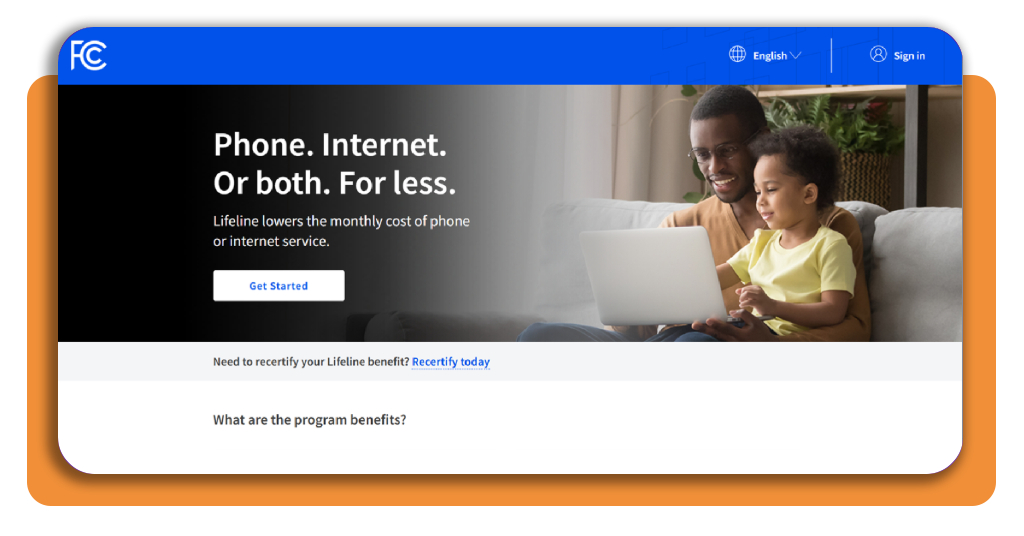
Open the “How to Apply” section on the Lifeline Support website and hit “Apply Now” under the online option, and you’ll land on the federal website where your form begins.
Switch the language menu if you’d rather read something other than English, then select “Get Started” to open the questions or “Sign in” with an account from a past visit.
Step 2: enter your legal name and birth date
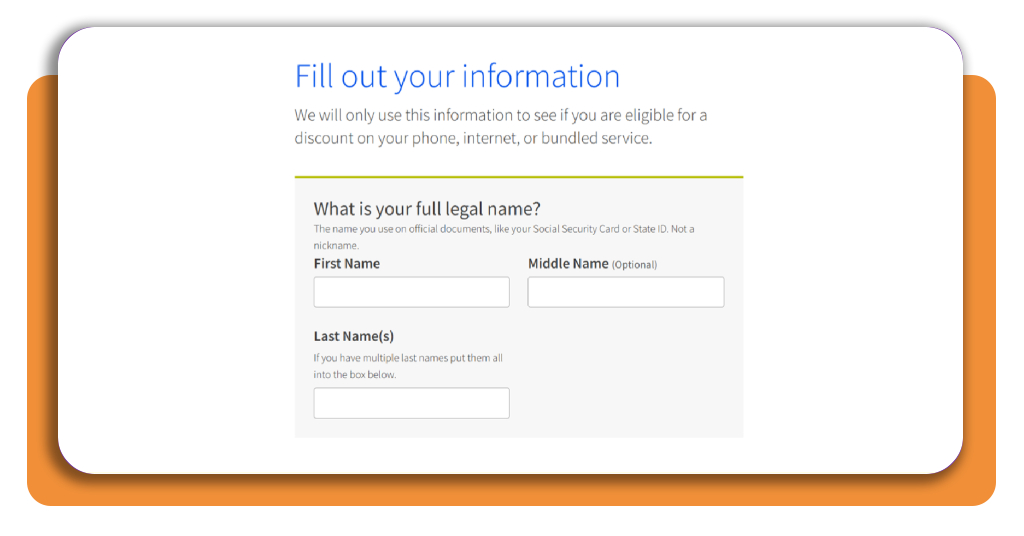
Enter your first and last name as they appear on your Social Security card or state ID, skipping nicknames, and add a middle name if you’d like to include one.
If you have multiple last names, type them all in one box, then enter your birth date using two digits for the month and day and four for the year.
Step 3: verify identity and add your home address
Choose between the last four digits of your Social Security number and your Tribal ID number to confirm who you are, then type it into the box below your pick.
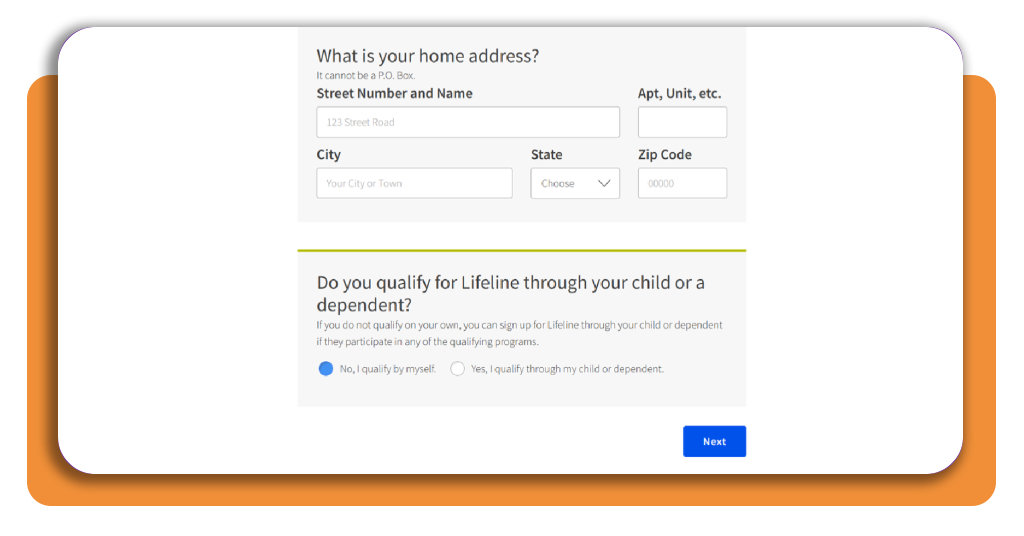
Type the address where you live, never a P.O. Box, as the Lifeline discount belongs to your household, and a shelter or relative’s address works if you lack a permanent home.
Step 4: pick how you qualify and submit
Answer the child or dependent question and select “Next” to move to the qualification section. There, pick the program you take part in or the income option that fits you.
Upload a document proving eligibility if the portal can’t confirm it on its own, then review your answers and agree to the program rules before you submit your finished application.
Check household rules, documents, and ongoing requirements
Keeping your benefit after approval takes some attention, and if your plan costs you nothing out of pocket, you need to use it at least once in 30 days.
Skip that window and you’ll receive a notice giving you 15 more days to use it, and letting that deadline pass shuts off the service tied to your Lifeline discount.
If someone uses your name or personal details to claim Lifeline without your consent, contact USAC and report it to the FCC’s Lifeline fraud tip line at (855) 455-8477.
One discount covers the whole household
Only one discount goes to a household, and the program defines that as the group of people who live with you and share income and expenses, regardless of family ties.
If you rent a room from someone and keep your money separate, you may count as your own household, while a partner who shares bills with you belongs to yours.
Have your identity details ready to go
Before you start, keep an official letter showing your enrollment in an assistance program nearby, or gather a tax return or recent pay stubs if income is your route in.
The “Supporting Documents” page on the official website lists what the program accepts, and checking it before uploading saves your Lifeline discount request from stalling.
Report changes and recertify on time
Tell your phone or internet company within 30 days if you move or stop qualifying, and do the same if a second person in your household starts receiving a Lifeline benefit.
Once a year, USAC confirms you still qualify, and if a recertification email or letter reaches you, ignoring it for 60 days ends your benefit and can raise your bill.
Where to apply through the official Lifeline channel
Lifeline gives you more than one official way to apply, letting you pick the route that fits your comfort with technology and how much help you’d like from someone else.
If you live in Oregon or Texas, skip the national application and use your state’s own Lifeline website, as those two states handle your Lifeline discount and its yearly recertification.
Outside those two states, the same national system reviews your eligibility whichever route you take, and your choice won’t change the benefit amount or the rules you agree to follow.
Apply online straight from your browser
Applying online gives you an account you can sign back into, letting you check on where your application stands and take care of any future recertification from the same login.
USAC posts a tutorial video on its website covering the online application from start to finish, and watching it first lets you preview the screens before you type a word.
Enroll with help from a participating provider
A participating phone or internet company can help you submit your application, and carriers such as Assurance Wireless and SafeLink Wireless offer Lifeline plans across many states.
Bring along the same identity details the online form asks for, and have the representative confirm they’re submitting through the official Lifeline system before you hand over any details.
Send a paper application by mail
Print the application in English or Spanish from the “How to Apply” page, and call the Lifeline Support Center if you’d rather have a paper copy mailed to your home.
Send the completed form with copies of your proof to Lifeline Support Center, PO Box 1000, Horseheads, NY 14845, and USAC takes over the review of your Lifeline discount request.
Compare participating plans and keep your benefit current
Lifeline plans vary from one company to the next, with some built around mobile phone service and others covering home internet or a bundle that mixes calling with mobile data.
Before you enroll, ask each company how much data its plan includes and whether calls and texts have limits, then line those answers up against how you use your phone.
If your carrier turns off your service, the “My Service Was Turned Off” page on Lifeline Support lists the most common causes and how to get your Lifeline discount back.
Browse providers with the ‘Companies Near Me’ tool
Open the “Companies Near Me” page on Lifeline Support and search for a provider using your ZIP code or state to see which phone and internet companies offer the benefit where you live.
Write down two or three companies from the results and call or visit their websites to compare the plans they sell, as the tool lists participants without ranking their offers.
Separate the discount from plan and device costs
Your discount lowers the price of a plan, and the company sets that price, meaning you could still owe a balance after the reduction along with any taxes or fees.
A new phone or hotspot counts as a separate deal with the company, and the Lifeline discount covers service alone, leaving any device price for you to check before signing.
Switch companies without losing your benefit
You can move to a different company whenever you want by contacting the new one and asking it to transfer your benefit, with a limit of one transfer per month.
The new company may ask you to reapply to confirm you’re still eligible, and most transfers go through without a gap in the phone or internet service you rely on.
Your bill has room to shrink, so claim it
Keeping your phone and internet running matters when job offers and doctor calls depend on it, and a lower bill gives you room to spend the difference on your family.
In this guide, you learned how to apply for the Lifeline discount through the official channel and keep the savings coming after a phone or internet company signs you up.
Read more Insiderbits articles to find other government benefits you may qualify for, from food assistance to help with energy bills, each explained in plain words you can act on.
Frequently Asked Questions
What is the Lifeline discount?
Lifeline is a federal program that reduces the monthly cost of phone or internet service for eligible households. The discount is applied directly to a plan you choose from a participating provider, and the amount varies depending on the type of service and whether you live on qualifying Tribal lands.
How do I know if I qualify for the Lifeline discount?
You may qualify by participating in a government assistance program such as SNAP or Medicaid, or by meeting the program’s income limit. A child or dependent enrolled in a qualifying program can also make your household eligible. The official ‘How to Qualify’ page at lifelinesupport.org lists every accepted program.
Does applying for Lifeline affect my credit score?
No. The eligibility review compares your answers with official records and does not leave any mark on your credit history or score.
Can more than one person in my household receive the Lifeline discount?
No. Only one Lifeline discount is allowed per household. The program defines a household as the group of people who live together and share income and expenses, regardless of family ties. If a second person in your household starts receiving a Lifeline benefit, you must report this to your provider within 30 days.
What documents do I need to apply?
You will typically need an official letter showing enrollment in an assistance program, or a tax return and recent pay stubs if you are qualifying through income. The ‘Supporting Documents’ page on the official Lifeline Support website lists all accepted documents.
How do I keep my Lifeline benefit active after approval?
If your plan has no out-of-pocket cost, you must use it at least once every 30 days. You will also need to complete an annual recertification when contacted by USAC. Report any changes, such as moving or no longer qualifying, to your provider within 30 days.
Can I switch phone or internet companies after enrolling in Lifeline?
Yes. You can transfer your benefit to a different participating company at any time, with a limit of one transfer per month. Contact the new company and ask them to transfer your benefit. Most transfers complete without a gap in service.
What if I live in Oregon or Texas?
Oregon and Texas have their own state-managed Lifeline programs. If you live in either state, you should use your state’s dedicated Lifeline website instead of the national application. Those states also handle annual recertification separately.