Those albums you bought years ago still deserve a spot in your daily soundtrack, and the right mp3 player app can pull them from that forgotten folder on an old hard drive or USB stick.
This Insiderbits guide introduces you to VLC as the free media player that puts those tracks back in your pocket, plus a handful of tricks to make them sound better than you remember.

3.7/5
What is the app to play your MP3 music offline without ads?
VLC (Android | iOS) is a free and open-source media player from VideoLAN, and its volunteer developers built it to play the music files saved on your phone with no signal required.
Opening a song in this mp3 player app means no banner ads popping up between your tracks and no premium tier locking features behind a monthly charge on your card.
Setting VLC up won’t ask you for an email address or a password, and its developers report collecting none of your personal data from the songs you play or skip.
Key features within the VLC media player app for mobile
- Car dashboard support: connect your phone to the car’s display and browse artists or saved playlists on the big screen while your hands stay on the wheel;
- Casting to your TV: send songs to a Chromecast and let your TV speakers fill the room with music while your phone stays free for texts and calls;
- A to B loop: mark two points in a track and replay that section on repeat, a handy trick when you’re learning a tough guitar solo by ear;
- Sleep timer: pick how long the music should keep going before it stops, letting your favorite chill album play you out without draining your phone’s battery.
Give your old MP3 downloads a second life
Those tracks you bought from music stores or Bandcamp, plus the DJ mixes a friend shared, still carry their artist and album tags for this mp3 player app to read.
The cover art and track titles stored in those tags line up on their own, turning a folder of odd file names into neat albums you can browse by artist.
Keep every song even when streaming catalogs shift
Licensing deals between record labels and streaming services come with expiration dates, and the album you saved in your library can turn gray and silent once that agreement runs out.
MP3 files stored on your phone follow no contract terms, and VLC (Android | iOS) keeps playing them after a service drops an artist or swaps a classic record for a remastered edition.
Step-by-step: how to import and organize your offline music collection
VLC (Android | iOS) builds its music library from the folders on your phone, meaning the way you arrange files in storage shapes what your collection looks like when you open the app.
Your tracks stay inside their original folders during setup, and this mp3 player app reads them in place without making copies that would eat into your phone’s free storage space.
Songs you transfer to your phone down the road show up after the app runs its automatic rescan, letting your library grow without you importing or syncing anything by hand.
Step 1: download the VLC app
Search for ‘VLC’ in the Google Play Store on Android or the App Store on iPhone, and confirm the developer reads Videolabs or VideoLAN before you tap the install button.
Copycat players with similar names and cone icons crowd the search results, and picking the official listing keeps you away from knockoffs that pad their playback screens with intrusive ads.
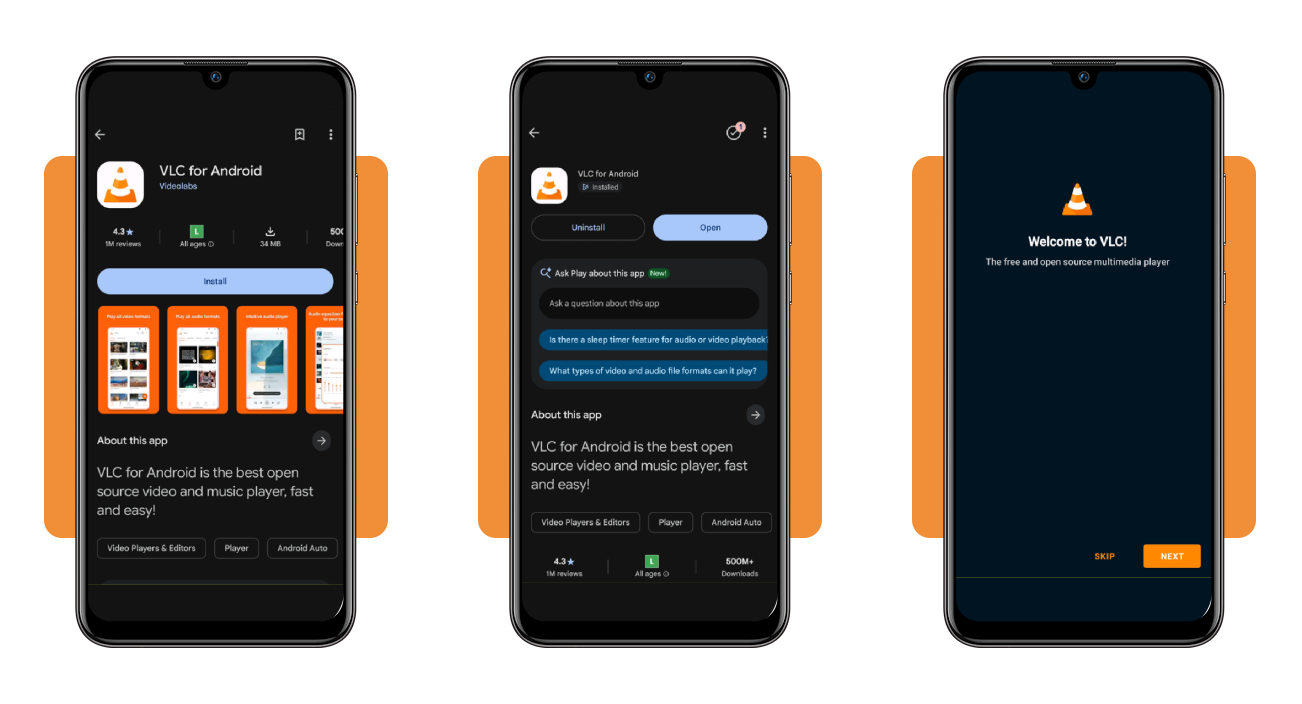
Step 2: grant access and customize the media scan
Open the app and choose the shield with the most icons on the permission page, letting VLC (Android | iOS) reach files outside your ‘Music’ folder.
Keep the scan toggle switched on and tap ‘Customize’ to uncheck folders holding ringtones or app sounds, then decide whether VLC can send notifications while it scans in the background.
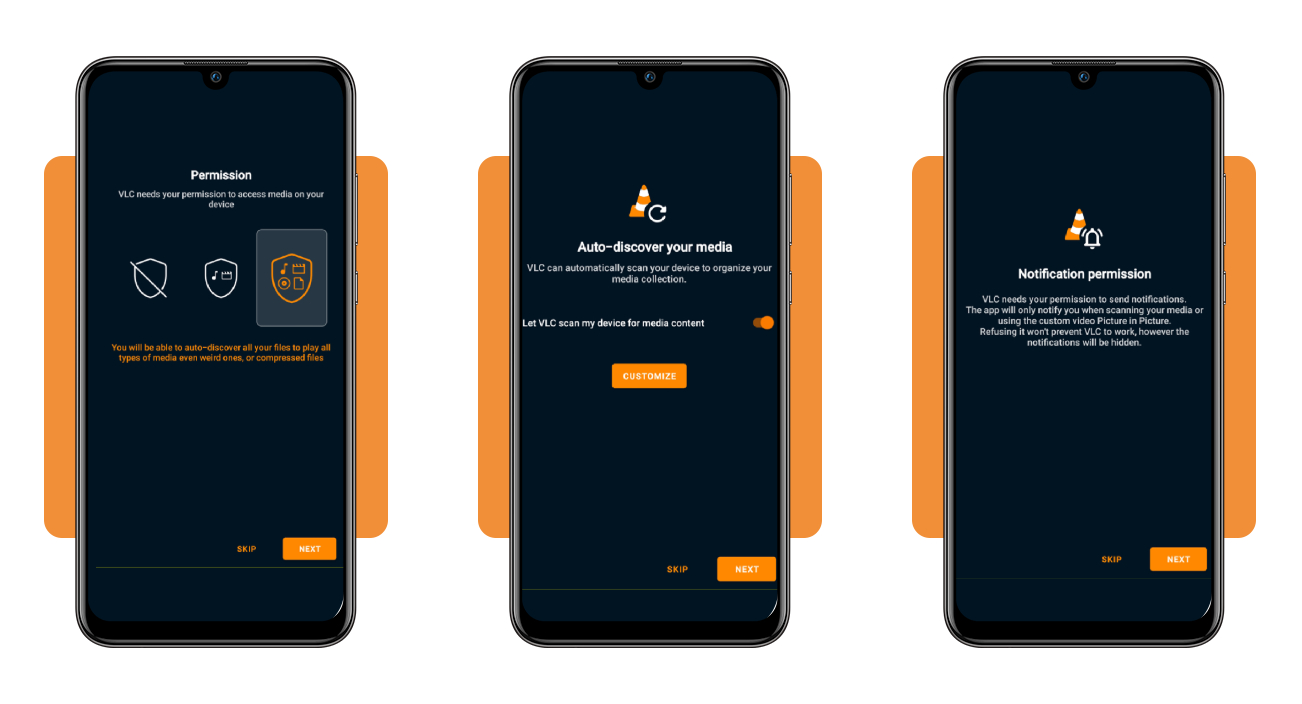
Step 3: build your library from the Browse tab
Tap ‘Browse’ on the bottom bar and select the internal storage card, where the numbers under folder names reveal how many songs and subfolders they hold before you open them.
Inside your ‘Music’ folder, tap the heart at the top to pin it to ‘Favorites’, and this mp3 player app adds a shortcut to the ‘Browse’ screen for quicker listening.
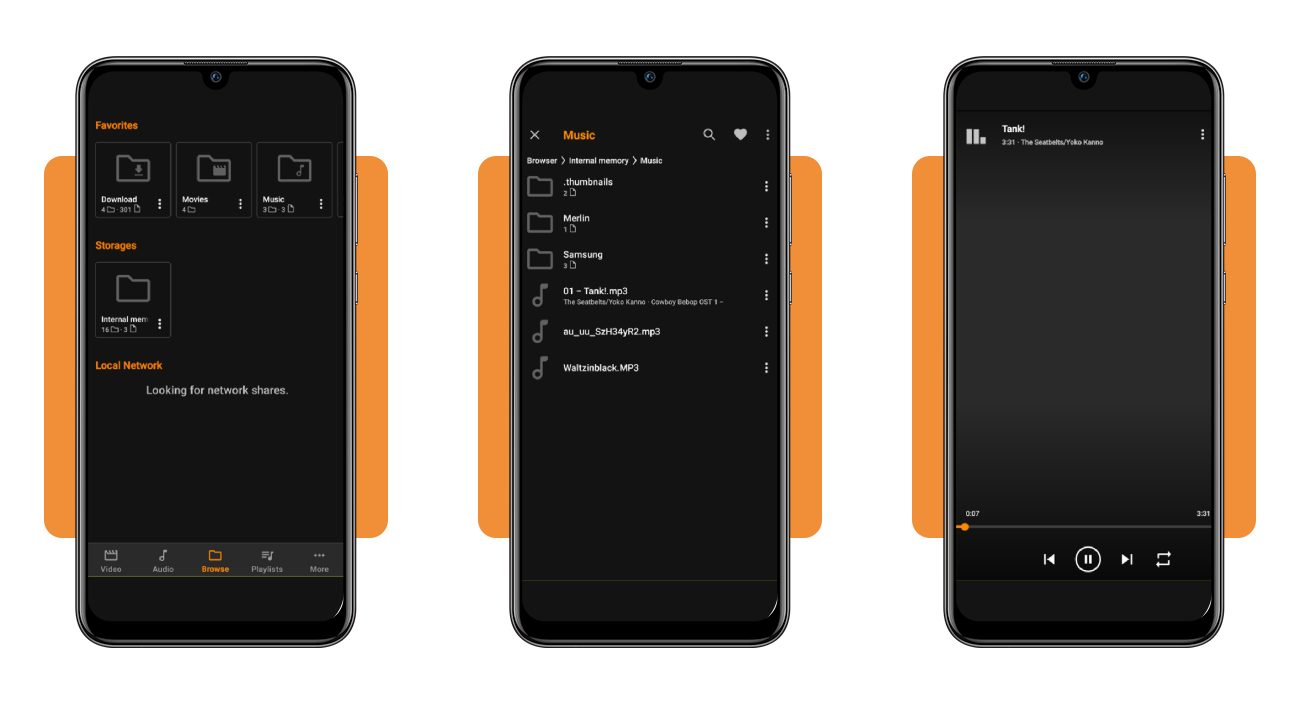
How to transfer MP3 audio files wirelessly from PC to your phone
Moving songs off your computer without a cable relies on the router in your home, and your phone and computer need to join that same network before files can travel.
Your tracks cross your local network and never pass through anyone else’s servers, keeping your collection private and out of reach of the upload caps that cloud storage plans enforce.
Transfers over a home router run at full Wi-Fi speed, letting an album land on your phone ready for the mp3 player app before a cloud upload wraps up.
Turn VLC into a wireless drop zone
On an iPhone, switch on ‘Sharing via WiFi’ in VLC’s ‘Browse’ tab, then type the address it displays into your computer’s browser and drag your MP3 files onto the upload page.
On Android phones, turn on ‘Remote access’ from VLC’s ‘More’ tab, then enter its link in your computer’s browser and type the temporary code shown on your phone to unlock uploads.
Beam tracks across platforms with LocalSend
LocalSend is a free open-source platform for computers and phones, and opening it on both devices lets them spot each other on your home network under quirky random nicknames.
On an iPhone, switch off the gallery toggle in LocalSend’s settings first so songs land in ‘Files’, then pick your phone on the computer and accept the incoming batch of MP3s.
Fix stalled uploads before you start over
A transfer that freezes points to a guest network or a VPN on your computer, and moving both devices onto your main WiFi with the VPN paused restores the connection.
Locking your phone can cut the connection during a big upload, and keeping the mp3 player app open on screen with enough free storage lets your MP3 files arrive intact.
How to boost your phone’s volume
Many older MP3 rips come from albums mastered at lower levels, and next to modern releases, those tracks can sound faint through your phone’s speaker even with the slider maxed.
Pressing the volume buttons with nothing playing can move the ringer level and leave your music untouched, and starting a song first makes those side buttons control the media channel.
Lint and pocket dust packed into the speaker grille muffle songs from the mp3 player app, and a soft dry toothbrush swept along the tiny openings lifts that buildup out.
Unlock the hidden sound limits in your settings
On your iPhone, open ‘Settings’ and tap ‘Sounds & Haptics’, then switch off ‘Reduce Loud Audio’ and check that the ‘Volume Limit’ option above it stays turned off.
On a Samsung phone, the ‘Volume’ menu in ‘Settings’ hides a ‘Media’ volume limiter behind the three dots, and turning it off lifts the cap your phone places on playback loudness.
Squeeze extra loudness from equalizers and boosters
Tap the equalizer icon in VLC’s player menu and try a preset like ‘Full bass and treble’, then nudge the preamp slider to raise the overall gain of your songs.
On Android, booster apps like Precise Volume 2.0 (Android) push output past the system ceiling and run in the background while the mp3 player app plays your tracks through a speaker.
Protect your ears and speakers from distortion
Crackling or a rattling speaker means the boost has gone too far, and bringing the preamp or booster down a notch keeps the sound crisp and spares your phone’s hardware.
With headphones on, keeping the volume near 60% of max for no more than an hour at a time lets you enjoy your music without risking lasting hearing damage.
3.7/5
Every song you own now plays louder and free
A music collection living on your phone answers to nobody but you, and the playlist you build for a birthday or a long drive stays the way you left it.
In this guide, you saw how the VLC (Android | iOS) mp3 player app sorts your song folders, along with ways to pull tracks off your computer and coax more sound from your speaker.
If music is your passion, you’re in the right place! Keep browsing Insiderbits and discover apps that help you find new artists and spend less on the things you love.