

A bank scam blocker can add an extra layer of protection to your phone by helping identify suspicious calls and text messages before you interact with them.
Some apps use databases of scam numbers and threat reports to flag potential fraud, giving you a heads-up before a suspicious caller gets near your bank details. Read on Insiderbits.

4.4/5
Truecaller: bank scam blocker app to protect your accounts
Bank scams don’t always arrive with a suspicious email or an obviously fake text. Sometimes, the caller ID looks familiar, and the person on the other end claims to be from your bank.
Available for Android and iOS, Truecaller can help.
This bank scam blocker app identifies incoming calls, flags numbers reported as spam, and offers call-blocking features to help you spot potential fraud before you pick up.
The app uses its caller ID technology and community-reported spam data to help users recognize unfamiliar or unwanted callers.
It can be a useful extra layer of protection, but it can’t guarantee that every scam call will be detected or prevent fraud on its own.
Scammers can also spoof legitimate phone numbers, so never share passwords or one-time verification codes with someone who contacts you unexpectedly.
Key features within the Truecaller app
Here’s what you can expect, although availability may vary depending on your device, region, and subscription:
- Caller ID and spam identification: see information about incoming callers and warnings for numbers reported as spam. Truecaller (iOS | Android) also offers verified business identification in supported markets, helping distinguish participating businesses from unknown callers;
- Call screening: on supported devices and plans, Truecaller can help screen unfamiliar calls. Some versions offer an AI-powered assistant that interacts with callers and provides information before you decide whether to answer;
- SMS spam protection: the app can identify and filter suspected spam or fraudulent text messages on supported devices. This can make it easier to spot suspicious messages without digging through your entire inbox;
- Community spam reports: users can report unwanted numbers, contributing to Truecaller’s (iOS | Android) shared spam database. These reports help the service identify numbers that other users have flagged, although new or unreported scams may still slip through.
Together, these features add another layer of awareness when unfamiliar callers or unexpected messages show up. Just don’t treat a green badge or a clean caller ID as a guarantee that someone is legitimate.
When money or banking details are involved, verify the contact directly with your financial institution.
Step-by-step: how to block bank impersonation scams
Setting up a bank scam blocker doesn’t have to be a whole afternoon project.
With Truecaller, you can enable caller identification, review spam protection settings, and report suspicious numbers in just a few steps.
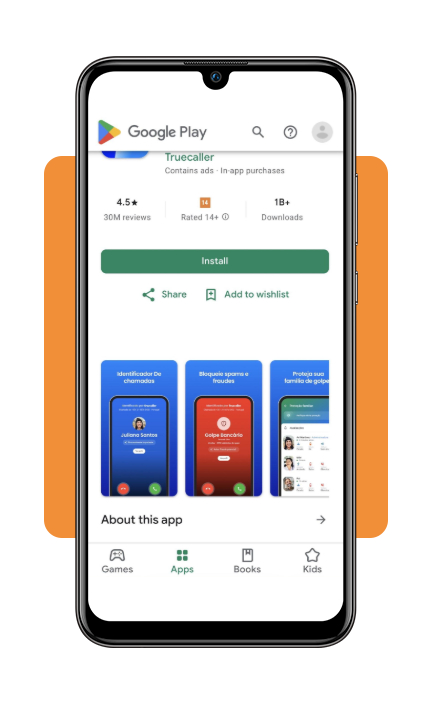
Step 1: download Truecaller and set up your account
Get Truecaller from the Apple App Store or Google Play.
Register your phone number and follow the setup instructions. The app will request access to certain phone features so it can identify incoming calls and, where supported, screen messages.
Step 2: enable caller ID and spam protection
On an iPhone, open ‘Settings’ and look for ‘Phone’ or ‘Apps’ > ‘Phone’, depending on your iOS version. Select ‘Call Blocking & Identification’ and enable Truecaller (iOS | Android).
On Android, follow the app’s setup instructions to activate caller ID and spam protection. Menu names and available options may vary by device.
Step 3: customize your blocking preferences
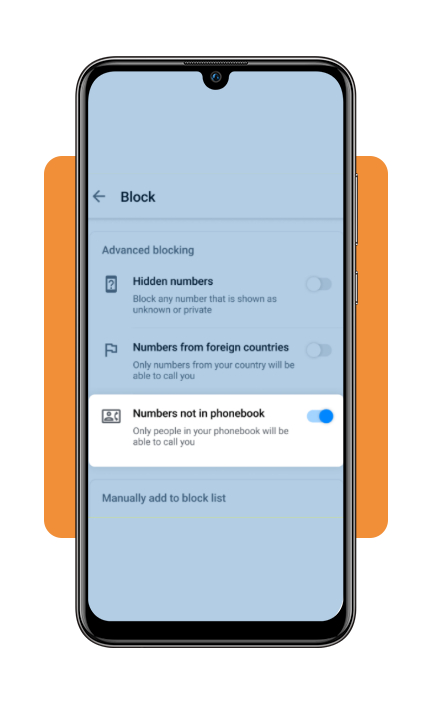
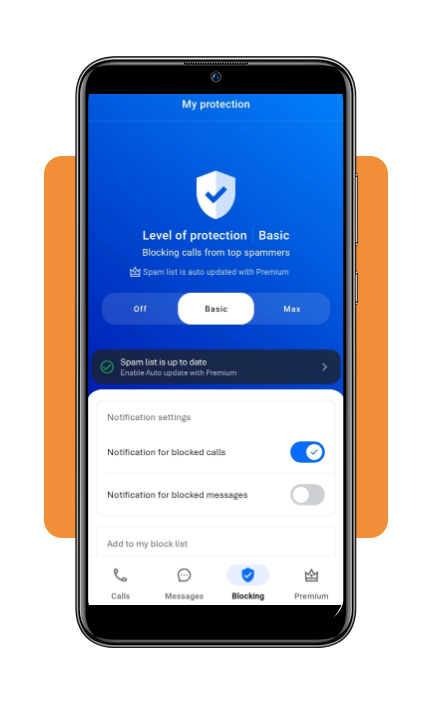
Open Truecaller’s protection settings and review the available options for blocking reported spam callers and unwanted numbers.
Some features, such as automatically blocking certain categories of callers, may depend on your device or subscription.
Choose settings that make sense for you rather than blocking every unfamiliar number. After all, not every unknown caller is a scammer.
Step 4: report suspicious calls and messages
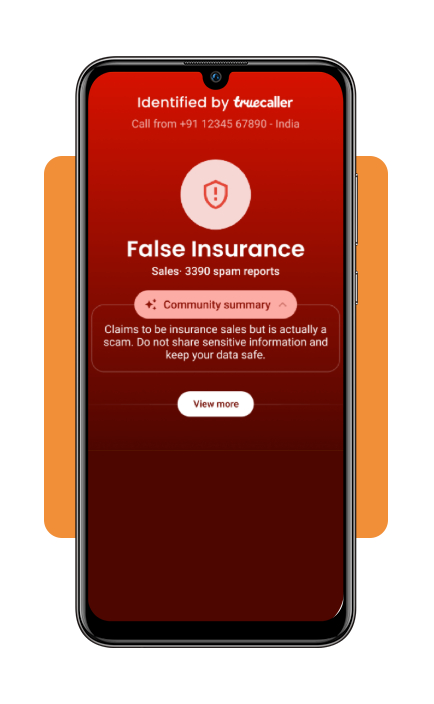
If someone calls pretending to represent your bank, avoid sharing personal or financial information.
End the call, then use the app’s reporting options if available to flag the number as spam or fraud. Community reports can help other users identify suspicious callers, too.
Top identity theft protection services
A bank scam blocker can help flag suspicious calls and messages, but protecting your finances takes more than screening your phone.
Identity theft protection services add another layer by monitoring credit reports, personal information, and, in some plans, financial accounts. Here are four options worth exploring:
- Aura: offers identity and financial account monitoring, three-bureau credit monitoring, dark web alerts, and fraud assistance. Its plans also include identity theft insurance, with coverage limits depending on the plan. Some options include spam call and message protection, too;
- LifeLock by Norton: monitors personal information and offers alerts for suspicious activity involving credit, checking, and savings accounts. If identity theft occurs, its restoration specialists can help with the recovery process. Available features and reimbursement limits vary by subscription;
- Identity Guard: provides dark web monitoring, bank account and high-risk transaction monitoring, and credit alerts. Certain plans also include three-bureau credit monitoring and Experian credit lock, making it an option for people who want to keep an eye on both their identity and credit activity;
- Experian Identity Theft Protection: combines credit monitoring across Experian, Equifax, and TransUnion with alerts for suspicious use of personal information, dark web monitoring, and identity restoration support. Its Premium plan also includes Experian CreditLock and up to $1 million in identity theft insurance, subject to policy terms.
These services can help you spot warning signs, but they aren’t a guarantee against fraud. Compare their features, subscription costs, and insurance terms before choosing a plan.
And if you receive a suspicious message or call, contact your bank directly rather than relying on an app to make the decision for you.
For more ways to deal with unwanted messages, check out our guide to spam-blocking tools and tips. You can also learn how to recognize synthetic voices and other warning signs in Fonio’s guide to detecting AI calls.
How to report phone fraud and secure your bank accounts
If you suspect you have engaged with a bank impersonation scammer, taking immediate action minimizes potential financial losses:
- Remember banks never ask for passcodes: legitimate financial institutions will never call, text, or email requesting your multi-factor authentication (MFA) codes, PINs, or online banking passwords;
- Beware of caller ID spoofing: scammers can manipulate caller ID displays to show your bank’s actual phone number or official name. Always hang up and call back using verified contact details;
- Refuse remote access requests: never download remote desktop applications (such as AnyDesk or TeamViewer) at the request of an incoming caller claiming to represent your bank’s fraud department.
4.4/5
Stop bank scams before they reach you
A bank scam blocker like Truecaller (iOS | Android) can help flag suspicious calls and messages before you get caught up in a convincing scam.
Pair caller ID and spam-filtering tools with a few smart habits: never share verification codes with unexpected callers, avoid clicking suspicious links, and contact your bank through its official channels if something feels off.