That chorus looping in your head on the drive home deserves a proper replay, and this music streaming service lets you call it up in seconds along with your favorite albums and songs.
This Insiderbits guide helps you set up a free Spotify account and build playlists that fit any mood you’re in. Keep reading to unlock a library of more than 100 million tunes waiting for you.

4.8/5
What is the best app to stream millions of songs for free?
Spotify (Android | iOS) is a music streaming platform with paid subscriptions alongside a free tier that lets you explore a massive catalog and find your favorite songs.
Type an artist or a half-remembered lyric into the search bar, and the app pulls up the track you want along with related tracks that match what you love hearing.
Besides music, the platform hosts more than 6 million podcast titles on topics like true crime and comedy, letting you follow favorite shows in the spot where your playlists live.
Key features within the Spotify Free tier
- Personalized weekly picks: the app’s “Discover Weekly” lands in your library on Mondays with fresh songs chosen around your listening habits and new favorites;
- Collaborative playlists: invite friends so they can add their tracks to a shared playlist and turn road trip planning or party prep into a group project;
- Spotify Wrapped: near the end of the year, the app hands you a recap of your top songs and artists to share with friends;
- Nearby concert alerts: follow artists you love, and the app tells you when they book shows near you, giving you first dibs on tickets.
The small tradeoffs of listening for free
Free listening comes with short audio ads between songs, and on your phone you’ll hear playlists on shuffle with a cap on how many tracks you can skip per hour.
Offline downloads stay locked behind Premium, so you’ll need Wi-Fi or a decent data plan to keep your music streaming going on a long road trip or during your morning commute.
Take your music to every screen you own
“Spotify Connect” lets you send whatever you’re playing to a smart TV or a game console on your home network, turning your phone into a remote for the living room.
Your playlists follow you into the car and onto a smartwatch, and a song you pause on one device resumes from the same spot on the next screen you open.
Step-by-step: how to create a free account in Spotify
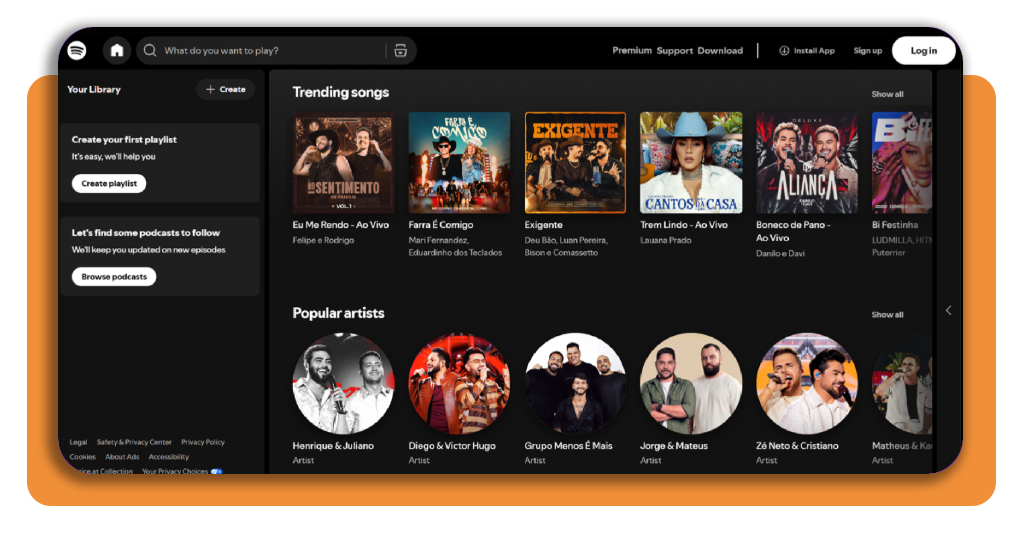
Spotify (Android | iOS) lets you peek at trending songs and popular artists without logging in, but you’ll need an account before the play button starts working for the tracks you pick out.
Creating a profile ties your liked songs and saved playlists to you, giving your music streaming habits a home you can reach from any phone or computer you sign into.
Registration won’t ask for a credit card, and the login you create stays with you if you ever decide to upgrade to a premium plan for yourself or your family.
Step 1: download the app or use the web player
You can easily grab Spotify from the Google Play Store on an Android phone or from the App Store on an iPhone, then open the app and tap the button to sign up.
If you’d rather listen on a computer, open the Spotify web player in your browser and click “Sign up” at the top of the page to reach the registration form.
Step 2: sign up for your free account
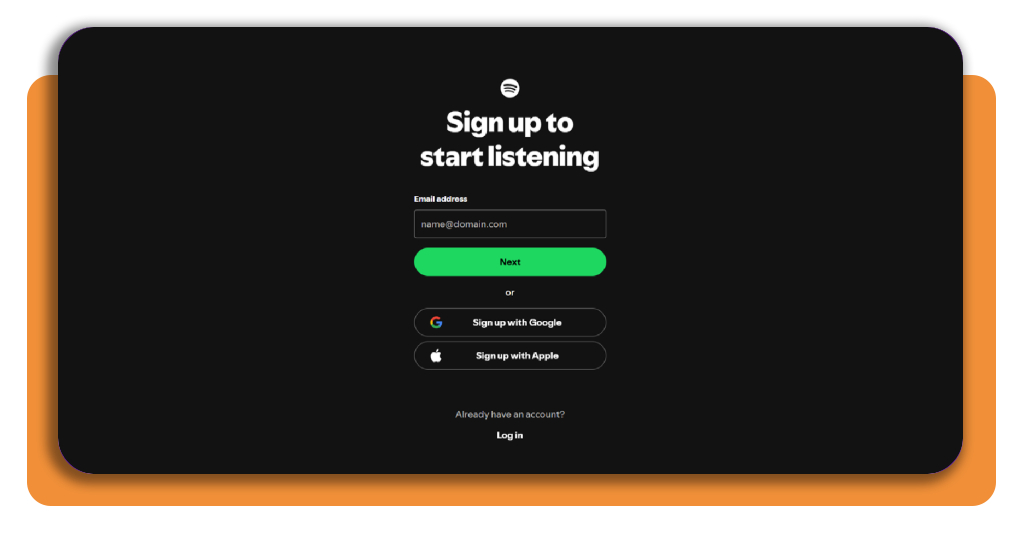
Type your email address and hit “Next”, or pick the Google or Apple option if you’d like to link an account you already use and skip creating a new password.
Going the email route means building a password with at least 10 characters, including a letter and a number or symbol, before your music streaming account moves ahead.
Step 3: set up your profile and start streaming
Enter the name you want people to see on your profile and choose a gender option or prefer not to say, then add your date of birth and press “Next”.
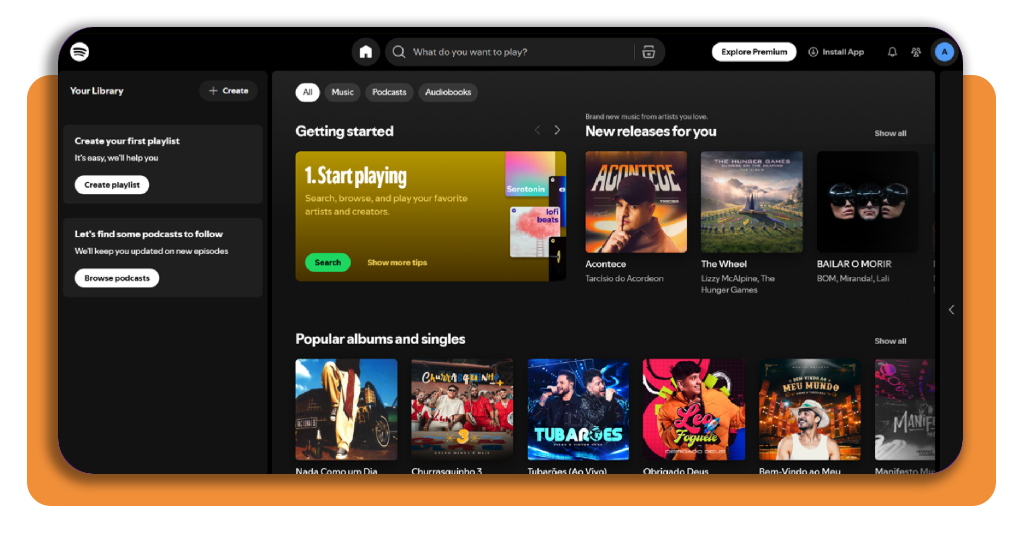
Check the box agreeing to the “Terms of Use”, decide on marketing emails, then hit “Sign up” and your home screen opens with fresh releases and playlists ready to play.
How to curate the perfect playlist
Hit “Create” in your Spotify (Android | iOS) library and you’ll land on an empty playlist with room for a name and cover photo, ready to become the soundtrack for your daily moments.
Scroll past your last track, and Spotify recommends songs based on what you’ve added, and you can drag any track up or down the list to rearrange the running order.
Keep the playlist private if it’s full of guilty pleasures, or make it public and share the link with the friends who count on you for their music streaming recommendations.
Pick one vibe and stick with it
Before adding a song, sum up the feeling you’re after in a short phrase like windows down on a summer drive, and let that phrase decide what makes the cut.
A label like “rainy Sunday cleaning” gives you a sharper target than happy songs, making it easier to toss a track that sounds great but pulls the mood off course.
Build around a handful of anchor tracks
Choose between 5 and 8 songs that nail your vibe and treat them as your backbone, giving the rest of your picks a standard they have to live up to.
Toss in 40 to 60 candidates without overthinking, then trim the list by comparing them against your anchors, keeping your music streaming queue tight with only the strongest options left.
Mix familiar hits with fresh discoveries
Familiar favorites keep you humming along while lesser-known artists bring a jolt of surprise, and blending the two stops your playlist from sounding like a copy of the local radio station.
Tap an artist’s page and scroll to the “Fans also like” section for new names, then limit any band to two songs to give your lineup room for real variety.
How to boost your phone’s volume
If you want your Spotify (Android | iOS) tracks to hit louder, press the side volume buttons while a song plays, as tapping them on a silent screen can change the ringtone level.
Take a peek at your Bluetooth list as well, where a forgotten pair of earbuds or a nearby car stereo can hijack your music streaming and leave your phone’s own speaker silent.
A quick restart wipes out audio glitches that build up over days of use, and installing the newest system update can bring fixes for sound bugs you didn’t know existed.
Turn up every hidden volume slider
On an Android phone, open “Settings”, tap “Sound” or “Sound and vibration”, then pick “Volume” and push the media slider to the top along with the ones for calls and alarms.
iPhone owners can swipe open “Control Center” and drag the volume bar to the top, then visit “Sounds and Haptics” in “Settings” to raise the slider for ringtones and alerts.
Lift the built-in volume limits
Some Android phones cap media output for safety and leave music streaming sounding flat, but tapping the three dots on the “Volume” screen lets you turn off “Media volume limit”.
On iPhone, open “Sounds and Haptics” and disable “Limit Maximum Volume”, then turn off “Reduce Loud Audio” under “Headphone Safety” to give your Bluetooth speakers full power.
Clear the path for your speakers
Dust and pocket lint love to pack into speaker grilles, and brushing them out with a soft dry toothbrush or a wooden toothpick can bring back a good amount of sound.
Pop off a chunky case to see if it muffles the speaker, and try setting your phone inside a bowl or mug to bounce the sound up toward your ears.
4.8/5
A full music library without the monthly bill
Next time a catchy chorus follows you home from the grocery store, you’ll know how to track it down and add it to a playlist that feels like your own.
With this article, you learned how to open a free Spotify (Android | iOS) account and tweak a couple of phone settings, giving your music streaming a louder voice wherever you press play.
If you love listening to music nonstop, stay with Insiderbits and explore more articles on the best listening platforms to uncover hidden features and free picks that save you money.