Cranking the volume all the way up and still leaning toward the screen feels ridiculous, and quiet phone speakers can turn your favorite podcast or a recipe video into a muffled background hum.
Volume Booster GOODEV gives your device a louder voice with one simple tweak, and this Insiderbits guide covers the full setup along with cleaning tricks that keep your audio booming.

4.4/5
What is the best app to fix quiet phone speakers?
GOODEV (Android | iOS) is a free audio app that raises your phone’s sound beyond the limit the manufacturer set, adding more punch to your music and movies without new gear.
Phone makers cap output to protect their hardware, and the app lifts that software ceiling to help quiet phone speakers deliver the full volume their drivers can handle.
A compact control panel pops up over your home screen instead of taking over the display, and the app focuses on media playback rather than the speakerphone during calls.
Key features within the Volume Booster GOODEV
- Boost slider: dial the added gain anywhere from a small bump to a big jump, and it applies to the audio playing from your other apps;
- Volume slider: set your media volume from the same panel that holds the boost control, letting you balance both levels without reaching for the side buttons;
- Quick launch notification: an alert puts the booster one tap away while music plays, and you can make it appear only when the service is on;
- Stop Service button: shut the booster down with one tap when you want stock audio back, or drag the boost to zero for the same result.
Hear every line of your favorite shows
Mumbled lines and whispered plot twists stop slipping past you once the boost lifts soft voices above household noise like a running dishwasher or traffic outside your window.
Audiobooks and podcasts benefit too, and the higher output helps quiet phone speakers carry a narrator’s voice across the kitchen while you cook dinner or fold the laundry.
Pair the boost with your favorite headphones
Earbuds and headphones that sound weak on a noisy train or at the gym get the same extra headroom, and the boost carries over without any new pairing or setup.
Sound travels straight into your ears with headphones on, and starting with a smaller boost than you’d use on the speaker protects your hearing during long listening sessions.
Step-by-step: how to boost low speaker volume on your phone
Getting the GOODEV (Android | iOS) app ready on your phone involves a download and some slider adjustments, and a little prep beforehand helps you judge the results with your own ears.
Pick a familiar song or video before you start, and that track makes it easy to hear what changes as you push the sound on quiet phone speakers.
Disconnect any Bluetooth earbuds or wireless speakers before opening the app, and your phone will route the audio through its built-in speaker to give you a fair test of the boost.
Step 1: download the app on your device
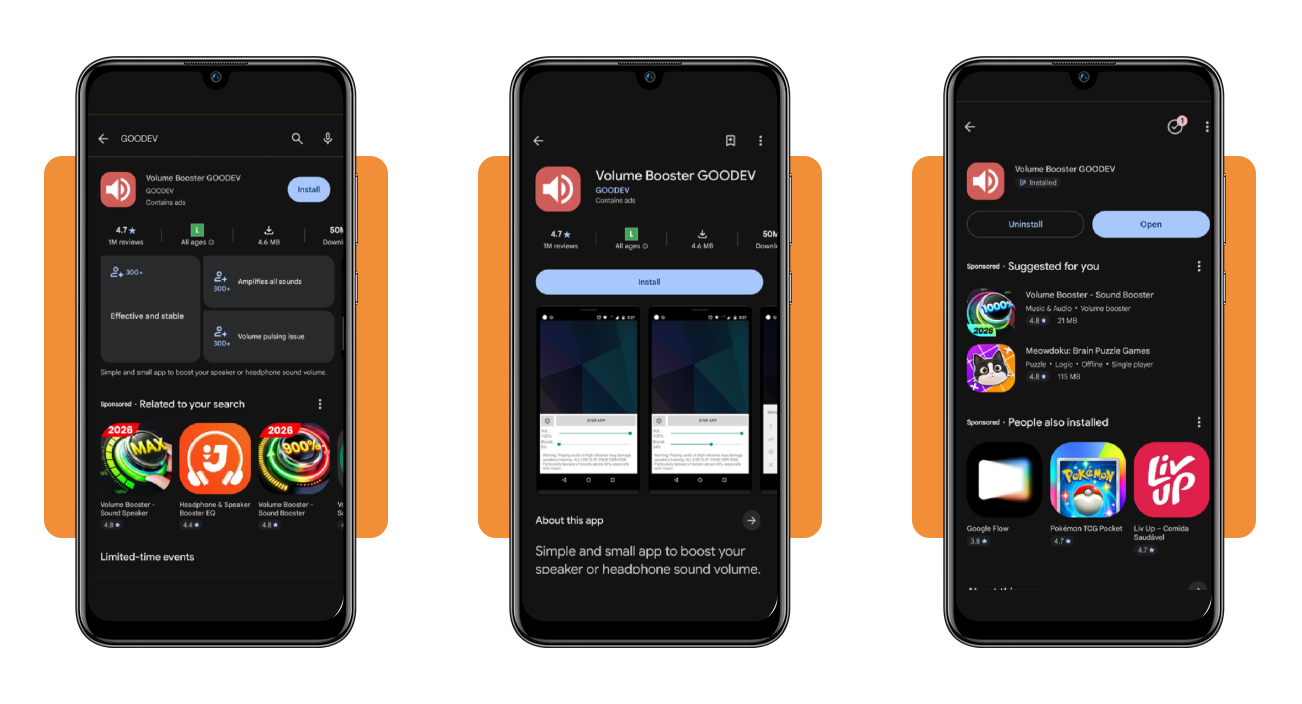
On an Android phone, type ‘Volume Booster’ GOODEV into the Google Play Store search bar and tap ‘Install’ once the listing with the red speaker icon shows up.
If you carry an iPhone, search for the same name in the App Store and tap ‘Get’, then confirm the download with Face ID or your Apple Account password.
Step 2: set your media volume slider
Drag the volume slider to the right until your media plays at a comfortable level, and aim for the upper part of the bar to give the booster a strong base.
A higher starting volume leaves the boost less ground to cover, and that keeps quiet phone speakers from straining or crackling when you add more gain on top of it.
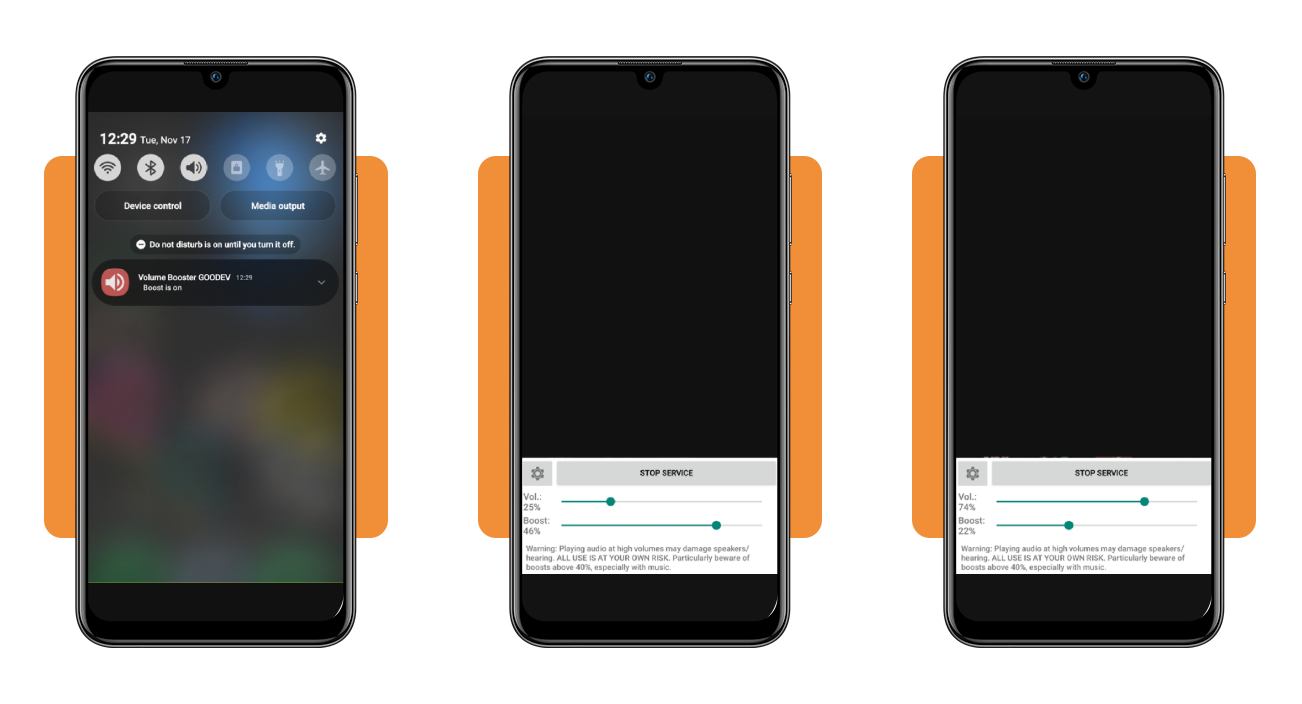
Step 3: raise the boost slider gradually
Nudge the boost slider in small increments while your test track plays, and pause after every move to listen for any rattle or fuzz creeping into the sound.
Keeping the boost below 40% protects your speaker from lasting damage, and sliding it back the moment you hear distortion keeps your audio loud without any harsh edges.
Top smartphones with powerful speakers
A booster app can only push a speaker as far as its hardware allows, and if your current phone keeps topping out, your next upgrade deserves a closer look at audio.
Bigger phones tend to sound better, and the extra room lets manufacturers fit larger drivers and space the stereo pair farther apart for a fuller and wider sound.
All of these picks launched in 2025 or 2026 and sell in the US, giving you a solid escape from quiet phone speakers, whether you lean toward Apple or Samsung.
iPhone 17 Pro Max for rich, balanced sound
Apple pairs the bottom speaker with the earpiece to create stereo sound, and the 17 Pro Max uses that setup to deliver wide and detailed audio with surprising bass.
Cranking it to the max keeps vocals smooth and free of distortion, and that polished top end makes the phone a great match for movie nights in bed or podcast sessions.
Galaxy S26 Ultra for bass you can feel
Samsung trailed rivals on audio for years, but the S26 Ultra changes that with loud stereo speakers and a fuller low end that gives hip hop and action scenes real weight.
Wide spacing between the speakers separates the left and right channels, and turning off the media volume limit in your ‘Sounds and vibration’ settings unlocks the phone’s full loudness.
Galaxy Z Fold 7 for wide cinematic audio
Unfolding the Z Fold 7 gives you a screen close to tablet size, and stereo speakers on opposite sides spread the sound wide to turn your shows into a mini theater.
Audio stays crisp at high volume, and Samsung’s foldables pack a bit more punch than standard phones, making the move away from quiet phone speakers feel like a real leap.
How to clean dirty speaker grilles
Pocket lint and dust pack into those tiny speaker holes over time, and that buildup acts like a muffler that no volume slider or booster app can overcome.
Shine a flashlight across the bottom edge of your phone, and if you spot gray fuzz or dark specks in the grille, that speaker is overdue for a cleaning.
Power off your phone before you begin, and a careful cleanup could fix what sounds like a case of quiet phone speakers without paying for repairs or a new device.
Blast out dust with compressed air
Hold the can upright and fire short bursts at an angle across the grille, and that sideways airflow lifts debris out of the holes without pushing it deeper inside.
Keep the nozzle a couple of inches from the phone and give the earpiece the same treatment, and long blasts are off limits because they can leave moisture behind.
Wipe the grille with isopropyl alcohol
Dampen a cotton swab with isopropyl alcohol and squeeze out the excess against the bottle rim, leaving the tip moist enough to grab grime without dripping into the holes.
Roll the swab along the grille and its edges, and the alcohol dissolves skin oil and dries fast, letting quiet phone speakers push sound through open holes again.
Keep water and sharp tools far away
Tap water and soapy sprays can seep through the mesh and reach the components underneath, and water resistance ratings don’t account for liquid you push in with a swab.
Toothpicks and safety pins can tear the mesh or puncture the speaker itself, and a soft dry toothbrush paired with a weekly microfiber wipe keeps the grille free of fuzz.
4.4/5
Turn every whisper into a full room sound
GOODEV (Android | iOS) gives your phone the push it was missing, and pairing that boost with a spotless grille means your favorite songs and shows come through loud and full.
In this guide, you picked up easy ways to rescue quiet phone speakers at home, along with a shortlist of great phones worth checking out when it’s time to upgrade.
Keep reading Insiderbits for more tricks that keep your phone in top shape, from battery savers to storage fixes that save you money and spare you a repair shop trip.