Pushing your phone’s slider all the way up and still missing every other word of a podcast during your commute makes low Bluetooth volume look like a sign your beloved earbuds are done for.
In this guide, Insiderbits points out the settings that hold your sound back on Android and iPhone, plus official fixes capable of rescuing the pair you already own from the junk drawer.
Low Bluetooth volume: start with official phone settings
Quiet sound from Bluetooth earbuds may start with a setting on your phone, and Apple and Google offer free troubleshooting pages that open in any browser without an app download.
Those pages steer you toward controls built into your device, and checking them shows whether low Bluetooth volume traces back to a phone setting or a defect in the earbuds.
Leave any hearing protection features switched on while you troubleshoot, because those limits guard your ears, and none of the fixes here require pushing your sound beyond a safe level.
Update your phone and earbud software first
Outdated software can mess with how your phone and earbuds talk to each other, and Apple recommends installing the latest iOS version before you try any fix on your iPhone.
On Android, find the software update option in ‘Settings’, then follow the maker’s instructions to install the newest firmware, as older versions can carry connection bugs newer releases fix.
Match the steps to your Android or iOS version
Google notes some fixes only work on Android 8.0 and newer, and phones from Samsung or Motorola relabel options, so look up your version under ‘Settings’ before following a path.
Apple tailors its iPhone instructions to the iOS version installed on your device, and following the matching set keeps you from chasing missing menus while low Bluetooth volume lingers.
Give Bluetooth and both devices a fresh restart
Toggling Bluetooth off and back on forces your phone to rebuild its link with the earbuds, and that quick reset can shake loose glitches behind a weak or muffled signal.
If the sound stays faint, restart your phone and power the earbuds down using their button or case, then reconnect them and play a familiar song to compare the volume.
Step-by-step: check volume, output, and pairing
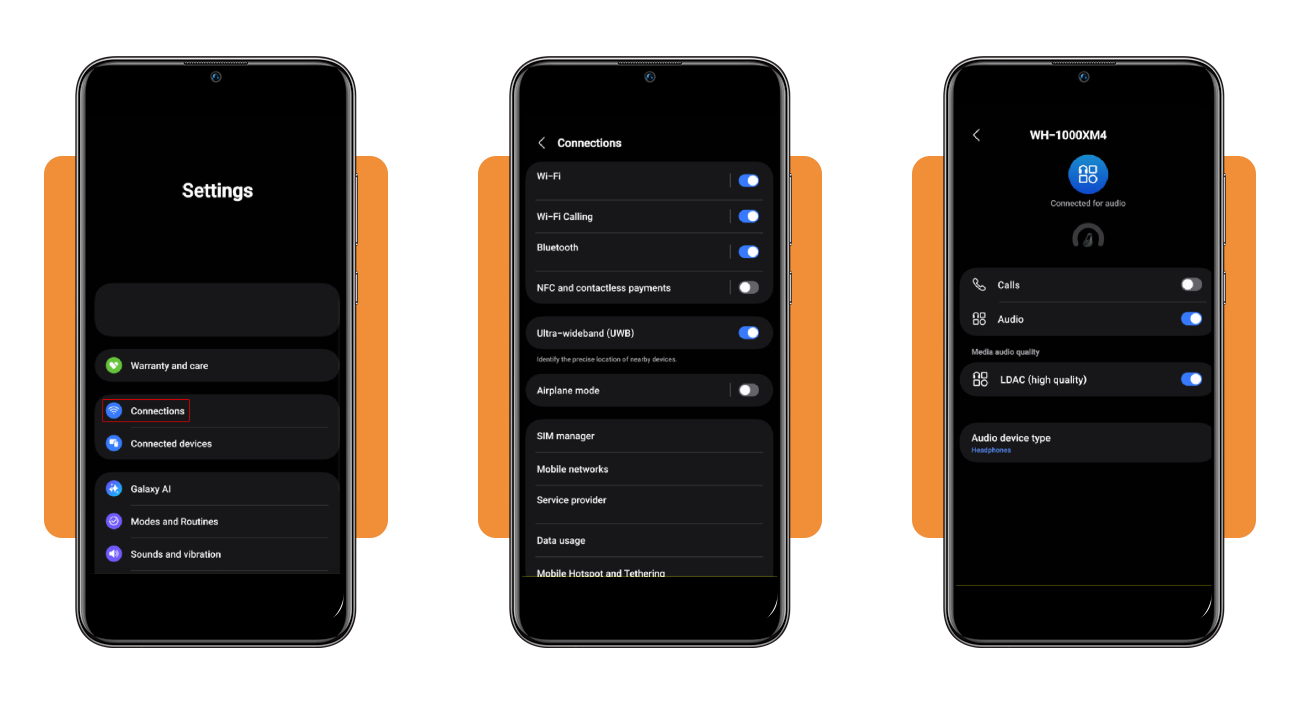
On a Samsung phone, you’ll find the Bluetooth controls under ‘Connections’, while Pixel phones and Google’s own help pages label the matching settings screen ‘Connected devices’.
Starting with the quickest checks and saving the pairing reset for last spares you some work, as low Bluetooth volume often comes from a slider or toggle you can adjust.
Charge your earbuds and keep them close to the phone before you start, because a dying battery or a long gap between devices can muddy the results of every check.
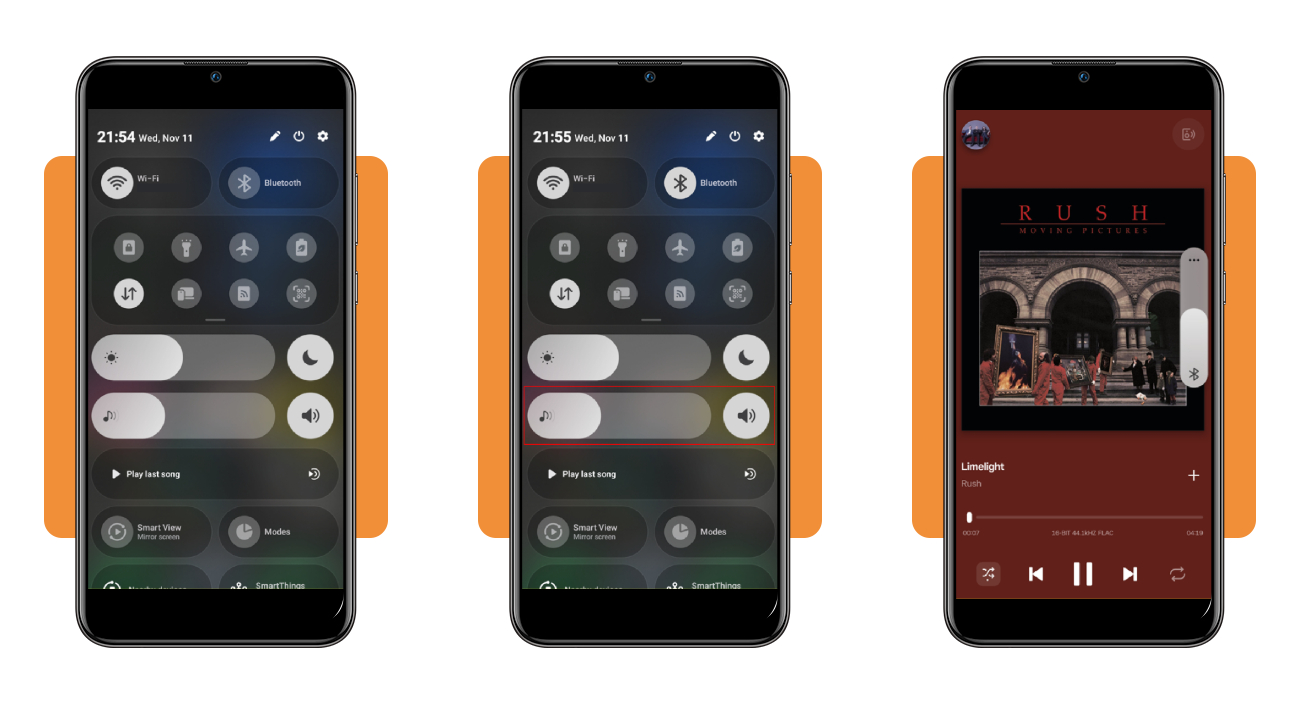
Step 1: play audio and raise the media volume
Swipe down from the top of the screen, turn Bluetooth on, and drag the music note slider to the right, then try the earbuds’ controls, because some pairs keep a separate volume level.
Start a song or podcast in any app, then press your phone’s volume up button while the audio plays, as that raises the media level and leaves your ringtone alone.
Step 2: make your earbuds the active audio output
In ‘Settings’, tap ‘Connections’ and ‘Bluetooth’ to find your earbuds under ‘Paired devices’. A status line that says ‘Connected for calls’ alone means your music won’t reach them.
Tap the gear icon beside their name and switch on ‘Audio’, which Google calls ‘Media audio’, and disconnect any nearby speaker or car stereo that might be grabbing the sound.
Step 3: forget your earbuds and pair them again
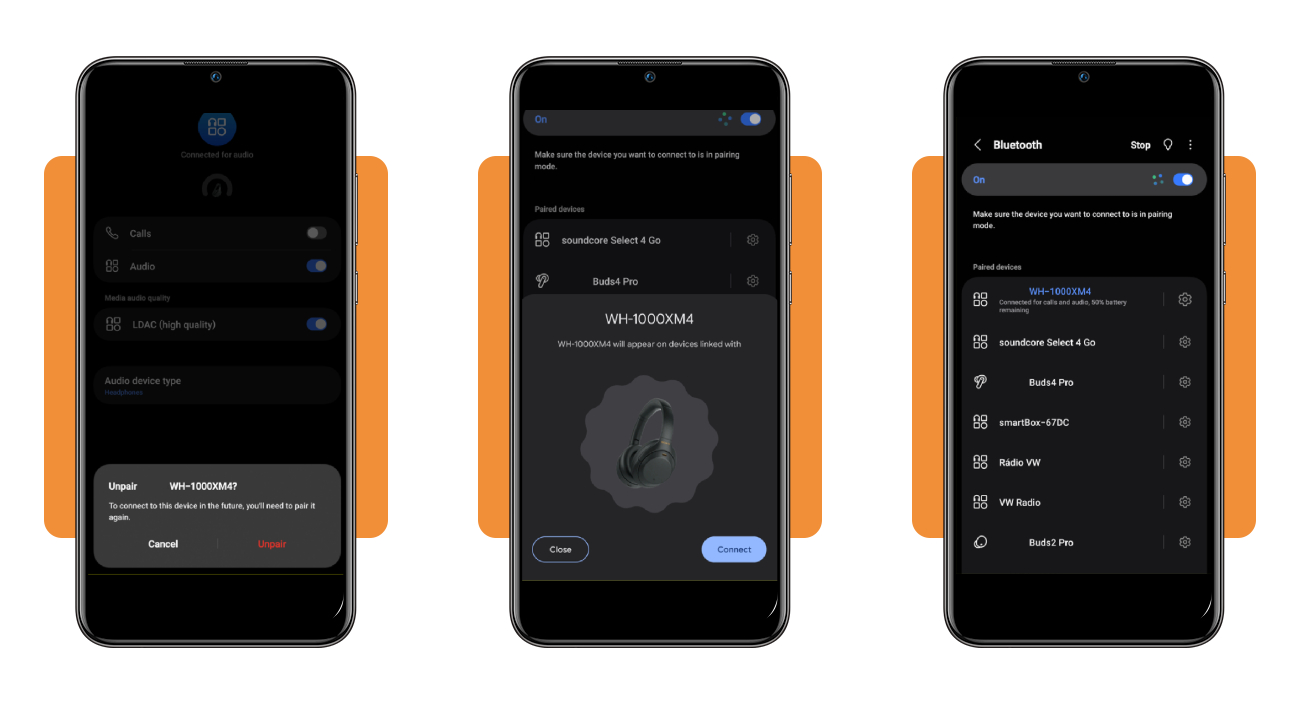
When the sound still feels thin, tap the gear icon beside the earbuds and choose ‘Unpair’, then tap ‘Unpair’ again in the confirmation box to erase the saved Bluetooth connection.
Put the earbuds in pairing mode, then tap their name under ‘Available devices’ and replay the same track to see whether your low Bluetooth volume improves.
Run the same checks on your iPhone
On an iPhone, the same checks apply under Apple’s labels, such as ‘Control Center’ for volume and output, and ‘Forget This Device’ for removing a stale pairing from your phone.
- Play a song or podcast, then press the volume up button on the left side of your iPhone to raise the media level;
- Swipe down from the top right corner to open ‘Control Center’ and drag the volume slider upward while the track plays;
- Tap the AirPlay icon on the music card in ‘Control Center’ and pick your earbuds from the list of available outputs;
- If the sound stays quiet, open ‘Settings’ and tap ‘Bluetooth’, then tap the Info button beside the name of your earbuds;
- Scroll down to tap ‘Forget This Device’ and confirm, then restart your iPhone as Apple recommends before you pair the earbuds again;
- Put the earbuds in pairing mode following the maker’s instructions, then tap their name in the Bluetooth menu and replay the same track.
Understand connection checks and their limitations
A connection that keeps dropping or crackling on you feels different from low Bluetooth volume, and telling the two apart is very important in this case, as the fix for one rarely solves the other.
Apple and Google built their connection checks to test the wireless link, and none of them can open up your earbuds to measure a worn speaker or a failing battery.
Run them one at a time and note what changes after each, because a test that fixes the sound points you toward the real cause and keeps you from guessing.
Play downloaded music to rule out streaming
Streaming leans on both your internet and your Bluetooth link, so a hiccup in either can make audio drop, and a downloaded song leaves Bluetooth as the only link left.
Download a track in your music app and play it with the phone a few feet away, and if the sound holds steady, your streaming connection likely caused the trouble.
Clear the path between phone and earbuds
Walls and floors can weaken a Bluetooth signal on its way to your ears, and keeping the phone in the same room within easy reach helps the link hold strong.
Crowded Wi-Fi networks and microwaves in use compete with Bluetooth signals, and moving to a quieter spot or switching off a nearby wireless speaker can help steady your connection.
Signs the problem is the earbuds themselves
If one earbud plays quieter than the other on any phone you try, or you hear rattling and buzzing at low levels, the hardware itself probably needs a technician’s attention.
Pair the earbuds with a second phone or a laptop, and if low Bluetooth volume follows them after every setting looks right, reach out to the maker about repair options.
Where to find official phone and headphone support
Random video tutorials and blog posts can send you toward settings your phone doesn’t have, while official support pages match the menus on your device alongside new updates.
Quiet audio through your car stereo calls for the owner’s manual, as Google notes some vehicles can’t play music over Bluetooth and each model handles pairing in its own way.
When every check comes back fine and low Bluetooth volume sticks around, official support channels give you answers built around your model and software version, plus a path to repair.
Free Google and Apple help pages online
Google’s Android Help Center sorts Bluetooth trouble by problem type, letting you jump to the part about music you can’t hear and skip the advice meant for making phone calls.
Apple Support keeps an article for headphones that cut out or sound distorted, and both companies host community forums where you can post your model and describe what you hear.
Pairing guides for AirPods, Beats, and others
Apple publishes separate pairing instructions for AirPods on an iPhone and for AirPods on a Mac or Android phone, so pick the version that matches the device in your hand.
If you own Beats headphones, you’ll find connection help on the Beats support site, and Apple offers another set of instructions for pairing other headphone brands with an iPhone or iPad.
Go straight to your phone or earbud maker
Phone makers like Samsung add their own Bluetooth features on top of Android, and on a Galaxy you can open ‘Warranty and care’ in Settings to reach Samsung’s support options.
Earbud brands post firmware notes and troubleshooting for their products, and searching your model name with low Bluetooth volume on their site can surface a known fix for your pair.
Test your sound and compare audio accessories if needed
Your ears make the final call on whether the fixes worked, and a little structured listening helps you decide between keeping your current earbuds and shopping around for another pair.
Bluetooth audio formats vary between brands, and a feature like LDAC only works when your phone and earbuds both support it, so read the specs before buying a new pair.
Note every fix you tried along with its result, because a support agent can use that list to tackle low Bluetooth volume without asking you to repeat the basics.
Run a quick before-and-after sound test
Pick a song you know by heart and note the slider position where it sounds comfortable before you change anything, so you have a baseline for judging the fixes you try.
Play the same section of the song at that slider position after each change, and if it sounds louder or fuller, you’ve found the setting that held your audio back.
Borrow a second pair to compare
Connect a friend’s earbuds to your phone and play your test song at the same slider position, because that swap shows whether the phone or your pair causes the problem.
If the borrowed pair plays at a healthy level, your earbuds likely need service, but if low Bluetooth volume shows up on both, the issue points to your phone’s software.
Weigh repair costs against new earbuds
Repairs and replacement parts can cost extra, so ask the maker for a quote and check whether your warranty or a store protection plan covers the earbuds before paying anything.
Set the quote next to the price of a comparable new pair, and if the gap looks small, replacing them might give you more years of listening for similar money.
Give your earbuds a second hearing
Your earbuds may bounce back after a settings check or a fresh pairing, and the money you’d put toward a new pair can wait until you’re sure you need one.
This article was created to help you track down the cause of low Bluetooth volume on your phone and earbuds, using settings and free help Apple and Google give you.
Keep browsing Insiderbits for friendly tips that help your phone sound crisp, so calls come through loud enough and your favorite playlists stay rich on your daily ride to work.