

Finding US jobs is harder if English is not your first language, but many employers focus more on experience and the ability to perform the job safely than on perfect fluency.
Indeed (iOS/Android) lets job seekers search by filters, making it easier to narrow down openings that may fit your current English level and work background.

4.8/5
What is the app to find US jobs that don’t require perfect English?
Today, we will explore Indeed (iOS/Android), one of the main apps that job seekers can use to search for US jobs by location, experience level, schedule, and job type.
Even though anyone can narrow the job search by using its filters, there is no universal “no English required” filter.
Therefore, the best strategy is to combine some keywords like ‘entry level,’ ‘no experience,’ ‘bilingual,’ ‘Spanish speaking,’ or ‘English not required’ with your city or ZIP code.
In addition to its filters, Indeed (iOS/Android) lets you narrow results by salary estimate, company, remote or on-site work, and posting dates.
Still, every job description should be checked carefully.
That’s because some employers may accept limited English for certain roles, while others require stronger communication skills for safety, customer service, or licensing reasons.
For more ideas beyond Indeed, this Insiderbits guide to jobs for immigrants in the U.S. covers additional job categories and ways to look for work.
Key features within the Indeed app
The main feature is that Indeed (iOS/Android) lets you save searches and job listings, so you can return to promising opportunities without starting over.
Also, by this platform, you can create job alerts for specific roles or keywords and receive notifications as new positions are posted.
Alongside, Indeed (iOS/Android) profiles allow you to upload a resume, add work history, and apply directly to many listings from the app.
Lastly, filters for location, pay, experience level, job type, and remote work are helpful for narrowing US jobs to openings that better match your current English level and background.
Step-by-step: how to filter non-English and entry-level jobs
Indeed does not offer one universal filter for jobs that require little or no English, so the best approach is to combine keywords with entry-level filters.
Step 1: search with the right keywords
Firstly, download Indeed (iOS/Android) and search terms for housekeeping positions. This position usually doesn’t require an excellent level of English.
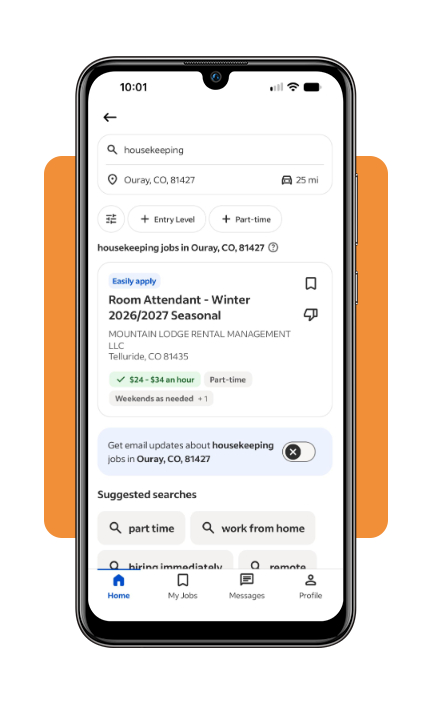
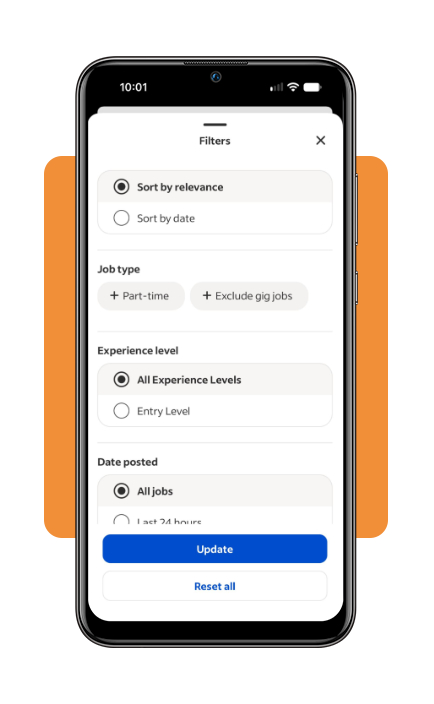
Step 2: open the filters
After the results appear, tap the Filter option or the filter bar at the top of the listings.
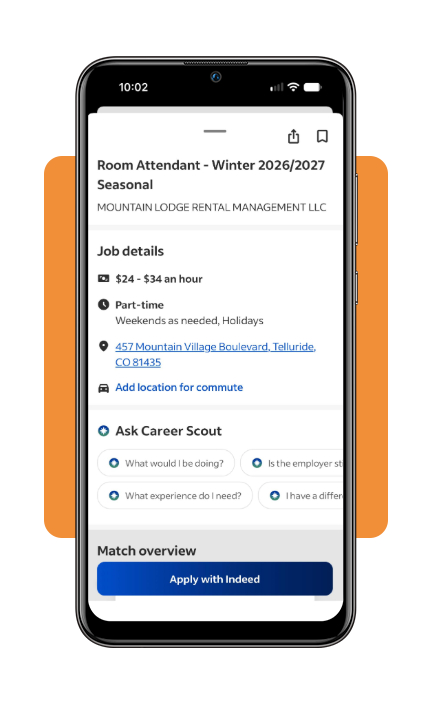
Step 3: apply for the job
Open each job description and look for sections covering qualifications, required skills, or language expectations.
If the description fits you, you can click on ‘Apply With Indeed’ and follow the prompts for application.
Top job categories in the US for non-native English speakers
Some job categories are easier to enter without advanced English when the work is more hands-on and less focused on customer interaction.
Cleaning and housekeeping are common examples. Janitors and building cleaners typically don’t need a formal educational credential, and most learn their duties on the job.
Also, construction and general labor offer entry-level opportunities.
Construction laborers and helpers had a median annual wage of $46,680 in 2025, although safety instructions still need to be clearly understood.
Other categories worth searching include warehouse and material-moving jobs, landscaping, food preparation, and housekeeping.
Still, English requirements will vary by employer and position, so no category should be treated as universally available to workers with limited English.
That’s why reading the full job description remains essential before applying for these US jobs.
How to learn conversational English while working in the US
Working in the U.S. gives non-native speakers regular opportunities to practice English in real situations with coworkers and customers.
First you must focus on the vocabulary you actually need at work.
Learning phrases related to schedules, safety, tools, directions, and common tasks usually has more immediate value than studying advanced grammar.
To help you with that, the U.S. Department of State offers free Everyday Conversations materials with dialogues on different topics.
Listening also matters, so podcasts, American TV with English subtitles, and short conversations with coworkers help you be more familiar with pronunciation and natural speech patterns.
Also, the American English Institute recommends combining daily listening and speaking practice with real-world interaction.
In summary, you don’t need perfect English to apply for US jobs. Improving a little every day while working will expand the range of positions you feel comfortable pursuing.
4.8/5
Build your options as your English improves
Finding US jobs without perfect English is possible for roles where practical skills matter more than advanced communication.
We just showed you throughout this guide how Indeed (iOS/Android) narrows the search with keywords, filters, location settings, and saved job alerts.
But we remind you that every listing should still be checked for its actual language requirements.
Start with positions that match your current skills, keep improving conversational English on the job, and gradually expand the range of roles you apply for as your confidence grows.
Enjoyed this article? Save Insiderbits to your favorites and discover the most useful tech tips.