

Rent, prescriptions, and the electric bill arrive on fixed dates, and a Social Security payment that shows up days later can leave you paying fees or an overdraft charge you never saw coming.
This Insiderbits guide shows you how to read the official SSA calendar online, spot the right date in seconds, and line up your monthly budget with the day your deposit’s due. Read on!
Social Security payment schedule: find your payment date
Social Security doesn’t send out its monthly deposits on one shared day, and the day assigned to you comes down to two personal details on your record that rarely change.
Once you know your group, finding your Social Security payment on the official calendar turns into a quick check you can run for any month you need to budget around.
The pattern repeats from month to month, and learning it once gives you a dependable anchor for rent, groceries, medication refills, and any other bill tied to a due date.
Three Wednesdays cover most beneficiaries
The birthday on file decides which Wednesday holds your deposit, and the calendar splits beneficiaries into three groups based on the day you were born, not the month or year.
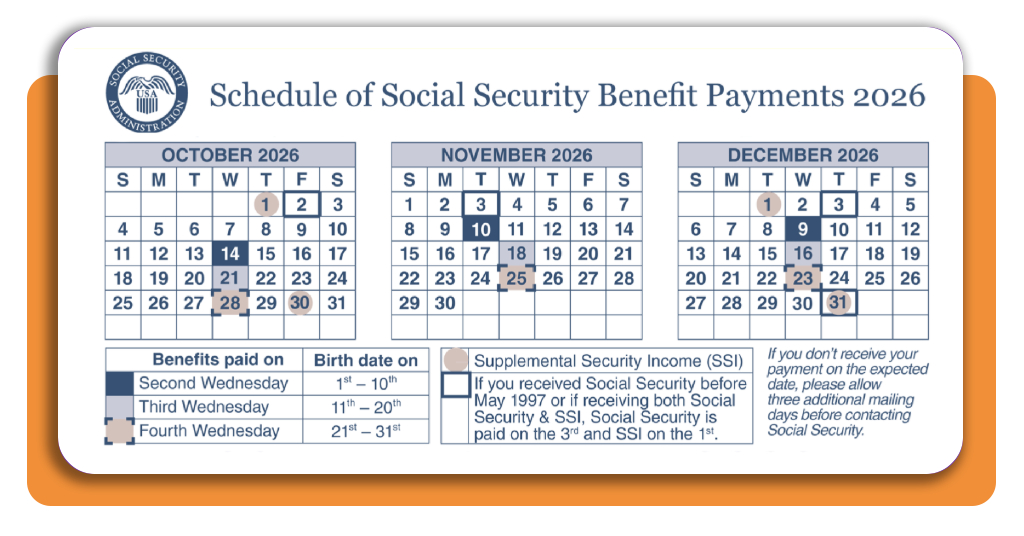
Birthdays from the 1st through the 10th line up with the second Wednesday, the 11th through the 20th with the third, and the 21st through the 31st with the fourth.
SSI runs on a separate calendar
Supplemental Security Income follows a rhythm of its own and lands on the 1st, no matter what day you were born or the Wednesday group your birthday would point to.
Keep SSI and your Social Security payment on separate lines of your monthly budget, as lumping them together can make one week look short when both deposits are on schedule.
A scheduled date is not a bank tracker
The calendar tells you when Social Security plans to release your money, but it can’t show you the moment the deposit posts to your checking account or prepaid debit card.
Banks credit deposits on their own timing, and if a payment hasn’t shown up on the scheduled day, SSA asks you to allow three extra mailing days before you call.
Step-by-step: check the official SSA calendar online
A web browser on your phone, tablet, or computer handles the job, and you won’t need to download an app or install extra software to see the official payment calendar.
The calendar page doesn’t ask you to sign in, create an account, or enter your Social Security number, and you should steer clear of any copycat site online that does.
SSA keeps the yearly calendars together on one permanent page, and returning to that spot lets you plan around your Social Security payment for any month listed on the schedule.
Step 1: access the official website
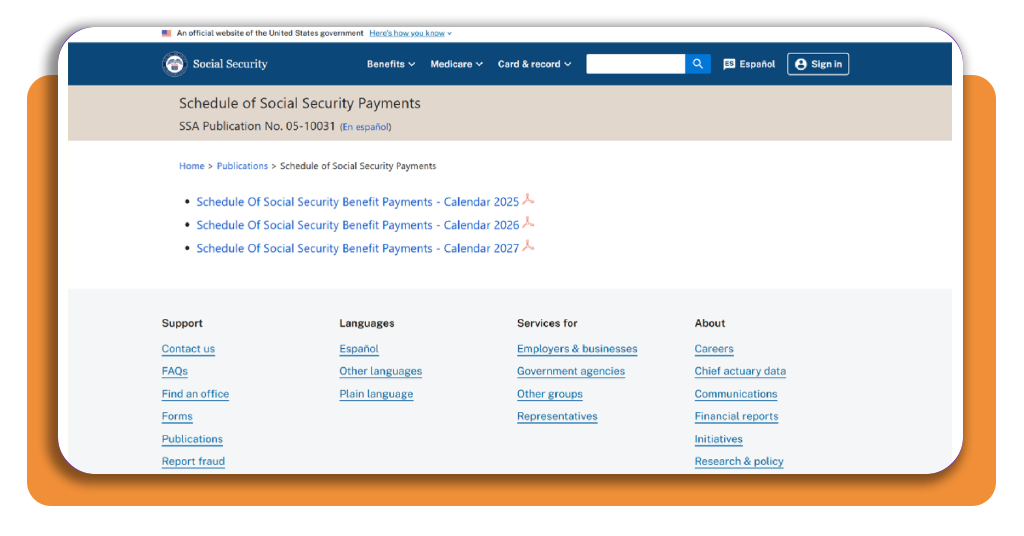
On your browser, go to the Social Security Administration’s official payment calendar page, which displays the agency’s name and publication number 05-10031 under the page title.
Before you tap any link, glance at the address bar to confirm the web address ends in .gov and shows the small padlock icon that marks a secure government site.
Step 2: open the current year’s calendar
The schedule page lists one calendar per year, starting with the previous year, and you’ll want to tap the link for the current year to open it as a PDF.
Download the PDF file or bookmark the page to keep your Social Security payment dates on hand, and use the Spanish link beside the page title if you prefer Spanish.
Step 3: match your month and benefit type
Scroll to the month you’re budgeting for, then look at the color key at the bottom of the page to learn what the shaded squares, circles, and outlined boxes mean.
Match your birth date to its shade in the key, and read the notes beside it to see if your benefit type moves you to the 1st or the 3rd.
Understand birthdays, benefit types, and holiday changes
The shade beside your birthday covers the basics, but a handful of rules can move your deposit to a different day than your own birth date would point to.
These rules depend on whose work record pays your benefit, when you started receiving checks, and whether a weekend or federal holiday lands on your usual payment day.
Once these rules click, you’ll read your Social Security payment day on the calendar with confidence, and a shifted deposit date won’t throw the budget you built off balance.
The worker’s birthday sets the date for families
If you collect benefits as a spouse, child, or survivor, the date follows the birthday of the worker whose earnings record supports your check, and your birthday plays no role.
Say your husband was born on the 14th and you were born on the 3rd, and your spousal benefit lands on the third Wednesday, matching his group on the calendar.
Fixed dates for longtime and dual beneficiaries
If you began receiving Social Security before June 1997, your deposit arrives on the 3rd of the month, and the same rule applies if you live outside the United States.
Collecting both Social Security and SSI gives you two deposits early in the month, and your Social Security benefit moves to the 3rd no matter which Wednesday your birthday matches.
Weekends and federal holidays shift the date
When your scheduled day falls on a Saturday, Sunday, or holiday, SSA sends your Social Security payment on the business day before, and the calendar shows that adjusted date.
SSI follows the same rule, and when the 1st lands on a weekend, the deposit arrives at the end of the prior month, leaving the new month without one.
Where to access official SSA calendars and guidance
Blogs, social media posts, and news roundups often repost payment dates, and a typo or outdated calendar on one of those pages can steer your budget in the wrong direction.
Scammers send texts and emails about “changes” to your benefit date, and they ask for your Social Security number or bank details to fix a problem that doesn’t exist.
Relying on SSA’s own resources means details about your Social Security payment come from the agency that sends it, and none of those sources will ask for private information.
Yearly calendar PDFs in English and Spanish
SSA posts next year’s calendar months in advance, and opening it in the fall lets you mark January deposit dates while you plan holiday spending and gift budgets.
The Spanish version lives on its own page with the same one-page layout, and you can print either file for the fridge or a family member who handles the bills.
The official FAQ on non-business days
SSA’s FAQ library includes an entry devoted to weekends and holidays, and typing “holiday payment” into the FAQ search box pulls it up along with related questions about deposit timing.
The answer page offers a Spanish version and a link to the payment calendar, and you can text the page to a parent or partner asking about a shifted date.
Phone and TTY lines for individual questions
SSA’s automated phone line at 1-800-772-1213 answers 24/7, in English and Spanish, and saying “check delivery” at the first prompt brings up payment information.
If you’re deaf or hard of hearing, call the TTY line at 1-800-325-0778, and save any questions about your own Social Security payment for these numbers or SSA’s website.
Plan your monthly bills and explore budgeting tools
With your deposit day marked, list your fixed bills by due date and circle any bill that comes due before the money reaches your checking account or debit card.
Many utility companies, lenders, and card issuers let you move a due date, and a quick call can shift your bills to the days after your deposit shows up.
A notebook or the printed calendar can carry this plan, but a budgeting platform can sync your bills and track spending around your Social Security payment with less manual math.
Monarch Money for shared household budgets
Monarch Money is a personal finance platform that connects your bank, credit card, and investment accounts to track budgets, spending, and net worth on the web.
It sorts transactions into categories, displays a cash flow view of money in and out, and lets a partner join your household with a separate login at no added cost.
Quicken Simplifi for tracking bills and spending
Quicken Simplifi is a budgeting platform from the makers of Quicken that links your financial accounts and organizes income, bills, and spending into a monthly plan you can view online.
The platform subtracts recurring bills from income, such as your Social Security payment, shows how much you have left to spend, and tracks savings goals next to regular expenses.
Goodbudget for monthly envelope planning
Goodbudget is a money management platform built on the envelope method, where you divide your monthly income into virtual envelopes for different spending categories.
You assign money to each envelope, log purchases by hand or through bank syncing on the paid plan, and share the same budget across devices with a partner or relative.
Circle your date and build the month around it
With your deposit day circled, rent and the electric bill stop feeling like a guessing game, and the dates in your budget start lining up with the official SSA calendar.
In this article, we explained where to find the calendar, which rules can move your Social Security payment, and how a budgeting platform can keep your due dates in order.
Keep browsing Insiderbits for more articles on government benefits, with answers about programs like Medicare, SNAP, and SSI that help you catch deadlines and protect your money.
Frequently Asked Questions
What determines my Social Security payment date?
Your payment date is determined by the birthday on file with SSA. Birthdays from the 1st through the 10th receive payment on the second Wednesday, the 11th through the 20th on the third Wednesday, and the 21st through the 31st on the fourth Wednesday of each month.
Does SSI follow the same Wednesday schedule as Social Security?
No. Supplemental Security Income (SSI) lands on the 1st of the month, regardless of your birthday or Wednesday group. Keep SSI and your regular Social Security payment on separate lines in your budget.
What happens if my payment day falls on a weekend or federal holiday?
SSA sends your payment on the business day before the scheduled date. The official calendar always reflects these adjusted dates, so check it for the exact day each month.
I collect both Social Security and SSI. Which date applies to me?
If you receive both benefits, your Social Security payment moves to the 3rd of the month, regardless of which Wednesday your birthday would normally point to. Your SSI still arrives on the 1st.
Where can I find the official SSA payment calendar?
Visit the SSA’s official payment calendar page at ssa.gov/pubs/calendar.htm. The page requires no sign-in, account creation, or Social Security number, and is available in both English and Spanish.
My payment didn't arrive on the scheduled day. What should I do?
SSA advises waiting three extra mailing days after the scheduled date before contacting them. If it still hasn’t arrived, call SSA’s automated phone line at 1-800-772-1213 (TTY: 1-800-325-0778).
I receive benefits as a spouse. Which birthday determines my payment date?
If you collect benefits as a spouse, child, or survivor, the payment date follows the birthday of the worker whose earnings record supports your check, not your own birthday.