

A tornado warning screaming through town at 3 a.m. leaves few precious minutes to find shelter, and a severe weather alert app can shake you awake before the twister arrives.
In this guide, Insiderbits covers the AccuWeather app, from government warnings to storms brewing near you. Read on for the setup that could hand you the head start in a time of need.

4.6/5
Why phone alerts matter when a storm hits
Outdoor sirens were designed to carry across open streets, and once you’re behind closed windows with the AC humming or earbuds in, that wail can fade into background noise.
Your phone follows you from the office to a friend’s couch, and it knows your location, so a warning can find you wherever the storm decides to show up.
Skies can flip from gray drizzle to pounding hail in under an hour, and a severe weather alert app lets you spot that shift while there’s room to adjust your plans.
Tornado warnings give you only minutes to act
Forecasters issue more than 2,000 tornado warnings in an average year, and those alerts tend to land somewhere between 8 and 18 minutes before a funnel touches down near you.
Losing three of those minutes to a phone on silent could leave you hunting for shoes as the roar starts, and an alert that pierces ‘Do Not Disturb’ wins them back.
Storms at night catch people off guard
Close to 4 in 10 tornado deaths in the U.S. happen after dark, during the hours when you’re asleep and the TV in your living room has gone quiet.
November also brings a second severe weather season to the South, and those late fall storms love rolling through after midnight while your guard is down and the lights are off.
Two warning sources are better than one
Keeping two ways to receive warnings is the rule weather experts swear by, and it makes sense once you picture a dead battery or a downed cell tower silencing one channel.
Pairing the government alerts built into your phone with a severe weather alert app keeps a backup ready if one stalls, and it adds live radar for checking a storm’s path.
How the AccuWeather app sends National Weather Service alerts
Your local National Weather Service issues the watches and warnings for your county, and AccuWeather (Android | iOS) picks them up and pushes them to your phone as a notification.
Its own team of meteorologists adds context to those government bulletins, and the company claims its app delivers official warnings faster on average than any other known source.
Coverage stretches past tornadoes, with this severe weather alert app flagging threats ranging from flash floods to wildfire smoke drifting into your area from hundreds of miles away.
Official NWS warnings at no cost
You won’t pay a cent to receive tornado or flood warnings while using this app, and the ads you scroll past on the forecast screens are what cover the bill.
Lightning notifications come at no charge either, and they’ll buzz you when strikes hit near your location, which helps if you’re grilling outside or out on a jog.
Turn on government-issued alerts in settings
Tap the menu icon with three lines at the top of the screen and open ‘Settings’, then find ‘Manage Notifications’ and switch on the ‘Government Issued Alerts’ toggle.
Saving a city as a favorite switches on warnings for it, and this severe weather alert app lets you mute specific places under ‘Locations’ if your phone starts buzzing too much.
Active warnings appear right on your location cards
Your ‘Home’ tab lays out saved places as cards, and when a warning is active for one of them, a red triangle with a number shows up in the corner.
Tapping that card opens the forecast for that city, where the warning details appear at the top of the screen so you can read what’s coming and when it should arrive.
Step-by-step: how to add locations in the severe weather alert app
AccuWeather (Android | iOS) can monitor several cities at the same time, so warnings for the places tied to your life reach your phone even when you’re hundreds of miles from them.
Saving a location in the severe weather alert app keeps its forecast one tap away, and you won’t have to type the name again when a storm starts building nearby.
The setup asks for nothing beyond a download and location permission, and the cities you save stay in the app until you decide to remove or rearrange them.
Step 1: download the app and sign up
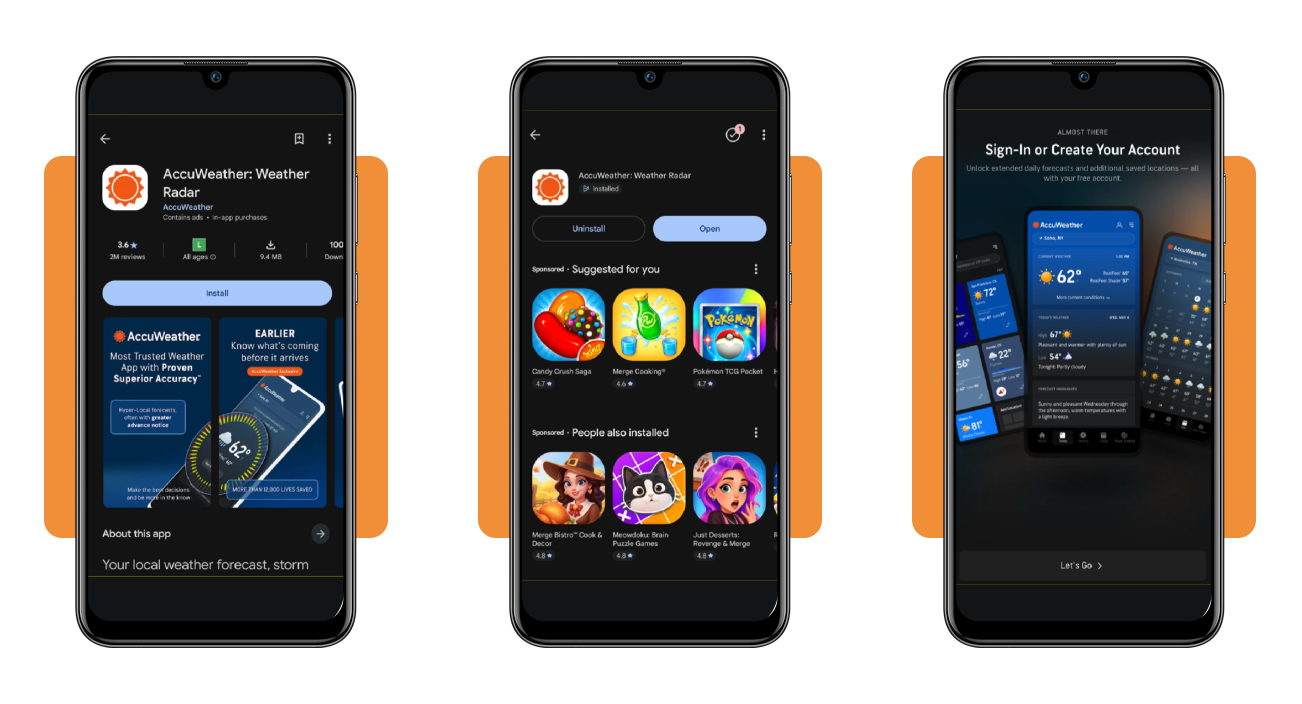
Grab the free app from Google Play or the App Store, depending on whether you carry an Android or an iPhone, and tap ‘Get Started’ once the welcome screen loads.
Creating a free account unlocks extra saved locations, so tap ‘Let’s Go’ if you want room for more cities or pick ‘Maybe Later’ and create one through the profile icon.
Step 2: allow location access for local alerts
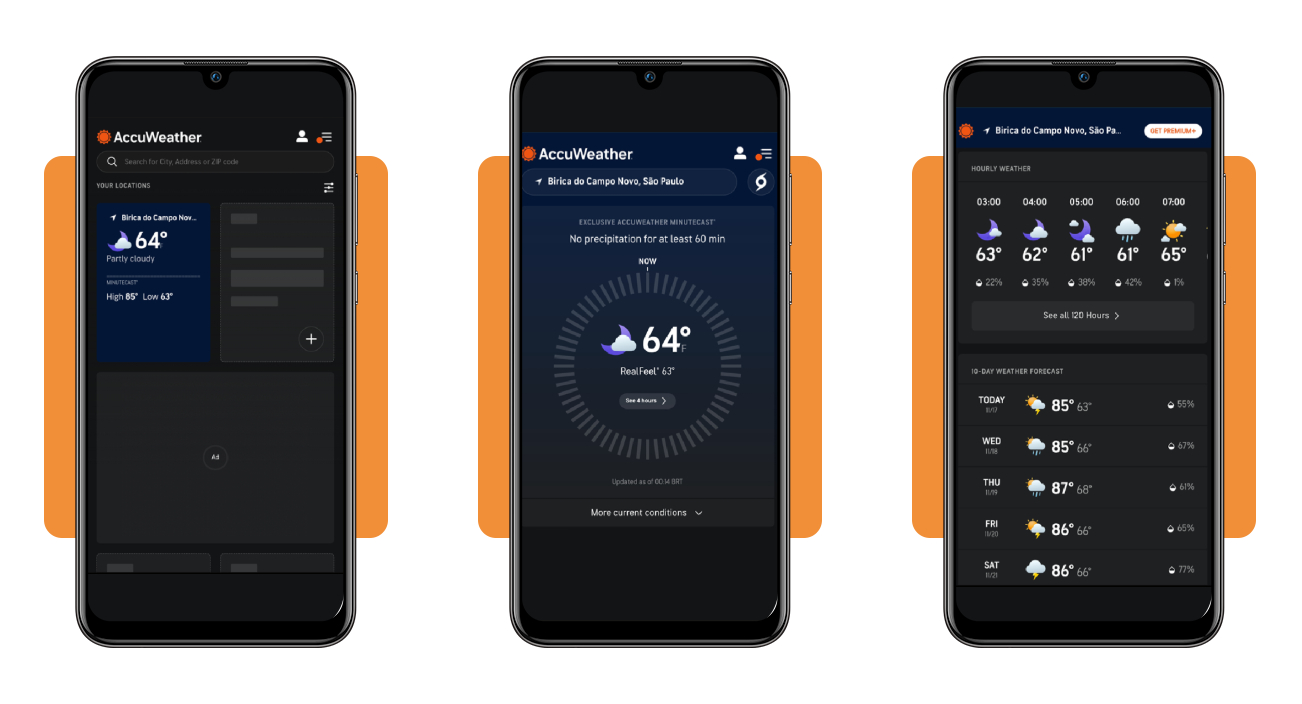
Location access lets the app tie warnings to wherever you’re standing, and choosing the background option means alerts keep up with you during a commute or a weekend trip.
After you approve it, this severe weather alert app turns your current position into the first card on ‘Home’, marked with an arrow that sets it apart from saved cities.
Step 3: search and save cities from Home
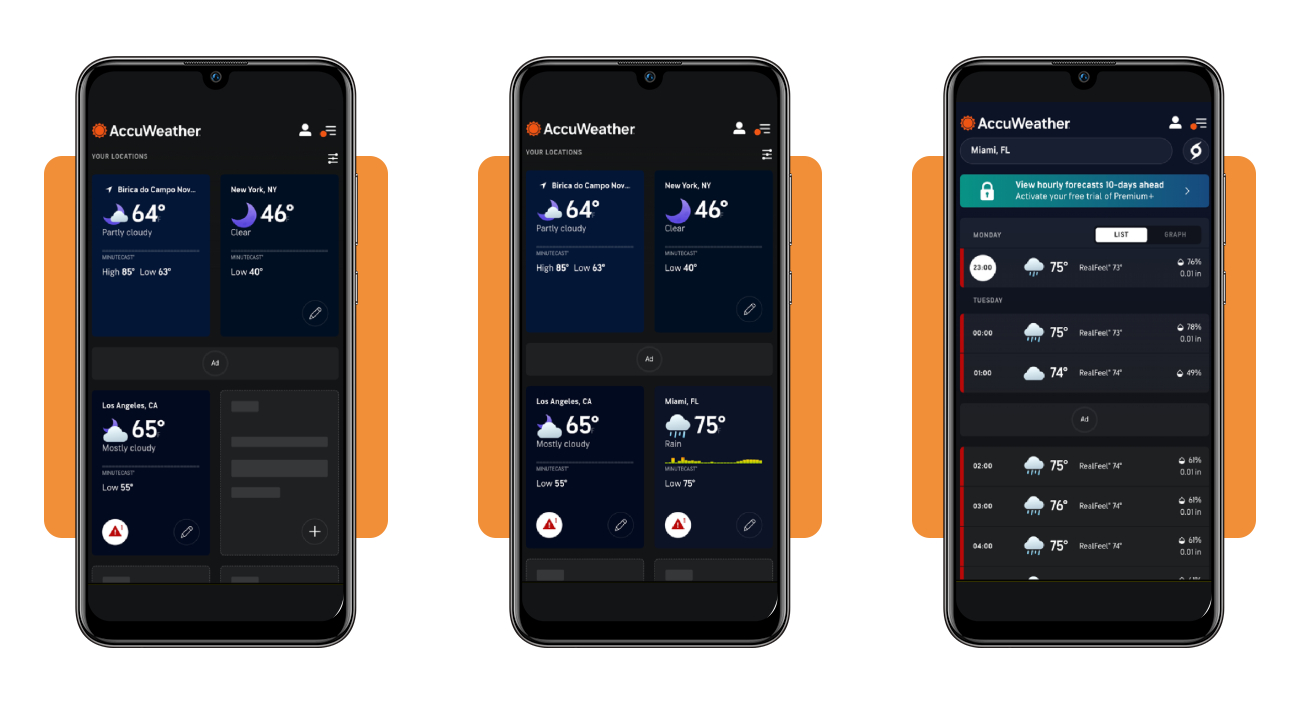
To add more locations to the app, tap ‘Home’ in the bottom bar and type a city name or ZIP code into the search field, then choose the right match to save it as a new card.
Hit the ‘plus’ sign on any empty card to keep building your list, and use the sliders icon next to ‘Your Locations’ to rearrange the cards you check most.
Is the AccuWeather app free? What else does it include?
AccuWeather (Android | iOS) costs nothing to download, and the free version covers a 15-day forecast and the live radar map without asking you to type in a credit card number.
Ads pop up between forecast cards, but this severe weather alert app also shows ‘RealFeel’ temperatures that factor in wind and humidity to reveal how the air feels on your skin.
Tap the ‘Daily’ tab and you’ll find extra views for cold and flu risk along with tree pollen levels, which are all handy if spring allergies tend to wreck your week.
MinuteCast tracks rain down to the minute
The ‘MinuteCast’ feature predicts rain or snow for the next four hours, showing when precipitation will start and stop at your spot along with how heavy it should come down.
A dial on the ‘Today’ screen spells out that forecast in plain words, letting you time a grocery run between showers or decide if the bike commute still makes sense.
Forecasts made for school days and dog walks
The app offers a ‘School’ tab that tells you if your kid needs a rain jacket for class and then lists the conditions for wake-up time and the walk to the bus stop.
If you have a dog, the ‘Pets’ tab in the severe weather alert app shows an hourly temperature chart and a daily walking forecast flagging days too hot or too cold for long strolls.
Extra perks with a Premium+ subscription
Premium removes the ads for $1.99 a month, while Premium+ costs $4.99 a month and adds AccuWeather’s own storm alerts with earlier notice plus hourly forecasts covering ten days.
The Family Plan costs $79.99 and extends Premium+ to as many as six profiles with their own local alerts, while the $29.99 annual Premium+ plan includes a free trial.
Built-in alerts: check Wireless Emergency Alerts on your phone
Wireless Emergency Alerts travel from cell towers to your phone, so they reach you without the severe weather alert app or any other download running in the background.
Government agencies like the National Weather Service send these warnings through your carrier, and they won’t cost you a dime or eat into your data or texting allowance.
The alerts follow the tower your phone connects to, meaning a visit to another state brings warnings for that area, and you can’t switch off messages sent by the President.
Turn on emergency alerts on your iPhone
Open the ‘Settings’ app on your iPhone, tap ‘Notifications’, and scroll to ‘Government Alerts’, where you’ll spot separate switches for Emergency Alerts and for AMBER Alerts.
Tap ‘Emergency Alerts’ next and switch on ‘Local Awareness’, a setting that lets your iPhone use your approximate location so government warnings land faster and with better accuracy.
Find wireless emergency alerts on Android
If you own a Pixel or a newer Galaxy, open ‘Settings’ and tap ‘Safety and emergency’, where ‘Wireless emergency alerts’ has a master ‘Allow alerts’ toggle at the top.
Menus shift between brands, so type emergency alerts into the ‘Settings’ search bar if the path looks different, and keep notifications for the severe weather alert app on as well.
Let alerts sound even in silent mode
In the ‘Emergency Alerts’ menu on your iPhone, the ‘Always Play Sound’ toggle lets warnings ring out loud even when the ringer switch is off or a Focus mode is active.
Many Android phones tuck a similar option into the ‘Wireless emergency alerts’ screen, and turning on full volume alerts lets a tornado warning blast through Do Not Disturb.
4.6/5
Free warnings that wake you before the wind does
With AccuWeather (Android | iOS) on your phone and government alerts switched on, the next storm rolling toward your street or your parents’ town will find you awake and ready to move.
Hopefully, this guide helped you understand how this severe weather alert app turns a buzz on your nightstand into the extra time you need to grab shoes and take cover.
Keep browsing Insiderbits for more apps that help you stay alert, and you’ll pick up setups that keep your loved ones safer and put your phone to work protecting them.