
Low ringtone volume makes important calls easy to miss, but the fix could be in your iPhone settings, speaker condition, or the sound profile.
Volume Booster GOODEV (iOS) offers equalizer, sound test, and audio enhancement tools for compatible playback.

4.4/5
How to boost ringtone volume using a free mobile app
In this guide, we will explore Volume Booster GOODEV (iOS), an app that helps with media playback and audio testing.
Still, we must make it clear that this app doesn’t directly raise the iPhone’s system ringtone beyond Apple’s own volume controls.
For the actual ringtone volume, go to Settings > Sounds & Haptics and drag the ringtone volume slider higher.
When it comes to the app, it is more helpful for testing how loud your speaker sounds and adjusting supported media audio with tools such as equalization and sound enhancement.
That can be useful if your phone sounds weak overall and you want to determine if the problem is limited to ringtones or affects media playback as well.
If GOODEV (iOS) is not enough, you can explore more ways to improve phone audio in our Insiderbits guide to volume booster apps that covers additional options and settings.
Key features within the app
As we just mentioned, the Volume Booster GOODEV app (iOS) includes an equalizer that lets you adjust frequency levels for supported audio playback.
It also offers bass enhancement and volume-related audio controls, along with sound-testing tools that can help you compare speaker output.
These features are mainly intended for media, so the iPhone’s Sounds & Haptics settings remain the correct place to control incoming-call volume.
The safest approach is to increase audio gradually, since very high playback levels can cause distortion and may be uncomfortable for extended listening.
Step-by-step: how to safely increase ringtone volume
The best way to raise ringtone volume on an iPhone is through Apple’s built-in sound settings rather than relying on a booster app.
You can then use an audio app to test speaker output and compare whether the phone sounds weak across ringtones and media.
Step 1: download and open Volume Booster GOODEV
To begin with, download Volume Booster GOODEV (iOS), and after installing, open the app.
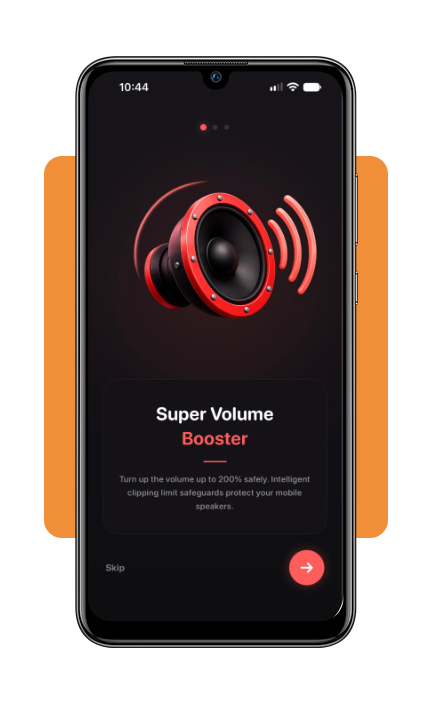
Step 2: check the smartphone volume
On the main screen, you will be able to see the overall volume of your phone. Below, there are three controls: media volume, bass boos, and virtualizer that you can adjust.
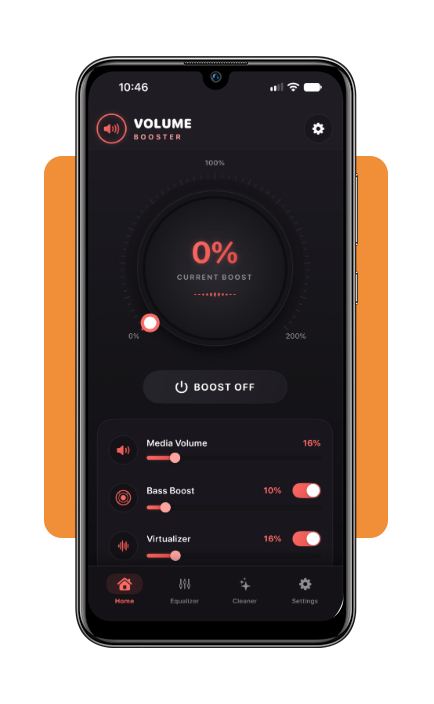
Step 3: boost on
As you can see, the volumes are low. Click on ‘Boost Off’ to turn it on. Then the overall volume will raise it up.
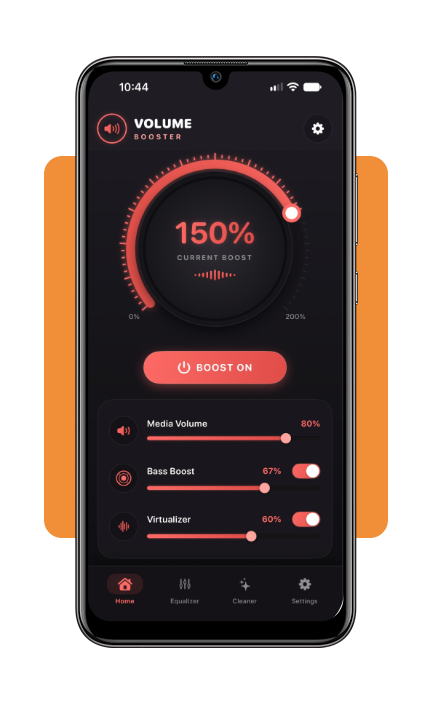
Step 4: test the speaker output
After that, play a ringtone or use Volume Booster GOODEV’s (iOS) sound testing tools to check if the speaker is louder.
If media and ringtone output are both weak, the problem may be related to the speaker, debris, or hardware rather than the volume setting itself.
Smartphone brands with loud speakers and audio enhancers
It is normal for some smartphone brands to perform better in speaker tests than others.
Among recent flagships, Apple has delivered strong speaker quality.
SMArena ranked the iPhone 17 Pro Max first among the flagship phones it tested for sound, with particularly strong overall audio quality.
Samsung is another solid option. The Galaxy S25 Ultra earned a ‘Very Good’ loudness score in the same comparison.
All while newer Galaxy models continue to offer stereo speakers and software-based audio enhancement.
For midrange buyers, Motorola, Xiaomi, and HONOR have also produced models with strong stereo speakers.
For those, GSMArena previously highlighted the HONOR 200 Pro, Motorola Edge 50 Pro, and Redmi Note 13 Pro+ for their balanced and relatively powerful output.
How to fix distorted phone audio and speaker hardware issues
If your problem is distorted audio, it can come from high volume levels, debris in the speaker grille, software problems, or physical damage to the speaker itself.
In that case, start by lowering the volume slightly and playing a different audio file.
If the distortion disappears, the issue may be related to the source or to pushing the speaker too hard.
Next, inspect the speaker grille for dust or debris and restart the phone. Keeping the operating system updated can also resolve bugs that affect sound output.
If the ringtone volume and media audio remain distorted even at moderate levels, test headphones or another audio output.
That’s important because clear sound through headphones can point to a problem with the phone’s built-in speaker rather than the audio file itself.
If your concern is hearing calls clearly, hearing-aid users can also adjust compatible devices through the myPhonak app, including volume and listening programs.
Persistent crackling, buzzing, or distortion after these checks may indicate hardware damage.
At that point, an authorized repair center is safer than attempting to open or repair the speaker yourself.
4.4/5
Make every call easier to hear
Improving ringtone volume starts with the right settings, but speaker condition, device temperature, audio profiles, and hardware quality can all affect what you actually hear.
Volume Booster GOODEV (iOS) helps you test and compare audio output, but the iPhone’s own Sounds & Haptics controls remain the main place to adjust ringtone and alert levels.
If the sound stays weak or distorted, check the speaker grille, test another audio source, restart the phone, and compare the result with headphones or another output device.
Use software tools to diagnose the issue first, then consider repair or a device upgrade only if the problem points to the speaker hardware itself.
Enjoyed this article? Save Insiderbits to your favorites and discover the most useful tech tips.