
Nobody sends an invitation when a federal assistance program fits your situation, which leaves you guessing about benefits eligibility while the help you could use is just a few clicks away.
In this guide, Insiderbits explains the official search tool and the available ways to submit each application, turning uncertainty into a solid plan for claiming the support you may have missed.
What is the official website to check eligibility for social benefits?
The resource for checking social benefits is called Benefit Finder, the government’s guide to information and services, which the US General Services Administration operates for the public.
Whether you’re curious about benefits eligibility for yourself or a close relative, the tool lists programs you may qualify for and links each result to instructions on how to apply.
That puts the research in one place and lets you learn about options before you start any application, and the Español button at the top switches the website’s language to Spanish.
Spot the real site by its .gov address
Look at the end of the web address in your browser bar, where a .gov ending marks a page that belongs to a real government organization in the United States.
A padlock icon or an https prefix signals a safe connection to the site you’re visiting, and you should share sensitive details only after you’ve confirmed a genuine .gov ending.
Twelve categories cover nearly every life situation
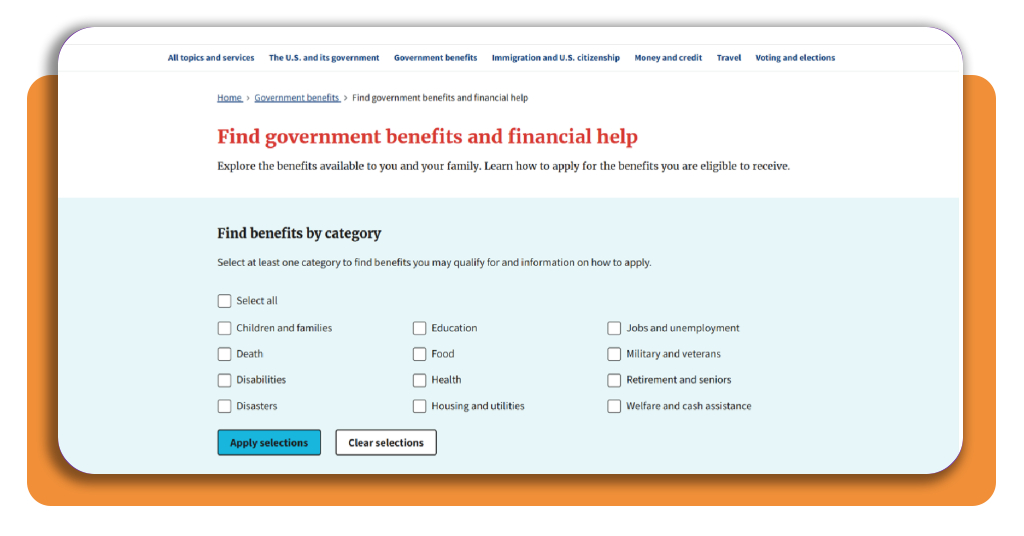
The checklist names life events such as “Death”, “Disasters”, and “Military and veterans”, and the results narrow to the support connected to whichever of those moments you select from it.
When your situation touches several areas, such as “Education” and “Disabilities”, your benefits eligibility can span both fields, and you tick every box that describes you or a family member.
Possible matches are not final approvals
Any match points you to a program, and the agency that runs it makes the final call on who qualifies, using its own rules and the personal data you submit.
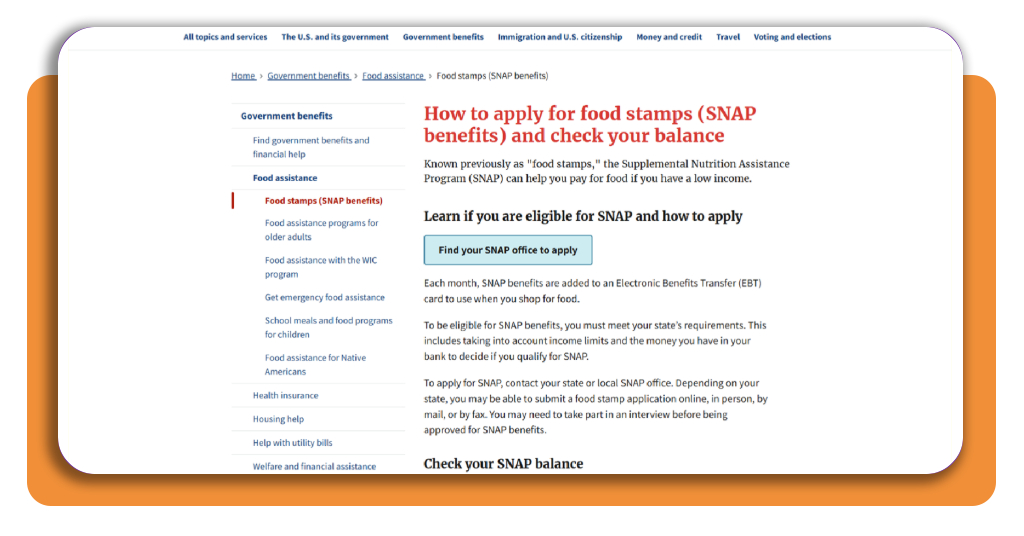
SNAP follows that pattern, with your state setting the requirements, weighing income limits, and possibly asking you to complete an interview before approval.
Step-by-step: how to find out which benefits are available to you and your family
Finding out which benefits are available to you and your family works like a short research trip that starts in the Benefit Finder and ends on an agency’s application page.
Before you open the site, jot down who lives in your home and which situations apply to each person, so you’ll have a focused list that guides your benefits eligibility search.
Remember to add your home state to that list, as the food stamps program, for example, uses a separate application form in each state, and yours is the one you’ll fill out.
Step 1: access the Benefit Finder website
Go to the USAGov website, click “Government benefits” in the top menu, and choose “Find government benefits and financial help” from the topics shown to land in the Benefit Finder.
The opening page asks for no account, no sign-in, and no personal details, which lets you browse the categories and read about programs without handing anything over to an agency.
Step 2: browse all available programs
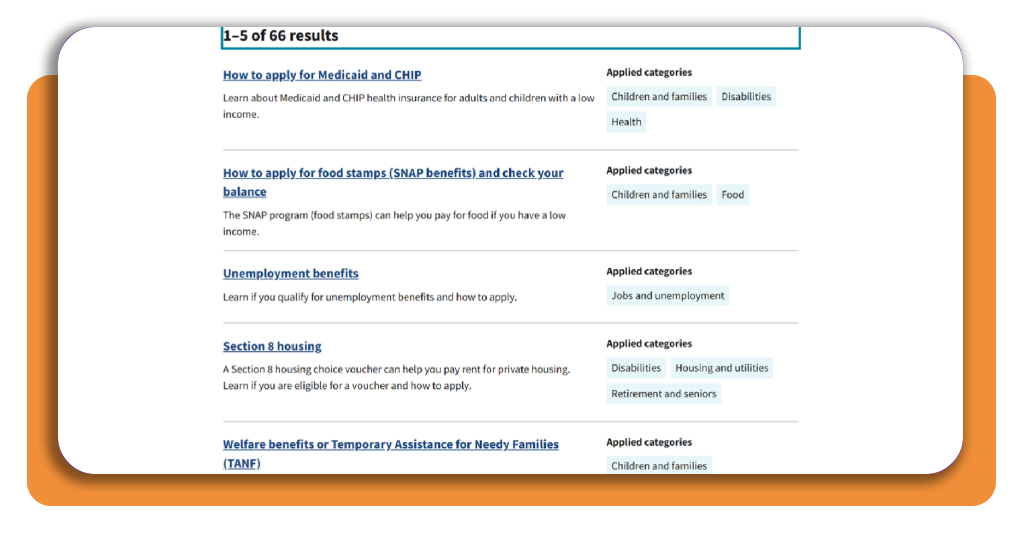
Tick “Select all” at the top of the category checklist, press “Apply selections”, and page through the results with the “Next” link to see every program on the list.
Each entry pairs a title and short description with category tags, from Medicaid and CHIP to Unemployment benefits, giving you a look at benefits eligibility across the programs it covers.
Step 3: choose a program and apply
Match each program in the results against your notes, then open the one that fits your household and read its page for details on who qualifies and how to apply.
If you need food assistance, for example, apply for SNAP, and on the food stamps page, select “Find your SNAP office to apply”, then click your state on the map to reach its local offices.
Top national assistance programs
After the Benefit Finder shows you what exists, the Government benefits hub on USAGov breaks help into 11 topic pages, where you can read about benefits eligibility for each area.
If your situation involves retirement, a loss in the family, or a large unplanned expense, the hub has dedicated pages on Social Security, survivor benefits, and federal loans for individuals.
When a government check goes missing, or your payment arrives in the wrong amount, the hub lists contacts for reporting it and pages that explain how to trace unexpected payments.
Food help through SNAP and WIC
SNAP loads its monthly benefits onto an Electronic Benefits Transfer card that you use when you shop for food, and the page itself covers how to check your remaining balance.
WIC supports women and children, and the food assistance topic gives you pages on emergency help, school meals, programs for older adults, and assistance for Native Americans.
Health coverage from Medicaid to Medicare
The health insurance topic offers you information on Medicaid and CHIP, which cover adults and children, along with Medicare, the ACA Health Insurance Marketplace, and COBRA.
Medicaid and CHIP carry tags for “Children and families”, “Disabilities”, and “Health”, so you’ll see them in your results whenever you check benefits eligibility in those categories.
Housing help and utility bill relief
The housing help topic covers rental and buyer assistance programs, emergency housing, and ways to avoid eviction, and Section 8 vouchers can help you pay your rent for private housing.
A utility bills page lists government programs that help you pay for phone, internet, and energy bills, and the Benefit Finder pairs housing with utilities in the same checklist category.
Best options for submitting official applications
The application you submit is the point where your research turns into a request, and the program you picked decides which submission routes the agency offers you and your family.
Code for America names confusing questions, documents you don’t have on hand, and repeated questions as obstacles for people who confirm benefits eligibility and apply online.
If an application asks you about your race, gender, or immigration status, Code for America says it should explain why and let you skip or answer in your own words.
Apply online from your phone
Minnesota’s MNbenefits application, launched with Code for America, lets you apply for multiple benefit programs from your phone in under 15 minutes.
The website includes tools to upload verification documents and switch the application to another language, which are features worth seeking in your own state’s online form.
Submit in person at a local office
Many program pages on USAGov point you to the agency that handles applications, where you can find office locations and phone numbers that confirm whether it accepts in-person visits.
If gig or contract jobs make your income change week to week, an in-person visit gives you a chance to ask staff how to report it for benefits eligibility.
Send paper forms by mail or fax
Some agencies accept mail or fax, so check the program page for a paper form you can print, or ask the agency’s local office to send one to your mailbox.
Ask the office for the mailing address or fax number when you collect the form, and run any confusing wording past that same contact before you send it off.
Stop guessing and start checking
Agencies review applications on their own timelines, and you can’t rush them, so start the clock by opening the Benefit Finder website and ticking boxes that match your family.
In this Insiderbits guide, you saw how USAGov topic pages, your state agency, and your local office work together to settle benefits eligibility and move each application forward.
Stay with Insiderbits for more articles about government benefits, covering programs and rules in plain language so you can keep checking what else you may qualify for.