
If your phone or internet bill keeps competing with rent, groceries, and gas for the same paycheck, a Lifeline phone discount could return part of that money to your monthly budget.
Lifeline Support is the federal platform where you apply, and this guide by Insiderbits shows you which qualifying route fits your household and how to start trimming your service costs.
Requirements to qualify for the Lifeline phone discount
Lifeline offers several routes to qualify for a discount, and matching one of them is enough, with your credit score playing no part in the program’s eligibility decision.
If you’ve survived domestic violence or trafficking, you can show proof of an attempted line separation and financial hardship, plus WIC, school meals, or income at 200% of poverty.
When you don’t meet the rules yourself, a child or dependent who participates in a qualifying program of their own can help you claim a Lifeline phone discount.
Documents required for registration
After you apply, the Lifeline Support Center contacts you if it needs more verification, and an Acceptable Documentation Guide in English and Spanish shows which papers to gather.
Each document must show your name or your dependent’s name plus a recent issue date, and income and program letters need to be from within the last 12 months:
- Proof of income, such as last year’s tax return or pay stubs covering 3 months in a row;
- Proof of program participation, such as a benefit award letter;
- An unexpired driver’s license, a Social Security card, or a Tribal ID card;
- A utility bill that doesn’t come from your internet company, or a lease statement;
- A household worksheet, if you live with another adult who already receives Lifeline.
Government assistance programs that qualify
If you or someone in your home receives Medicaid, SNAP, SSI, or a Veterans Pension and Survivors Benefit, you meet the program rule and skip any income math.
Federal housing help also counts, including Section 8 vouchers, and residents of qualifying Tribal lands can use Tribal TANF, BIA General Assistance, or food distribution benefits.
Income limits by household size
Earning at or below 135% of the 2026 Federal Poverty Guidelines qualifies you, starting at $21,546 for 1 person in the contiguous states and adding $7,668 per person.
A household of 4 in those states can earn as much as $44,550 and qualify for a Lifeline phone discount, while Alaska and Hawaii publish their own limits.
Step-by-step: how to apply for the telephone benefit
Lifeline accepts applications online, through a participating phone or internet company, and by mail, and the online route lets you finish from your couch on any connected device.
If you live in Oregon or Texas, apply through your state’s Lifeline website, and if you live anywhere else, the federal process in this guide covers your application.
The online form takes a few minutes to complete, and each screen you finish moves you toward a Lifeline phone discount on your monthly phone or internet bill.
Step 1: access the Lifeline website
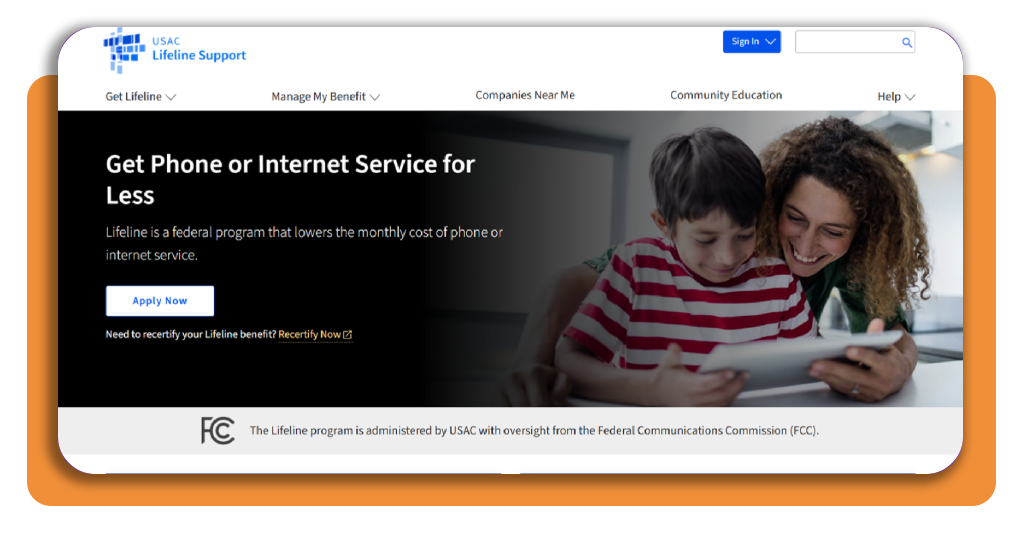
Access the official website by searching for Lifeline Support and opening the result from the Universal Service Administrative Company that runs the federal program under FCC oversight.
Below the short description, you’ll spot a recertification link for people renewing an existing benefit, which you can ignore, and you need to click the ‘Apply Now’ button.
Step 2: open the official application page
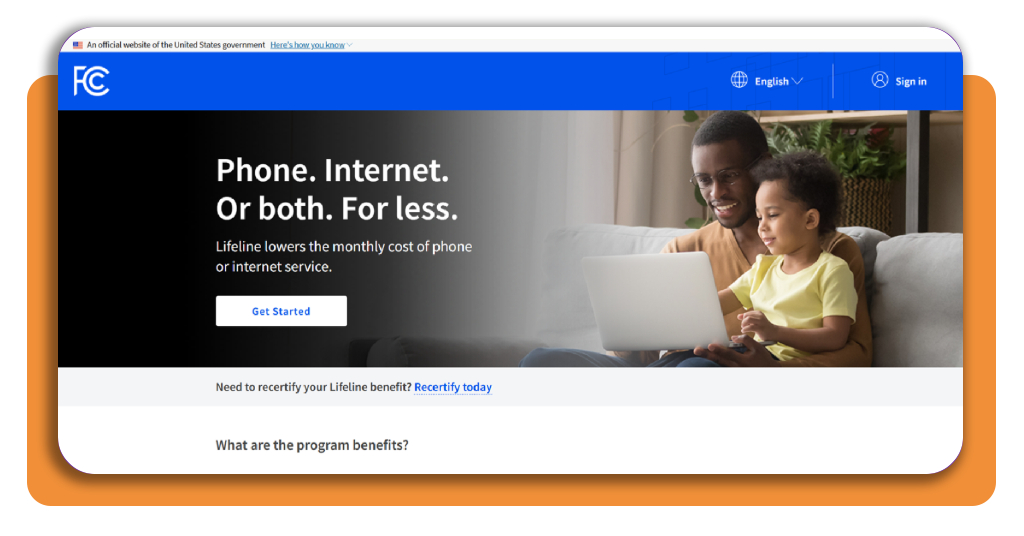
Your click opens a separate government page, and confirming its top banner and the .gov ending in your address bar protects your personal details before you enter them.
If you’re applying for the first time, skip the Sign in option in the top corner, which serves returning applicants, and click ‘Get Started’ to access the form.
Step 3: fill out the online form
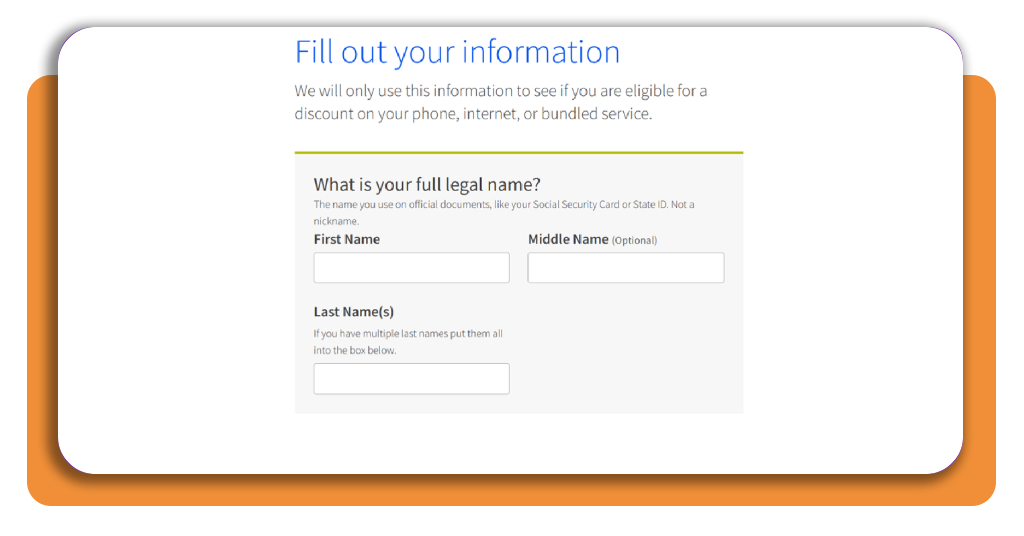
Enter your full legal name, date of birth, SSN or Tribal ID, home address, and other details the form requests to begin building your Lifeline phone discount request.
The identity check needs the last 4 digits of your SSN, the address field rejects P.O. boxes, and the name section lets you leave your middle name blank.
Step 4: select your qualification path
Near the bottom, a short question asks whether you qualify on your own or through a child or dependent, and you select the answer that matches your situation.
Click the blue ‘Next’ button at the form’s bottom right corner, and once you receive approval, pick a participating phone or internet company to start receiving your savings.
Types of benefits available under the program
Lifeline discounts are not the same for everyone. Where you live and the circumstances that brought you to the program decide which version reaches your monthly bill.
Whichever version applies to you, your Lifeline phone discount can move to another provider once a month, though your new company may ask you to reapply to Lifeline.
Each year, USAC or your state checks whether you still qualify through recertification, and missing the deadline ends your benefit and can terminate service or raise your bill.
Standard discount on phone or internet
The standard benefit trims up to $9.25 from your bill each month, and it applies to phone service, internet service, or a bundle that combines both of them.
Each company sets its own plan prices, and a $30 plan drops to $20.75 before taxes and fees once the full $9.25 discount applies to your monthly statement.
Enhanced savings on Tribal lands
If you live on qualifying Tribal lands, the enhanced benefit takes up to $34.25 off your monthly bill for phone, internet, or bundled service through a participating company.
Your address proof on Tribal lands needs latitude and longitude coordinates on a map of your location, and the online application includes a mapping tool that covers this part.
Emergency support for survivors
If you qualify as a survivor, you receive up to 6 months of emergency Lifeline support, which keeps a phone or internet connection within reach while you rebuild.
The application adds extra safeguards that protect your personal information, which is crucial when you apply for a Lifeline phone discount after leaving an unsafe situation behind.
Top affordable internet providers
Your discount trims a bill that starts low, and the 3 providers in this list offer both fiber and cable plans with monthly prices built for tight budgets.
Before you count on a Lifeline phone discount for any of these plans, ask each company whether it participates in the program and covers plans at your address.
Availability, speeds, and prices vary by address, and each company’s website checks your home once you enter it, which lets you compare live offers before you sign anything.
Optimum 300 Mbps with locked pricing
Optimum prices its 300 Mbps plan at $30 a month with Auto Pay and paperless billing from a checking account, and that rate stays locked for 5 years.
The plan carries no data caps, free self-setup takes about 20 minutes, equipment can arrive the next day, and a 60-day refund guarantee covers the monthly fee.
T-Mobile Fiber 300 for fast uploads
T-Mobile Fiber 300 costs $35 a month with AutoPay, and your uploads run as fast as your downloads, which helps with video calls, cloud backups, and file sharing.
Installation and a Wi-Fi router are included with unlimited data and no annual contract, and you can ask T-Mobile whether it accepts a Lifeline phone discount as well.
Breezeline Internet 100 for light users
Breezeline Internet 100 starts at $20 a month, which fits your routine if you browse, check emails, stream on one or two screens, and video chat with family regularly.
Order online, and you can skip the activation fee, use the equipment free for 2 years, and request a refund within 30 days if the speed disappoints you.
Best emergency financial assistance tools
Surprise car repairs or cut shifts can drain your account before the next paycheck lands, and free money tools can help you respond with a plan you control.
After you secure a Lifeline phone discount, rent, groceries, and utilities still need a plan, and online services that cost little or nothing can help you build it.
Start with the problem that worries you, like a bill you can’t cover or a balance you can’t see, and add another service once the first feels routine.
Budgeting tools to track every dollar
A budgeting tool sorts your spending into categories, reminds you when bills come due, and shows how much money remains after each goal, replacing guesswork with a number.
EveryDollar gives you a free version with no time limit, and YNAB lets you try every feature, including bank syncing, for 34 days before charging $14.99 a month.
Credit monitoring services for peace of mind
Credit Karma monitors your TransUnion and Equifax reports, while Experian monitors your Experian file, and both cost nothing and alert you to new accounts and credit inquiries.
Use the cash a Lifeline phone discount frees up to pay down balances, and check your monitoring dashboard to see how each extra payment moves your credit score.
Investment platforms to grow savings
Investment platforms let you buy stocks, bonds, and ETFs online, and they fit money you won’t need for years while your rent money stays in a savings account.
Fidelity charges $0 commissions on online US stock and ETF trades with no minimum to open an account, while Vanguard focuses on low-cost index funds for savers.
Keep the connection and drop the cost
Getting help with your phone or internet bill takes a little patience and a few papers from your drawer, but the payoff lands in your budget every month, giving you more breathing room.
This Insiderbits guide was designed to show you who qualifies, how to gather your documents, and how to apply for a Lifeline phone discount, along with tools for your other bills.
Keep browsing Insiderbits for more articles on government benefits that could lower your bills, cover your groceries, or ease your housing costs, and see what else fits your situation.