
Federal benefits are spread across many programs, and the hardest part is knowing where to start since a lot of them follow different rules and application processes.
Check a platform that gives a place to explore those options to narrow the search based on your needs and points you toward the government resources responsible for eligibility and applications.

4.5/5
Which is the best app to check hidden federal benefits?
The US Gov Benefits app (iOS/Android) gives users an official starting point for exploring government assistance.
This platform is known because it organizes programs by need and then directs the reader toward eligibility and application information maintained by government sources.
However, the tool doesn’t promise that a benefit is waiting to be claimed.
That said, its role is narrower and more practical: help users identify programs that may fit their situation and show where to continue the process.
We need to highlight that because each program follows its own rules.
And different factors like income, age, household composition, disability status, employment, military service, and other circumstances can all affect eligibility.
Therefore, for someone who doesn’t know which program about federal benefits to investigate first, US Gov Benefits (iOS/Android) is the ideal.
Key features within US Gov Benefits
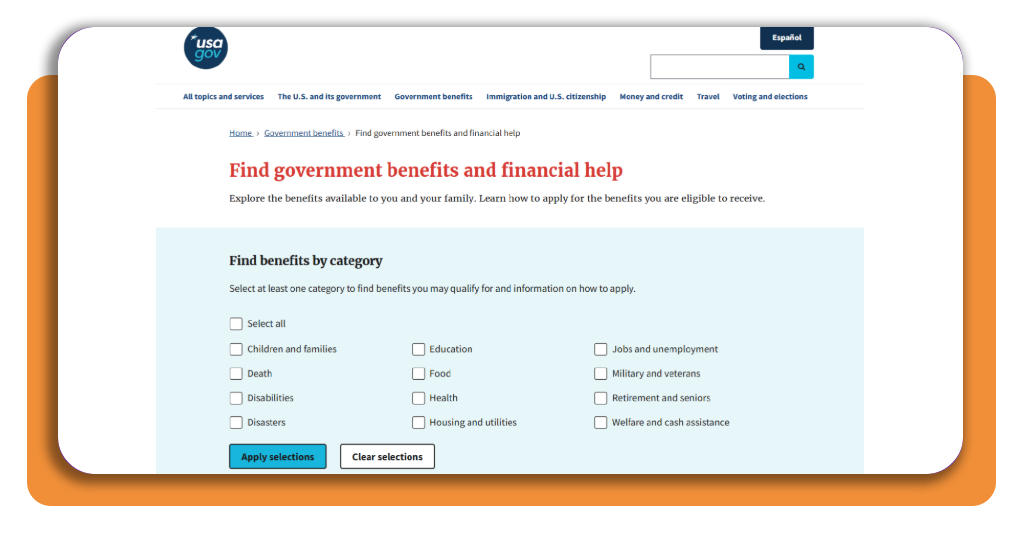
The main aspect of US Gov Benefits (iOS/Android) is category based filtering. Once the platform is opened, users can search across different areas.
For example: children and families, disabilities, disasters, education, food, health, housing and utilities, jobs and unemployment, military and veterans, retirement, and cash assistance.
Moreover, it is even possible to select one or more categories and apply those choices to narrow the results.
Then, each result then leads to information about the benefit itself, who may qualify, and how to apply through the appropriate agency.
Also, since the platform is part of USAGov, it also serves as a gateway to official resources. That keeps the discovery stage separate from the actual eligibility decision.
The result is a simpler first step for people who know they need assistance but are not yet sure which federal program matches their circumstances.
Step-by-step: how to discover unclaimed benefits
USAGov Benefit Finder works as a discovery platform and it doesn’t tell you that money is automatically owed to you.
However, it can narrow a large number of federal benefits into a smaller set that matches your needs more closely. Check how to do it:
Step 1: open the USAGov Benefit Finder
Firstly, go to the Benefit Finder page or download the US Gov Benefits app (iOS/Android) and start from the main page.
You will see several benefit categories that cover different types of assistance, including food, health, housing, education, jobs, retirement, and family-related programs.
Step 2: choose the categories that match your situation
Now, select the areas that are most relevant to what you need right now. After that, you will see the categories that match your search.
For example, someone looking for help with groceries might start with food assistance, while another person may need to explore housing or education programs.
Step 3: review the programs that appear
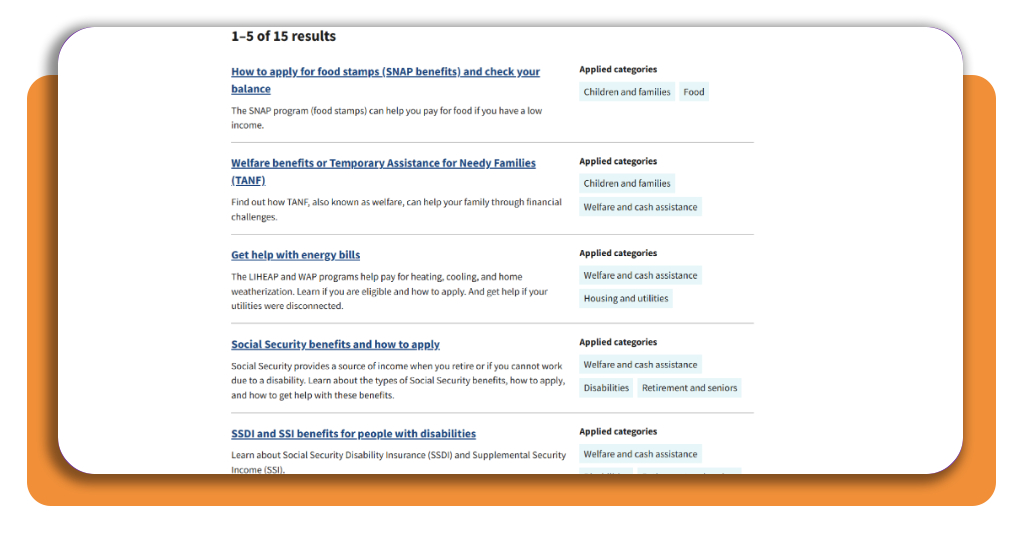
The results page presents benefit programs related to the categories you chose. Open the programs that seem relevant and read the eligibility information.
Step 4: continue through the official agency
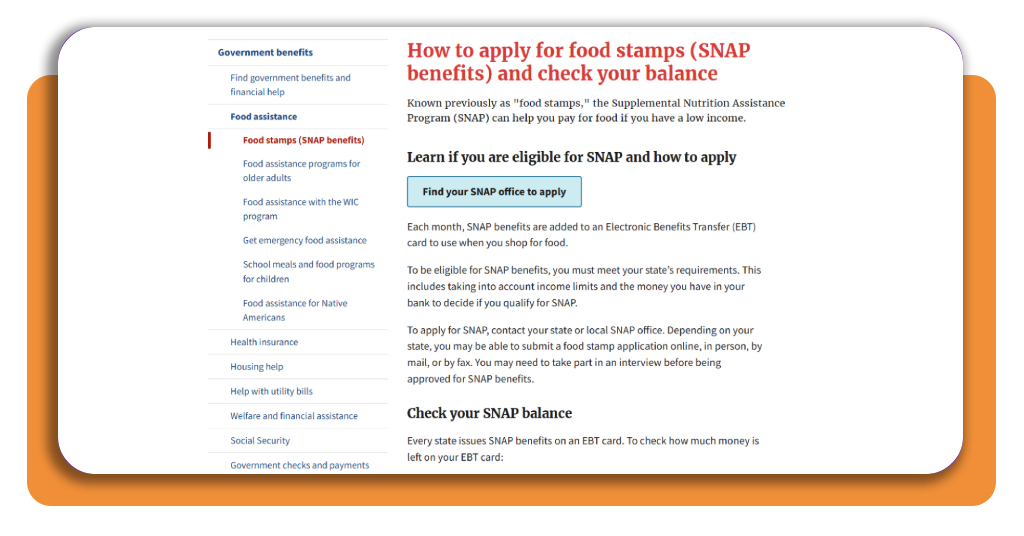
Once you find a program that appears to fit your situation, follow the official link provided for more details or application instructions.
Benefit Finder identifies where to look, but the agency responsible for each program makes the actual eligibility decision and handles the application process.
Top credit union platforms
In this context, credit unions can be worth comparing when you are looking for banking, savings, loans, or lower-fee financial services.
The main difference from a traditional bank is that you usually need to meet membership requirements before opening an account.
Alliant Credit Union
Alliant is a fully digital credit union, so its platform is built around online and mobile access.
Through Alliant, members can manage accounts, transfer money, pay bills, monitor balances, and access more than 80,000 fee-free ATMs across the U.S.
And when it comes to membership it is relatively accessible.
People who don’t qualify through an employer or eligible community can join through the Alliant Credit Union Foundation, with Alliant covering the one-time $5 membership fee.
Navy Federal Credit Union
On the other hand, Navy Federal has a more restricted membership model.
That said, eligibility commonly extends to active-duty military members, veterans, Department of Defense personnel, and qualifying family or household members.
For those who qualify, the platform combines checking, savings, cards, loans, and other banking services with digital account management.
Still, credit unions will not replace federal benefits, but it can be part of the broader financial picture once benefits or other income arrive.
How to gather required verification documents
The truth is that finding federal benefits that appear relevant is only part of the process.
Most programs still require documents that confirm the information entered on the application, and the exact requirements depend on the agency and benefit involved.
That said, this process should begin with the records that are most requested:
Usually a government-issued ID, Social Security number or other identity documentation, proof of address, and information about everyone included in the household.
In addition, income verification requires recent pay stubs, tax documents, benefit statements, or records of other household income.
For programs tied to housing, medical expenses, disability, unemployment, or family circumstances may ask for additional evidence specific to that situation.
Also, don’t send documents simply because they seem relevant.
Once you identify a program through US Gov Benefits (iOS/Android), check the official agency page and build your document list from its current application requirements.
If in your case financial assistance is connected to an injury or problem at work, the paperwork can follow a different process.
In that case, our Insiderbits guide to workers’ compensation that explains what that type of claim involves and where it differs from broader public benefit programs.
4.5/5
Your next step for federal benefits
We just showed how federal benefits are easier to navigate once the search is narrowed to programs that actually match your situation.
The US Gov Benefits app (iOS/Android) gives you that line without pretending that every result means automatic eligibility.
From there, the process becomes more concrete: review the program requirements, collect the documents the responsible agency asks for, and follow the official application route.
The value of the platform is in making a complicated system easier to explore so you can identify which benefits are worth pursuing and where to continue.
Enjoyed this article? Save Insiderbits to your favorites and discover the most useful tech tips.