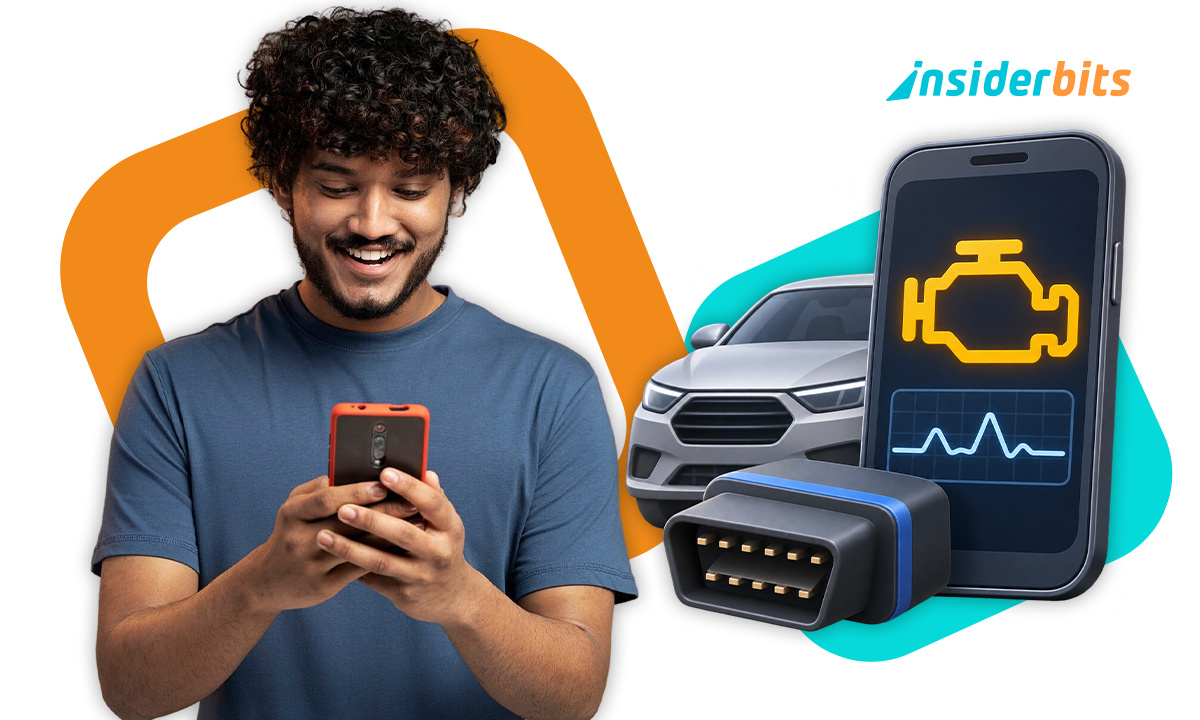
A check engine light doesn’t tell exactly what went wrong, but an OBD2 scanner app helps you read the fault code stored by the vehicle and see related data.
Car Scanner ELM OBD2 (iOS/Android) needs a compatible adapter connected to the vehicle. The code it reads is a diagnostic clue, not proof that a specific part has failed.

4.8/5
How an OBD2 scanner app reads supported engine codes
The OBD2 scanner app (iOS/Android) works by receiving data from the vehicle through a compatible adapter plugged into the OBD2 port.
Even with that, the phone itself doesn’t read the car directly, and the vehicle’s multimedia Bluetooth connection cannot replace that adapter.
Once connected, the OBD2 Scanner app requests supported diagnostic trouble codes, or DTCs, stored by the vehicle.
Those codes point to systems or conditions the car has detected, giving you more context about why the check engine light may be on.
The app also shows descriptions associated with supported codes and, depending on the vehicle, additional sensor information that help you understand what was happening when the fault appeared.
Therefore, a code should still be treated as a clue rather than a final diagnosis.
The same code can have more than one possible cause, so replacing a part based only on the code can lead to the wrong repair.
That makes the app most useful as a first step: read the code, note the available data, and use that information to guide further troubleshooting or a conversation with a mechanic.
Step-by-step: connect your adapter and check a code
The Car Scanner needs a compatible OBD2 adapter before it can communicate with the vehicle. The adapter is sold separately and connects the car’s diagnostic port to your phone.
In the steps below, you will see how to connect both.
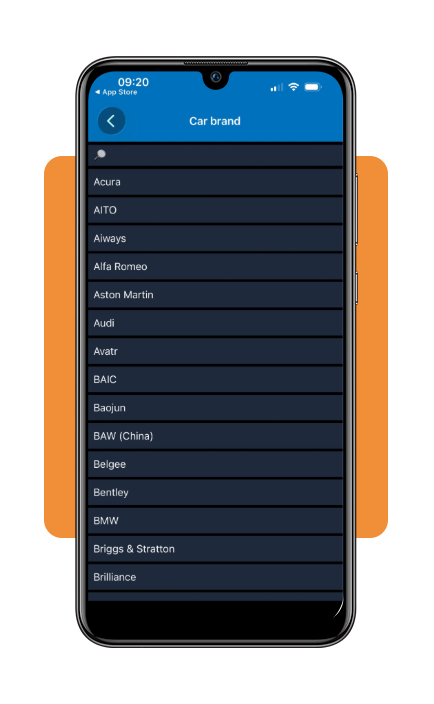
Step 1: open Car Scanner and select your car brand
First, download Car Scanner ELM OBD2 (iOS/Android) and open the app on your phone. In the first screen, you will need to select your car brand.
Step 2: open the adapter settings
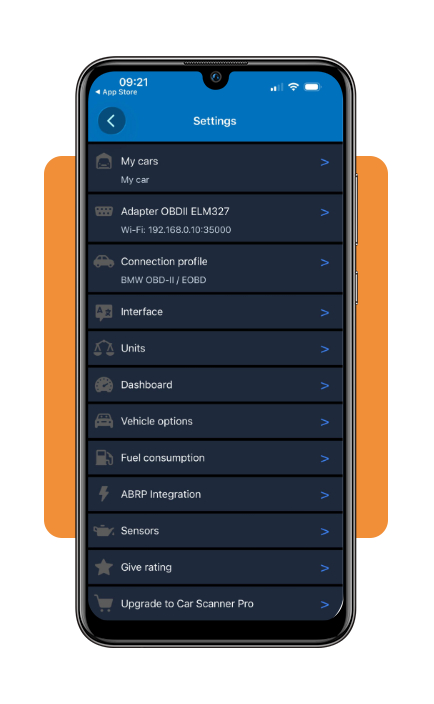
After accessing the main screen, go to Settings and select Adapter. This is where Car Scanner lets you configure how the phone will communicate with an OBD2 adapter.
Step 3: check the connection options
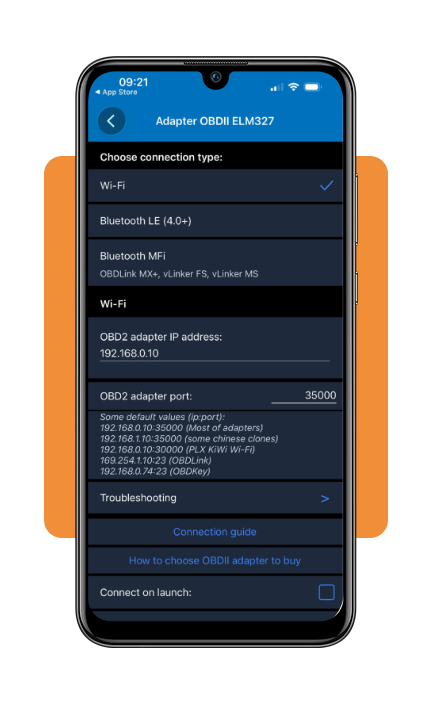
Open the connection type menu to see the available methods. Android supports compatible Bluetooth and Wi-Fi adapters, while iPhone users should look for Bluetooth LE or Wi-Fi options.
Also, there’s no need to own an adapter just to view these settings.
Step 4: review compatibility before buying an adapter
Before purchasing hardware, check which connection type works with your phone and read Car Scanner‘s adapter recommendations.
The adapter is what communicates with the vehicle, the app cannot retrieve diagnostic codes on its own.
Explore sensor data and understand the limits
First thing you must know is that the OBD2 Scanner app (iOS/Android) can display more than fault codes.
Depending on the vehicle and the systems it exposes through OBD2.
Then, the OBD2 scanner app can also show live sensor data such as engine temperature, RPM, fuel-related information, and other supported parameters.
This information is what adds context to a warning light or code when you want to see whether a reading changes while the engine is running.
However, the available data still depends on the vehicle, adapter, and connection profile.
Still, not every sensor or control module is accessible through standard OBD2, and some vehicles expose much more information than others.
That means the app should not be treated as a universal diagnostic tool.
Also, sensor readings need interpretation since a value outside the expected range may point to a problem, but it wouldn’t identify the failed part or confirm the repair.
With that, the smartest strategy is to use the data to understand what the vehicle is reporting.
After that, merging that information with the service manual or a qualified mechanic when the issue is unclear or potentially serious.
For more context before deciding what a reading might mean, Insiderbits also has a mechanics guide covering common vehicle systems and basic repair considerations.
Read this guide and decide all you need without committing to anything.
Where to download Car Scanner and check adapter compatibility
The OBD2 scanner app (iOS/Android) is available for both Android and iPhone, but downloading the app is only half of the setup.
You also need a compatible OBD2 adapter before the phone can communicate with the vehicle.
Before buying an adapter, check the official Car Scanner compatibility guidance.
The developer warns that some low-quality ELM327 adapters may not work correctly, so choosing a supported model matters.
Android users can use compatible Bluetooth or Wi-Fi adapters.
On iPhone, the connection requirements are different, and the official guidance recommends checking for Bluetooth LE or Wi-Fi support.
You can download Car Scanner through Google Play or the Apple App Store, then review the official Car Scanner FAQ before purchasing hardware.
Compatibility can also depend on the vehicle and the data it exposes through OBD2, so confirm both the adapter and your car before relying on a particular feature.
4.8/5
Use the code as a place to begin
An OBD2 scanner app (iOS/Android) gives more information than a check engine light alone, but it works best as an early troubleshooting tool.
Car Scanner can read supported codes and sensor data when paired with a compatible adapter.
However, the results still need context. A fault code may point you toward the right system, but it doesn’t confirm which component failed or which repair is necessary.
Use the information to plan the next step, compare it with the vehicle manual, and discuss the findings with a mechanic when needed.
That keeps the app useful without treating it as a replacement for a complete diagnosis.
Enjoyed this article? Save Insiderbits to your favorites and discover the most useful tech tips.
Frequently Asked Questions
Does Car Scanner ELM OBD2 work without an adapter?
No. The app requires a compatible OBD2 adapter plugged into your vehicle’s diagnostic port. The phone itself cannot read car data directly, and the car’s built-in Bluetooth or multimedia system cannot replace the adapter.
What adapters work with Car Scanner on iPhone?
On iPhone, the official Car Scanner guidance recommends checking for Bluetooth LE or Wi-Fi compatible adapters. Standard Bluetooth adapters that work on Android may not be compatible with iOS due to platform differences.
Can Car Scanner confirm which part needs to be replaced?
No. A fault code is a diagnostic clue, not a confirmed diagnosis. The same code can have more than one possible cause, so the app results should be used as a starting point for discussion with a qualified mechanic.
Is Car Scanner ELM OBD2 free to use?
The app is free to download on both Android and iOS. However, some advanced features may require a paid unlock. On iOS, full access may involve a one-time purchase or subscription. Check the app listing for current pricing details.
Where can I check which adapters are recommended by Car Scanner?
You can review adapter recommendations and compatibility guidance on the official Car Scanner FAQ before purchasing any hardware.