

A GED practice test helps you check your readiness before taking the real exam. Created by GED Testing Service, use an official practice test for the high school equivalency credential.
It mirrors the actual exam’s format and scoring, giving you a realistic look at your performance and a personalized study plan to guide your review. Read on Insiderbits.
How the official GED practice test helps you prepare
Preparing for the High School Equivalency exam can feel overwhelming when you’re not sure what to study first.
A GED practice test gives you a clearer picture of your strengths and the subjects that need more attention, so you can spend your study time where it actually counts.
For a more realistic assessment, GED Ready is the official practice test developed by the GED Testing Service.
It covers all four subjects: Mathematical Reasoning, Reasoning Through Language Arts, Science, and Social Studies.
Unlike a quick online quiz, it’s timed, follows the real exam’s format, and is half its length. You’ll need a computer or laptop to take it, since mobile devices aren’t supported.
To explore complementary mobile review applications and adult education resources, check out our guides on top GED prep apps and GED and trade certification tools.
And for official testing policies and purchasing information, visit the GED Ready Portal.
Step-by-step: access GED Ready and choose your subject
Ready to see how you’d do on the real exam?
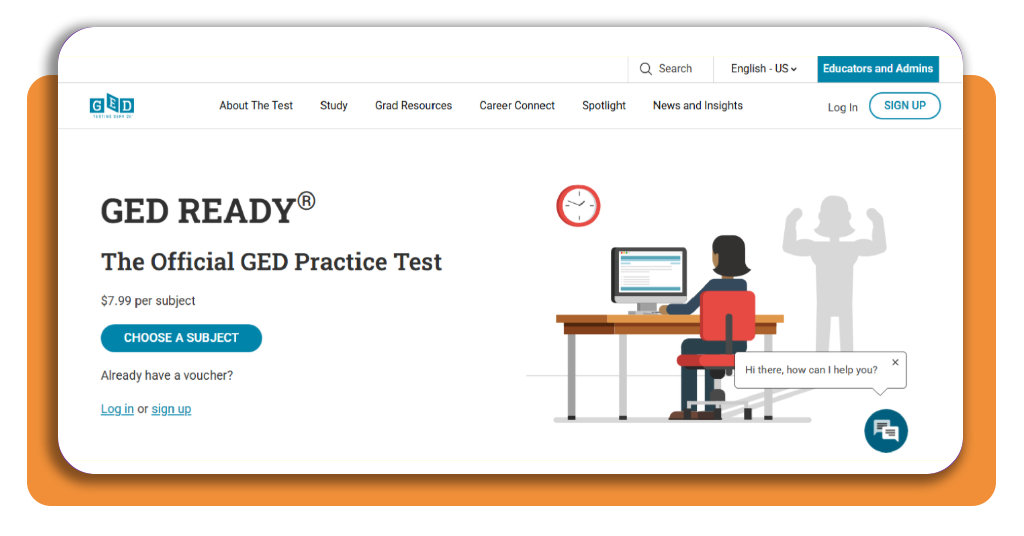
Getting started with the GED practice test is simple, as long as you have a computer and a GED.com account. Here’s how to access your practice test:
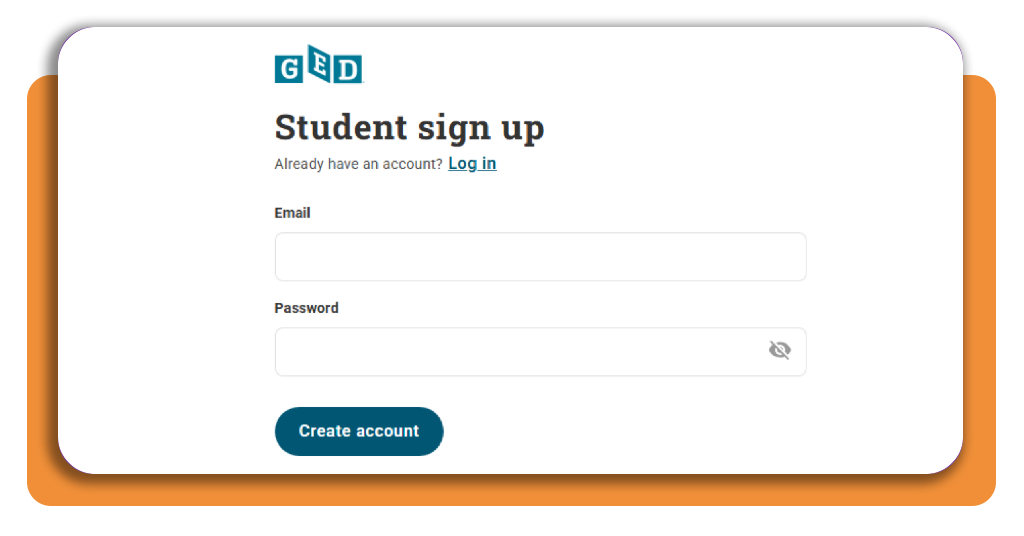
Step 1: sign in to your GED account
Visit GED.com using a desktop or laptop. Create an account if you’re new to the platform, or sign in with your existing credentials. Mobile devices aren’t supported for taking the full GED Ready test.
Step 2: choose your subject
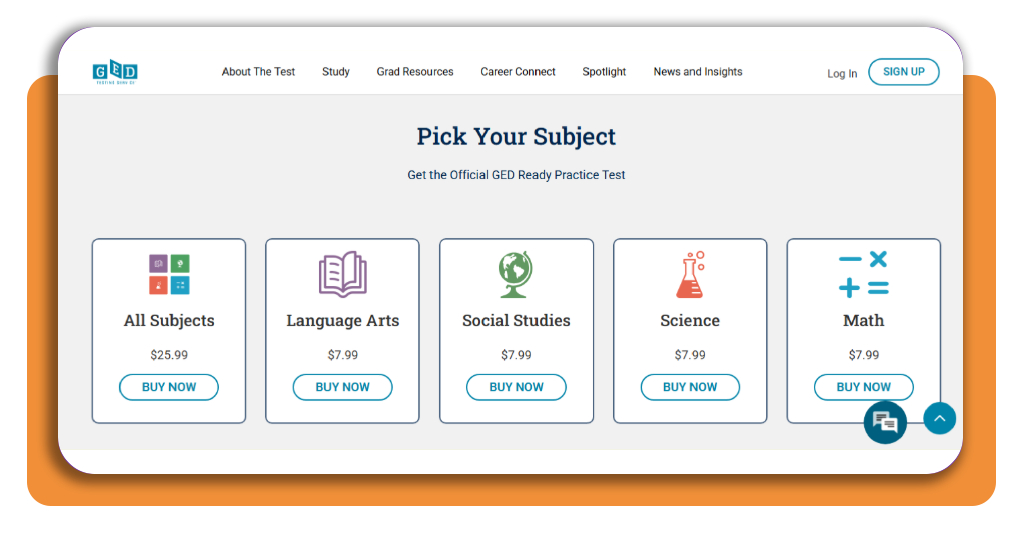
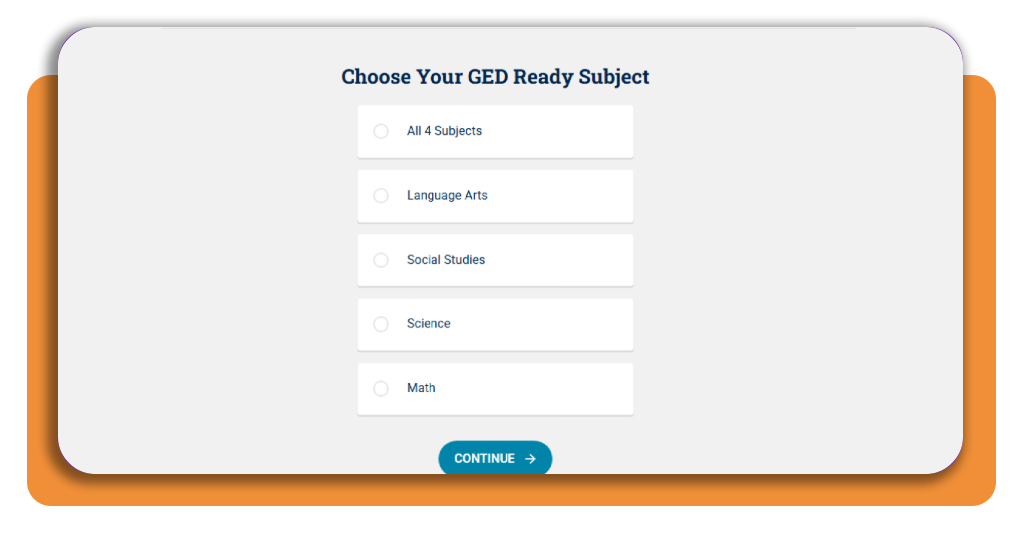
Open the GED Ready practice test page and select the subject you want to practice: Math, Reasoning Through Language Arts (RLA), Science, or Social Studies.
You can purchase individual tests or choose the bundle covering all four subjects.
Step 3: review the price and complete your purchase
The GED website currently lists each subject test at $7.99, with the four-subject bundle priced at $25.99. Choose your preferred option and follow the checkout instructions to complete your purchase.
Step 4: take the test and review your results
Once your test is available in your account, launch it on your computer. Find a quiet spot, set aside some time, and work through the timed questions.
GED Ready is half the length of the actual exam, and you can pause and resume if needed, although taking it in one sitting is recommended for a more realistic assessment.
After finishing, check your score report and personalized study plan to see which topics deserve another look.
Understand your score, study plan, and test requirements
A GED practice test is useful for more than checking how many questions you got right.
Your GED Ready score report also gives you a readiness indicator for each subject, helping you decide whether to schedule the official exam or spend a little more time studying first.
Key differences: account, practice test, and official exam
Understanding the distinction between testing tools prevents confusion during your preparation:
- Free GED account: creating an account on GED.com is completely free and allows you to access study resources, track your progress, and view test schedules;
- GED ready (paid practice test): an official paid diagnostic simulation ($7.99 per subject) taken on a computer. It yields a practice score and study plan but does not confer official college or high school equivalency credit;
- Official GED exam: the proctored, official test administered online or at certified testing centers. State and jurisdictional rules, residency requirements, and testing fees vary by location. Passing all four official subject tests earns your state-issued high school equivalency credential.
Where to access GED Ready and check current costs
The official practice test is hosted exclusively on the testing service’s central platform:
- Official practice test page: access vouchers and diagnostic tools on the GED Ready Official Web Portal;
- Official FAQ resource: review jurisdictional policies, testing retake rules, and scoring guidelines on the GED Top FAQs Page.
Use your results to choose the right GED study resources
Once you receive your GED Ready score report, leverage the diagnostic data to optimize your study time:
- Link your preferred textbook: inside your GED account profile, select the test prep book or online program you are using (such as Kaplan, Princeton Review, or Aztec). The GED Ready score report will link your missed questions directly to specific chapter and page numbers in your book;
- Focus on specific weaknesses: rather than re-reading entire textbooks, target the exact competencies identified in your score report (such as quadratic equations, passage synthesis, or interpreting scatter plots).
- Retest before scheduling the official exam: if your initial score falls into the ‘Too Close to Call’ or ‘Not Likely’ categories, complete targeted practice and take another GED Ready test to confirm your improvement before paying for the official exam.
Take the guesswork out of test prep
Taking an official GED practice test through GED Ready gives you a clearer picture of where you stand before the real exam.
Review your results, follow your personalized study plan, and revisit the topics you struggled with. With a better idea of what needs work, you can make your study sessions count and walk into test day feeling more prepared.
What is GED Ready?
GED Ready is the official practice test developed by GED Testing Service. It mirrors the real exam’s format and is half its length, covering all four subjects: Mathematical Reasoning, Reasoning Through Language Arts, Science, and Social Studies.
How much does GED Ready cost?
Each subject test is currently listed at $7.99, and a four-subject bundle covering all subjects is priced at $25.99. Always check the GED Ready official page for current pricing.
Can I take GED Ready on my phone?
No. GED Ready is not supported on mobile devices. You need a desktop or laptop computer to take the full practice test.
Does passing GED Ready mean I earned my diploma?
No. GED Ready is a paid diagnostic practice test that gives you a readiness indicator and personalized study plan. It does not confer official high school equivalency credit. You must pass the official proctored GED exam to earn your state-issued credential.
How do I use my GED Ready score report?
Your score report provides a readiness indicator per subject and a personalized study plan. You can link your preferred textbook inside your GED account so that missed questions are mapped to specific chapters, helping you focus on exact weaknesses rather than re-reading entire books.