Spelling your own name with confidence, reading a restaurant menu, and answering a friend’s text can all start with a free application that turns rapid adult literacy into an enjoyable game.
In this Insiderbits guide, we’ll review Read and Count, from its illustrated alphabet to counting quizzes, and show you how to build a routine that takes you from first letters to full sentences.

4/5
Which is the best app for rapid adult literacy?
Read and Count (Android | iOS) is a free learning app that teaches you to read, write, and count with illustrations and tasks, starting with the alphabet, vowels, consonants, and syllables.
Select any letter, and the app pronounces its sound, displays a matching picture, and invites you to trace it with a fingertip, turning rapid adult literacy practice into play.
Along the way, you’ll find 60 animals with their names and calls, 30 fruits, 30 vehicles, 12 colors, 75 flags, and a shuffle button that combines activities from every category.
Key features within the Read and Count app
- Name practice: work through the ‘Write Your Name’ menu, then lean on handwriting recognition to polish the letters you’ll put on forklift job applications and forms;
- Number skills: saying, writing, and ordering the numbers 0 to 100 prepares you for aisle labels, bay codes, and rack tags that guide every forklift run;
- Load math: addition, subtraction, and greater than, less than, and equal symbols help you total pallets and compare a load’s weight with a lift’s rated capacity;
- Word recognition: studying the 200+ words and taking the quiz trains your eye to spot familiar terms in forklift operator job postings and warehouse safety notices.
Practice anywhere with no internet needed
After the installation, the app works without an internet connection, which means you can squeeze in a few exercises from a parked car, a break room, or a bus seat.
Progress toward rapid adult literacy comes from 10 minutes here and 10 minutes there, and a short lesson in your pocket fills every gap in your workday and your weekend.
Start from zero without feeling judged
No teacher stands over your shoulder, and no classmates wait for you, and the bright blue refresh button on activity screens deals a fresh puzzle when one trips you up.
The blocks on the home screen carry large colorful images, like a xylophone or a pair of hands, and you can pick out the right menu without reading any instructions.
Step-by-step: how to start learning to read and write
Read and Count (Android | iOS) turns learning to read, write, and count into short puzzles you can play on your phone or tablet, starting at whatever level feels comfortable for you.
Working through one menu at a time gives rapid adult literacy a steady daily rhythm, and each letter, sound, and picture sticks before you move on to the next one.
Headphones, a notebook, and a pencil round out the setup, and the app’s spoken letters turn into handwriting practice you can copy onto paper as the narrator says each one.
Step 1: download Read and Count
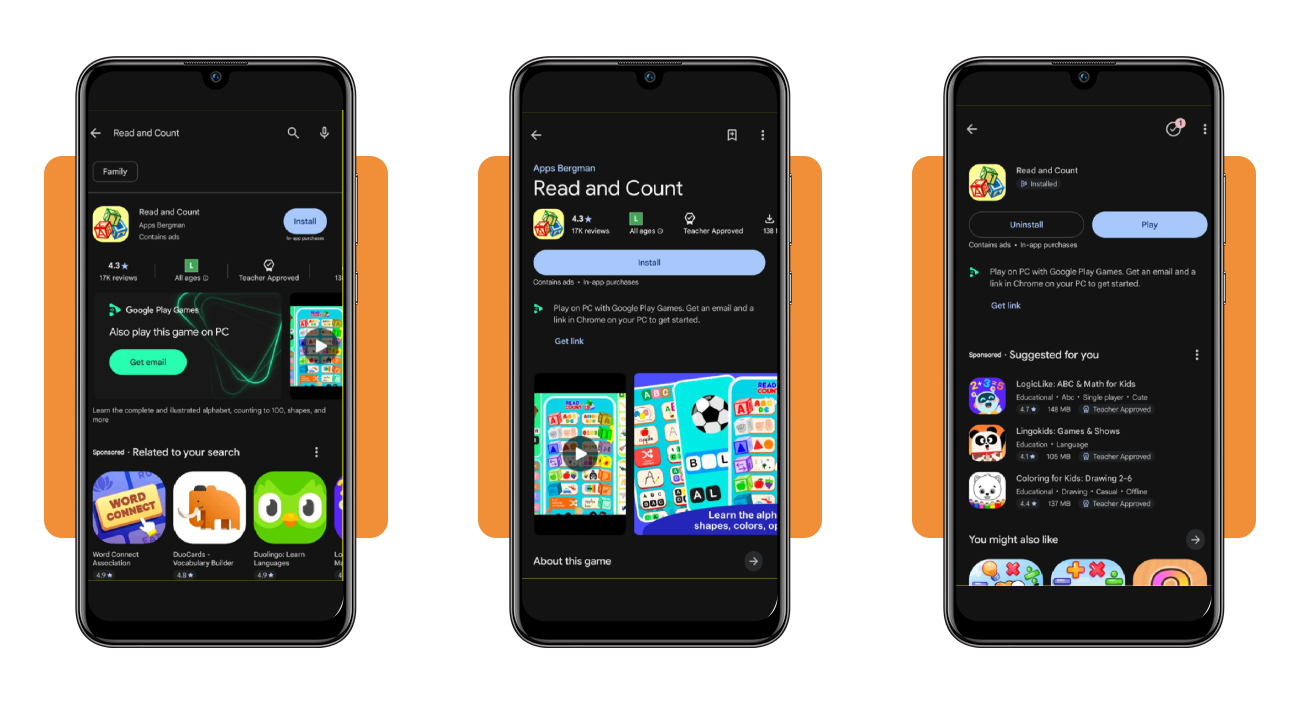
Open the app store on your Android phone, iPhone, or iPad, type ‘Read and Count’ into the search bar, and tap the icon that shows a stack of lettered blocks. Next, tap ‘Get’ or ‘Install’.
The store listing discloses ads and optional purchases. The iOS version takes up 346 MB and the Android version, 138 MB, which are sizes worth checking against the space on your device.
Step 2: browse activities in the app
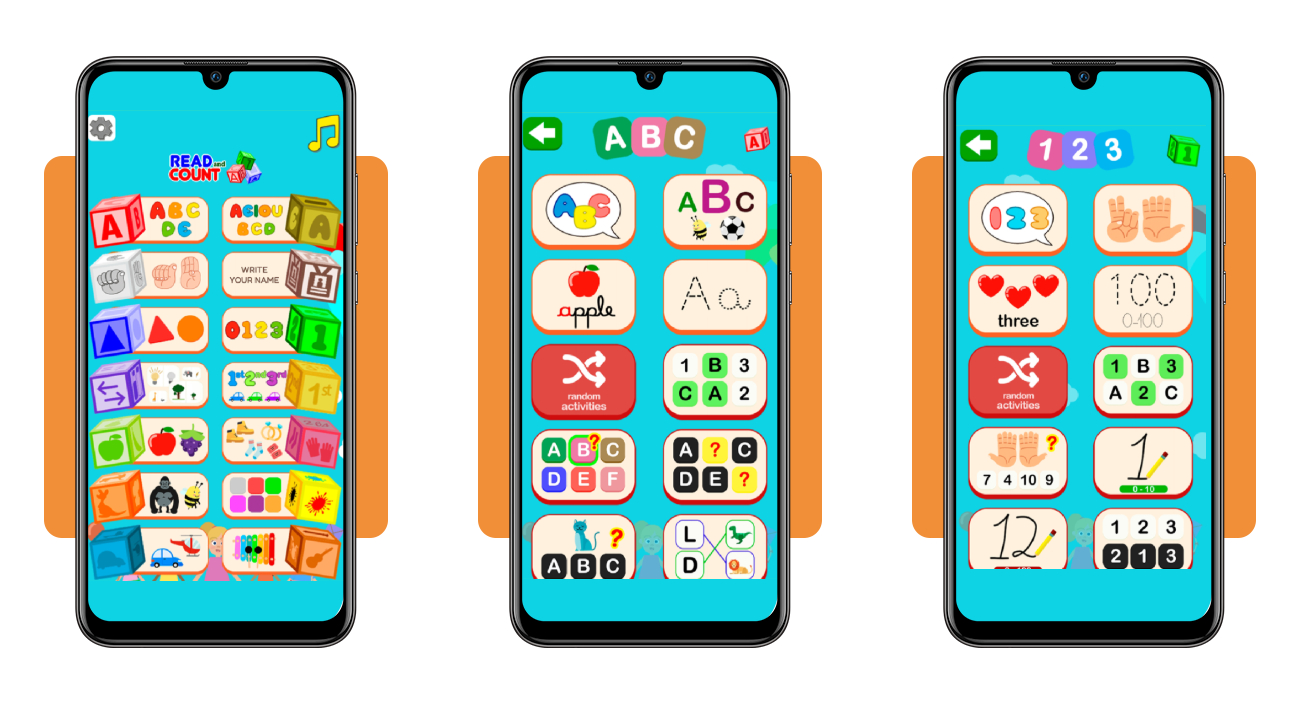
From the home screen, you can choose between dozens of exercises covering letters, numbers, shapes, animals, and more. Tap the block you want, and the lesson starts instantly.
Press the green arrow in the top left corner to go back to the home screen, then try all available options before settling on one you feel comfortable with.
Step 3: choose and complete an activity
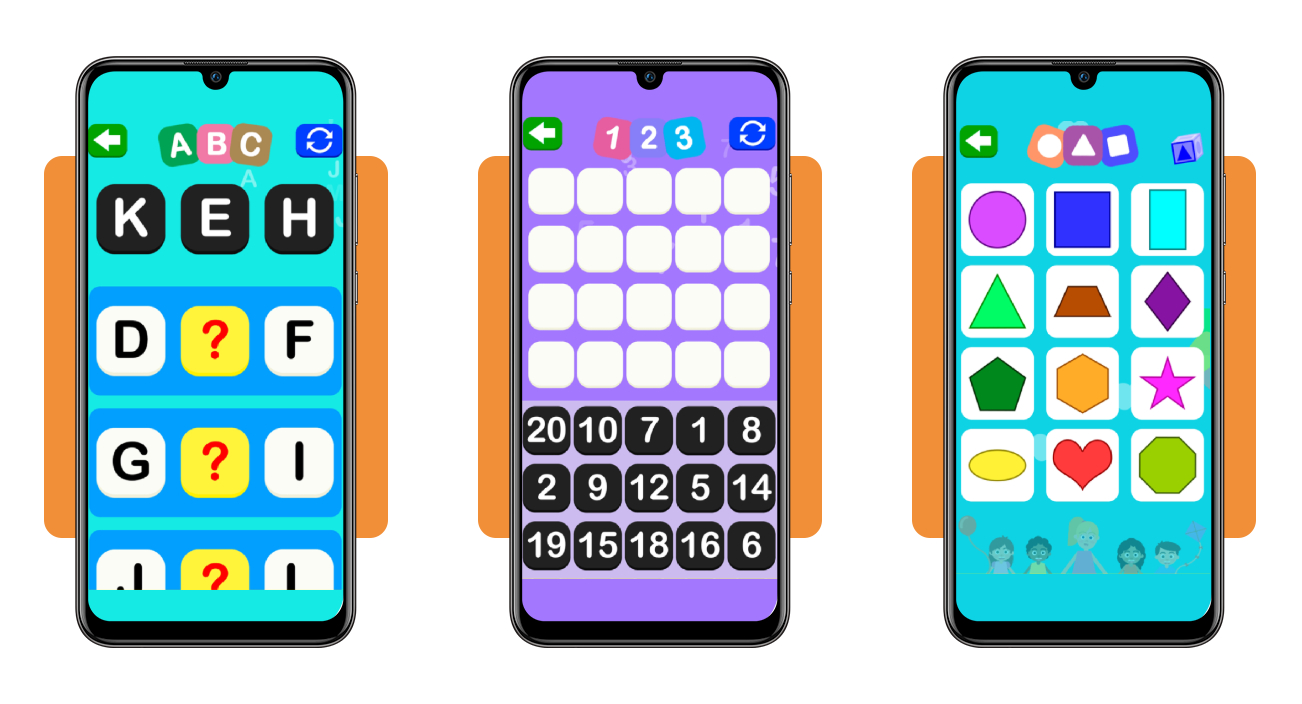
Pick an activity that catches your eye, listen to the narrator, and study the screen, where the task asks you to match, order, or fill in letters, numbers, or words.
Drag or tap your answers into place, then choose another activity, and each finished exercise moves rapid adult literacy forward as your confidence grows with every new round you play.
Top national adult education programs
The 2023 PIAAC skills assessment placed 28% of American adults at Level 1 or below on its literacy scale, up from 19% in 2017, which puts you in excellent company.
National programs meet you where you are, whether you’re learning letters for the first time or polishing skills for a job application, and they schedule classes around work and family.
Pair one with the app practice you’ve started, and rapid adult literacy picks up speed as every lesson from a live instructor earns a short daily rehearsal on your phone.
Free classes through federal adult basic education
The Adult Education and Family Literacy Act funds free classes in every state, teaching reading, math, and high school equivalency to adults 16 and older who aren’t enrolled in school.
Local providers include public schools and community groups, and your nearest American Job Center can tell you which one runs classes that match your schedule and your reading level.
Volunteer tutors waiting at your local library
At the Free Library of Philadelphia, the ‘Languages & Learning Center’ matches you with a volunteer for free tutoring in reading, math, or English, and sessions can happen online.
The Lawrence Public Library in Kansas pairs you with a trained tutor for one hour each week after a talk about your goals, and your branch may offer a similar program.
Search national directories for a class near you
The National Literacy Directory lists nearby adult basic education, English, and citizenship classes, and its helpline at 877-389-6874 can help you search for a class.
CareerOneStop, a US Department of Labor site, links to that same directory, and enrolling in a nearby class gives rapid adult literacy a steady home with a teacher beside you.
Best options for practicing reading daily
App sessions and classes plant new letters and words in your memory, and daily reading gives those words a place to grow when you pick material that matches your level.
A 15-minute routine with text you enjoy keeps your progress toward rapid adult literacy going, and a bedside table, a bus ride, or a lunch break can become a welcoming reading spot.
Choose the format that suits your mood, set a timer and stop when it rings, and each session ends while you still feel curious about what the next page holds.
Read short stories written for adults
Reading Skills for Today’s Adults is a free website that groups short passages by difficulty and covers everyday adult topics like job loss, home repairs, and family health.
Press play on a passage’s audio, trace the words with your finger, then answer the comprehension questions at the end and write a sentence or two about what you read.
Try news articles at your reading level
Newsela Lite rewrites each news story at several reading levels, and you adjust the Lexile setting until the sentences feel comfortable, then raise it as your skills and confidence grow.
ReadWorks sorts free articles by grade after you register, and its early grades cover figures like Shirley Chisholm and topics like clean water that give rapid adult literacy real substance.
Borrow audiobooks to read along for free
Libby is a free platform that lets you borrow audiobooks, ebooks, and magazines with your library card, and it downloads each title to your phone so you can listen without a connection.
Borrow the audiobook and the ebook of one title, listen while your eyes follow each word, and send the ebook to a Kindle when you want a dedicated reading screen.
4/5
Each new word you learn is yours to keep
Building reading skills later in life takes real courage and patience, and every word stays with you, from work to the family kitchen table and the pharmacy counter.
In this article, Insiderbits laid out a guide to tools, programs, and daily habits behind rapid adult literacy, and you can start with whichever one fits your week.
Learning is an ongoing process, and with Insiderbits by your side, you can practice with Read and Count (Android | iOS), then browse more articles about apps and resources for study.