
Using a camera translation app allows you to point your phone camera at any physical text and instantly view a translated overlay in your native language right on your screen.
With OCR and machine learning, these tools help you identify local dishes, order with confidence, and navigate unfamiliar cities more easily. Read on Insiderbits.

4.3/5
Which is the best camera translation app?
While several translation tools exist in mobile app stores, Google Translate (iOS | Android) remains the most reliable and versatile camera translation app for global travelers.
Available for free across both major mobile operating systems, Google Translate supports visual translation across more than 100 languages.
It ranges from widely spoken languages like Spanish, French, and Mandarin to complex scripts like Arabic, Cyrillic, Thai, and Japanese.
What sets the top visual translation platforms apart is their integration of computer vision and neural machine translation.
Rather than manually type foreign characters into a search bar—which is nearly impossible if you do not know the local keyboard layout—this camera translation app processes character shapes through your lens in milliseconds.
DeepL excels at translating many European languages, while Microsoft Translator offers useful group conversation features. Google Translate stands out for its camera translation, offline support, and broad language coverage.
For a comparison of top translation tools, consult this best camera translation apps guide.
Key features within Google Translate
Google Translate offers several features that make translating on the go easier:
Live viewfinder translation (AR mode)
Powered by Google Lens technology, instant camera mode detects foreign character blocks through your camera lens and automatically replaces them with translated text in real time.
The app matches the original text color, font style, and background texture, giving the visual illusion that the physical menu or sign was printed in your native language.
Offline language dictionaries
Travelers can download individual language packages (ranging from 30 MB to 100 MB per language) directly to their device over Wi-Fi before embarking on a trip.
Once downloaded, the camera can scan and translate printed signs, restaurant menus, and train maps without consuming international mobile data or requiring an active Wi-Fi signal.
Image capture and precision scanning
For dense, highly detailed text—such as complex legal notices, train schedules, or stylized artistic restaurant menus—the instant camera overlay can sometimes flicker as your hand moves.
Switching to image capture mode allows you to snap a static photo of the text.
Once captured, you can drag your finger over specific lines or tap individual words to view precise, line-by-line translations and detailed definitions.
Dual-way voice conversation mode
While camera translation handles printed text, Google Translate also features an interactive conversation tool.
By tapping the microphone icon, the app listens to two spoken languages simultaneously, translating dialogue back and forth in real time so you can communicate with waiters, hotel concierges, or taxi drivers.
To explore: Find more tools for real-time speech translation and cross-language communication on our guide to real-time translator apps.
Step-by-step: how to translate menus and signs instantly
Using a camera translation app abroad is simple once your settings are ready. Follow these steps to translate signs, menus, and other text on the go:
Step 1: install the app and download offline language packs
Open Google Translate on your iOS or Android while connected to home or hotel Wi-Fi.
Tap the language selection menu and download the offline dictionary for your destination country (e.g., Japanese, Italian, or Korean) to ensure full functionality without roaming data.
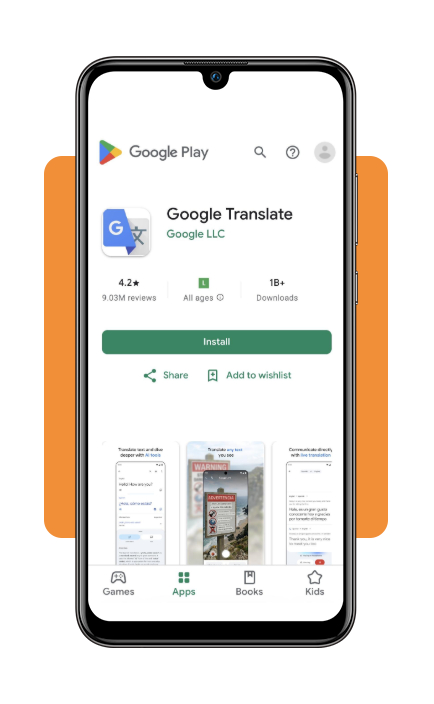
Step 2: activate camera mode and point viewfinder at text
Launch the app, select your source and target languages (or set source language to ‘Detect Language’), and tap the Camera button. Point your phone lens directly at the restaurant menu, street sign, or grocery product label.
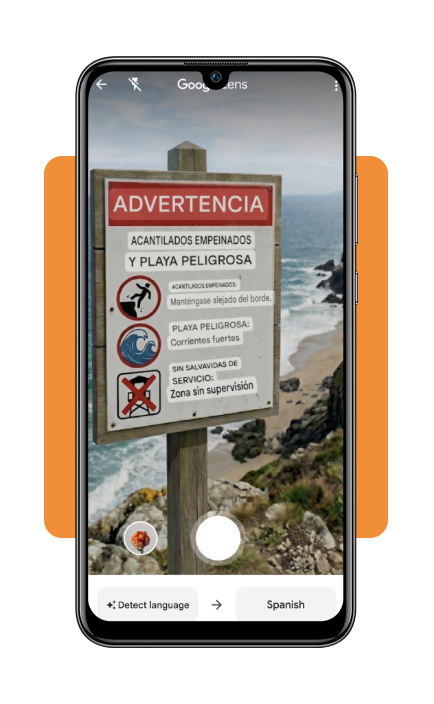
Step 3: tap specific text for detailed definitions and audio
Tap any specific translated word on your screen to view alternate translations, double-check food allergy information, or listen to native audio pronunciations to help you order directly from your server.
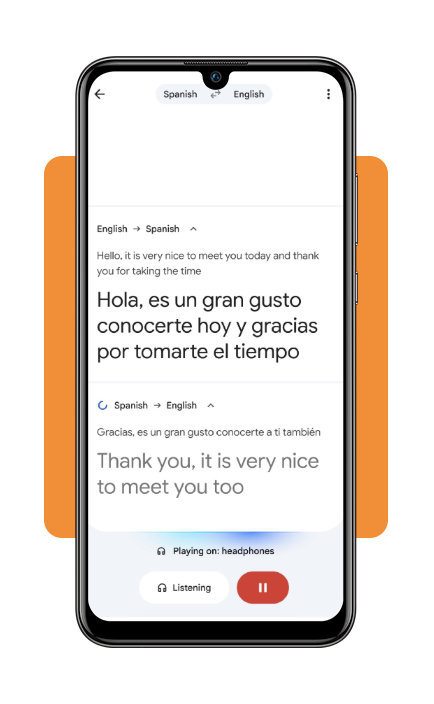
Top national travel connectivity services
While offline camera translation functions smoothly without an internet connection, having active mobile data abroad unlocks cloud-based translation accuracy, live transit updates, ride-hailing apps, and map navigation.
Instead of relying on expensive international roaming plans from home carriers, modern travelers rely on digital eSIM connectivity services:
Airalo (pay-per-gigabyte model)
Airalo (iOS | Android) is a leading digital eSIM marketplace offering local, regional, and global data plans across more than 200 countries and territories.
Travelers purchase fixed-data packages (such as 3 GB or 10 GB for 15 to 30 days) and install the profile digitally on their smartphone before flying.
Holafly (unlimited data model)
Holafly (iOS | Android) specializes in unlimited data eSIM packages across more than 200 travel destinations.
Users select their exact trip duration—ranging from 1 to 90 days—and receive uninterrupted high-speed mobile data without monitoring daily gigabyte caps.
This service is for digital nomads, business travelers, and individuals who stream media or work while traveling.
Local physical SIM cards
Purchasing a local prepaid physical SIM card at international arrival airports or city convenience stores often provides the highest data speeds and local calling numbers for the lowest cash price.
However, it requires physically removing your primary home SIM card and navigating local registration procedures in a foreign language.
Home carrier international day passes
Major domestic telecommunications carriers offer daily international roaming passes (typically ranging from $10 to $12 per day).
While convenient because your existing phone number remains active automatically, these passes can quickly become an expensive option on multi-week international vacations.
Best options for saving offline maps
Translating street signs and building names makes getting around easier, but offline maps are just as useful. They help you navigate unfamiliar cities even when your connection is weak or you need to save mobile data.
Google Maps offline areas
Google Maps (iOS | Android) allows users to download large geographic rectangles directly to their phone’s local storage.
Once downloaded, you can search for addresses, discover points of interest, and receive turn-by-turn driving or walking directions completely offline.
Downloaded maps automatically update when connected to Wi-Fi and expire after a year if not refreshed.
Organic Maps
Organic Maps (iOS | Android) is a fast, privacy-focused offline mapping and navigation app based on OpenStreetMap data.
Built entirely for offline utility, Organic Maps collects no user tracking data, displays zero advertisements, and consumes significantly less battery power than traditional online map apps.
It includes detailed hiking trails, cycling paths, public transit stops, and building numbers, making it a favorite for outdoor adventurers and international backpackers.
Maps.me
A long-standing favorite among global travelers, Maps.me (iOS | Android) utilizes OpenStreetMap crowdsourced data to provide offline map downloads covering entire countries and territories.
It features pedestrian-friendly walking routes, built-in hotel booking links, user-created travel bookmark lists, and a distance measurement tool that helps pedestrians plan efficient walking routes between sightseeing stops.
4.3/5
Exploring new places with confidence
A reliable camera translation app, offline maps, and a travel eSIM can make exploring a foreign country much easier.
From reading street signs to understanding local menus, these tools help you navigate unfamiliar places, overcome language barriers, and travel with greater independence.