
Overlooking the small victories that made your week worth remembering lets exhaustion shape your outlook, but a journal app with thoughtful prompts can hand the steering wheel back to you.
Gratitude is the focus of this guide by Insiderbits, which unpacks the prompts, reminders, and streak tracker that can turn ordinary evenings into a daily ritual you’ll look forward to. Read on!

4.9/5
Which is the best gratitude journal app?
Gratitude (Android | iOS) is a self-care app from Hapjoy Technologies that turns noticing the good parts of your day into a lasting routine that fits your schedule, your energy, and your mood.
The developer built the journal app as a private space where you write honest entries about anything from a tense meeting to a perfect dinner, and no one reads them.
Beyond a place to write, the app works toward two goals: steady motivation and kind self-talk, which shape how you handle rough mornings and days when plans fall into place.
Key features within Gratitude
- Affirmation library: hundreds of affirmations to read or hear, with themed sets for sleep and body appreciation, plus room to write your own and add music;
- Vision boards: collage your dreams from photos and quotes, keep multiple boards for different areas of your life, and turn them into videos with a soundtrack;
- Daily Zen: a quiet reading corner with quotes, thank-you cards, thought-switch ideas, blog articles, and real-life stories of mindset change, plus buttons to save or share;
- Courses and community events: lessons you can follow at your own pace, plus challenges like ‘Honoring Myself’ that center on healthy personal boundaries.
Daily prompts that spark quick entries
Each entry starts with a ready-made question, like which object nearby brings you comfort or what tasted good today, and the ‘New Prompt’ button swaps it when it falls flat.
A short answer is enough during this part, and the journal app lets you attach a mood, photo, color, voice note, list, or tag whenever words alone fall short of the moment.
Free tools and Pro upgrades compared
Gratitude (Android | iOS) is free to download, and the free version works without ads, letting you write entries and test the habit before you decide whether a paid plan is worth paying for.
The app’s Pro tier costs $4.99 monthly, $9.99 quarterly, or $29.99 yearly, which brings the annual plan to about $2.50 a month, and the monthly option also includes a free trial.
Step-by-step: how to build a daily gratitude habit with the journal
Gratitude (Android | iOS) turns a pause in your routine, like waiting for the kettle or riding the elevator, into a slot for one entry, and that borrowed time is how habits stick.
In a University College London study, volunteers repeated a daily behavior for 12 weeks, and those whose data fit the model needed a median of 66 days to feel automatic.
The streak counter in the journal app fills a heart for each day you write, which gives a 66-day stretch a visible scoreboard you can check whenever you open it.
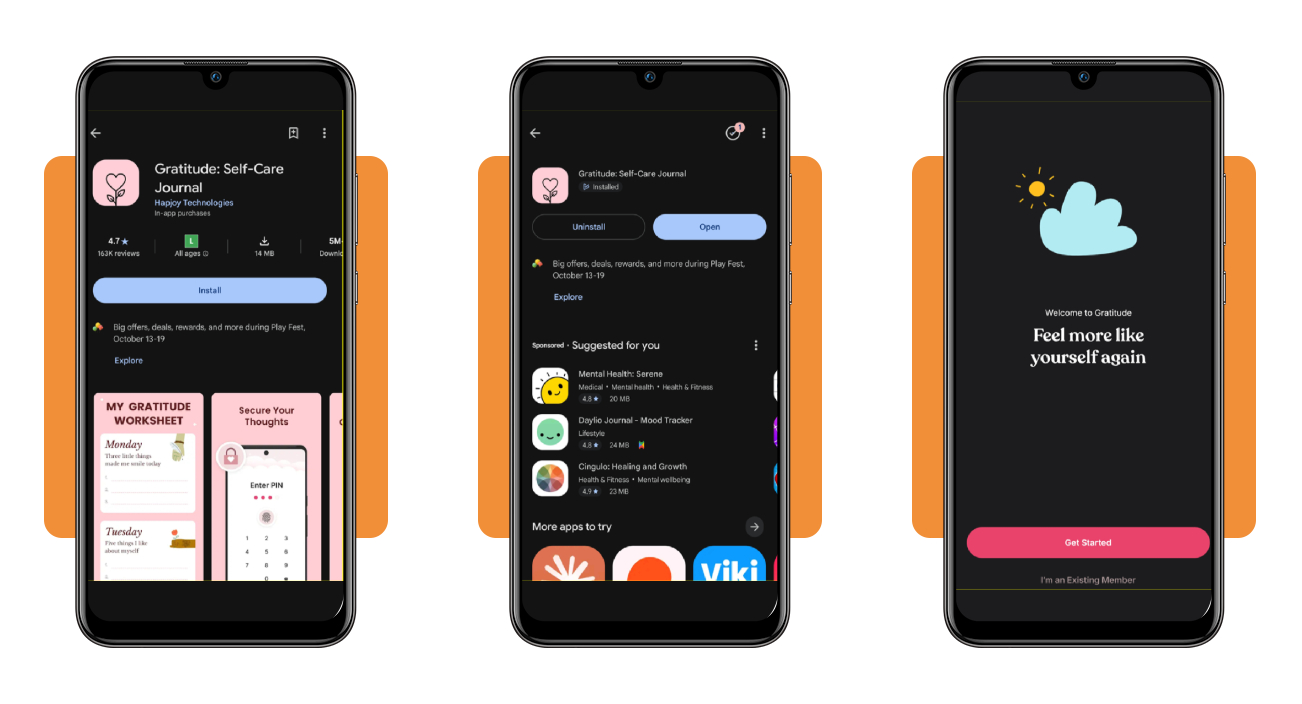
Step 1: download Gratitude on your device
Open the App Store or Google Play on your phone, then type ‘Gratitude: Self-Care Journal’ into the search bar and select the top result from developer Hapjoy Technologies.
Press ‘Install’ on Android or ‘Get’ on iPhone, wait for the download to finish, then open the app and press ‘Get Started’ on the welcome screen to begin your setup.
Step 2: name your journal and start writing
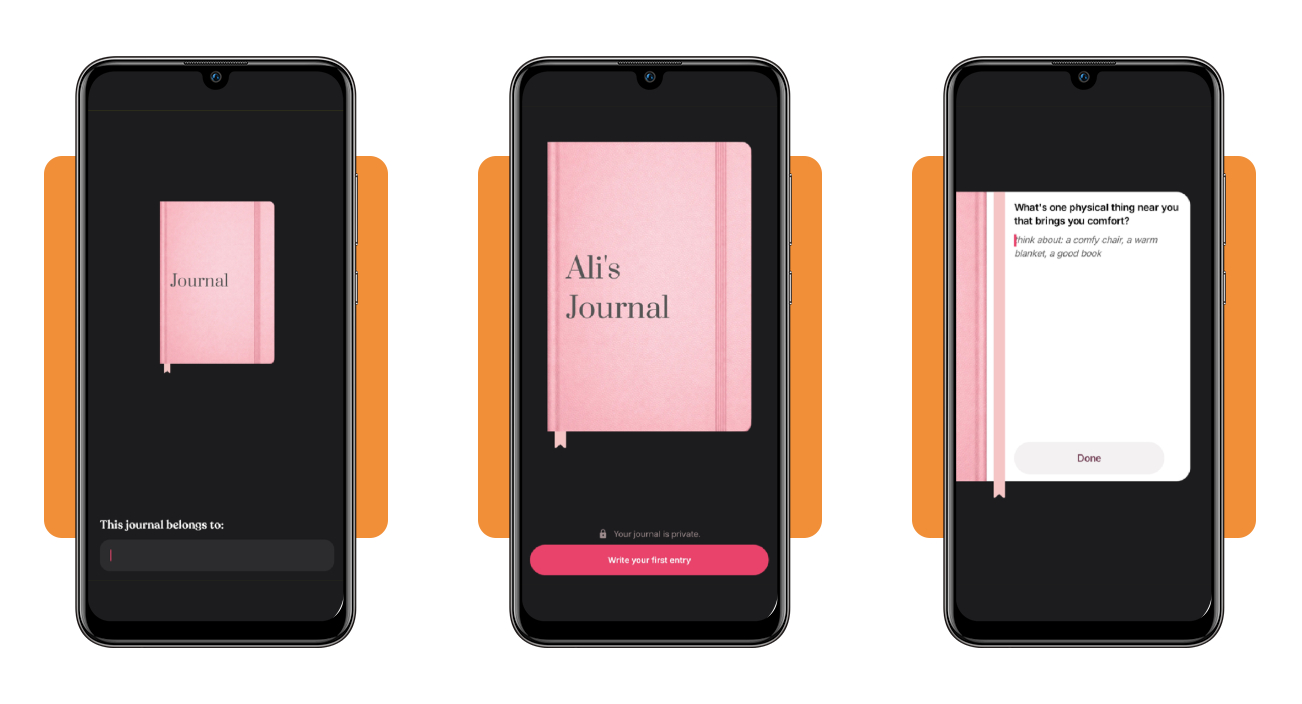
Type your first name into the box under ‘This journal belongs to’ and watch the pink cover update, or select ‘Skip’ in the top corner to move on without one.
Select ‘Write your first entry’, answer the question in a sentence or two, and press ‘Done’ to save it, and the journal app confirms the entry with a short note.
Step 3: set a daily reminder and explore the app
Select ‘Set a schedule’, tap the time on the next screen to choose your reminder hour, and confirm with ‘Continue’ to receive a notification with a prompt at that hour.
Open the ‘Affirmations’ tab and select ‘Create My Space’ to build your first collection, then visit the ‘Vision Board’ tab and press the arrow button to start a new board.

Top mental wellness apps
Gratitude (Android | iOS) trains your attention on the good moments, and pairing it with other mental wellness apps hands you tools for the rough moments that a written entry can’t handle.
Think of your daily entry as the anchor, with the other apps you try as extra support for the days you feel restless and the moments you need a nudge.
Writing a short entry in the journal app takes a minute, which leaves room in your day to test one of these picks and keep whichever one fits your routine.
Headspace for guided meditation
Headspace (Android | iOS) offers guided meditations led by friendly teachers, including resets that last three minutes when your schedule leaves no room for a lengthy session.
Beyond meditation, you’ll find breathwork, mindful movement, and therapy sessions through insurance or an employer, and a free trial lets you test the plans at $12.99 monthly.
Calm for deeper sleep and relaxation
Calm (Android | iOS) built its reputation on ‘Sleep Stories’, with over 100 tales read by celebrity narrators in soothing voices that help you drift off when your thoughts keep racing at bedtime.
‘Daily Calm’ brings a guided session each morning, and you can explore soundscapes, music, ‘Daily Move’ stretches, and 7-day and 21-day programs, with plans at $14.99 per month.
Wysa for anytime AI chat support
Wysa (Android | iOS) greets you with a friendly AI penguin that listens to what’s on your mind and walks you through short self-help exercises inspired by cognitive behavioral therapy.
The app offers about 20 meditations and guided journaling that pair well with the journal app you already use, plus optional human coaching, and the company frames it as wellness support.
Best options for securing private journal entries
Your entries hold honest thoughts about tense meetings, family moments, private goals, and worries, which makes privacy worth planning before you write the first line of your next entry.
Honest writing flows when you trust the space around it, and that trust grows from a few choices you make once and then leave alone as part of your day.
Every entry you type into the journal app holds a piece of your day, and protecting those private pages takes small daily choices that keep your words in your hands.
Choose a device that only you unlock
Set a passcode that nobody else knows and add fingerprint or face recognition if your phone offers it, which locks your private pages away from borrowed hands and wandering thumbs.
Shared tablets and family computers invite curious eyes, which is why your own phone with automatic screen lock and a short timer protects your pages from visitors and nosy roommates.
Keep app names and reminders low-key
Drop the icon into a folder with a bland name like ‘Utilities’, and curious friends who borrow your phone will scroll past the folder without giving it a second look.
Switch off lock screen previews in your phone settings to keep the prompt text from the journal app hidden when a reminder lights up your screen during dinner with friends.
Keep your entries for your eyes only
Treat sharing as a choice you make with care, and skip screenshots, screen mirroring, and group chats whenever an entry holds something personal or painful that belongs only to you.
Voice notes and photos carry details that text alone leaves out, and headphones plus a closed door keep those moments between you and your screen while you record or replay.
4.9/5
A minute a day buys you a better mood
Gratitude (Android | iOS) gives you a spot to jot down one good moment from your busy day, and that small, steady habit can change how you feel when tomorrow arrives.
In this article, Insiderbits taught you how to use this journal app for one entry a day, protect your private pages, and try a few mental wellness tools.
If you’re looking for a little relief at the end of your days, keep reading Insiderbits for more articles about mental wellness, daily journaling, and simple self-care routines.