
If you type your own name into Google you can reveal old profiles, public records, forgotten accounts, or contact details you no longer remember sharing. That’s why a privacy scan app is relevant.
It helps you to understand how much of that information is still connected to you online, and then decide what should stay public.

4.3/5
Which is the best privacy scan app?
If your goal is to reduce the amount of old account information tied to your name, Just Delete Me (iOS/Android) is a privacy scan app that can be the right option.
We are recommending this app because it helps users find account deletion pages across many online services.
Its value comes from making account cleanup easier to navigate.
So instead of searching each website separately for a hidden deletion page, Just Delete Me (iOS/Android) points users toward the relevant removal path when one is available.
That makes it supportive for forgotten social profiles, shopping accounts, forums, and other services you no longer use but that still remain connected to your identity.
Nevertheless Just Delete Me (iOS/Android) is less suited to people expecting a full data broker scan or a report showing every place where their number or address appears online.
You can read this Insiderbits article to learn how to check if your personal information was leaked. There, we recommend another data leak scanner so you can investigate it.
For broader exposure checks, Google provides tools for reviewing personal information that appears in Search results, which can complement the account cleanup process.
So, the strongest use case Just Delete Me (iOS/Android) is account cleanup, and it works best when you want to shrink your digital footprint by removing profiles and services you no longer need.
Key features within Just Delete Me
As we mentioned, Just Delete Me (iOS/Android) is a privacy scan app centered on account removal.
That said, its main function is helping users find the deletion path for online services they no longer want connected to their identity.
The app organizes services in a way that makes cleanup easier, especially when account deletion settings are difficult to locate manually.
Moreover, it would be really useful for old social profiles, shopping accounts, forums, and other services that still exist even if you stopped using them years ago.
Another practical feature is the direct access to account removal pages when they are available, which reduces the need to search through each service’s help center.
The app is best understood as a digital footprint cleanup tool, so it doesn’t replace broader privacy services that search data broker sites or monitor where personal details appear online.
That narrower focus can still be valuable if your goal is to remove forgotten accounts and reduce the number of services holding information tied to your name.
Step-by-step: how to run a digital footprint audit and erase exposed accounts
A digital footprint audit starts by identifying what information and old accounts are still connected to your name.
From there, you can decide what should remain public and what is worth removing.
Step 1: search for the service
Open Just Delete Me (iOS/Android) and use the search tool to find the website or app connected to the account you want to remove.
For example, you can search for a social network, shopping site, streaming service, or another platform you no longer use.
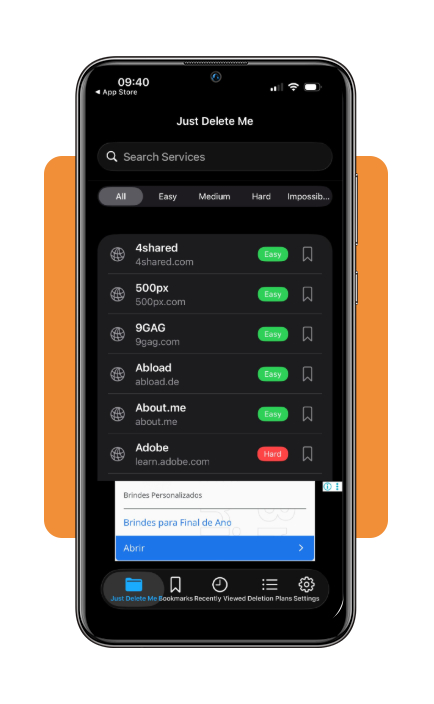
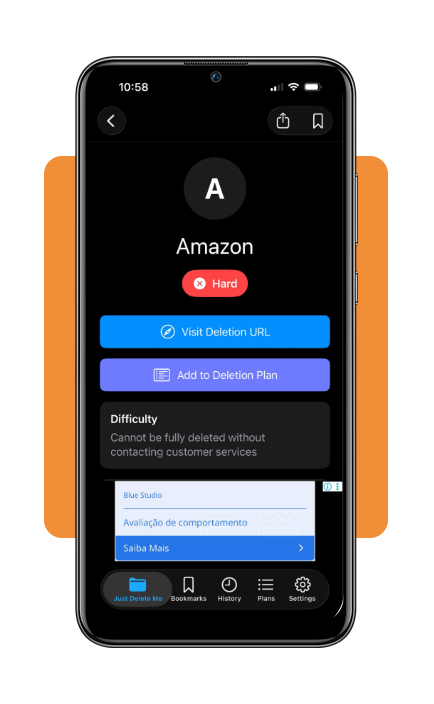
Step 2: check how difficult deletion will be
Open the service and review its difficulty rating .
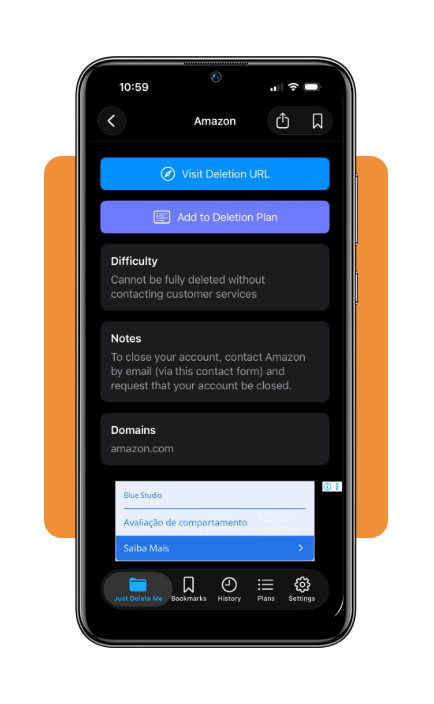
Step 3: read the deletion instructions
If the service requires more than a direct link, review the instructions provided in the app.
These guides explain the steps needed when the account cannot be removed from a single settings page.
Step 4: open the deletion page
Use the link provided by Just Delete Me to reach the service’s account deletion page.
The app includes an internal browser, so supported deletion pages can be opened without leaving Just Delete Me.
Top privacy protection services
Even though account deletion through the privacy scan app does some part of the process, this is only one part of reducing your digital footprint.
Privacy protection services, for example, go further by looking for personal information that appears across data broker sites and other public databases.
DeleteMe
For that goal, we begin recommending DeleteMe.
This platform focuses on removing personal information from data broker databases and people search sites.
The service handles removal requests on the user’s behalf and continues checking for information that returns later.
That makes it a stronger fit for people who want ongoing cleanup instead of manually contacting each site one by one.
Aura
Aura combines identity protection with privacy tools, including features related to data exposure and personal information removal.
The good side of Aura is that it works broader than a simple account deletion tool, so it can appeal to users who want monitoring and privacy services in one place.
Incogni
Incogni is another service centered on sending removal requests to data brokers.
Its value comes from reducing the manual work involved in finding companies that hold your personal information and asking them to delete it.
If you wanna check another comparison, Security.org’s privacy protection service guide reviews several options and the differences in how they approach personal data removal.
Best options for removing personal phone numbers
What some people don’t know is that removing a phone number from public view usually takes more than deleting an old account.
That happens because the number can still appear on people search sites or other public listings.
One option is to use a data removal service that submits requests to brokers and people search sites on your behalf.
This can be practical when the same phone number appears across several databases and you do not want to contact each company individually.
You can also handle removals manually by finding the opt out page for each site where your number appears.
However, this process requires more time, but it gives you direct control over the process without paying for a separate privacy service.
If your phone number appears in Google Search, Google also provides tools for requesting removal of certain personal information from search results.
That does not remove the information from the original website, so the source page still needs to be addressed separately.
4.3/5
Take control of what stays connected to your name
A digital footprint can build up over years through old accounts, public listings, and personal details that remain searchable long after you stop using a service.
A privacy scan app is better for cleaning up accounts you no longer need, while broader privacy services can address information that appears across data brokers and people search sites.
Removing a phone number or profile from one place doesn’t erase it everywhere, so the process works best in stages: delete unused accounts, and check search results again later.
The goal is not to disappear from the internet, but to reduce unnecessary exposure and keep more control over the personal information connected to your name.
Enjoyed this article? Save Insiderbits to your favorites and discover the most useful tech tips.