

A loan offer at breakfast, a bank warning at lunch, and a Medicare pitch before dinner can turn your phone into an annoyance, but there’s a spam call blocker app that handles that for you.
In this Insiderbits guide, you’ll meet Hiya: Spam Blocker, see what its free plan covers, and grab tips for breathing easy whenever a stranger’s number lights up your screen. Keep reading!

Why spam calls keep reaching your phone
Nationwide robocall volume has dropped to its lowest point in years, according to companies that track it, but that average means little to you when your phone won’t stop buzzing.
The “Do Not Call Registry” keeps honest telemarketers in line, but scammers treat the list as optional, and that’s the gap this spam call blocker app is built to close.
There’s a chance you gave permission without realizing it by entering your number for a raffle or a quote, and that tiny checkbox still counts as a “yes” for marketers.
Data brokers sell your number to marketers
Companies called data brokers collect details like your ZIP code, age, and shopping habits, then sell those lists to anyone hoping to reach a certain kind of customer or voter.
Other callers skip the lists and dial through blocks of numbers tied to your area code, so your phone can ring with a pitch even when nobody sold your info.
Election season and open enrollment bring call spikes
Political campaigns ramp up calls and texts in the weeks before Election Day, and Medicare pitches pile up around open enrollment, while loan offers keep coming no matter the month.
Campaign calls fade once the votes are counted, but holiday package and fake purchase scams take over, and this spam call blocker app keeps that second wave from reaching you.
Fake bank alerts are the most dangerous calls
The scariest script starts with a call or text claiming your bank account is at risk, and then a voice asks you to move your savings into a “safe” account.
Let unexpected calls roll to voicemail, and if one claims to be your bank, dial the number on the back of your card and ignore whatever callback line they offer.
Spam call blocker app: how it screens unknown numbers
Hiya (Android | iOS) is an app that stands between your phone and unwanted callers, blocking robocalls and spotting scam attempts before they cost you time or personal information.
Rather than a bare string of digits, this spam call blocker app shows you who’s calling and tags numbers tied to scams, telemarketers, or debt collectors before you pick up.
Any mystery number in your call history can go into Hiya’s search bar, where you’ll read recent reports about it and can toss your own warning onto the growing pile.
Every call gets checked before your phone rings
The app runs each incoming call against the roughly one billion calls it sees that day and blocks the numbers that carry a spam track record before your screen lights up.
Calls that make it through show up with a background color matching the caller type, and fresh reports keep feeding Hiya’s system so your next warning lands with sharper accuracy.
A virtual assistant that answers strangers for you
Once you enable “Call Screener” and set up call forwarding with your carrier, the app answers unknown calls in English or Spanish and asks whoever’s on the line why they’re calling.
The caller’s answer appears as a live transcript, and this spam call blocker app lets you jump into the conversation, end it, or play the recording to hear their pitch.
Catching cloned voices and scam scripts in real time
A cloned voice can mimic a support agent or someone you love, and Hiya’s AI voice detection catches giveaways of digital speech and alerts you before the conversation goes further.
Fraud call detection also picks up on scam playbook moves, like a fake IRS agent demanding gift cards, and drops a bold warning on your screen while the call continues.
Step-by-step: how to set up Hiya: Spam Blocker
All you need before starting is an active phone number that receives texts and an updated operating system on your device, because the app ties your new account to that number.
Hiya (Android | iOS) will ask to see your contacts and call history, and granting that access lets the app recognize people you know so it never mistakes your mom for a telemarketer.
Once you’re set up, this spam call blocker app runs in the background, and the gear icon on the “Calls” tab lets you tweak or undo any choice you make.
Step 1: download Hiya on your device
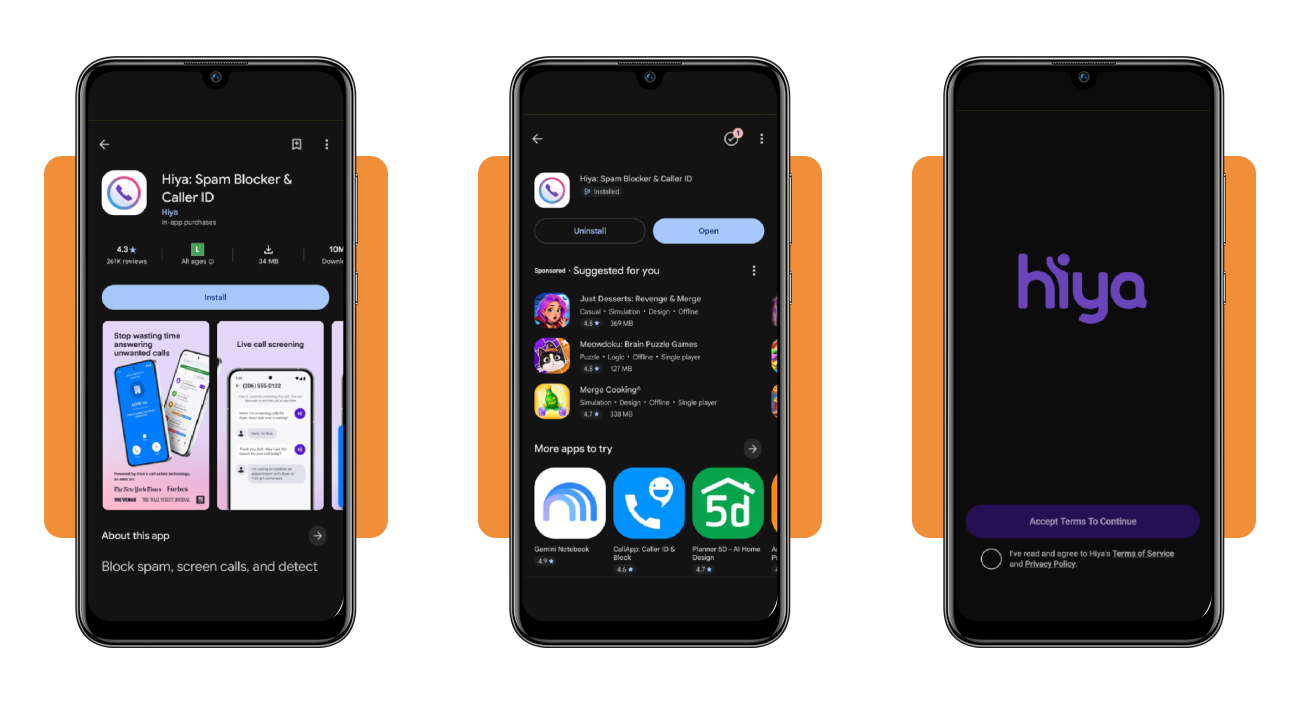
Open the Google Play Store on Android or the App Store on your iPhone, search for “Hiya: Spam Blocker”, and tap “Install” or “Get” on the listing with the purple logo.
Open the app, read through Hiya’s Terms of Service and Privacy Policy, tick the box confirming you agree, and tap “Accept Terms To Continue” to reach the following setup screen.
Step 2: enable the dialer and verify your number
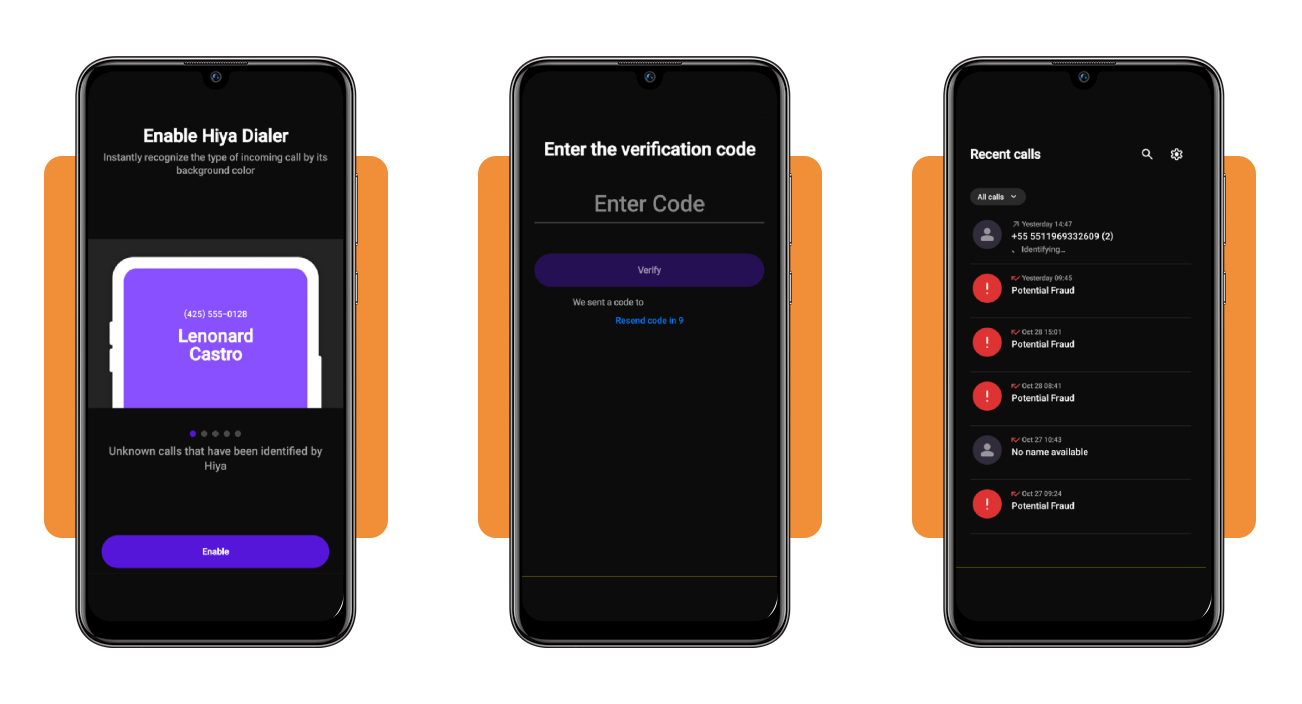
Tap “Enable” on the Hiya Dialer screen to set it as your Android phone app, or on an iPhone, open “Settings”, “Phone”, “Call Blocking & Identification”, and switch Hiya (Android | iOS) on.
Type the verification code that lands in your texts and tap “Verify”, and if the message doesn’t show up, this spam call blocker app lets you request a new code.
Step 3: choose warn or block for each category
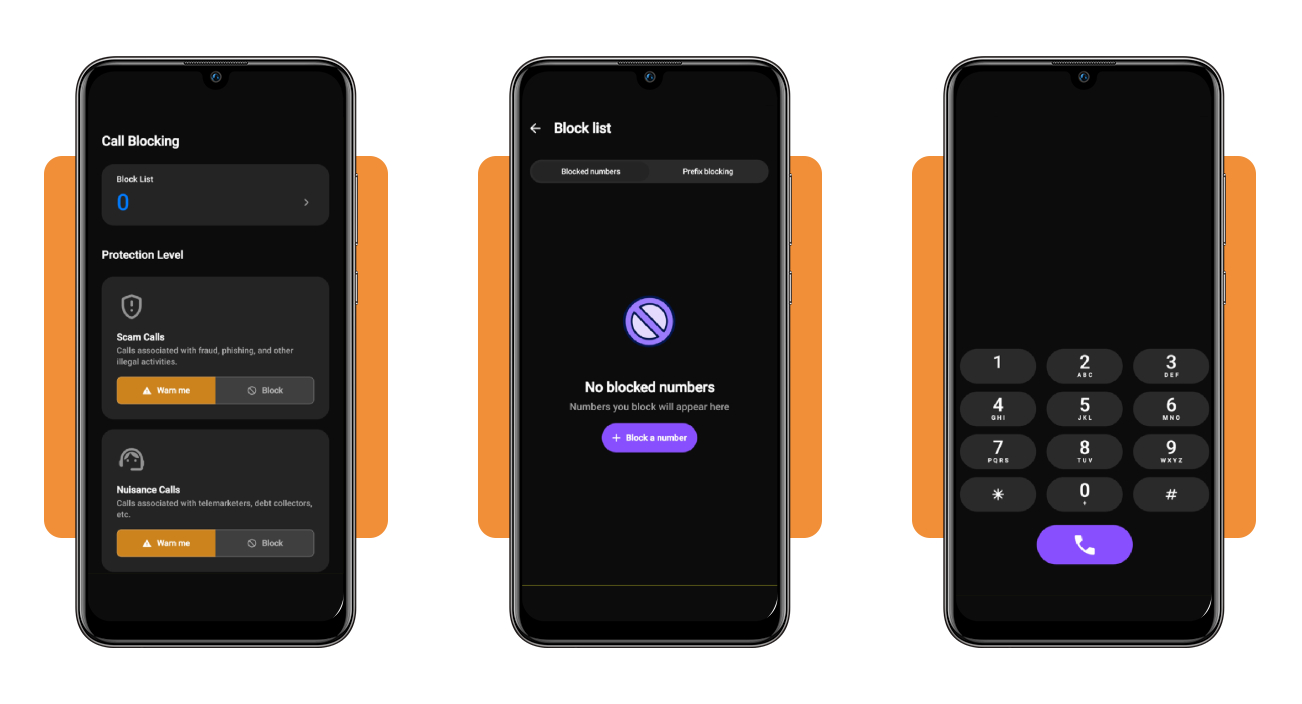
In the “Blocking” tab, choose “Warn me” or “Block for Scam Calls”, covering fraud and phishing, and for “Nuisance Calls”, covering telemarketers and debt collectors, to fit your patience level.
Tap “Block List” to add numbers with “Block a number”, or switch to “Prefix blocking” and enter the opening digits of a range to shut down every number in it.
Is spam blocking free or paid on Hiya?
Hiya (Android | iOS) runs on a “freemium” setup, so you can keep a basic plan at no cost for as long as you like and pay when you want premium’s extra tools.
Premium charges go through the Apple or Google account tied to your phone, and recent versions of the app let you manage or cancel your plan from the Hiya’s “Settings” menu.
Before paying, check whether your carrier supports call forwarding, because the screening tools in this spam call blocker app depend on it and only work in the US and Canada.
What the free Basic plan covers
With Basic, you’ll see caller names for strangers, block calls from lines with a bad reputation, and report shady numbers you spot, and none of it costs you a cent.
If you mostly deal with telemarketers and the occasional robocall, Basic may cover everything you need, and you can test it against your own call patterns before spending any money.
Extra protection unlocked with Hiya Premium
The Premium tier unlocks the Call Screener, AI voice and deepfake detection, and fraud alerts, so your protection keeps going after you or the screener picks up a stranger’s call.
Premium also brings deeper number lookups, advanced blocking options, and visual voicemail, which lists your messages and lets you play them in any order without calling your mailbox.
Picking the subscription length that fits your budget
Hiya Premium costs $3.99 a month, $9.99 a quarter, or $24.99 a year in the US, and the price you see in the app may differ by platform or region.
Paying yearly works out to $2.08 a month, so if this spam call blocker app earns a spot on your phone, that plan trims about $23 off twelve monthly payments.
Other ways to cut robocalls on your phone
Federal rules say callers need your consent before hitting your cell with autodialed or prerecorded calls, and callers who use AI-cloned voices without your okay are breaking the law.
If you agreed to robocalls in the past, you can take that consent back in any reasonable manner, and prerecorded sales calls must open with a way to opt out.
Ask your carrier about its blocking tools, including one that lets through only numbers in your contacts, and pair them with this spam call blocker app for a tighter net.
Sign up for the Do Not Call Registry
Registering costs nothing on the National Do Not Call Registry’s website, or you can dial 1-888-382-1222 from the landline or cell number you want sales callers to leave in peace.
Telemarketers can’t ring your home phone before 8 a.m. or after 9 p.m., and asking one to stop during a call legally obligates that company to quit dialing your number.
Forward spam texts to 7726
Most mobile carriers let you report a spam text by forwarding it to “7726”, which spells SPAM on your keypad, and that tip helps your carrier block the sender’s number.
Don’t reply to texts from numbers you don’t know or tap their links, and lean on 7726 for your messages while the spam call blocker app guards your phone calls.
Report illegal calls to the FCC
File a complaint through the FCC’s Consumer Complaint Center, pick “unwanted calls”, and mention whether a scammer is spoofing your number or carriers are blocking or mislabeling it.
The FCC won’t solve your case one on one, but it uses complaints to guide enforcement under federal calling laws, and the FTC takes reports on scams and registry violations.
Pick up every call without second-guessing it
A ringing phone shouldn’t make your stomach drop, and with some setup, calls from strangers show up labeled, screened, or blocked before they steal a moment of your day.
In this review, we showed you how the Hiya (Android | iOS) spam call blocker app handles strangers, what you’ll pay for the extra features, and which free FCC tools fill in the gaps.
Read more Insiderbits for simple tips on keeping your phone yours, from shutting out nosy apps to dodging data brokers, so you spend less time worrying about who’s calling or watching.