
Waiting rooms, lunch breaks, and late nights on the couch feel a lot shorter when Los Santos fits in your pocket, and GTA V mobile through cloud gaming makes that possible without a PC.
In this guide, Insiderbits shows how Boosteroid streams the copy you own to your phone. Read on to learn how you can turn your spare minutes into smooth heists with no annoying lag.

4.5/5
Can you really play GTA V on your phone?
Yes, you can play it, and starting GTA V mobile sessions doesn’t involve an official phone port or a cut-down version of Los Santos built for a smaller screen.
What lands on your screen is the PC edition, with the story campaign, all three protagonists, and GTA Online running on hardware with more muscle than any handset can offer.
Rockstar keeps your saves in its cloud, and a heist you finished on your desktop at home picks up where you left it when the game loads on your phone.
Your phone becomes a window to a gaming PC
Think of your phone as a portal into a gaming computer, where the graphics and chaos of Los Santos come from that rig and not the chip in your hand.
A budget handset or an older flagship can handle the job, and the same account lets you continue a session on a tablet, laptop, or TV whenever you switch screens.
Check your Epic library before you buy
Epic Games gave GTA V away in May 2020, and if you claimed it during that promo, it unlocks GTA V mobile play and spares your wallet a second purchase.
PC copies from Steam, the Rockstar Games Launcher, and the Microsoft Store count, but a game bought on an Xbox or PlayStation console won’t carry over to a cloud PC.
Enhanced or Legacy: pick the one your crew plays
Enhanced arrived in March 2025 with ray tracing, 3D audio, and quicker loading, while Legacy preserves the original 2015 PC release, and both share the same story, missions, and map.
The choice matters in GTA Online, where a character you move to Enhanced can’t return and the editions keep separate progress, making the version your crew runs the safest pick.
GTA V mobile: how cloud gaming works
Cloud gaming works like streaming a show, except you control the plot, with GTA V running on a remote machine while your phone shows the picture and plays the sound.
Your phone’s storage stays free for photos, music, and apps, and the massive GTA V install lives on the server’s drives, keeping your GTA V mobile setup lean and tidy.
The catch comes down to your signal, and a shaky connection means blurry frames or stutters during a tense police chase while GTA V keeps running on the other end.
Boosteroid runs GTA V on its own servers
Boosteroid (Android) operates gaming hardware in 29 data center locations, and when you hit play, a nearby server launches GTA V on a graphics card built for the heaviest PC titles.
That setup pushes GTA V at up to 4K and 120 frames per second, and you’re free to dial it down to a resolution that suits your phone’s smaller screen.
Every button press makes a round trip
Hit the gas on a stolen car, and your command races to the server, the game reacts, and a frame travels to your screen in a fraction of a second.
Distance and network traffic stretch that trip, and you’ll notice the delay in GTA V mobile shootouts and races as aim and steering that drift a beat behind your thumbs.
Unlimited playtime with no hourly caps
Boosteroid (Android) doesn’t limit your monthly hours or cut sessions short with a timer, letting you grind GTA Online businesses or replay the story for as long as your evening allows.
Compare that with GeForce NOW’s cap of 100 hours a month or the 5 to 15 hours on Xbox Game Pass, though a long idle stretch will close your session.
Step-by-step: how to start a cloud gaming session
Boosteroid (Android) won’t launch any game without an active subscription and doesn’t offer a free trial, leaving a paid plan as your entry ticket to the busy streets of Los Santos.
Five icons along the bottom of the screen open favorites, the library, search, the speed test, and your profile, and you’ll bounce between them while setting up GTA V mobile.
When you’re done playing, quit from GTA V’s own pause menu and avoid swiping the app away, giving Rockstar’s cloud the time it needs to store your latest mission progress.
Step 1: download the app on your phone
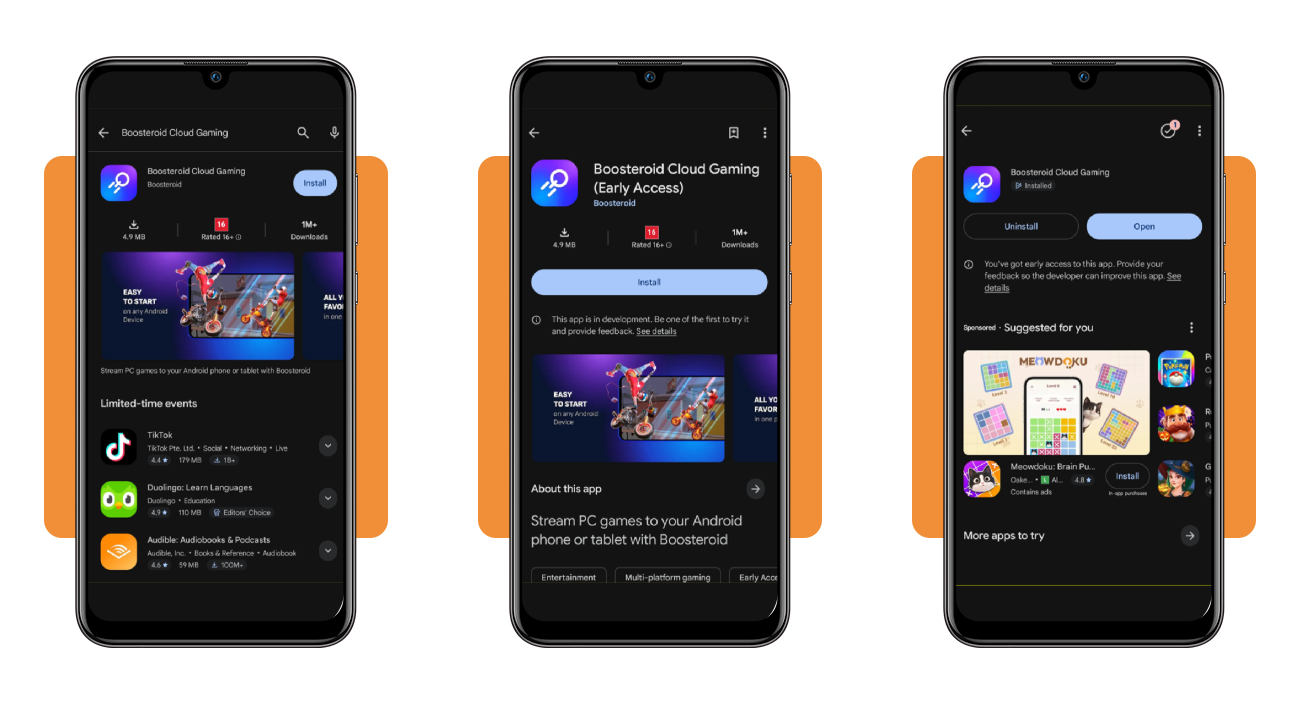
Open the Google Play Store on your Android phone or tablet, search for ‘Boosteroid Cloud Gaming’, and install it, skipping the separate Gamepad and TV apps from the same developer.
On an iPhone, you won’t find Boosteroid in the App Store, but Safari runs the web version of the service, letting you sign in and stream with the same account.
Step 2: sign in and run the speed test
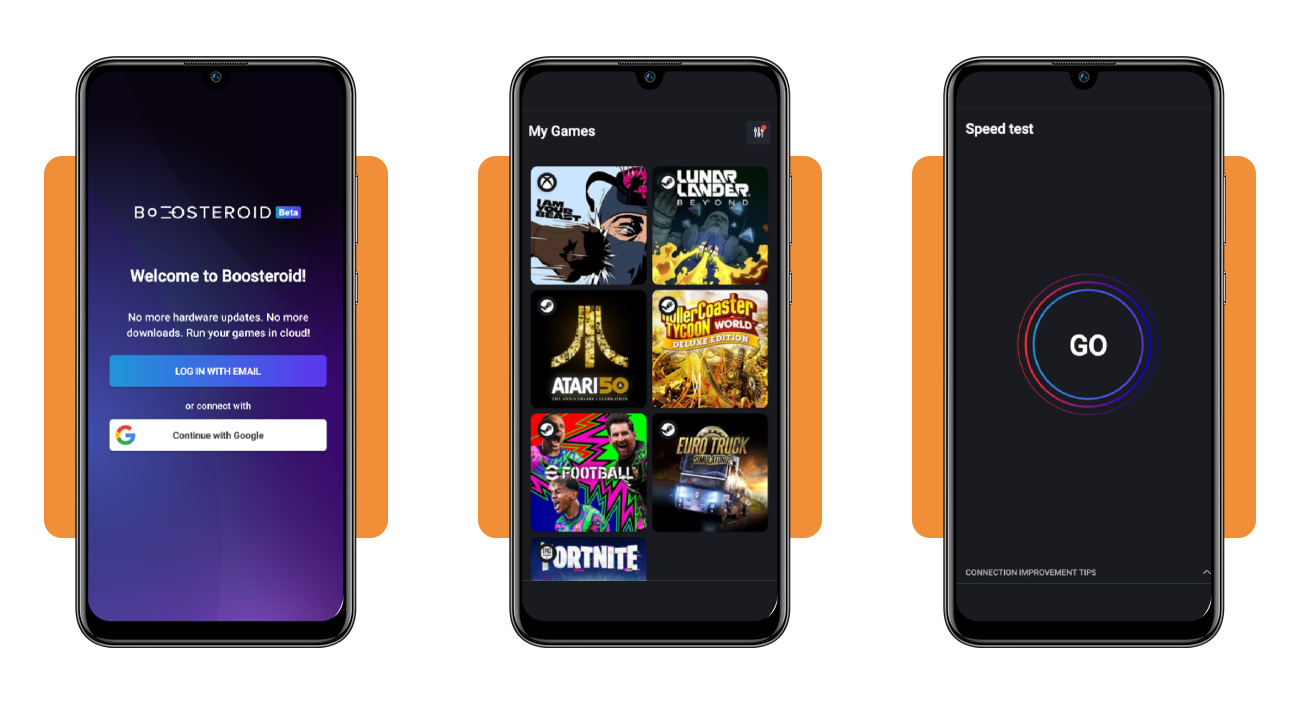
Open Boosteroid (Android) and choose ‘Log in with email’, tap ‘Continue with Google’, or pick ‘Create an account’ if you’re new, and the ‘My Games’ page loads the moment you’re in.
Tap the speedometer icon, hit ‘GO’, and if the result looks weak, pause downloads, move closer to your router, or switch networks before your first GTA V mobile heist.
Step 3: choose your version and link your store
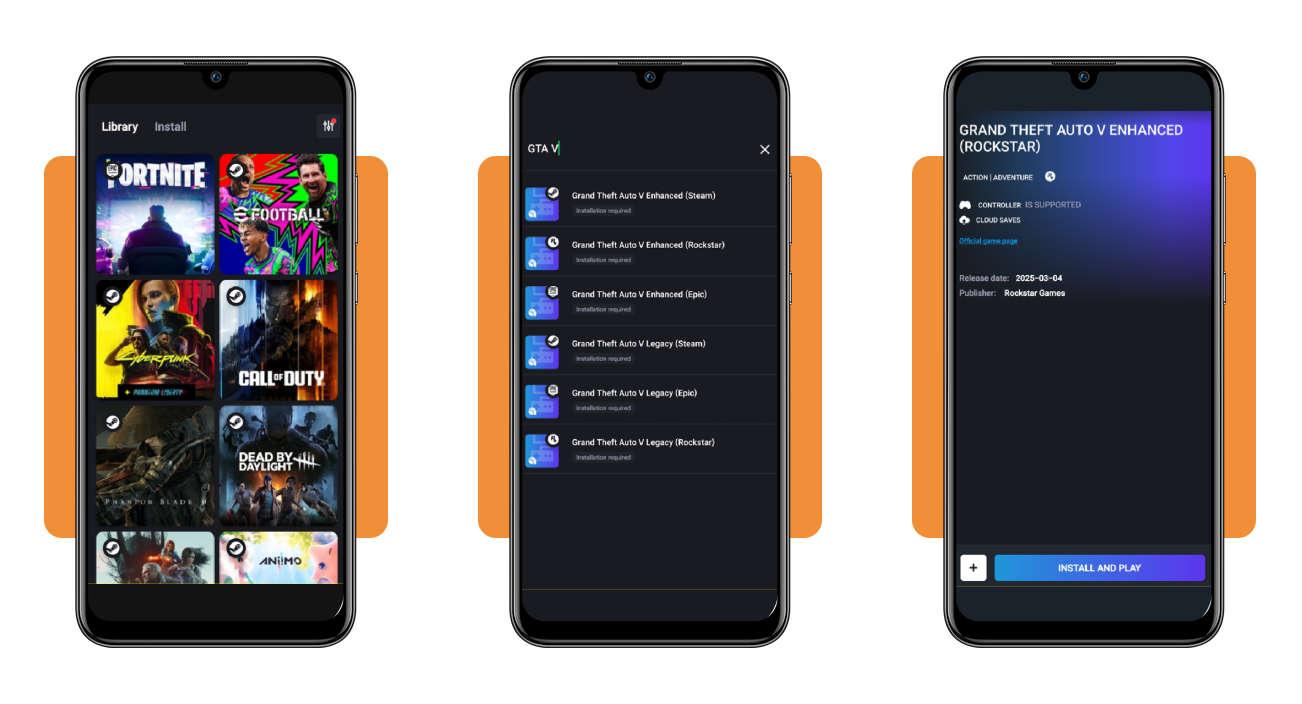
Tap the magnifying glass, type ‘GTA V’, and pick the ‘Enhanced’ or ‘Legacy’ entry that matches the store where you own the game, whether that’s Steam, Epic, or Rockstar’s launcher.
Tap ‘Install and Play’, sign in to that store and to your Rockstar Games account, and give the first launch some time to set up GTA V on the cloud machine.
What you need: controller, Wi-Fi speed, and subscription cost
Most of the gear might be in your house, and the shopping list for GTA V mobile comes down to a sturdy gamepad, a strong home network, and a subscription.
Boosteroid (Android) can’t promise smooth play over 2.4 GHz wireless, 4G LTE, or DSL, and that pushes you toward a 5 GHz band on your router or a wired Ethernet adapter.
A 1080p stream burns through around 10 GB of data an hour, a figure that can wipe out a modest capped cellular plan during one long session in Los Santos.
Grab a controller: touch controls won’t cut it
GTA V streams with no touch controls built for phones, and handling steering, aiming, and the weapon wheel without physical sticks and triggers turns simple missions into a frustrating mess.
An Xbox or PlayStation controller pairs over Bluetooth through your phone’s settings, and a cheap clip that holds the phone above the buttons turns the combo into a handheld console.
Latency matters more than raw download speed
Boosteroid (Android) asks for 14 Mbps at 720p and 24 Mbps at 1080p, and setting the stream bitrate about 30% below your measured speed keeps a safety buffer for hiccups.
Speed alone won’t save you, though, and a ping above 20 to 30 milliseconds turns GTA V mobile gunfights sluggish, even on a connection with plenty of bandwidth to spare.
The Ultra plan covers everything GTA V needs
Ultra unlocks everything GTA V can do, ray tracing included, and costs about $18.88 a month, or $100.50 for a prepaid year, bringing your average monthly cost down to $8.37.
Ultra Pro adds server selection, a longer idle allowance, and extra viewer seats on identical hardware, while a month of Ultra lets you test your connection before a yearly commitment.
Which cloud services list GTA V right now
Rockstar decides where its games can stream, and that choice keeps your GTA V mobile options short, with GeForce NOW losing access after the publisher pulled its titles in 2019.
Xbox Cloud Gaming streamed GTA V through Game Pass until April 15, 2026, and that fourth exit means a Game Pass membership won’t put Los Santos on your phone screen.
Amazon Luna dropped EA, Ubisoft, and GOG libraries in June 2026, and catalogs on the remaining services shift, making it worth checking the lineup before you pay for any plan.
Boosteroid streams the copy you already own
Boosteroid’s plans include zero games, and what you pay covers the cloud machine, leaving GTA V and the rest of your PC library as the content you load onto it.
Red Dead Redemption 2, GTA IV, and Max Payne 3 stream on Boosteroid (Android) from PC copies, putting your Rockstar shelf under the same subscription.
Shadow PC gives you a whole Windows machine
Shadow PC rents you a Windows computer in the cloud, where you install the Rockstar Games Launcher and GTA V the same way you would on your own gaming PC.
Shadow’s compatibility list includes GTA V and GTA Online, and the freedom of a full PC lets you bring mods and FiveM roleplay servers into your GTA V mobile routine.
PlayStation Plus Premium skips phones entirely
PlayStation Plus Premium streams the PS5 version of GTA V from its Game Catalog with no purchase required, but the stream lands on a PS5 console or a PlayStation Portal.
If you keep a PS5 at home with GTA V installed, Sony’s Remote Play feature streams that console to your phone, a workaround that turns your PS5 into the server.
4.5/5
Your next heist can start on the commute home
Los Santos used to stay parked at your desk, but a cloud subscription, a gamepad, and a steady connection let the city follow you to the couch, porch, or breakroom.
In this article, you saw how GTA V mobile play works through Boosteroid (Android), which PC copy you can bring, what your internet connection needs, and where else the game streams.
Stay with Insiderbits for gaming articles that save you money, help you squeeze extra life out of the devices you own, and point you toward games you’ll want to finish.