
A paycheck can look generous on paper, yet the number that lands in your account often depends on tax withholding choices nobody explained when you signed your W-4.
Insiderbits reviewed Pay44, an app that turns confusing pay stubs into an honest preview of your real take-home money, giving your budget a number it can finally trust. Read on for more!

4.9/5
Which is the best app to check your tax withholding and estimate your take-home pay?
Pay44 (Android | iOS) works as a paycheck calculator you carry in your pocket, turning your hourly rate or salary into a real take-home number within a handful of quick taps.
The app walks you through your state, your filing status, and any deductions or extra income you report, then builds a full breakdown around those precise paycheck figures.
Once you enter those details, tax withholding math runs behind the scenes, and the app displays federal, state, Social Security, and Medicare amounts drawn from your paycheck total.
Key features within the Paycheck Calculator US – Pay44 mobile app
- Budget planner: combine every paycheck with your monthly bills and watch a waterfall chart reveal where each dollar in your personal bank account lands;
- Simulation mode: test a new hourly rate, a raise, or a different job offer and preview how the change affects your take-home paycheck amount;
- Insights dashboard: check your effective tax rate, your yearly income projection, and a simple grid showing how much of your paycheck taxes claim overall;
- Export options: save several job calculations at once, compare them side by side, and export any paycheck report as a PDF, image, or CSV.
Free features versus the Pro upgrade
The free version of Pay44 (Android | iOS) covers your core paycheck math, letting you plug in your pay details and pull a full tax breakdown at no monthly cost whatsoever.
Upgrading to Pro removes the ads, unlocks unlimited saved jobs for comparing detailed offers, and opens up exports in PDF, CSV, or image format for your own records.
Built for salary and hourly workers
Whether you clock hourly shifts or earn a fixed salary, Pay44 (Android | iOS) adjusts its math to match your setup and lets you pick daily, weekly, biweekly, or monthly pay.
Hourly workers can log overtime hours and shift differentials, while salaried workers can add yearly bonuses, and both groups see their tax withholding adjust to match those changes.
Step-by-step: how to simulate W-4 changes and optimize your tax withholding
Pay44 (Android | iOS) walks you through a quick paycheck simulation, letting you swap your pay frequency, state, or filing status and watch your number shift before your eyes.
The app asks for your hours, your rate, and the state where you work, then builds a full personalized breakdown around every number you choose to plug in.
Once you review those numbers, you can adjust your filing status or add deductions and watch how each change to your tax withholding affects your take-home paycheck.
Step 1: download Pay44 on your device
Pay44 shows up as a free download on both the Play Store and the App Store, weighing in at a light 14 MB for Android and 69.5 MB for iOS devices.
Tap ‘Install’ or ‘Get’, wait a moment for it to load, then open the app straight from your home screen without creating an account or entering payment details at all.

Step 2: enter your pay and location details
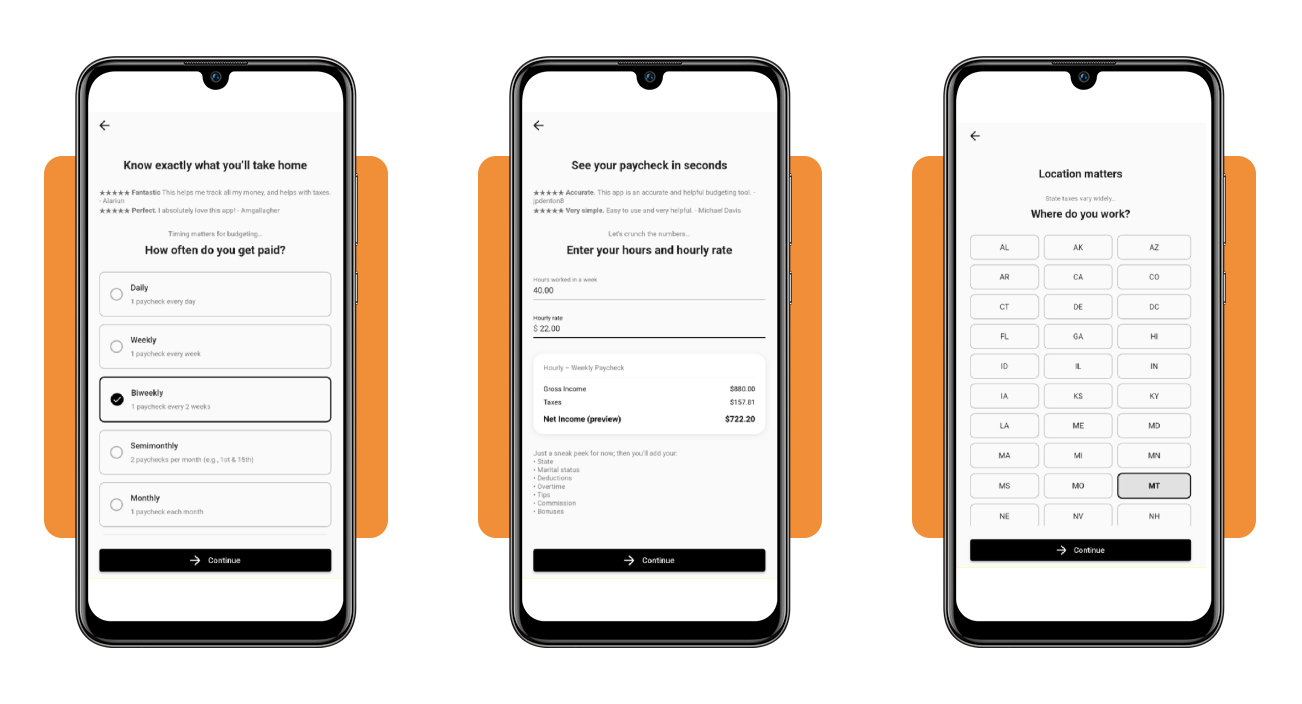
Pick how often you receive pay, whether that means every week, every two weeks, or once a month, and the app adjusts its calculation to match your schedule.
Next, type in your hours worked and hourly rate, then choose the state where you work, and watch your tax withholding numbers shift to match your location choice.
Step 3: review your paycheck and tax breakdown
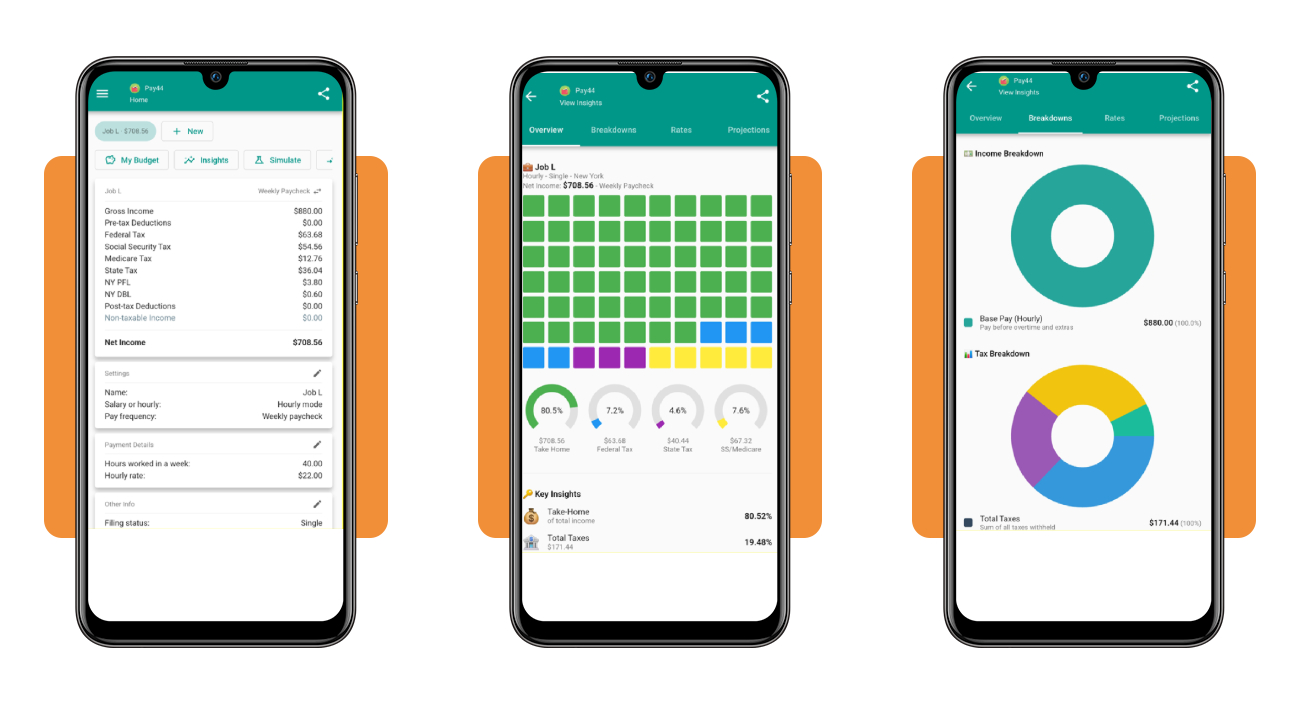
Your results appear as a full breakdown showing gross income, federal tax, state tax, Social Security, and Medicare, plus your final net income for that entire pay period.
Tap into the ‘Insights’ tab to see your effective tax rate, a visual chart of your income split, and detailed projections for your yearly earnings after all deductions.
Top tax preparation software
Choosing the right tax software makes filing season smoother, saving you money on complicated returns while guiding you through credits, deductions, and refund calculations.
Once you track your tax withholding throughout the year, matching that number against your refund becomes the real test when tax season rolls around again each spring.
Every platform takes a different approach to guiding you toward an accurate return, whether you want a free filing option or support from a live professional along the way.
TurboTax for free simple returns
TurboTax offers a free edition for taxpayers with simple W-2 income, standard deductions, and no extra schedules attached, covering roughly 37% of filers who qualify each tax season.
Beyond the free tier, TurboTax adds paid options like Deluxe and Premium, plus Expert Assist for live guidance and Full Service if you prefer someone else filing it.
TaxAct for budget-friendly filing
TaxAct positions itself as a cheaper alternative, charging less than TurboTax across its Deluxe and Premier tiers, while still letting simple W-2 filers submit their return free.
Filing with TaxAct works best once you already know your numbers; tracking your tax withholding ahead of time helps you avoid surprises when your final refund total appears.
H&R Block for live expert help
H&R Block blends do-it-yourself software with in-person offices nationwide, letting you file online, chat with a tax pro, or walk into a local branch for added face-to-face help.
About 52% of filers qualify for the free online edition, and every paid tier includes access to a live tax professional through chat or a scheduled phone call.
Best high-yield savings accounts
Once your paycheck lands in your account, parking that money in a high-yield savings account lets it earn interest instead of sitting idle between now and your next bill.
After you see your tax withholding explained and know your real take-home pay, picking a savings account that rewards your balance becomes the next smart money move.
These accounts reward savers in a different way, whether your priority sits with a bigger balance, zero fees, or simply chasing the highest rate available.
CIT Bank Platinum Savings for big balances
CIT Bank rewards savers who keep at least $5,000 parked in their account, unlocking a rate of 3.75% APY that outpaces the national average by a wide margin.
Drop below that $5,000 threshold, though, and your entire balance earns only 0.25% APY, making this account a strong fit for savers who consistently hold larger sums.
Live Oak Bank for fee-free savings
Live Oak Bank charges no monthly fees and sets no minimum balance requirement, letting your money earn interest from dollar one without any hidden costs eating into it.
Once your tax withholding leaves less room in your budget for extra deposits, an account with zero fees and no minimums keeps every dollar you save working for you.
Bread Savings for the highest APY
Bread Savings consistently ranks among the top earners in its category, with rates that climb past 4% APY depending on current market conditions and ongoing promotional offers.
Opening an account requires just $100 to get started, and your balance compounds daily, adding a small boost to your total every single day it sits there.
4.9/5
Know your number before payday
Pay44 (Android | iOS) gives your paycheck a real number to work with, and pairing that with good filing software and a savings account turns tax season into something you can handle.
In this article, Insiderbits taught you how tax withholding shapes your pay, walked you through an app for checking your numbers, and pointed you toward software that fits your filing needs.
Keep exploring Insiderbits for more guides on tax filing, budgeting apps, and money-saving resources that help you keep a bigger share of every paycheck you earn.