Today, we present an SSN scanner app that will help you check whether your Social Security number or other personal information appears in data found on the dark web.
Experian (iOS/Android) offers a free one-time dark web scan for your SSN, email address, and phone number, so you can get an early warning that sensitive information has been exposed.

4.8/5
Which is the best SSN scanner app?
Well, to begin with, a good and trustworthy SSN scanner app or platform should do more than show a generic warning.
In that case, the best option is one that checks if sensitive information appears in exposed data and gives you clear next steps if something is found.
For that, Experian (iOS/Android) is our recommendation. Its identity tools merge dark web scanning with credit monitoring and identity protection features.
Meanwhile, the Experian (iOS/Android) free dark web scan checks your Social Security number, email address, or phone number against data found online.
The main advantage is that the scan is tied to a broader credit and identity platform.
Therefore, if exposed information is detected, you can move from just seeing the problem to monitoring your credit and deciding if additional protection is necessary.
Experian (iOS/Android) also offers ongoing identity monitoring through its paid protection services.
The free scan is a one-time check, but if you keep continuous monitoring you can watch for new exposure.
Key features within Experian
The most relevant feature on Experian (iOS/Android) when used as an SSN scanner app is the dark web scan.
This scan checks personal information against exposed data and shows if your SSN or other details have appeared in known breaches.
The Experian app (iOS/Android) also gives access to credit monitoring, which helps you notice unexpected activity or changes that deserve attention.
In addition, identity protection services add another layer by monitoring for signs that personal information may be used without authorization.
Still, Experian (iOS/Android) doesn’t guarantee that every breach or misuse will be detected.
The platform value comes from exposure checks, credit visibility, and identity monitoring so you can react faster when something looks wrong.
Step-by-step: how to run a free identity scan and detect SSN breaches
Experian (iOS/Android) can work as an SSN scanner app that checks if your Social Security number appears in exposed data.
Follow these steps to run the check:
Step 1: open Experian’s free dark web scan
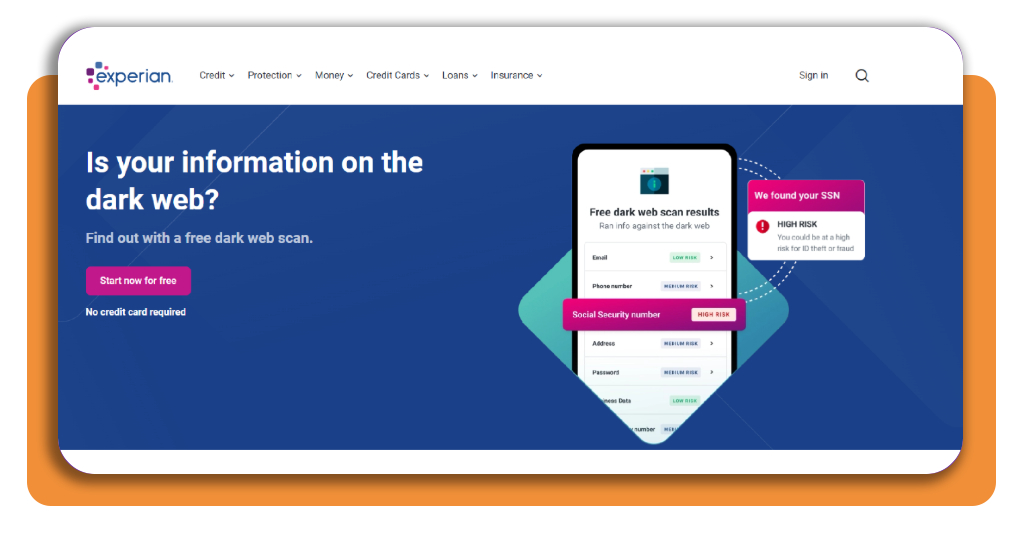
Go to the Experian Free Dark Web Scan page and select “Start now for free.” As you can see, no credit card is required for the one-time scan.
Step 2: registration
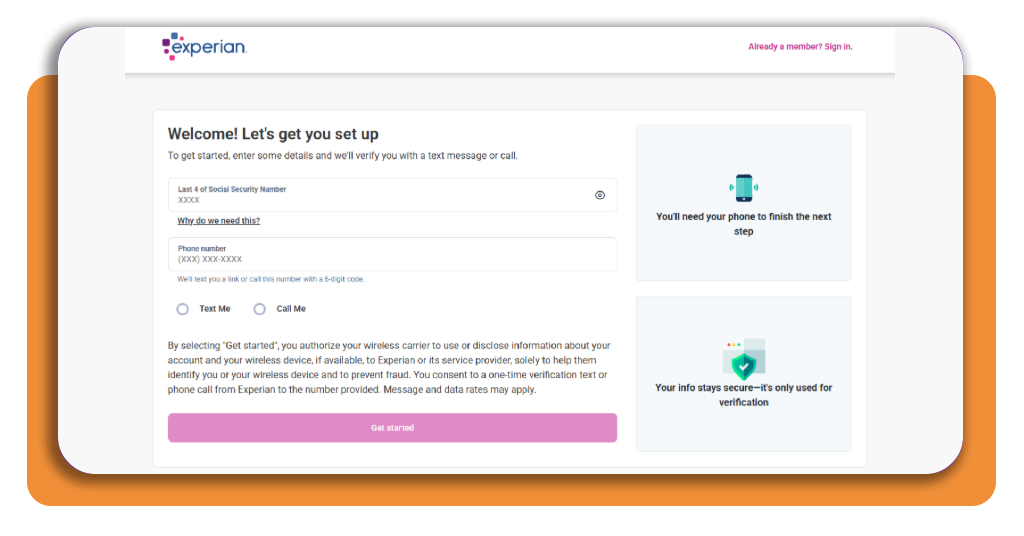
Now you need to register at Experian. You’ll be asked to provide the last 4 numbers of your SSN and phone number.
Step 3: run the scan
Start the dark web scan after your identity is verified. Experian (iOS/Android) checks thousands of sites for exposure involving your Social Security number, email, or phone number.
Step 4: review the results
Open the results on Experian’s secure site and check if any of your information was found in exposed data.
The report can show where your information appeared and give you guidance on what to do next.
Top national identity theft protection services
If you really want to learn more about identity theft protection, there are some services that go beyond a one-time SSN scanner app.
Their main role is ongoing monitoring, alerts, recovery support, and, depending on the plan, insurance coverage if identity theft leads to financial losses.
Security.org currently highlights several national providers, but two stand out for different reasons: LifeLock for broader insurance coverage and Aura for extensive monitoring.
LifeLock
The first platform is LifeLock. It monitors the dark web, credit activity, and other signs of identity misuse.
Depending on the plan, users also get access to credit monitoring from up to all three major bureaus and Norton cybersecurity tools.
Its highest-tier individual plan includes up to $3 million in identity theft insurance coverage, divided among legal expenses, personal expenses, and stolen funds.
Some features include 401(k) monitoring, scam support, and protection against synthetic identity theft in more advanced plans.
However, pricing varies by tier, so the amount of monitoring and insurance changes substantially between plans.
Aura
Aura takes a broader monitoring approach. All of its plans include credit monitoring from Experian, Equifax, and TransUnion, along with dark web and data breach monitoring.
The service also watches home and auto titles, which adds protection against forms of fraud that may not appear as a traditional credit account.
In addition, Aura includes cybersecurity tools as part of the subscription, including a VPN and other digital security features.
Security.org lists identity theft insurance coverage of up to $1 million and notes that the core protection features remain available across its plans.
Best options for locking your credit
If your Social Security number or other sensitive information was exposed, a credit freeze is the first step for limiting new-account fraud.
A freeze restricts access to your credit report, which prevents creditors from approving new credit in your name while it is active.
You need to place the freeze separately with all three major credit reporting agencies: Equifax, Experian, and TransUnion.
When it comes to that, a freeze only applies to the bureau where you request it. To fully restrict access to your credit files, submit a separate request to each agency.
You can also use a temporary lift when applying for credit, since a freeze doesn’t permanently block your ability to apply for a loan, credit card, or other account.
Additionally, you can temporarily lift it when a legitimate lender needs access to your report and restore the freeze afterward.
If you want to check for broader data exposure beyond your SSN, this Insiderbits’ data leak scanner guide explains another way to review compromised information.
4.8/5
What to do after checking your SSN
As you can see, using Experian (iOS/Android) as an SSN scanner app gives you visibility into possible exposure, but the scan is only the first step.
Still, the real value comes from reviewing the result and responding to anything suspicious.
If your information appears in exposed data, monitor your credit, review unfamiliar activity, and consider identity monitoring or a credit freeze.
The goal is not to panic over every breach notice. It is to know where your information may have surfaced and take practical steps that reduce the chance of further misuse.
Enjoyed this article? Save Insiderbits to your favorites and discover the most useful tech tips.