
Signing a lease or freelance contract without reading every clause can trap you in fees you never agreed to, but there’s a free tool that helps you avoid legal scams and protect yourself.
Contract Review turns dense legalese into plain English explanations you can really trust. This guide by Insiderbits explains its risk score and red flags to help you avoid any future surprises.
Which is the best platform to decode legal contracts and avoid scams?
Contract Review is a tool designed to scan freelance agreements, leases, and NDAs, translating every dense clause into simpler terms before you sign anything important.
Once you upload a document or paste text into the platform, the AI reads through all of it and produces a risk score along with detailed explanations for every clause.
Learning the meaning behind these small red flags puts you in control, helping you avoid legal scams and catching unfair terms before a bad contract touches your steady income.
Key features within the Contract Review platform
- Risk scoring system: Contract Review rates every agreement from 1 to 10, showing you how safe or risky the terms are for your situation;
- Simple explanations: every clause turns into everyday language, cutting through legal jargon and helping you understand what you are agreeing to before signing;
- Clause rewrite suggestions: paid plans offer fair alternative wording for risky sections, giving you language you can send back during any negotiation with landlords;
- Red flag detection: the platform scans 11 clause categories, from termination terms to liability traps, flagging where a contract puts your interests at risk.
What the free and paid tiers get you
Contract Review offers a free monthly tier, which includes 3 contract analyses, an overall risk score, a detailed summary, and a preview of the 3 most important red flags.
The Pro plan costs $29 a month, unlocking 30 analyses and every other red flag, while Agency runs $79 a month with unlimited contracts, priority support, and dedicated onboarding.
Who benefits most from this platform?
Freelancers signing client contracts, renters reviewing lease terms, and remote employees reading offer letters might be confused without a lawyer close by to explain the fine print.
Running a small business often means negotiating vendor deals, and catching unfair terms helps you avoid legal scams before real problems drain money from your business accounts.
Step-by-step: how to scan legal agreements and identify red flags
Scanning a contract with Contract Review takes less effort than reading through pages of dense clauses on your own, hunting for hidden traps and unfair terms buried inside.
Walking through this process shows you how the platform changes any signed document into a detailed risk report loaded with explanations you can easily follow without any trouble.
Knowing where to click and what to expect at every stage helps you avoid legal scams and move through your very first contract analysis without any hassle.
Step 1: access the Contract Review website
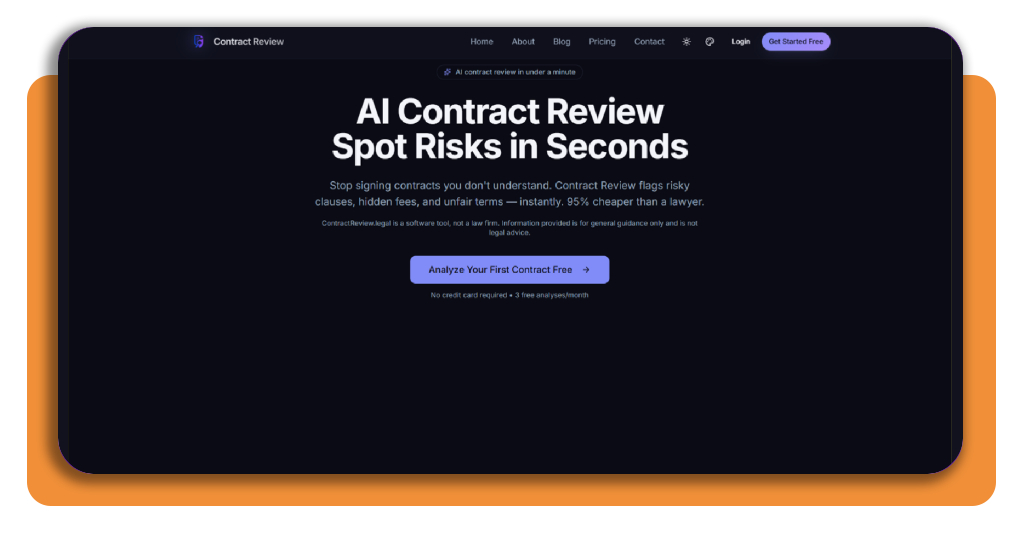
On the Contract Review website, you’ll see a bold headline promising fast contract analysis, alongside a short explanation of how the tool spots risky clauses and unfair fine print.
Scroll past the headline until you spot a bright purple button on the page, then click ‘Get Started Free’ to move forward and create your brand new account.
Step 2: create your free account
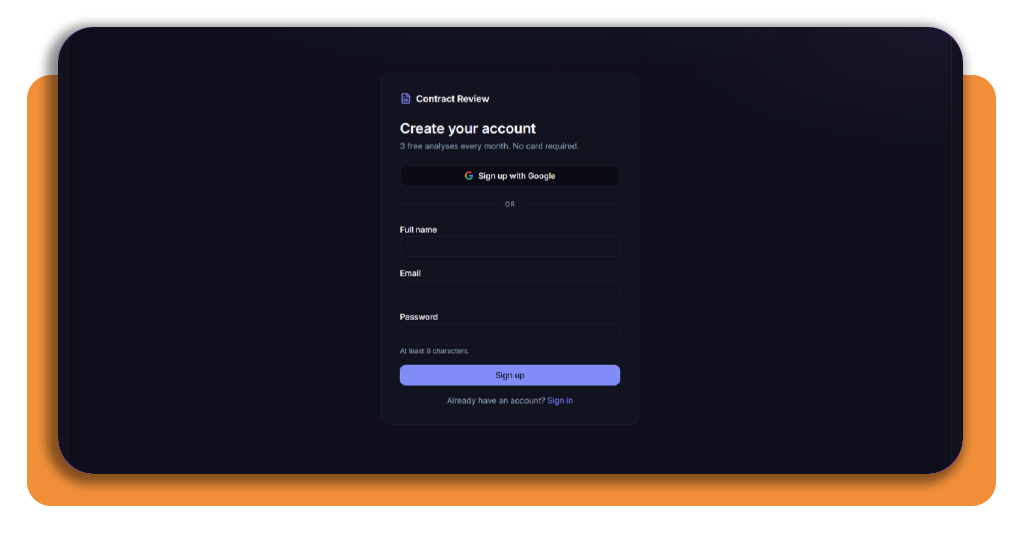
The signup page offers two paths forward, letting you sign up fast through Google or fill in your full name, email, and a password with 8 characters minimum.
Once you submit the form, the platform creates your profile without asking for payment details, and you land straight on your brand new personal dashboard ready for review.
Step 3: open and browse through your dashboard
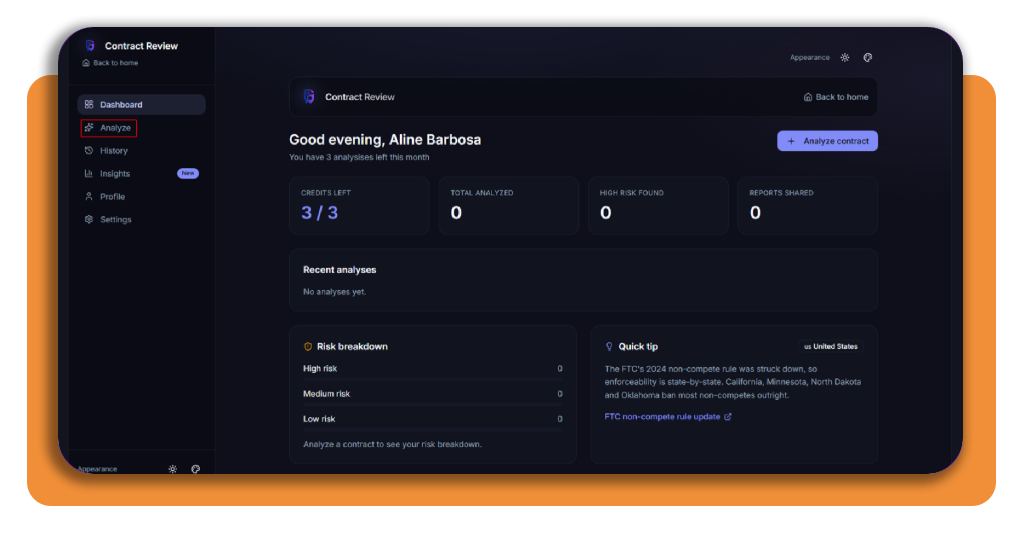
Your dashboard greets you by name and shows a quick overview, including credits left for the month, contracts analyzed to date, and any flagged high-risk agreements found.
Below those numbers, a colorful risk breakdown chart separates your contracts into high, medium, and low categories. To analyze your first contract, click on ‘Analyze’.
Step 4: upload your contract file
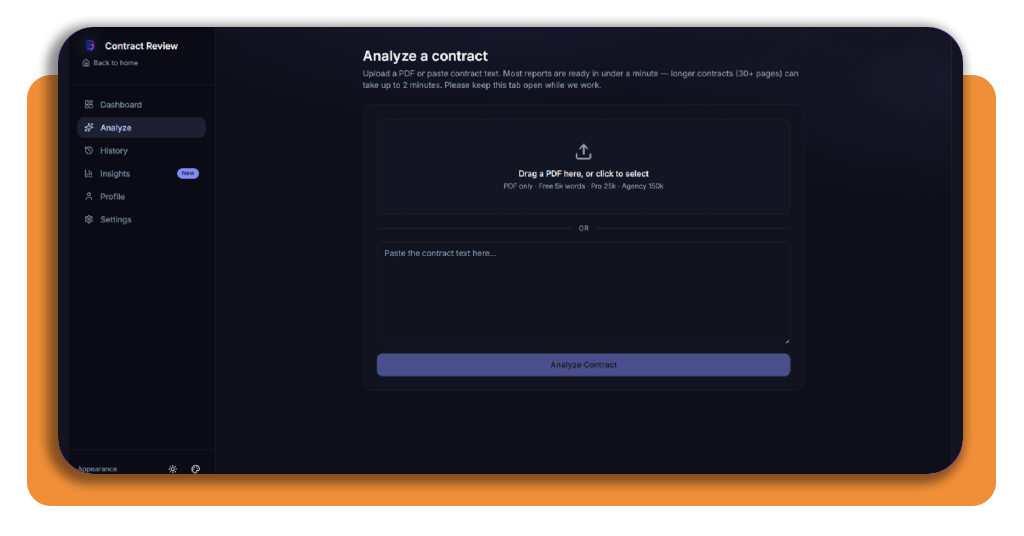
This next page lets you drag a PDF into a dotted box or paste your full contract text into a wide field below, ready for the AI to scan. Once you upload the contract, click on ‘Analyze Contract’.
Free accounts handle documents up to 5,000 words, while Pro and Agency plans stretch that limit further, giving you room to avoid legal scams hidden in longer agreements.
Step 5: open and analyze your risk report
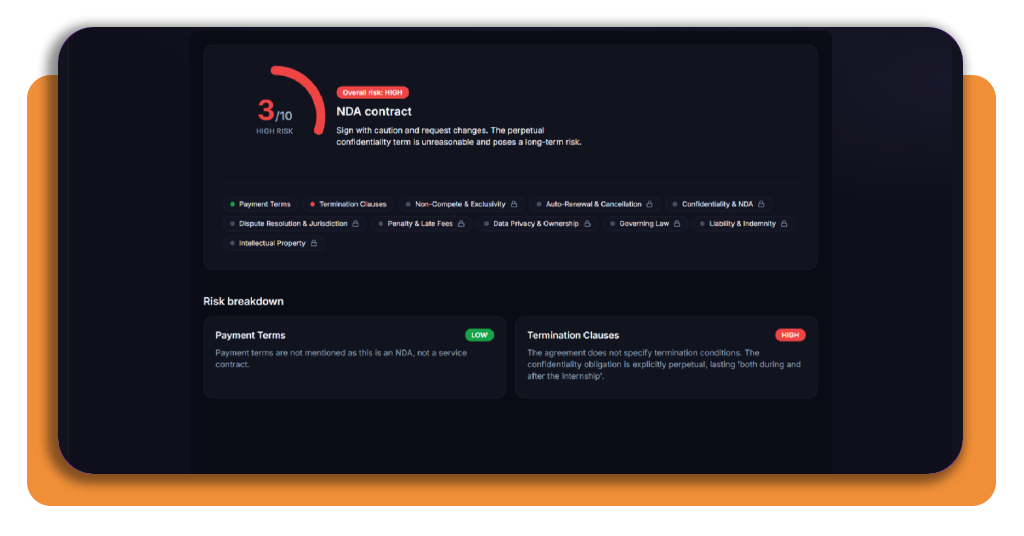
Your finished report opens with a bold score out of 10, alongside a short verdict explaining whether the agreement leans safe, cautious, or too financially risky for you.
Below the score, separate tabs detail each clause category, and clicking any one reveals a short explanation labeled low, medium, or high risk for that specific section.
Top legal aid networks and tools
Sometimes an AI tool spots trouble in your contract, but you still need a real person to walk you through your options and explain your specific situation.
Several organizations across the country connect you to affordable legal support, court forms, and research tools built for people without a law degree or a personal attorney.
Having a few trusted names saved as a backup can turn a stressful contract dispute into a manageable problem, and it helps you avoid legal scams when situations get complicated.
Scale Justice links you to help
Scale Justice built a network connecting you to legal aid organizations, court systems, and community groups across the country, all working toward equal access to justice.
Their platform links you to resources like LawHelp.org and Justicia Lab, giving you referrals based on your state and situation instead of leaving you to search blind.
Law Help Interactive drafts your paperwork
Law Help Interactive helps you complete legal documents without hiring an attorney, walking you through a short questionnaire that fills in court forms based on your answers.
Their state-by-state form finder connects you with trusted local partners, and using verified resources like this one helps you avoid legal scams tied to shady document mills.
Clio Library powers professional legal research
Clio Library gives access to over 1 billion documents, spanning case law, statutes, and regulations from more than 100 countries across the globe.
Attorneys rely on daily updates from courts and agencies, along with citation-tracking tools that show how judges interpret precedent across jurisdictions and practice areas.
Best identity theft protection tools
Bad contracts aren’t the only threat lurking around your personal information. Stolen data can open credit lines and drain accounts without you noticing right away.
Protecting your identity matters just as much as reading contracts carefully, and a few dedicated tools help you avoid legal scams tied to leaked personal data online.
Building a habit of monitoring your accounts and personal details keeps criminals from exploiting gaps most people never think to check until real damage happens.
Surfshark Alert monitors your data everywhere
Surfshark Alert scans the internet for your leaked passwords, email addresses, and credit card numbers, sending you a warning the moment your information surfaces somewhere unsafe.
Their dark web monitoring digs into hidden corners of the internet where stolen data gets traded, giving you a window to secure your accounts before criminals act.
Incogni erases you from data brokers
Incogni sends removal requests to over 420 data broker sites on your behalf, scrubbing your name, address, and phone number from public databases criminals often exploit.
Cutting off these sources helps you avoid legal scams tied to stolen personal data, since fraudsters rely heavily on broker sites to build convincing fake identities.
Identity Guard® restores your stolen identity
Identity Guard® keeps watch over your Social Security number, driver’s license, and bank accounts, alerting you fast whenever suspicious activity pops up across any of them.
Their recovery team steps in if theft happens, offering coverage up to $1 million alongside support agents who help you reclaim your name and your finances.
Read every contract like a lawyer would
Every contract you sign carries some risk, but you don’t have to face confusing clauses or hidden fees without support or a clear path forward.
In this guide, Insiderbits showed you how Contract Review handles a contract’s risky terms, how legal aid networks step in, and how identity tools help you avoid legal scams.
Keep reading our Insiderbits articles for more practical advice on staying safe legally and protecting your personal information across every corner of your life.