Those minutes you spend scrolling through social media could be paying you back instead. Side hustles that run on your phone can turn that idle time into store credit and spendable perks.
In this Insiderbits article, you’ll meet Swagbucks, an app where surveys, games, and shopping earn points and real money. Read on to see how a few taps can fund your next weekend plans.

4.4/5
Which is the best app for easy side hustles and instant extra income?
Swagbucks (Android | iOS) is a free rewards app from Prodege that pays you in points called SB. Points land in your balance as you finish tasks and wait until you use them.
Advertisers and game studios pay the app for attention, and the platform passes a portion of that spending to members as rewards, funded by brand budgets and not by your wallet.
Swagbucks (Android | iOS) skips the startup costs that come with many side hustles and lets you earn whenever a gap opens between work shifts, classes, and family time.
Key features within the Swagbucks mobile platform
- Welcome bonus: join and activate the $10 bonus in Swag Ups, then spend at least $25 at a Swagbucks Shop store within 30 days of signing up to redeem it;
- Cash back shopping: rates vary by retailer at stores such as Kohl’s, Macy’s, Lowe’s, and Best Buy, and merchant pages list terms before you buy;
- Receipt scanning: photograph your grocery receipts to collect earnings and coupons on everyday purchases, with no scissors or paper clippings needed at the checkout lane;
- Privacy controls: your data travels encrypted, and you can submit a deletion request whenever you choose to close the account and move on from the app.
Turn spare minutes into rewards
Survey lists let you pick a length that fits your day and compare pay, and hundreds of options appear daily, with some ending early when your answers miss the mark.
Mobile games reward you when you reach goals the developer sets, while daily trivia squeezes quick rounds into lunch breaks and commutes for side hustles you can pause between errands.
Redeem points for PayPal cash or gift cards
Redemption lets you choose either PayPal cash or gift cards from brands like Amazon, Apple, Starbucks, Uber, and more, plus Mastercard and Amex cards for routine purchases.
Points convert at 100 SB for $1, and you decide whether to redeem for a small treat like a phone case right now or keep stacking toward a larger payout.
Step-by-step: how to start making extra cash on your phone today
A phone, a charged battery, and a connection cover the setup, and you can collect your first Swagbucks (Android | iOS) points before that sitting ends, with no gear or fees to cover.
Setup takes the bulk of the effort, and once your account is ready, side hustles like this one slot into waiting rooms, school pickups, and evenings already on your calendar.
Pick a quiet spot, silence incoming calls, and block out time for a nice session. Interruptions can end a survey midway, and a lost connection can erase progress you made.
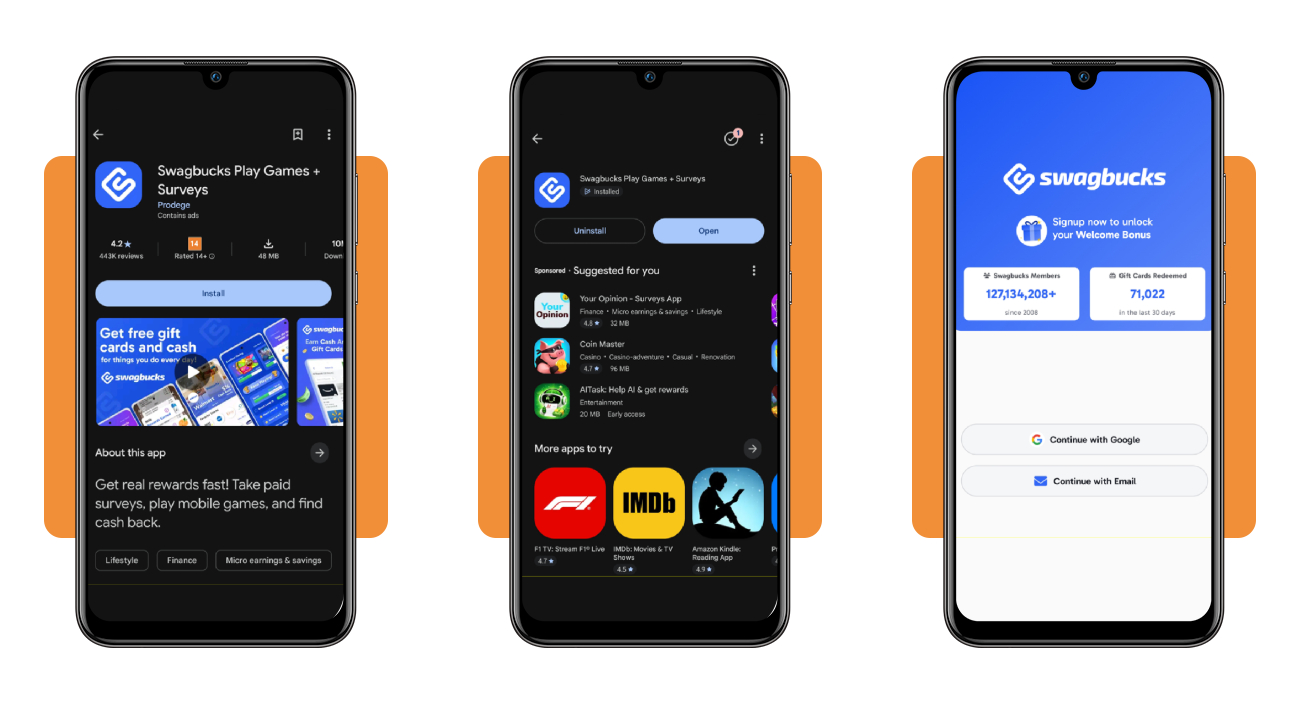
Step 1: download Swagbucks and sign up
Search for ‘Swagbucks’ in the Google Play Store on Android or the App Store on iOS, and install the version published by Prodege to sidestep lookalike apps with similar names.
Tap ‘Continue’ through the welcome screens, choose ‘Google’ or ’email’ to create your account, allow notifications, and confirm your email when the verification message arrives.
Step 2: answer a survey to get started
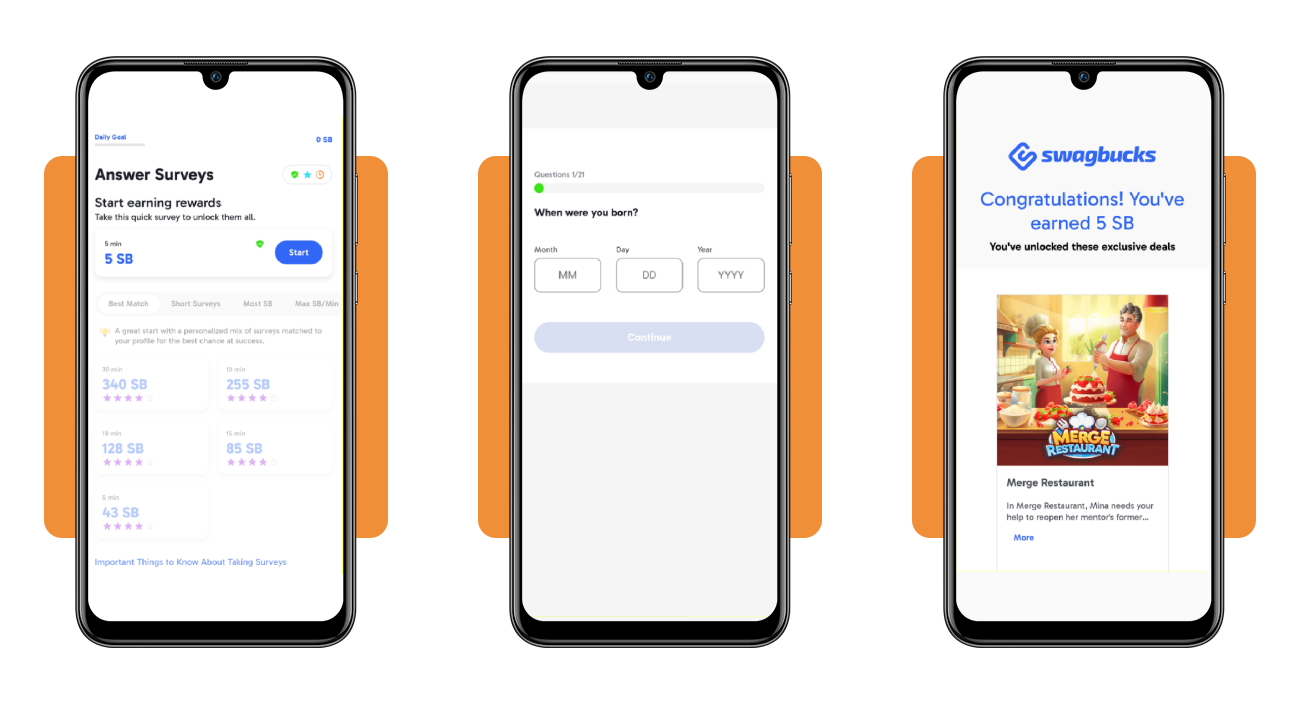
Open the ‘Surveys’ tab, tap ‘Start’ on the starter survey, and press ‘I agree’ on the short data consent prompt that lets Swagbucks (Android | iOS) match surveys to your interests.
Honest answers to the profile questions shape the surveys you see next, and finishing the starter survey opens the full list, officially turning the app into one of your side hustles.
Step 3: join surveys and play games to earn more
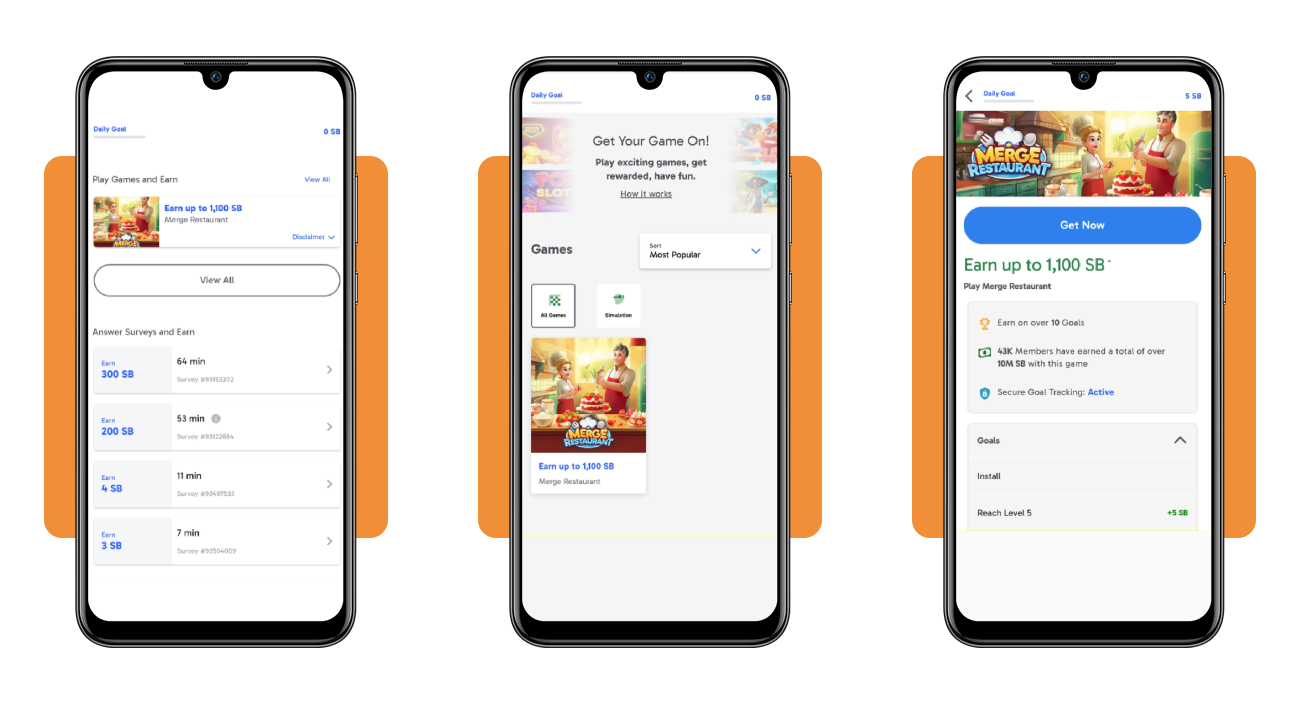
Start with the ‘Best Match’ filter that ranks surveys by your profile, and save the long, high reward listings for evenings when you can finish without interruptions or lost progress.
Switch to the ‘Games’ tab, read an offer’s disclaimer for its requirements and expiration date, and install only the games whose reward tiers match the free time you can spare.
Best digital wallet apps
Money from side hustles needs a landing spot, and a digital wallet gives those payouts a home on your phone where you can check balances, move cash, and spend it.
These apps hold your money, pay at checkout from your phone, and send cash to close friends, and Revolut, Cash App, and PayPal all handle those basics with different strengths.
Swagbucks (Android | iOS) pays out redeemed points in PayPal cash, and you can leave that balance in the app or move it to a linked bank account when a bigger purchase comes up.
Spend smarter with Revolut cards and tools
Revolut (Android | iOS) offers physical, virtual, and one-time cards that work with Apple and Google Pay, and a disposable card number keeps your main card details out of risky checkouts.
Budgeting tools sort your spending by category, stock purchases start at $1, and over 25 currencies let you hold foreign cash for trips, with 55,000+ in-network ATMs for withdrawals.
Send money in seconds with Cash App
Cash App (Android | iOS) sends money to friends for free, and the Visa debit card pays from your balance at checkout, while direct deposit can land paychecks up to two days early.
When income from side hustles comes in uneven lumps, overdraft coverage up to $200 for eligible accounts and automatic spare change round-ups keep your week steady.
PayPal keeps your payments flexible
PayPal (Android | iOS) stores your cards and bank account behind a secure login, and you pick a funding source at checkout while the merchant never sees your card number or bank details.
You can send money to over 110 countries, split eligible purchases with Pay in 4, and claim Purchase Protection on orders that never arrive, while package tracking follows your delivery.
Top budgeting tools for flexible gig workers
Income from side hustles arrives in uneven amounts, and a budgeting tool helps you set money aside for rent, taxes, and weekly groceries before a slow week hits your account.
A budget app reads your transactions, sorts them into categories, and shows what’s left to spend, and the best ones adapt when a paycheck lands late or skips a month.
Choose a tool that fits your rhythm, whether payouts land weekly, clients pay monthly, or shifts overlap, and let it show where your money goes before the next bill arrives.
Plan uneven paychecks with YNAB
YNAB asks you to assign a job to payouts, invoices, and tips as they land, and bills get first claim on that incoming money while the leftover covers what you want.
Pricing runs $14.99 per month or $109 per year, and a 34-day free trial needs no card, with resources written for irregular income to guide you through your first budget.
Monarch shows all your accounts together
Monarch connects your bank, card, loan, and investment accounts through more than 13,000 institutions, and balances and net worth appear with no ads cluttering your screen.
After a 7-day trial, the plans cost $14.99 per month or $99.99 per year, and either plan covers tracking the income from side hustles beside your regular paycheck, rent, and bills
Lunch Money keeps budgets simple across currencies
Lunch Money handles several currencies in one budget, and that helps when clients pay you in dollars, euros, or pounds while your rent and groceries stay in your home currency.
The platform costs $10 per month or $100 per year, a 30-day trial needs no card, and your price stays locked for life once you subscribe to a paid plan.
4.4/5
Put your idle minutes on the payroll
Swagbucks (Android | iOS) turns spare time into points you can swap for PayPal cash or gift cards, and your first survey fits into a quiet coffee break or a long bus ride.
In this article, you learned how to sign up and earn points, where to park your payouts, and how budgeting apps keep your side hustles under control when income swings.
Make technology work for you! Keep browsing Insiderbits and pick up plain advice that saves you time, protects your wallet, and builds your confidence to try ideas on your own.