

A surprising amount of personal data can circulate through broker databases without you realizing it. Trying to remove personal info starts with finding where those records are stored.
Incogni (iOS/Android) automates removal requests and tracks the process gradually, helping you to reduce how much personal information continues circulating through data brokers.

4.3/5
Which is the best app to automate personal data removal from data brokers and websites?
If your personal details appear across multiple data broker databases, removing them one by one can be a lot of work.
Because of that, we will highlight Incogni (iOS/Android), an app made to handle much of that process automatically by sending removal requests to data brokers on the user’s behalf.
That makes it a better fit for ongoing data broker cleanup than manually searching dozens of sites and submitting separate opt-out forms.
The service focuses on companies that collect and resell personal information.
However, Incogni (iOS/Android) doesn’t remove social media posts or every Google result tied to your name. For those, it may require separate action through the original platform.
To reinforce, where Incogni (iOS/Android) stands out is in reducing the workload involved in broker removal.
And if you want to see how the process works in more detail, Incogni explains its personal data removal service and how requests are sent to participating data brokers.
So, you are trying to remove personal info from commercial databases, that automation is the main reason to consider it over a fully manual approach.
Key features within Incogni
As we just mentioned, Incogni’s (iOS/Android) main feature is automated data disposal to remove personal info.
After setup, the service sends removal requests to supported data brokers and follows up as those companies respond.
The platform also tracks request status, so users can see which brokers have been contacted, which removals are still pending, and which have already been completed.
Another important feature is the recurring remove personal info.
Since personal data can reappear, the app can send new requests when supported brokers collect the information again.
In addition, Incogni (iOS/Android) service covers different categories of data brokers, and that includes companies involved in marketing, people search, risk assessment, and other forms of personal data collection.
Still, Incogni (iOS/Android) has a limitation and does not erase every trace of someone from the internet.
Its role is reducing exposure through supported broker databases, while social media posts and other public content may require separate action.
Step-by-step: how to scan for exposed personal records
Incogni includes a scanner that can surface websites where your personal information appears.
From there, you can review each exposure and decide which records you want the service to remove. Check how to do it:
Step 1: open the Exposures section
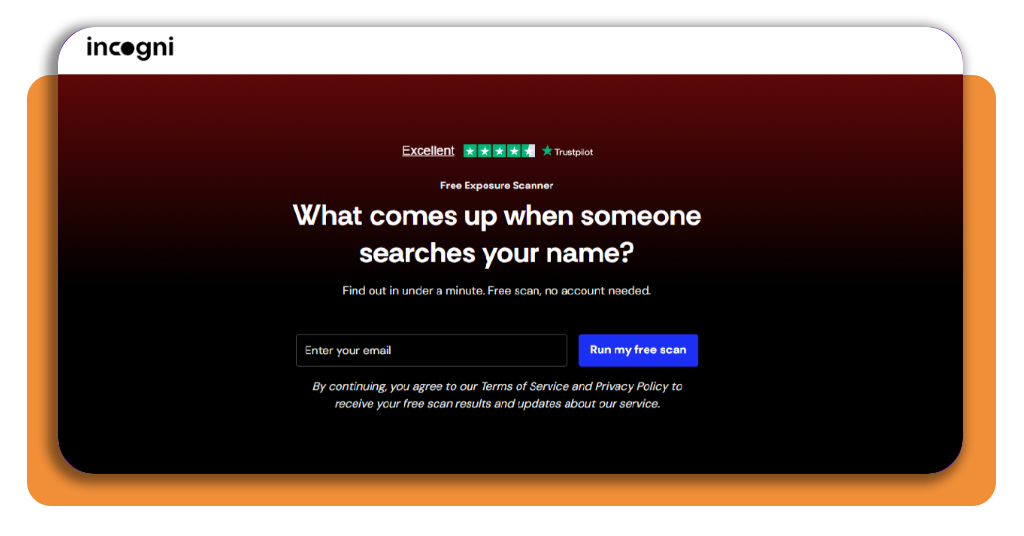
Firstly, download and install Incogni (iOS/Android), or you can access the official website as well. After that, go to the ‘Exposure Scanner’ page.
Step 2: review the records Incogni found
Enter your email, and click on ‘Run my free scan’. Then, you will receive a code on your email to verify your account.
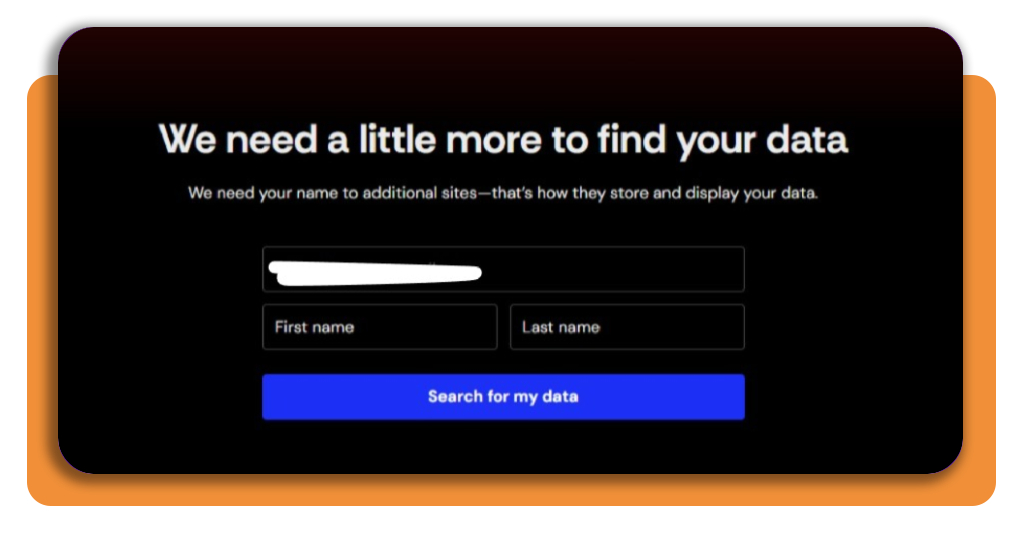
After verifying, Incogni will ask for some information about you.
Step 3: choose which exposures you want removed
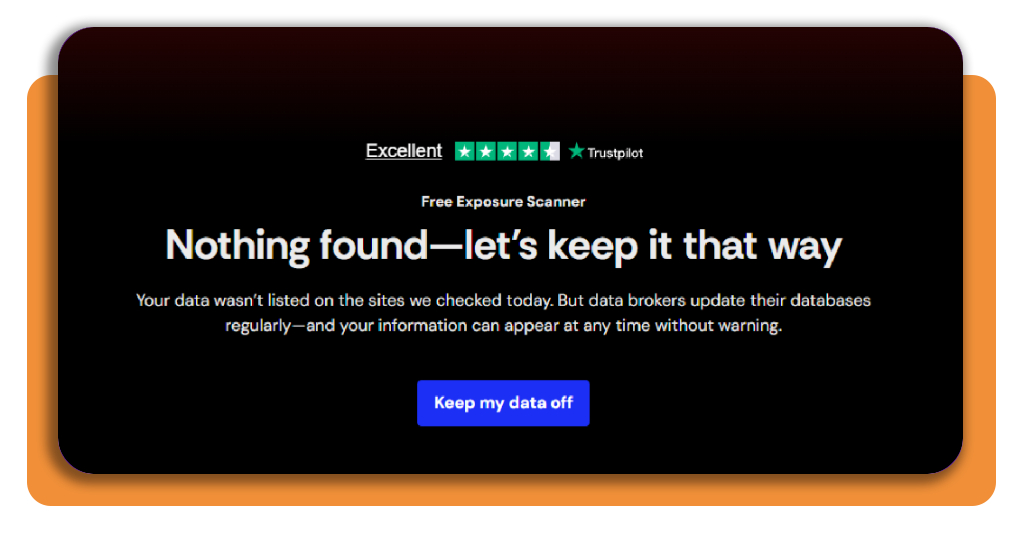
In case you find a record that matches you, select ‘Remove me.’ In that case, you need to click on ‘Keep my data off’, and the next step will be to select a plan that makes sense for you.
If nothing is found, you don’t need to do anything else.
Top national identity theft protection services
In order to remove personal info and monitoring for identity theft, you need to solve different problems.
As Incogni focuses on reducing personal information held by data brokers, identity theft protection services watch for signs that someone is already misusing your identity.
LifeLock
For identity theft protection, LifeLock is our first recommendation because it combines identity monitoring with credit protection and broader digital security through Norton.
Depending on the plan, it can monitor credit activity, dark web exposure, financial accounts, and other signals associated with identity misuse.
Additionally, its higher-tier plans include identity theft insurance and restoration support.
That makes it more relevant after suspicious activity appears, rather than simply reducing how much personal data is publicly available.
Aura
Aura takes a broad approach by combining identity monitoring, three-bureau credit monitoring, dark web checks, and antivirus and VPN access.
It also includes data broker removal features, so there is some overlap with Incogni.
The difference from Lifelock, is that Aura packages removal together with ongoing fraud and credit monitoring.
Other apps to shield yourself online
As you can see, when you remove personal information from data brokers, it addresses just one part of digital privacy.
It’s highly recommended to use other apps to limit the amount of information exposed during browsing.
Proton VPN
Let’s begin with Proton VPN (iOS/Android), a platform that encrypts your internet connection and hides your real IP address from the websites you visit.
Alongside, it can also reduce tracking tied directly to your connection, especially on public or unfamiliar Wi-Fi networks.
Its apps are available across major desktop and mobile platforms, and the service offers a free tier for people who do not need the additional features of a paid subscription.
Bitwarden
Bitwarden (iOS/Android) approaches privacy from the account-security side.
The password manager stores credentials in an encrypted vault and makes it easier to use different, strong passwords instead of recycling the same login across multiple services.
That becomes particularly important after a breach. If one password is exposed, unique credentials can prevent the same information from opening several other accounts.
Remember that privacy protection begins with knowing whether your information has already been exposed.
To consolidate your data security, this data leak scanner Insiderbits guide covers another way to check for compromised personal data before deciding what additional protection you need.
4.3/5
Take control of what stays visible
If you want to remove personal information online, you must know that it is rarely a one-time cleanup. Data can reappear and keep you exposed even after a removal request succeeds.
Incogni (iOS/Android) can reduce that workload by automating broker removals and tracking exposures.
While the other apps and tools recommended above are helpful for identity monitoring, passwords, encrypted messaging, and private browsing cover different risks.
The best strategy is always layered this way: remove what you can, monitor what remains, and make future exposure harder.
Enjoyed this article? Save Insiderbits to your favorites and discover the most useful tech tips.