
Ever whisper a weekend getaway to a friend, then watch flight deals flood your phone? An online tracker blocker stops data collectors behind that coincidence and shields your AI chats.
Insiderbits created this guide on DuckDuckGo, the browser that blocks trackers and keeps AI optional. Read on to set up protections and browse without an audience watching.

4.8/5
Which is the best free app to block online trackers and stay safe online?
DuckDuckGo (Android | iOS) is a free browser that opens pages and videos while collecting almost nothing about you, and it doesn’t ask you to sign up for an account or share your email.
Behind the scenes, it stops advertisers’ trackers from loading and masks the search and device traits that sites piece together to recognize you as you move between pages on the web.
With DuckDuckGo as your online tracker blocker, the protection starts working from the first time you use it, and there are no menus to dig through or settings to hunt down.
Key features within the DuckDuckGo Private Browser
- Cookie banner control: consent pop-ups disappear from sites as the app picks the privacy-friendly choice for you, limiting the cookies a page can store about you;
- HTTPS upgrades: sites load over an encrypted connection, shielding the passwords and messages you send from snoopers on public cafe and airport networks;
- Email protection: custom @duck.com addresses hide your real inbox from senders and sign-up forms while stripping hidden email trackers out of the messages you receive;
- Secure sync: turn it on to copy your bookmarks and passwords across your devices in protected form and keep logins within reach after a phone upgrade.
Search without leaving a digital trail
Every lookup stays private, from weekend plans to medical questions, and the company earns its money from ads shown on results instead of selling your queries to data brokers.
Results sort themselves into “All”, “Images”, “Videos”, “News”, and “Maps” tabs, and filters narrow the list by region, date, and image size, plus a toggle that hides AI-generated pictures.
Chat with AI without giving up privacy
Duck.ai lets you chat with AI models from other companies as your prompts pass through anonymization, and nothing you type trains those models or links back to who you are.
“Search Assist” drops short AI summaries above the links and stays optional if you prefer plain listings, while an online tracker blocker keeps your worries out of ad profiles.
Step-by-step: how to block web trackers and secure your mobile browsing
Every website you open on your phone passes your visit to ad networks that stitch those visits into a profile, and the browser you use decides how much they receive.
Fixing that takes a handful of quick decisions about search, privacy, and screen layout, and you can make them in the order the app presents them without reading any manual.
Using DuckDuckGo (Android | iOS) as your online tracker blocker requires no advanced settings, and the app applies its protections as you answer questions about how you browse.
Step 1: download DuckDuckGo on your device
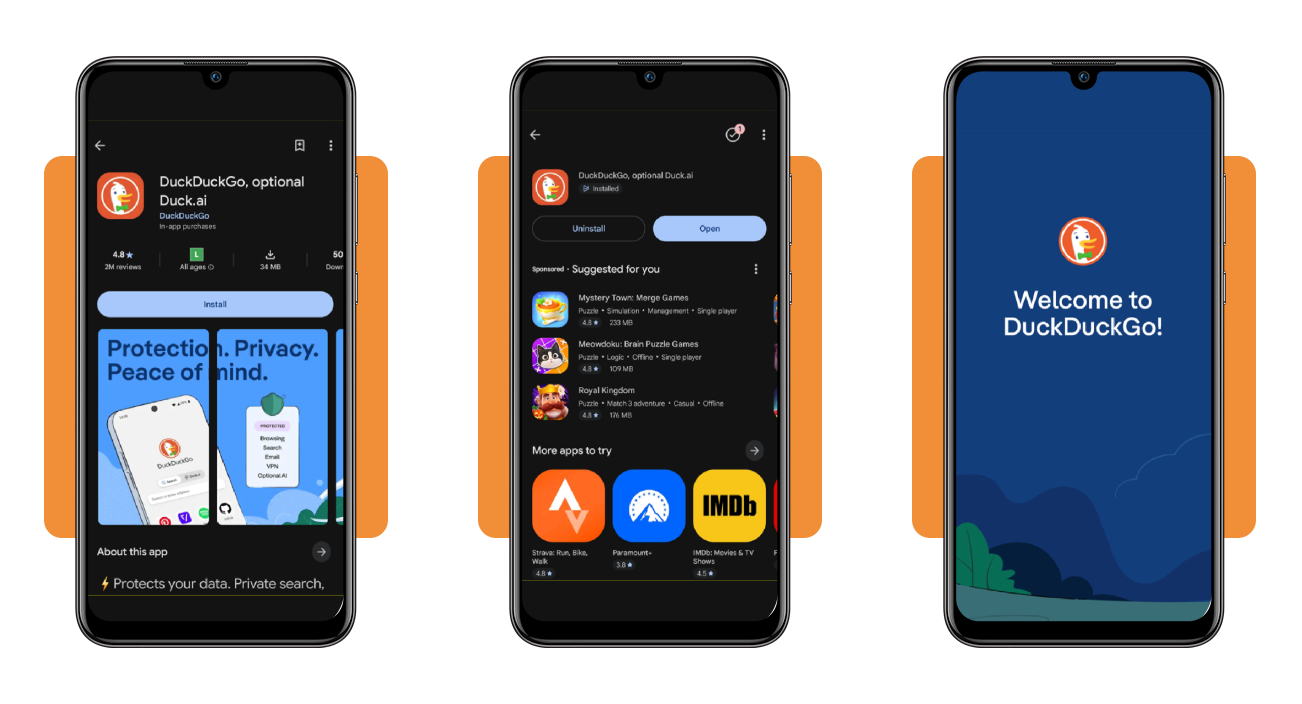
Open Google Play on Android or the App Store on iOS, then type “DuckDuckGo” into the search bar at the top of the store screen to find the free app.
Confirm the publisher reads DuckDuckGo, tap “Install” on Android or “Get” on iOS, and open the app after the free download finishes on your phone to reach the welcome screen.
Step 2: set your protections and preferences
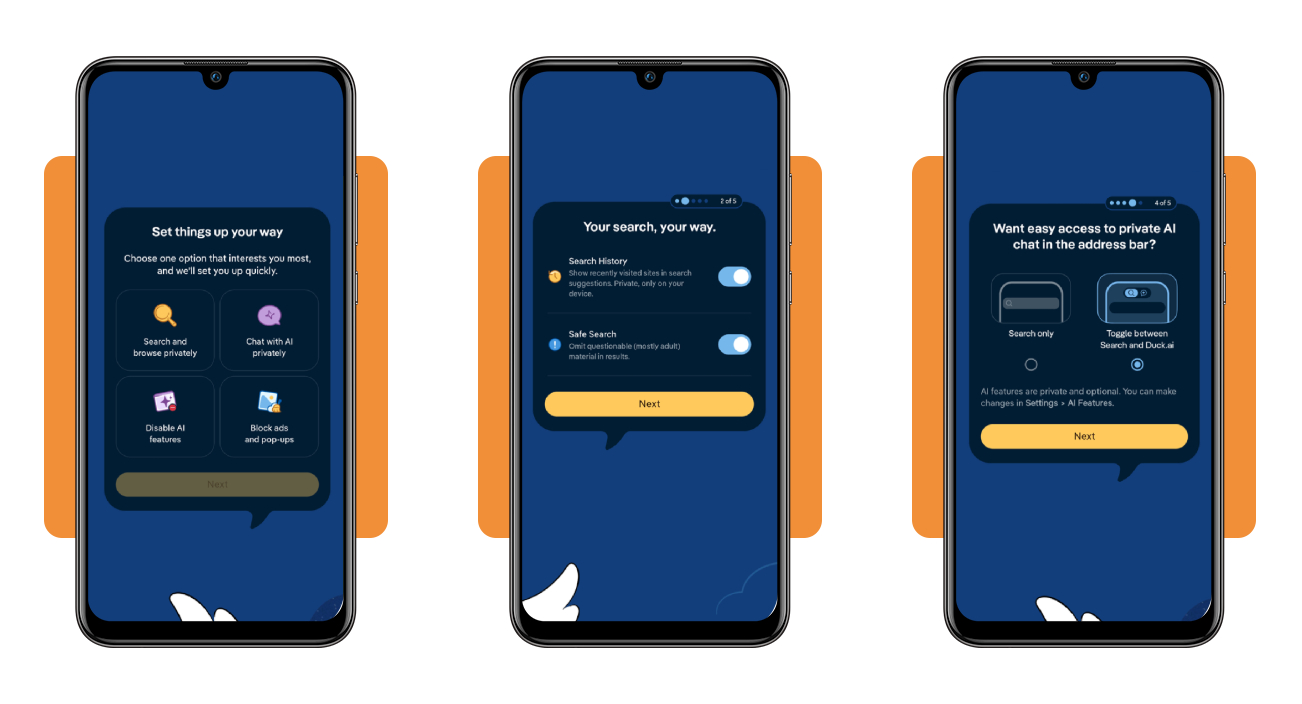
Pick an interest, such as searching privately or blocking ads and pop-ups, then set the app as your default browser and decide whether your “Search History” and “Safe Search” stay on.
Choose “Search only” for the address bar if you want a plain online tracker blocker, or select the “Duck.ai” toggle, then place the bar at the top, bottom, or split.
Step 3: use the shield and Fire Button
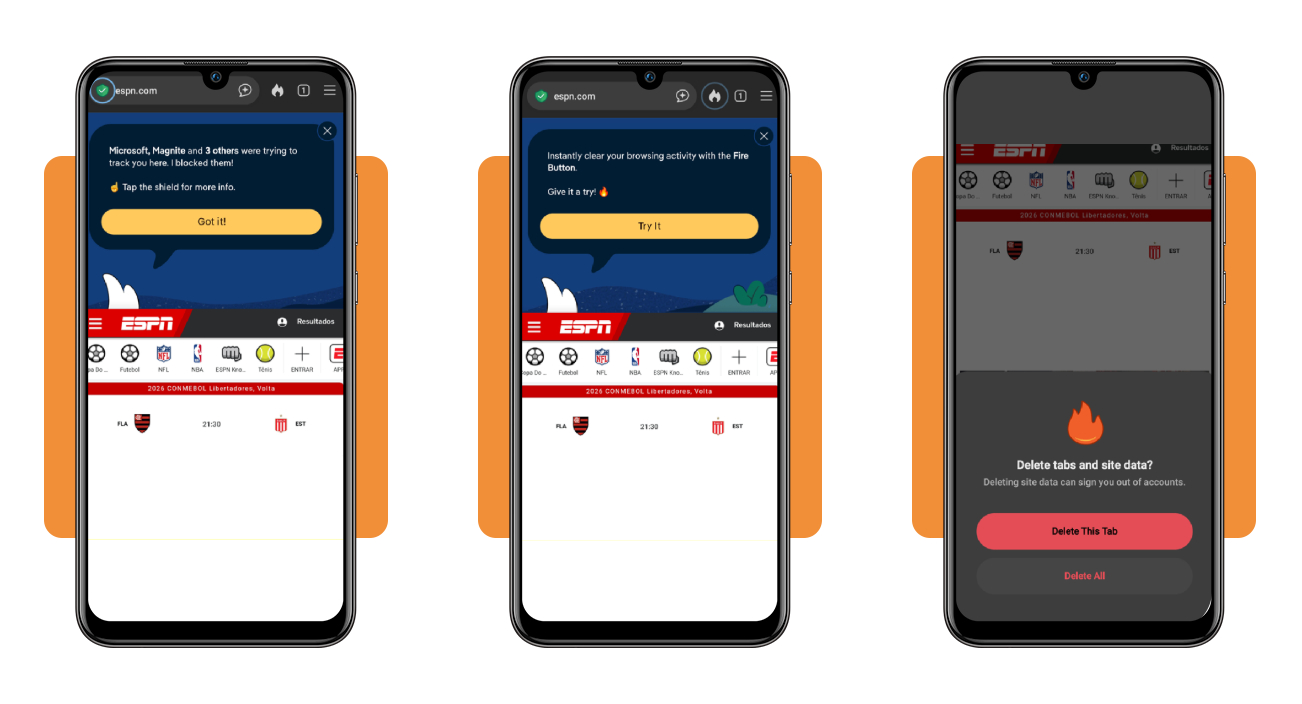
Visit any site and tap the shield in the address bar to see how many trackers the app blocked, whether the connection is encrypted, and the third-party requests that loaded.
When you finish browsing, tap the “Fire Button” and choose “Delete This Tab” or “Delete All” to erase every tab, which is a move that can sign you out of all accounts.
Top secure VPN services
Your internet provider sees every address your phone visits, and strangers on shared hotel or gym Wi-Fi can watch the same traffic until a VPN wraps it in protective encryption.
A browser works as an online tracker blocker for the pages you open, while a VPN masks your IP address across every app on your phone, from streaming to banking.
Check a provider’s logging policy, server spread, device limit, and refund terms before you pay, and skip any service that won’t state in writing what it does with your data.
Try Bitdefender Premium VPN before paying
Bitdefender Premium VPN offers a seven-day free trial that lets you test the connection speeds and server locations on your phone before you commit to a paid subscription plan.
It runs on more than 3,000 servers across 100 countries, protects up to 10 devices with AES-256 encryption, and follows a no-logs policy covering your browsing activity.
Proton VPN privacy backed by Swiss law
Proton VPN works under Swiss privacy law and outside the major intelligence-sharing alliances, and independent audits plus open-source apps verify its no-logs promise.
The free plan covers one device in five locations, and Plus costs $3.49 monthly on two-year plans, adding 20,000 servers in 140 countries that complement your online tracker blocker.
Surfshark covers unlimited devices on one account
Surfshark lets you connect unlimited devices on one account, covering phones, laptops, tablets, smart TVs, and consoles, and those of roommates or relatives who join you.
Its 4,500 servers in 100 countries run on RAM only, and One plans add breach alerts, “Alternative ID” for sign-ups, and antivirus, all backed by a 30-day money-back guarantee.
Best identity theft protection tools
Thieves who obtain your Social Security number and birth date can open credit cards, file tax returns, or take out loans in your name and leave you to fix it.
Even with an online tracker blocker on your phone, a breach at a retailer or lender can expose your personal and financial information, which is a risk that no browser setting can prevent.
These services watch your credit reports, the dark web, and public records for signs of misuse, then send alerts, and help you recover if someone does use your information against you.
Aura protection that covers the whole household
Aura offers Individual, Couple, and Family plans priced from $12 to $32 a month on annual billing, and the Family tier protects every adult and child under one shared account.
A 14-day free trial lets you test the service, and the provider removes your data from more than 425 data broker sites while insurance against losses reaches $1 million per adult.
LifeLock restoration help backed by a guarantee
LifeLock assigns a dedicated restoration specialist to repair your records if thieves strike, and its guarantee covers up to $1 million for lawyers and experts hired to handle your case.
Core, Advanced, and Total plans run $10.42, $16.67, and $29.17 monthly on annual billing, covering threats an online tracker blocker can’t reach, such as credentials sold on the dark web.
Identity Guard monitoring for a lower monthly price
Identity Guard starts at $7.50 a month for the entry-level Individual Value plan, while Total at $16.67 and Ultra at $25 add extra monitoring layers as your needs grow.
Family plans start at $12.50 a month with $5 million in insurance, individual plans carry $1 million, and a 60-day money-back guarantee lets you cancel if the service disappoints you.
4.8/5
Make your phone a hard target for trackers
DuckDuckGo (Android | iOS) gives you a quiet corner of the internet where your searches, chats, and browsing stay your business, and it costs nothing to try on the phone.
In this guide, you learned how to install an online tracker blocker, adjust its settings, and pair it with a VPN and identity protection that guard what a browser can’t.
Staying protected online matters now more than ever, and Insiderbits has more articles waiting for you, with easy ways to spot scams, protect your family, and stay completely safe online.