

Steady work and a modest yearly income could qualify you for tax credit dollars that never reach your bank account unless a reliable EITC maximizer spots them before you submit a return.
In this guide, Insiderbits explores MyBlock from H&R Block, covering the moves that boost a refund. Dig in and collect the full payout that your job has earned for you and your family.

4.6/5
Which is the best EITC maximizer app?
If you want the Earned Income Tax Credit on your return, MyBlock (Android | iOS) deserves first place. H&R Block built this free app to manage the tax side of your busy life.
The app works as an EITC maximizer by pairing with H&R Block’s filing tools that check your credit eligibility, while the app handles prep work and supports you through the refund.
The company has prepared a billion tax returns across 70 years, and that experience stands behind MyBlock from the first form you collect to the deposit in your bank account.
Key features within MyBlock
- Personalized organizer: answer a handful of questions about your job and income, and the app builds a checklist of the forms you need before filing day;
- Pro conversations: secure messaging, screen sharing, and video chat link you with an H&R Block tax professional whenever a credit question pops up during your prep;
- Appointment planning: schedule or reschedule a visit with a tax preparer in person or virtually, then share your documents before the meeting begins and join prepared;
- Refund estimate and status: preview an estimated refund before you file, then monitor your return’s status inside the app once you submit it to the IRS.
Stay tax-ready all year long
You don’t need to file inside MyBlock (Android | iOS) to use it, and you can photograph a W-2, 1099, or donation receipt and store it in your account the day it arrives.
Previous tax returns stay available in your account, making the platform a steady EITC maximizer by showing you what has changed in your income, filing status, or dependents.
Guarantees that back your maximum refund
If H&R Block or its software makes an error, the company covers penalties and interest. A separate audit promise gives you steps to follow if the IRS questions your filing.
If you find an error that affects your refund, H&R Block refunds your prep fee, files the amended return at no extra cost, and names your price before work starts.
Step-by-step: how to calculate your EITC eligibility
Calculating your eligibility means comparing income tables, dependent rules, and filing status. H&R Block’s questions run that comparison while you share facts about your work and family.
An account anchors the process, and tying your income and family details to that profile turns MyBlock (Android | iOS) into a capable EITC maximizer that flags the credits you qualify for.
The free version covers W-2 income, unemployment, and student loan interest, while freelance work, rental income, or itemized deductions move you into a paid product with extra forms.
Step 1: download the app or visit the website
Open Google Play on Android or the App Store on iOS, search ‘MyBlock’, and select the listing from H&R Block, then install it and launch it when the download finishes.
If you’d rather work on a computer, open your web browser, search ‘H&R Block’, and select the official website to reach the ‘Taxes’ menu and the ‘MyBlock’ sign-in button.

Step 2: create your free account
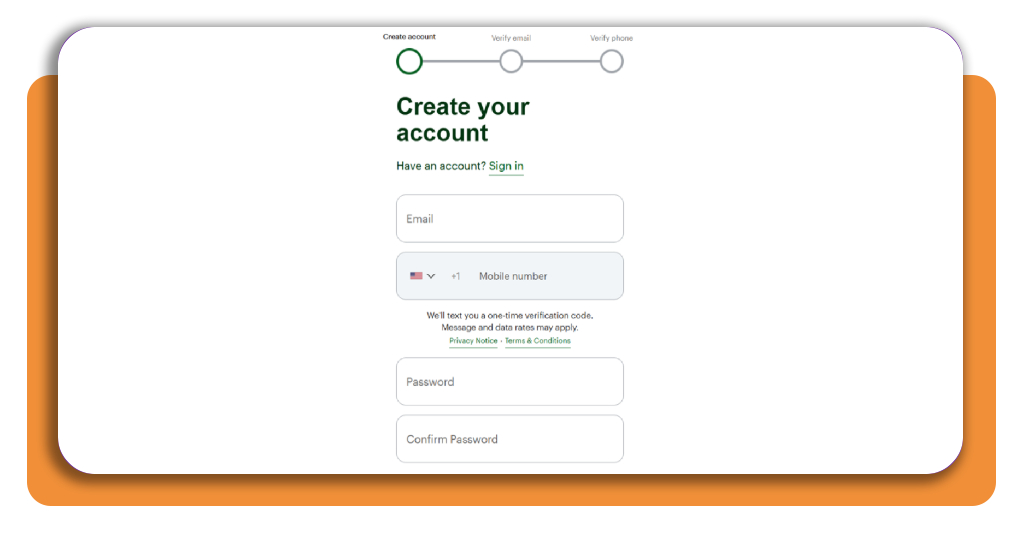
Select ‘Create Account’, then enter your email address and mobile number and set a password. Retype the password to confirm, read the terms, and check the agreement box to continue.
Enter the codes that H&R Block sends to your email and phone, and your verified account becomes the home base for your EITC maximizer and keeps your filing progress saved.
Step 3: upload your documents and add dependents
Upload your W-2 and any 1099 forms by snapping a photo with your phone or adding a saved file from your computer, and the software fills in your income details.
Add your children and other dependents next, entering their names, birth dates, and Social Security numbers, along with the number of months they lived with you during the tax year.
Step 4: answer questions to see your EITC
Work through the questions about your job, earnings, filing status, and household members, matching your answers to the numbers on your tax forms and dependents you entered.
When the questions end, look for the ‘Earned Income Tax Credit’ in your results, then recheck your income and dependent entries if the credit amount looks off before you file.
Top tax preparation software
Filing with H&R Block is one option, and three other platforms deserve a look if you want a second EITC maximizer to confirm the credit amount on your tax return.
Free tiers draw their lines around dependents, credits, and income types, and those lines decide whether you file for $0 or move up to a paid plan with added forms.
Price tags, accuracy promises, and credit coverage vary across these alternatives, and lining all three up with your tax return reveals the best match for your W-2 income.
TurboTax offers free filing with EITC support
TurboTax asks simple questions about your job and family, then fills in the Earned Income Tax Credit and Child Tax Credit on the free edition when your return qualifies.
Seven years of guarantee coverage back your return, and that window gives you protection if the IRS questions the credit you claimed on your filing and asks you for proof.
TaxAct adds a $100K accuracy guarantee
TaxAct pairs its guided interview with a $100,000 accuracy guarantee, and the free federal edition lets you claim the EITC and the Child Tax Credit with all your dependents included.
The platform acts as an EITC maximizer once you enter your children’s details and income, and Xpert Assist lets you ask a tax expert to review those entries before you file.
TaxSlayer needs Classic to claim your EITC
The TaxSlayer free version leaves out dependents and the EITC, and that makes ‘Classic’ the starting point when you want the credit or plan to claim a child on your return.
This paid tier adds the EITC to a guided interview that builds your forms from your answers and e-files the finished return, keeping the credit calculation in the software’s hands.
How to track IRS refund status
Submitting your return starts a countdown, and the IRS lets you follow it from your phone or your computer with a status that moves from received to approved to sent.
Software that works as an EITC maximizer finishes its main job once it files your return, and the official IRS tools take over to tell you where your refund stands.
Keep your Social Security number, filing status, tax year, and refund amount from your return within reach, and the IRS tracker accepts them all without asking you to sign in.
Check your status a day after filing
Your e-filed return appears in the system 24 hours after you submit it, a prior-year return takes three days, and a mailed paper return takes four weeks to show up.
Open the IRS app or your online account to check refund status, or call the refund hotline at 800-829-1954, and switch on email notifications in that account for status updates.
Plan for the EITC refund hold in February
By law, the IRS holds any refund that claims the EITC until mid-February, and a claim for the Additional Child Tax Credit brings the same wait to your tax return.
File with an EITC maximizer as soon as the filing season opens, then budget your rent, bills, and any large purchases around a deposit that arrives after the hold lifts.
Handle delays and reduced refunds quickly
A missing signature, math error, amended return, or injured spouse claim can slow your refund, and you can check an amended return by calling the IRS automated line at 866-464-2050.
Past-due taxes or debts can reduce your refund; the Bureau of the Fiscal Service mails a notice, and you can ask the IRS to trace a lost or stolen check.
4.6/5
Leave no earned dollar unclaimed
MyBlock (Android | iOS) holds your forms, questions, and chats with a pro, and that puts the Earned Income Tax Credit within reach whenever your paycheck, family, or filing details change.
In this article, we explained how to check your eligibility, compare filing software, and follow your refund, with an EITC maximizer doing the math on your credit before you file.
Keep reading Insiderbits for more tips on tax returns, refunds, and credits, and you’ll spot extra savings, dodge filing mistakes, and walk into next tax season knowing what to expect.