
A car insurance comparison tool shows if the premium you have been paying still makes sense compared with current offers.
Let’s see how Jerry (iOS/Android) compares personalized quotes, reviews coverage, and which insurers and auto refinancing tools are worth knowing about when evaluating the cost of owning a car.

Which is the best car insurance comparison tool?
First of all, if we are talking about a useful car insurance comparison tool, it should do more than show a single advertised rate.
That’s because, the most important for drivers is showing how prices change with coverage limits, deductibles, location, driving history, and the insurer providing the quote.
In this guide, Insiderbits chose Jerry (iOS/Android) as our recommendation for this type of comparison.
The platform collects information about the driver and vehicle, then compares personalized auto insurance quotes from multiple insurers.
The app also lets users review coverage details, making it a stand out feature since a lower premium comes with different liability limits or optional protections.
If a better option appears, Jerry (iOS/Android) also assists with the switching process and policy cancellation.
The comparison itself is free, although the company notes that broker fees may apply in some states when a policy is purchased through the platform.
That makes Jerry (iOS/Android) useful for drivers who want to check whether their current premium is still competitive without contacting insurers one by one.
Key features within the Jerry mobile platform
Jerry (iOS/Android) features show how this platform goes beyond a basic quote search and is just a car insurance comparison tool.
That is done by keeping insurance comparison and other car-related tools inside the same mobile platform.
Its main insurance feature is the ability to pull personalized quotes and display prices and coverage side by side.
With that, users can adjust coverage limits and deductibles to see how those changes affect the premium, then purchase a policy directly through the app if they find a better option.
Also, Jerry (iOS/Android) handles cancellation of the previous policy and coordinates the switch to avoid a gap in coverage.
Another useful feature is automatic rate monitoring.
The automatic rate monitoring can reshop insurance at renewal and alert users when a potentially better rate becomes available.
That makes the car insurance comparison tool remain useful even after the first search.
In short, this makes Jerry (iOS/Android) useful for keeping insurance and basic car management information accessible from the same app.
Step-by-step: how to compare quotes and switch auto insurance
Jerry (iOS/Android) is a car insurance comparison tool that organizes the comparison process around a single profile.
Follow the steps below and compare quotes:
Step 1: download or access Jerry website
To begin with, you can choose to use the Jerry mobile version by downloading the app on the App Store or Play Store, or you can access the official website.

Step 2: get started
After accessing the website, you can check options about car care, driver safety, and insurance. Click on ‘Get Started’ to begin your process and provide some information.
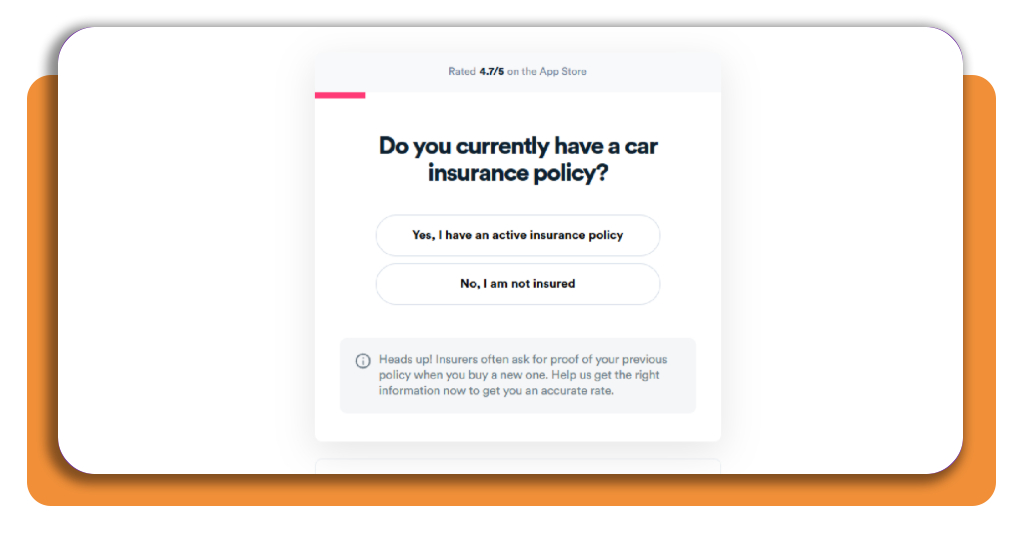
Step 3: review the available quotes
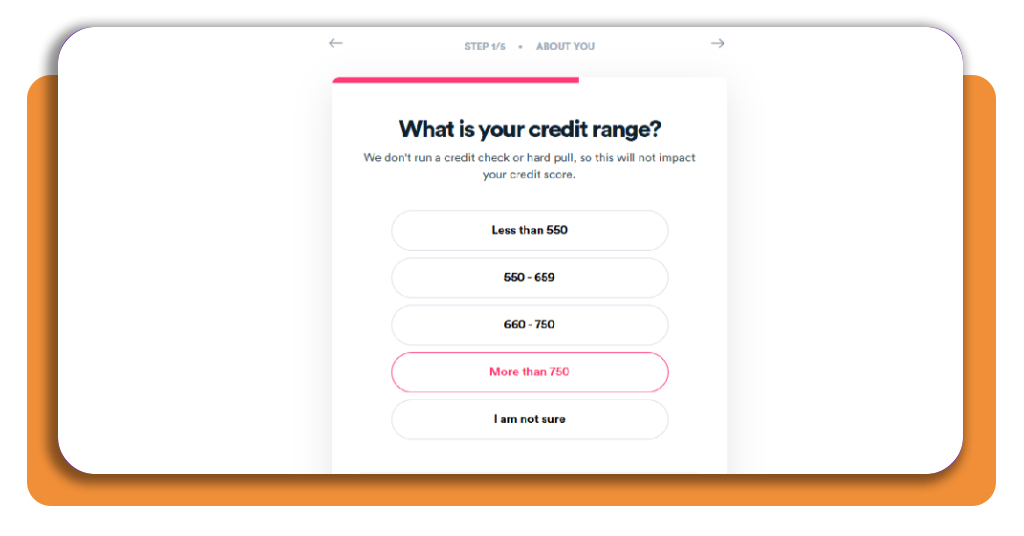
Now, you will need to answer questions about if you have insurance, your living situation, ticket violations you have, and credit range.
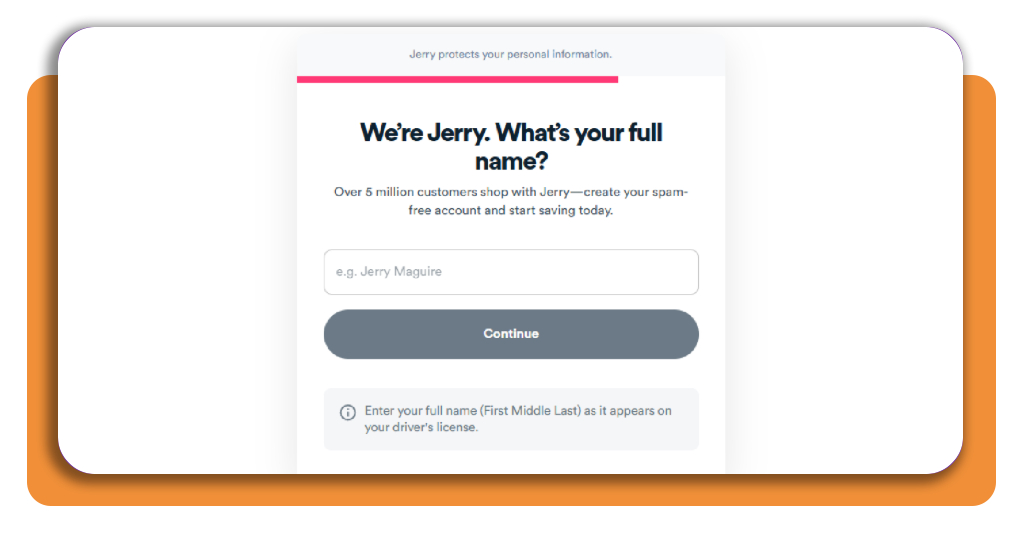
Step 3: personal information
After these questions, it will be needed to provide your full name and phone number.
Step 4: adjust coverage and deductibles
Then, you get a code to access your account, and Jerry will show you some available quotes.
Remember to change coverage limits or deductibles to see how they affect the price. Keeping comparable coverage across different quotes gives you a clearer idea if another insurer is actually offering better value.
Step 5: coordinate the insurance switch
Set the new policy to begin before the old one ends so there is no lapse in coverage.
Jerry (iOS/Android) can handle the paperwork associated with the switch and may also cancel the previous policy on your behalf.
After the change, Jerry (iOS/Android) can continue monitoring insurance rates and notify you when it may be worth comparing again.
Top car insurance providers
There is no single insurer that offers the best mix of price and coverage for every driver.
Unfortunately, rates vary with location, driving history, vehicle, age, and coverage choices, so comparing several companies is more useful than relying on one national ranking.
For that, check some of our recommendations as top car insurance providers:
GEICO
Firstly, we highlight GEICO, an insurance company that received U.S. News’ Best Overall designation for 2026–2027.
It is widely available and offers online quoting, policy management, multiple discounts, and several standard coverage options.
Travelers
Then, there’s also Travelers, an insurance company that was recognized as Best for Low Complaints.
This platform can be worth including in a comparison for drivers who want to consider service and claims experience alongside the premium quoted.
Nationwide
For customer service, U.S. News selected Nationwide, an insurance company that also offers some financial services.
The company offers standard auto coverage along with optional programs and discounts that can change the final premium depending on the driver.
USAA
USAA works differently because it only stands out for military households.
From this platform, you can get auto, home, and life insurance policies if you are an active-duty military member, veteran, or an eligible family member.
As we mentioned, eligibility is limited to qualifying military members, veterans, and their families, so it is not available to every driver.
Best auto loan refinancing tools
Refinancing is worth exploring when your credit has improved. In this situation, some refinancing platforms provide an initial look at offers from multiple lenders.
Two options stand out for comparing possibilities before replacing an existing auto loan:
Caribou
Caribou works with a network of lenders to match borrowers with prequalified refinancing offers.
You provide information about yourself, the vehicle, and the existing loan, then compare available rates, terms, and estimated monthly payments.
Checking available rates uses a soft credit inquiry, so this initial comparison does not affect your credit score.
Once the loan is approved and signed, the new lender pays off the existing auto loan.
Still, Caribou advises borrowers to keep making payments on the old loan until the payoff has been confirmed, which helps avoid missed-payment problems during the transition.
Auto Approve
Auto Approve is another refinancing marketplace. It matches applicants with lending partners, then assigns a consultant to move the application through the refinancing process.
A quote starts with a soft credit inquiry, while choosing to proceed with refinancing triggers the hard inquiry used for the formal application.
Then, Auto Approve selects a potential lender based on the applicant’s prequalification and credit profile before submitting the application with the borrower’s approval.
The platform can also handle parts of the paperwork associated with refinancing, including lender and DMV documentation.
Nevertheless, loan terms vary by borrower, and Auto Approve says they range from 12 to 96 months.
Therefore, comparing APR and total repayment cost remains important even when a longer term produces a lower monthly payment.
Look beyond your current monthly car costs
As you can see, a car insurance comparison tool reveals if another insurer offers comparable coverage at a different price.
The most important is to compare equivalent coverage and look at APR, fees, loan length, and total interest before refinancing.
Alongside, some car expenses we listed above extend beyond insurance and financing as well.
You can check Experian’s car insurance quote marketplace as another reference when comparing current insurance offers.
For that, our guide to an OBD2 diagnostic shows another way to use your phone to follow vehicle information and identify problems before they become larger repair expenses.
Enjoyed this article? Save Insiderbits to your favorites and discover the most useful tech tips.