
Let’s explore today a personal finance app that makes it easier to see where money is going without relying on scattered bank statements or spreadsheets.
In this guide, we’ll explore Wallet (iOS/Android), and this app brings budgeting, expense tracking, financial reports, and account organization, while leaving the user in control of the money held at their bank.

4.5/5
Which is the best personal finance app to get your financial life in order?
Insiderbits will highlight Wallet (iOS/Android) as a good personal finance app for people who want to see their spending, budgets, bills, and account balances in one place.
It supports both manual transaction entry and bank synchronization, while reports and cash flow views make it easier to understand how money moves throughout the month.
The app is even better for regular money management, standing out from banking itself. Still, we must mention Wallet (iOS/Android) doesn’t hold funds or move money.
The app works as a budgeting and tracking platform, so connected bank accounts remain separate from the app.
Key features within the Wallet platform
Wallet (iOS/Android) lets users create custom budgets, track monthly bills and subscriptions, monitor cash flow, organize savings goals, and review detailed spending reports.
Moreover, the app can also categorize transactions automatically when bank accounts are connected.
Users who prefer more control can enter expenses manually instead of linking a bank.
Besides that, the platform also supports shared finances, allowing selected financial information to be managed with a partner or other trusted people.
It is important to notice that Wallet (iOS/Android) follows a freemium model.
That means basic features are available without paying, while advanced functions such as some bank sync capabilities require Premium access.
Step-by-step: how to build a monthly budget and track your spending
Wallet lets you set monthly spending limits and then compare them with the expenses you record or import from a connected bank account.
The process differs slightly between Android and iOS, but the core setup is the same. Check it below:
Step 1: download Wallet
Firstly, download and open Wallet (iOS/Android). Then, create your account on the app.
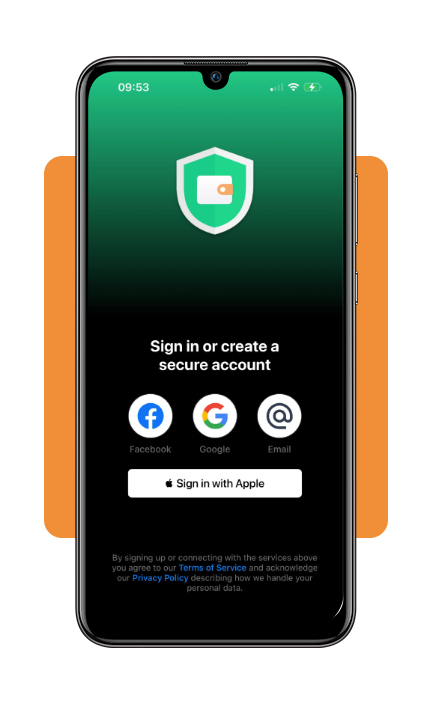
Step 2: select your currency
After creating your account, the personal finance app will ask a few questions. The first one is about your base currency.
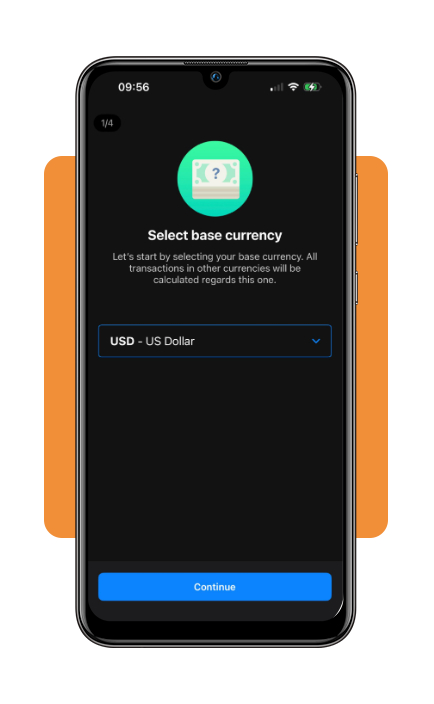
Step 3: cash balance
Then, the next one is about your cash balance. After that, you need to allow notifications and location.
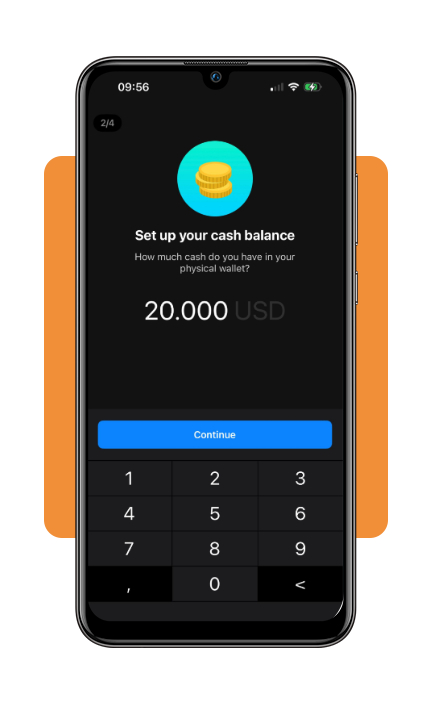
Step 4: add your accounts
Now you’re finally on the dashboard. From here, you can add the accounts you want to track.
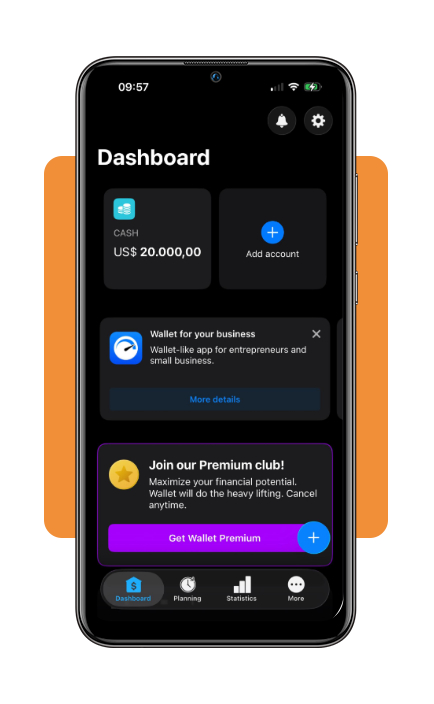
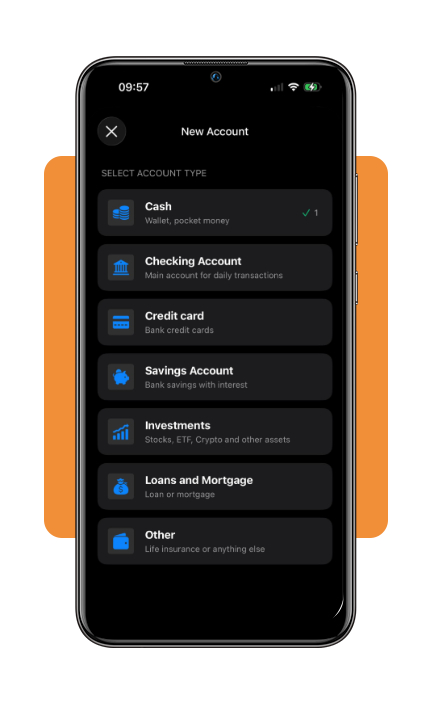
Step 5: new account
Tap on ‘Add Account’ to sync your account with the app. From here, you select your account type and follow the prompts.
After connecting one account, you can enter a budget name and spending limit and see how much you have spent and how much remains over time.
Top high-yield savings accounts
A high-yield savings account can complement a personal finance app by separating money reserved for emergencies or short-term goals from regular spending.
The accounts below offer competitive yields, but APYs are variable and should always be checked again before opening an account.
Happen Bank
Happen Bank is a digital-first bank, formerly known as LendingClub Bank.
Its current LevelUp Savings account has no monthly account fee, no minimum opening deposit, and is FDIC insured within federal limits.
The account currently pays 4% APY when at least $250 is deposited during the monthly evaluation period. If that requirement is not met, the account earns the standard 3% APY.
The qualifying deposit can also be automated through recurring transfers, making the account suitable for someone who wants to move part of each paycheck into savings.
Also, money is not locked in like it would be with a CD.
Happen allows withdrawals through external ACH transfers, wire transfers, and eligible ATM access, giving users flexibility when the savings are needed.
CIT Bank
CIT Bank, a division of First Citizens Bank, offers the Platinum Savings account with no monthly maintenance fee and a $100 minimum opening deposit.
It is an online account with mobile access and FDIC insurance, and interest is calculated daily and paid monthly.
The standard account currently earns 3.75% APY on balances of $5,000 or more, while balances below that threshold receive a substantially lower rate.
Bankrate is also showing a limited-time promotion that can increase the yield to 4.10% APY for six months with the required promotional code.
Therefore, readers should check the current terms rather than assuming that the promotional rate is permanent.
Best investment platforms for beginners
For beginners, a useful investment platform should keep costs low and make it possible to start without committing a large amount of money.
NerdWallet’s 2026 comparison highlights Fidelity and Charles Schwab as two strong options for new investors.
Fidelity
Fidelity has no minimum deposit for its standard brokerage account and charges $0 commissions for online U.S. stock and ETF trades.
Within this platform, beginners can buy fractional shares of U.S. stocks and ETFs starting with just $1, which makes it possible to build a portfolio without purchasing full shares.
Fidelity has educational material, research tools, retirement-planning resources, mutual funds, bonds, and recurring investments as well.
This gives beginners room to start with basic investing and continue using the same platform as their knowledge grows.
Charles Schwab
Charles Schwab also has no minimum deposit or annual maintenance fee for a standard brokerage account.
Online trades of listed U.S. stocks and ETFs carry $0 commissions, and investors can buy fractional shares of most U.S.-listed stocks and ETFs from $1.
Schwab adds extensive educational resources:
PaperMoney for practicing trades with simulated funds, 24/7 customer support, and physical branches for people who prefer access to in-person assistance.
These features are important for someone moving from basic budgeting in a personal finance app to learning how investing works.
Opening a U.S. financial account also involves identity and tax-information requirements.
That said, anyone who doesn’t have a Social Security number can review Insiderbits’ ITIN application guide.
From there, you can understand what an Individual Taxpayer Identification Number is and how the application process works.
4.5/5
Put your money plan into a routine
A personal finance app can make budgeting easier to maintain by keeping spending, monthly limits, savings goals, and financial reports visible in one place.
For this goal, Wallet (iOS/Android) is our recommendation for building that routine without requiring users to move their money into another financial institution.
Once spending is under control, the next steps depend on your priorities. For another look at budgeting and money management tools, PCMag maintains a comparison of personal finance services.
The important part is to build each layer gradually: understand where your money goes, set realistic limits, establish savings, and only then consider investing what is not needed for immediate expenses.
Enjoyed this article? Save Insiderbits to your favorites and discover the most useful tech tips.