
Misplacing a certified letter or watching a time-sensitive package stall somewhere along its route turns a calm afternoon into real panic, but the USPS app exists to ease that worry.
In this Insiderbits guide, you’ll learn about every feature built to protect your paperwork, from digital mail previews to real-time delivery alerts that keep your documents accounted for.
Related: Package tracker app: track all your mail and packages

4.5/5
What is the USPS app and how to download it?
The USPS app (Android | iOS) comes from the United States Postal Service, giving you tracking, delivery previews, postage calculators, and mail scheduling tools on your phone.
Enter a tracking number or scan a barcode with your camera, and the app pulls real-time status updates directly from postal scanning stations nationwide within seconds.
You can also buy postage, print shipping labels, request a package pickup, put your mail on hold, or locate the nearest post office without stepping outside your door.
Get it for free on Android and iOS
Android users find this download on the Google Play Store, while iPhone owners grab it from the Apple App Store, and neither listing charges a cent for it.
Search ‘USPS Mobile®’ by name in your device’s app store search bar, then tap ‘Install’ or ‘Get’, and give the app a few seconds to finish downloading.
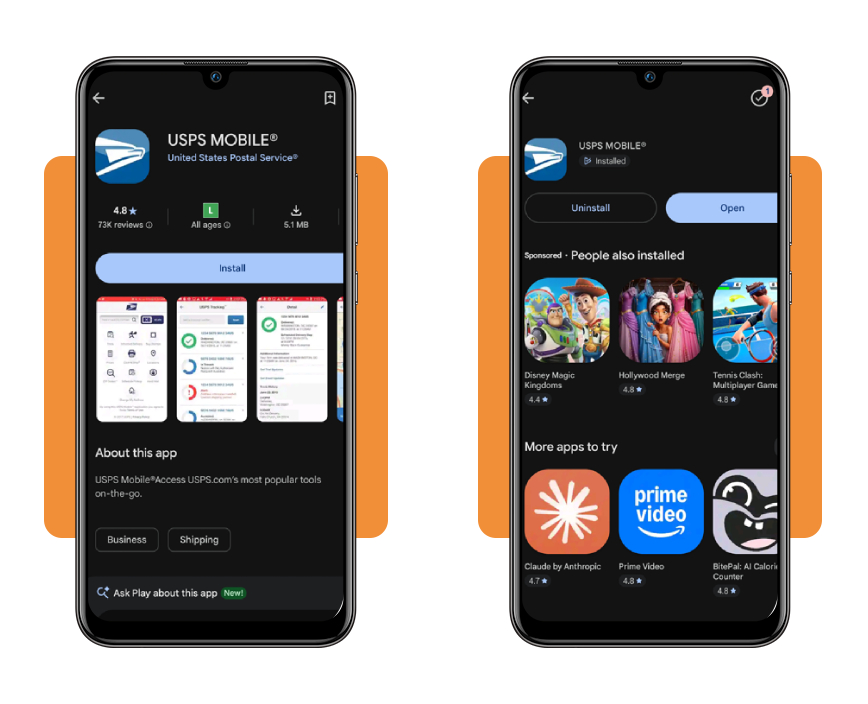
Explore the app’s core toolkit
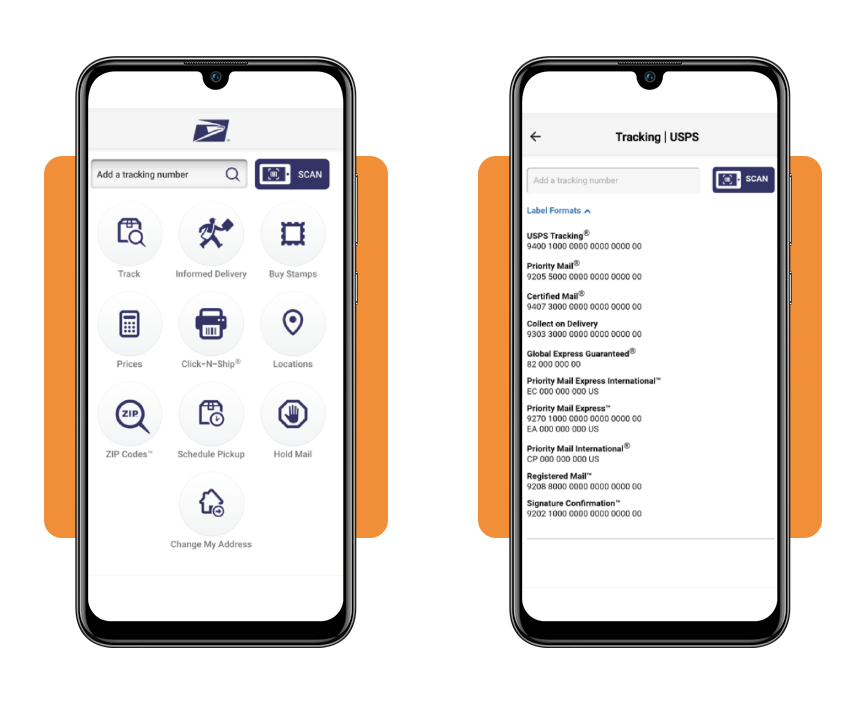
You’ll find a tracking search bar and a scan button on the home screen, sitting above nine shortcuts that cover stamps, postage prices, shipping labels, and nearby locations.
Two more shortcuts handle scheduling a pickup and putting your mail on hold, and together they turn the USPS app into a genuine shortcut for handling errands from home.
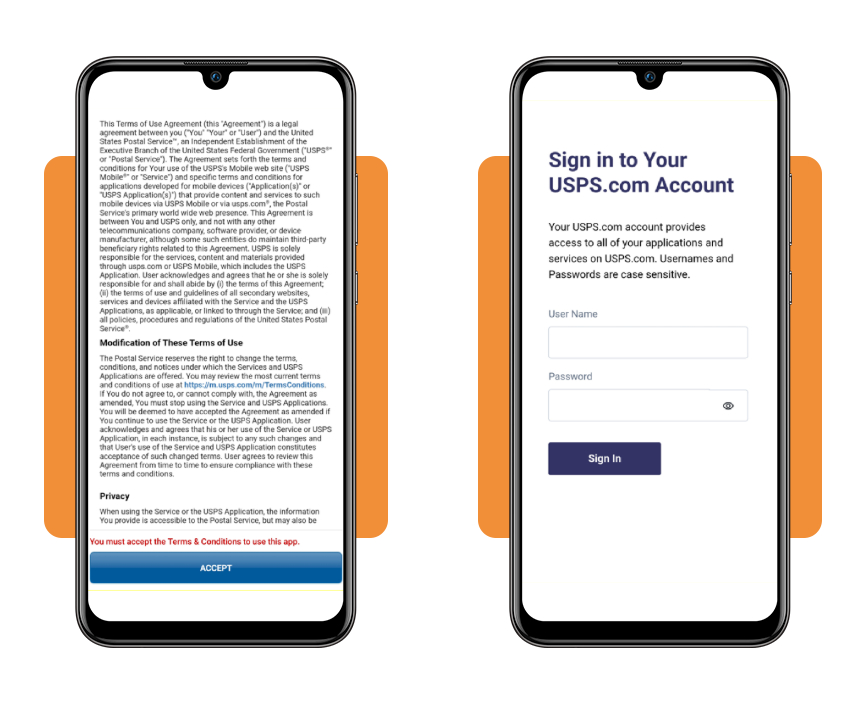
Set up your account in seconds
Before you track a single package, a terms of use screen appears and asks for your acceptance before any other feature on the entire home screen becomes usable.
Tapping accept lets you sign into an existing USPS.com account or create a brand new one, which saves your home address and personalizes delivery alerts for each shipment.
How to track important documents: step-by-step
Certified letters, signed contracts, and tax notices all carry tracking numbers that start with specific prefixes, and those digits reveal which delivery service is handling your envelope.
Typing that number into the search bar pulls live facility scans showing where your envelope sat last, along with an estimated delivery window based on current transit patterns.
Each scan updates as the package moves through sorting facilities, and checking your status inside the USPS app (Android | iOS) beats calling a local post office and waiting on hold.
Informed Delivery: preview your mail digitally
Tapping Informed Delivery in the app opens a browser page where you can sign up for Daily Digest emails that preview letters and packages headed toward your mailbox each morning.
Those digests show grayscale images of the exterior on letter-sized mail, letting you spot a certified notice or important envelope before your carrier even reaches your porch.
Real-time tracking: monitor your official papers
Pop your certified mail or priority tracking number into the search field, and the app lays out every scan from acceptance at the counter through sorting facility stops.
You’ll see arrival times at regional hubs and local post offices, plus a projected delivery date that adjusts whenever weather or shipping volume shifts your paperwork off schedule.
Certified mail adds proof of delivery
Certified mail numbers begin with 9407, and sending a document that way through the USPS app creates a digital record confirming the moment someone signed for your papers.
That signature record protects you during disputes over missed deadlines, given that courts and government agencies require proof a document reached its recipient before a filing deadline.
Related: Track USPS Packages for Free Right From Your Phone
Bonus options: shipping labels and postage rates
Sending a document yourself involves more than dropping an envelope in a mailbox, and pricing the shipment correctly helps you avoid underpaying and having your mail bounce back.
Weight, size, and destination all factor into the final cost, and guessing wrong at the counter wastes a trip when your envelope needs extra postage stamped on top.
Handling labels and pricing from your phone cuts out that guesswork entirely, and the USPS app puts both tools within reach before you ever leave your kitchen table.
Calculate postage before you ship
Open the ‘Prices’ tool and enter your origin ZIP code alongside the destination ZIP code, then pick a shape like an envelope, a large envelope, or a package from the dropdown menu.
The app returns a cost breakdown before you commit to anything, letting you compare retail pricing against online rates and choose whichever option fits your shipping budget better.
Print shipping labels from home
‘Click-N-Ship’ handles the label side of things, walking you through entering recipient details, selecting a mail class, and paying for postage straight from your bank card.
Once payment clears, a printable label appears on screen, and sticking that label onto your envelope skips the counter line entirely at your local post office branch.
Compare rates across every mail class
Certified mail, priority mail, and standard first class postage all carry different price points, and choosing the right class matters when a document needs to arrive by a set date.
Faster classes cost more, but the USPS app lays out each option side by side, so weighing speed against your budget takes seconds instead of a guessing game.
Delivery notifications: what to expect from your status
Watching a tracking page refresh over and over feels like wasted time, especially when you’d rather get a heads-up the moment your envelope changes hands at any facility.
Setting up alerts pulls that information toward you instead, and the USPS app sends a notification straight to your phone the second a new scan gets logged.
Knowing what those alerts actually mean saves you from misreading a routine scan as a problem, so let’s break down what shows up and when to expect it.
Text and email alerts explained
Signing up for alerts takes a tracking number and either your phone number or email address, both entered right on the tracking results page after your first search.
You’ll get a message whenever your shipment reaches a new milestone, covering acceptance, departure from a facility, arrival at your local post office, and final delivery confirmation.
Status updates from acceptance to delivery
Every shipment starts with an acceptance scan logged the moment a clerk or carrier takes possession of your envelope, and this scan kicks off the entire tracking timeline.
From there, the USPS app logs each transit stop, including processing plants and regional hubs, until a delivery scan closes out the shipment with a timestamp and location.
Spot delays before they surprise you
A gap between scans longer than a day or two usually signals weather disruptions, high shipping volume, or a misrouted package sitting somewhere along its intended path.
Checking your tracking page during that gap shows you the last confirmed location, giving you enough information to contact USPS support before a deadline creeps up on you.
Related: Be your own boss: download the top delivery driver app free
4.5/5
Stay ahead of every important delivery
Losing track of a certified letter or an important package shouldn’t cost you sleep, and USPS Mobile puts every answer you need right in your pocket.
Insiderbits crafted this guide to show you how the USPS app handles tracking, digital mail previews, postage costs, and shipping labels, all from one free download on your phone.
If you want more practicality in your day, keep reading Insiderbits and learn how to make mundane tasks easier, from managing deliveries to finding apps that save you time.