
You can find job training certificates on Alison (iOS/Android), a platform that provides free access to thousands of self-paced courses covering many different areas.
Read the article below to learn how to complete a course and document your achievement on Alison (iOS/Android) and which resume-building tools complement that training.

Which is the app to find free job training certificates that actually get you hired?
Every learner looking for career-focused training without paying tuition, Alison (iOS/Android) is a useful place to start.
Its web platform and mobile app gives access to thousands of self-paced courses covering IT, business, healthcare, construction, engineering, sales, management, and workplace safety.
The best part is enrollment and course completion are free, so users build skills around the type of job they want to pursue.
Still, there is an important distinction when searching for job training certificates on Alison (iOS/Android).
Most courses are free to study and complete, but the branded digital or printed certificate is normally optional and paid.
Nevertheless, learners who don’t purchase one can still obtain a free Learner Record as evidence of completed courses and results.
Also, it is important to mention that completing a course doesn’t guarantee employment.
Its value depends on how closely the subject matches the skills requested for a particular position and whether an employer recognizes that type of training.
Therefore, Alison (iOS/Android) works best as a way to close specific skill gaps and add relevant training to a resume.
Key features within the Alison mobile platform
The Alison (iOS/Android) app lets learners search courses by category or subject, enroll without a course fee, and study at their own pace.
To successfully complete an Alison course, learners need to finish all required sections and achieve at least 80% on each assessment.
Because the catalog spans both technical and workplace subjects, users can focus their learning around a particular career goal instead of following a single general curriculum.
Additionally, course progress remains connected to the Alison account, which is useful for people studying in shorter sessions from a phone.
One limitation is worth knowing: Alison (iOS/Android) currently says the free Learner Record and Learner Verification documents cannot be downloaded directly through the app.
After completing training, users need to sign in through a web browser to access those records; purchased digital certificates, however, can be downloaded after purchase.
Step-by-step: how to enroll in free courses and earn career certificates
Alison (iOS/Android) lets users enroll in and complete its courses without paying tuition.
Check below how to do it:
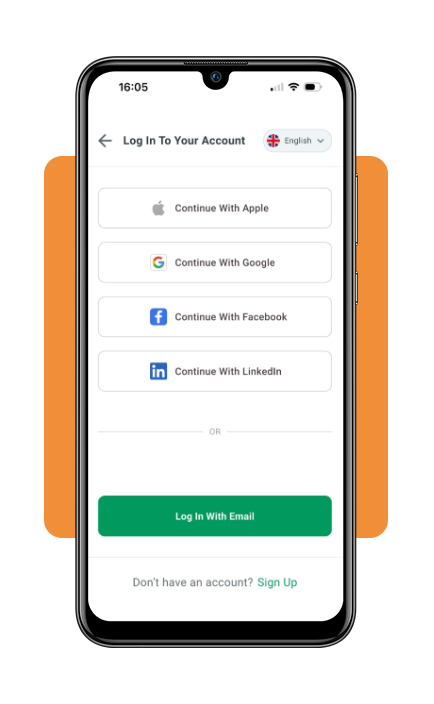
Step 1: create an Alison account
Download and open the Alison (iOS/Android) app and select Sign Up. If you use email, complete the verification sent to your inbox and then log in to the app.
Step 2: search for career-focused courses
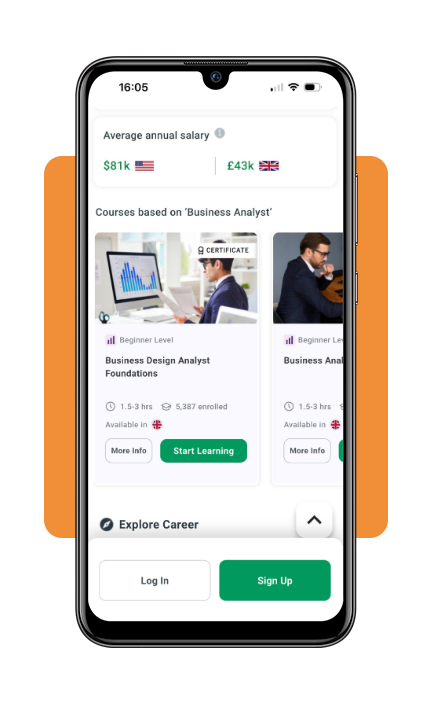
Use the search function, course categories, or course types to find training connected to the work you want to pursue.
Once you find a suitable course, select Start Learning to enroll and begin studying.
Step 3: complete the modules and assessments
After choosing your course, work through every required module and topic at your own pace.
To complete a course successfully, your progress must reach 100%, and you need a score of at least 80% on each required assessment.
Step 4: choose how to document your training
After passing the course, Alison offers the option to purchase a digital or printed certificate.
Most certificates are not free, although a small selection of courses currently includes a free digital certificate.
If you do not want to pay, your Learner Record provides free confirmation of completed courses and results.
Alison (iOS/Android) currently requires learners to access this document through a web browser rather than directly through the mobile app.
Top professional online bootcamps
For learners who want something more intensive than job training certificates, some professional programs provide a sequence of courses and portfolio work.
For that, Coursera offers several certificate programs that are generally self-paced and allow you to develop your career.
IBM Full Stack Software Developer Professional Certificate
The IBM Full Stack Software Developer Professional Certificate is designed for beginners and does not require prior programming experience.
The current program includes 15 courses and is estimated to take about six months at roughly 10 hours per week.
Training covers front-end technologies such as HTML, CSS, JavaScript, React, and Bootstrap, along with back-end development using Node.js, Python, Django, and related tools.
Learners also work with cloud technologies, containers, Kubernetes, microservices, and hands-on projects that can be added to a GitHub portfolio.
Meta Front-End Developer Professional Certificate
The Meta Front-End Developer Professional Certificate focuses more specifically on building websites and web applications.
It is also beginner friendly, currently consists of nine courses, and is structured to take about seven months at approximately six hours of study per week.
The curriculum covers HTML, CSS, JavaScript, React, Bootstrap, GitHub, and responsive interface development.
It also includes a capstone project and coding interview preparation, giving learners both portfolio material and practice for the technical side of a front-end job search.
Programs like these are more substantial than a short standalone course, but they still do not guarantee employment.
Their value comes from combining a recognized credential with demonstrable projects and technical skills that can be shown directly to employers.
Best resume-building tools
Completing job training certificates is only part of preparing for a new role.
The next step is presenting those skills clearly on a resume, especially when the training supports a career change or adds experience in a field where you have not worked before.
Kickresume
Kickresume (iOS/Android) combines resume templates with AI-assisted writing, pre-written phrases, cover letter tools, and an ATS resume checker.
Its free plan currently includes four customizable resume templates and unlimited resumes and downloads when you stay within the free customization options.
The platform can be even better when adding newly completed training to a resume.
Instead of simply listing a course title, you can create dedicated skills or education sections and describe the practical abilities developed through the program.
Additionally, Kickresume’s AI tools generate a first draft, though the company’s own comparison notes that AI-generated content needs manual editing to sound specific to the applicant and the job.
Enhancv
Enhancv offers a flexible editing experience, with an AI assistant that revises bullet points, suggests section titles, and helps develop resume content.
It also lets users rearrange sections and choose from different layouts, which is useful for applicants who need to emphasize recent training over a traditional employment history.
The main limitation is its free access model.
Enhancv provides full access for seven days, but editing becomes restricted afterward unless the user upgrades, and resumes created under the free plan include a watermark.
Turn training into a stronger job application
Free courses are a way to build new skills when job training certificates are closely related to the positions you want to pursue.
Alison (iOS/Android) offers broad access to career-focused learning, while more structured programs add deeper technical training and portfolio projects.
You can also explore this guide to trade skills training for more hands-on career paths, while Indeed’s overview of free online certifications offers examples of credentials that strengthen a resume.
Finally, once all your training is complete, try showing employers what you learned and how those skills apply to the role.
Enjoyed this article? Save Insiderbits to your favorites and discover the most useful tech tips.