
Some government benefits provide support for food, income, disability, and other essential expenses, but eligibility depends on specific requirements.
Insiderbits will show in this guide where eligibility can be checked and how ebtEDGE can help people who already receive supported EBT benefits manage them from a phone.

Which is the app to check government benefits for workers aged 45–60?
If you are a worker between 45 and 60 and are dealing with different financial circumstances, there are some government benefits that can help you.
With ebtEDGE (iOS), people who already participate in supported EBT programs can check SNAP, WIC, and childcare benefits in participating states.
However, being between 45 and 60 years old alone doesn’t determine access to the app or eligibility for these programs.
For more information about how Social Security programs relate to older workers, see this Congressional Research Service report on Social Security and older workers.
The eligibility is established by the agency responsible for each benefit, while ebtEDGE (iOS) becomes useful after a supported account or card has been issued.
For readers who are still identifying which programs might fit their circumstances, our guide to social benefits provides a broader starting point before focusing on a specific program.
Key features within the ebtEDGE mobile platform
Once a cardholder is connected to a supported program, the main value of ebtEDGE (iOS) is having benefit information available without repeatedly navigating a state agency’s website.
Within the app, users can check SNAP and WIC balances, review when cards are scheduled to reload, monitor benefit expiration information, and access transaction details.
Additionally, for safety, cardholders can lock or unlock their cards, report a card as lost, stolen, or damaged, use Face ID, and receive alerts related to card activity or credential changes.
These additional resources make the app really useful, although the exact programs and features available still depend on the state and benefit system connected to the account.
Step-by-step: how to check benefit eligibility and claim assistance
USA.gov’s Benefit Finder helps narrow government benefits by category and then directs you to the agency responsible for each program.
Step 1: open the Benefit Finder
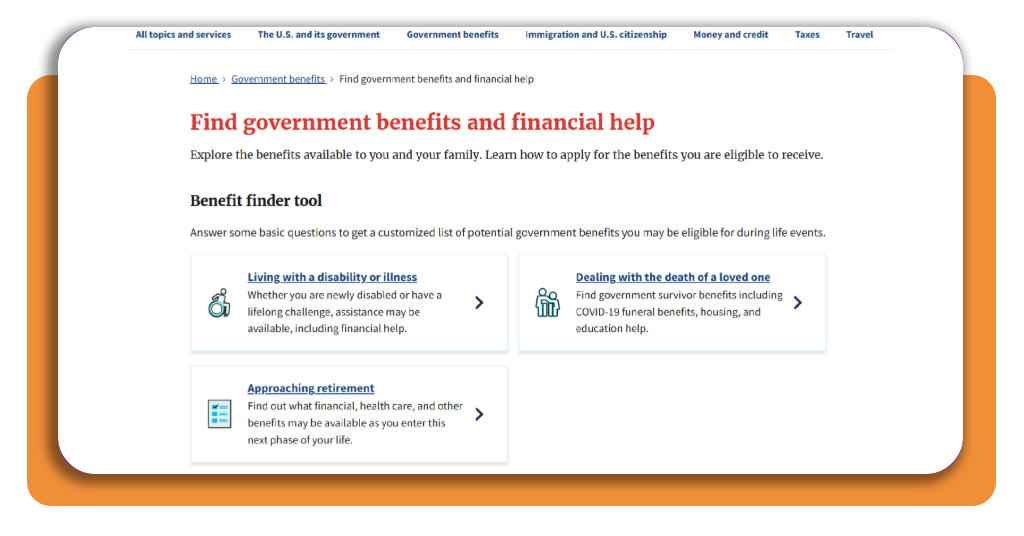
Start on USA.gov benefits page and read the options on the benefit finder tool.
Step 2: select a benefit category
The categories help narrow the programs shown to you. Choose between ‘living with a disability or illness’, ‘approaching retirement’, or ‘dealing with the death of a loved one’.
Step 3: find benefits
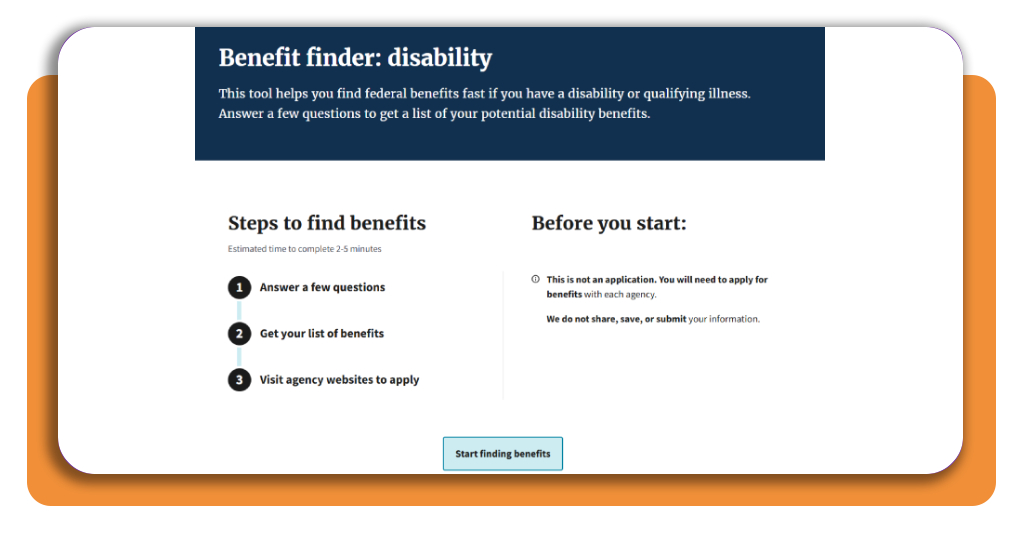
After choosing the option that fits your situation, you will be directed to another page, where you can find steps to find benefits and a button to start finding government benefits
Step 4: answer the questions
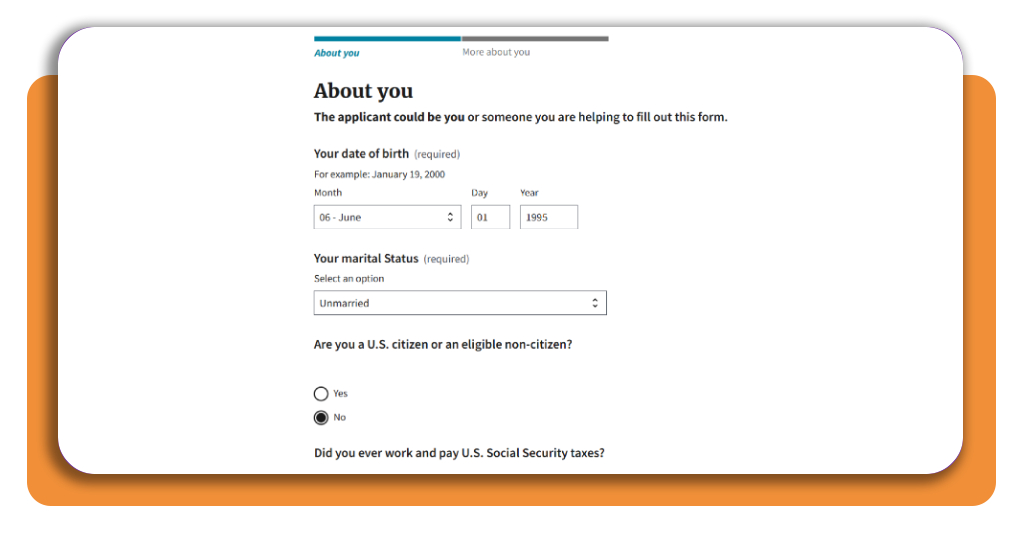
Once you click to find the benefits, you will need to provide some personal information.
Step 5: check your eligibility
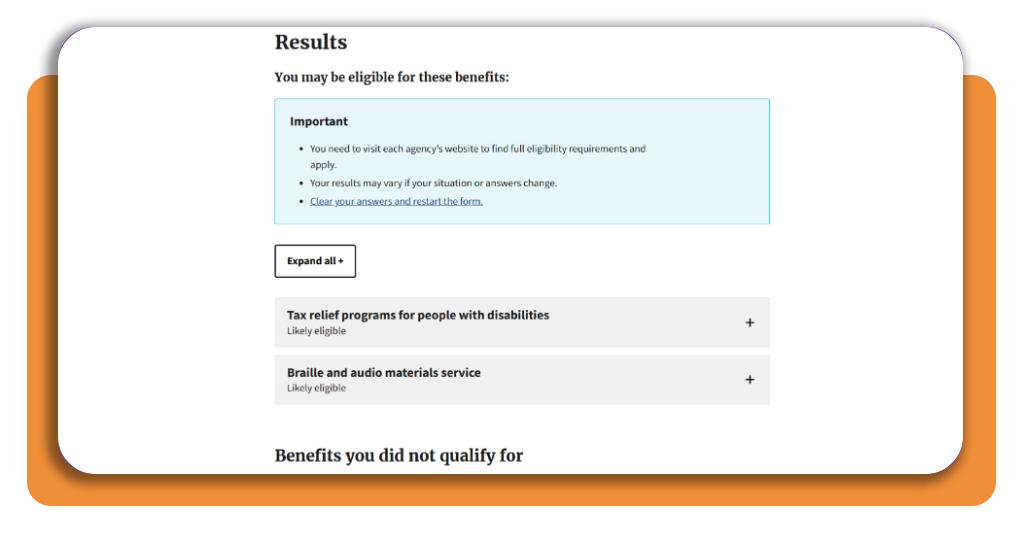
Once you answer all questions, you will have a preview of your eligibility. This way, you read the benefits you qualify for and the benefits you don’t.
Check that, but also we need to mention you need to visit each agency’s website to find full eligibility requirements and apply.
Top benefit advocacy networks
Some people also need help completing enrollment, which is where benefit advocacy and assistance networks are useful.
The organizations below approach that support differently, from benefit screening to local referrals and hands-on community assistance.
National Council on Aging
People approaching later working years may begin encountering programs connected to health care, disability, food assistance, or financial security.
Having one place to screen several possibilities can make that research less fragmented.
The National Council on Aging (NCOA) operates BenefitsCheckUp, a free tool covering more than 2,000 public and private benefit programs across the United States.
Its network of Benefits Enrollment Centers also helps older adults and people with disabilities screen for and enroll in programs related to food, medicine, health care, and other expenses.
211
One of the best things we have not mentioned yet is that financial difficulty does not always fit neatly into a single government program.
Housing, utilities, food, transportation, or medical costs may require local assistance in addition to any federal or state benefits a person receives.
For that reason, 211 connects people with local social services through phone, web, text, and chat.
More than 200 local 211 agencies operate across the country, helping users locate resources for basic needs and other forms of assistance in their communities.
Best emergency financial assistance tools
A financial emergency can create pressure long before a benefit application is approved or another source of income becomes available.
During that gap, financial tools can organize immediate expenses, identify where money is going, and estimate how much short-term support may be needed.
Emergency fund calculators
Planning can be way easier if there is a concrete savings target rather than just a vague goal of ‘saving more.’
For that reason, an emergency fund calculator can estimate how much money may be appropriate to keep available based on regular expenses and household needs.
The result will serve as a reference for rebuilding financial reserves after an emergency or preparing for another interruption in income.
Credit monitoring services
We all know that periods of financial stress can also affect credit if bills become harder to manage.
Keeping an eye on credit activity can help users identify changes early and understand how their financial situation is being reflected in their credit file.
Credit monitoring services can provide access to credit information, alerts about significant changes, and recommendations related to credit health.
Some services also include identity-theft monitoring, which adds another layer of protection when financial accounts are being managed closely.
Now you have a clearer path through available assistance
Understanding government benefits starts with knowing which programs match your circumstances and where official eligibility decisions are made.
Advocacy networks and emergency financial assistance resources can provide additional support when one program is not enough.
And then, by making use of official benefit information with reliable local and financial resources, workers can build a clearer picture of the assistance available to them.
Enjoyed this article? Save Insiderbits to your favorites and discover the most useful tech tips.