
Reading a label that lists 40 ingredients while a hungry kid waits in the car turns shopping into a pop quiz, but a food intolerance app can answer every question before you reach the checkout.
In this Insiderbits guide, you’ll meet InTolerApp, a scanner that rates products and generates safe recipes, showing you how to build a profile that puts meals you love back on the menu.

4.8/5
Which is the best app to scan ingredients for food intolerances?
InTolerApp (Android | iOS) scans products and matches ingredients against the intolerances, allergies, and diets in your profile, giving you a verdict on what belongs in your cart.
Point your camera at a barcode or photograph an ingredient list, and this food intolerance app compares the contents with your restrictions across a library of more than 800,000 products.
Coverage runs from histamine, lactose, and gluten to low FODMAP, soy, sulphites, and vegan eating, with a ‘missing’ option to add if you send a request through customer support.
Key features within InTolerApp
- Personal food ratings: browse categories such as grains, sauces, and spices, rate foods on your own terms, and mark a filtered favorite as tolerable for you;
- Symptom diary: log meals, drinks, activities, and symptoms, then review the past 14 days at no cost or unlock longer history and PDF summaries with Pro;
- Trace control: switch off trace consideration in the options when the app’s warnings flag triggers you’ve handled fine, and the compatibility analysis stops weighing them;
- Product corrections: when a barcode comes back unknown, rename the product, photograph its front for the database, and tap the heart to keep it among favorites.
Read every result through four color-coded levels
Green marks a product that suits your profile with nothing flagged, while yellow marks one you might tolerate in small portions after you compare the packaging against your own limits.
Orange flags items likely to cause symptoms unless your tolerance runs high, and red marks products containing ingredients to avoid.
Generate safe recipes around your own profile
The ‘Recipes’ tab builds dishes around your allergies, intolerances, and diet choices after you pick a meal type, serving size, and cuisine, plus wishes like ‘leftovers’ or ‘under 500 kcal’.
Add ingredients you want to use up, tap ‘Shuffle’ for a fresh idea, and reopen past results from ‘History’ while this food intolerance app keeps every dish within your limits.
Step-by-step: how to set up your food intolerance profile
Answering a handful of questions about your body, your triggers, and your eating habits gives InTolerApp (Android | iOS) everything it needs to judge products the way your gut would react.
Think of the setup as a conversation about how your body responds to food, one that leaves you with a profile ready for grocery trips, restaurant orders, and home cooking.
The questions rely on taps and short lists rather than typing, and this food intolerance app turns your answers into personal limits that shape every product you enter.
Step 1: download InTolerApp on your device
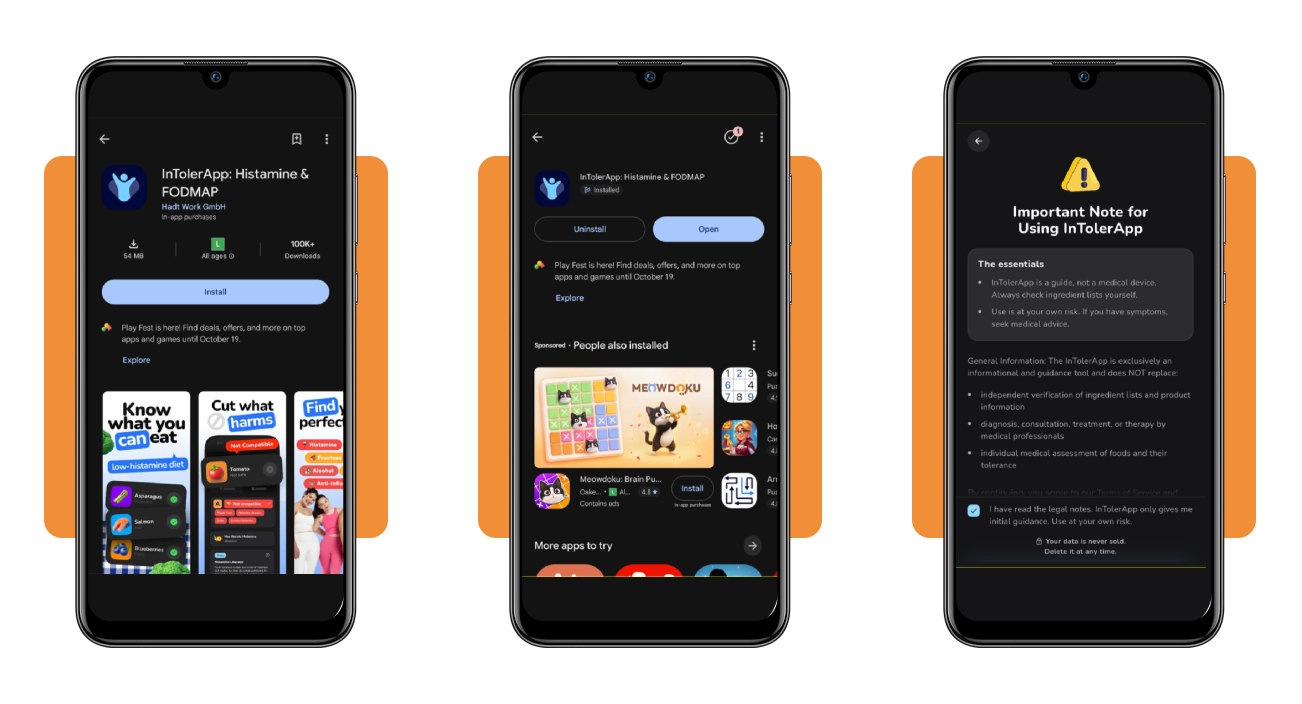
Open the Google Play Store on Android or the App Store on iOS, search for ‘InTolerApp’, and tap ‘Install’ or ‘Get’ to place the icon on your phone’s home screen.
Launch the app after the download finishes, read the welcome screen, and tick the legal note checkbox that reminds you that InTolerApp is a guide and not a medical device.
Step 2: answer the questions about your symptoms
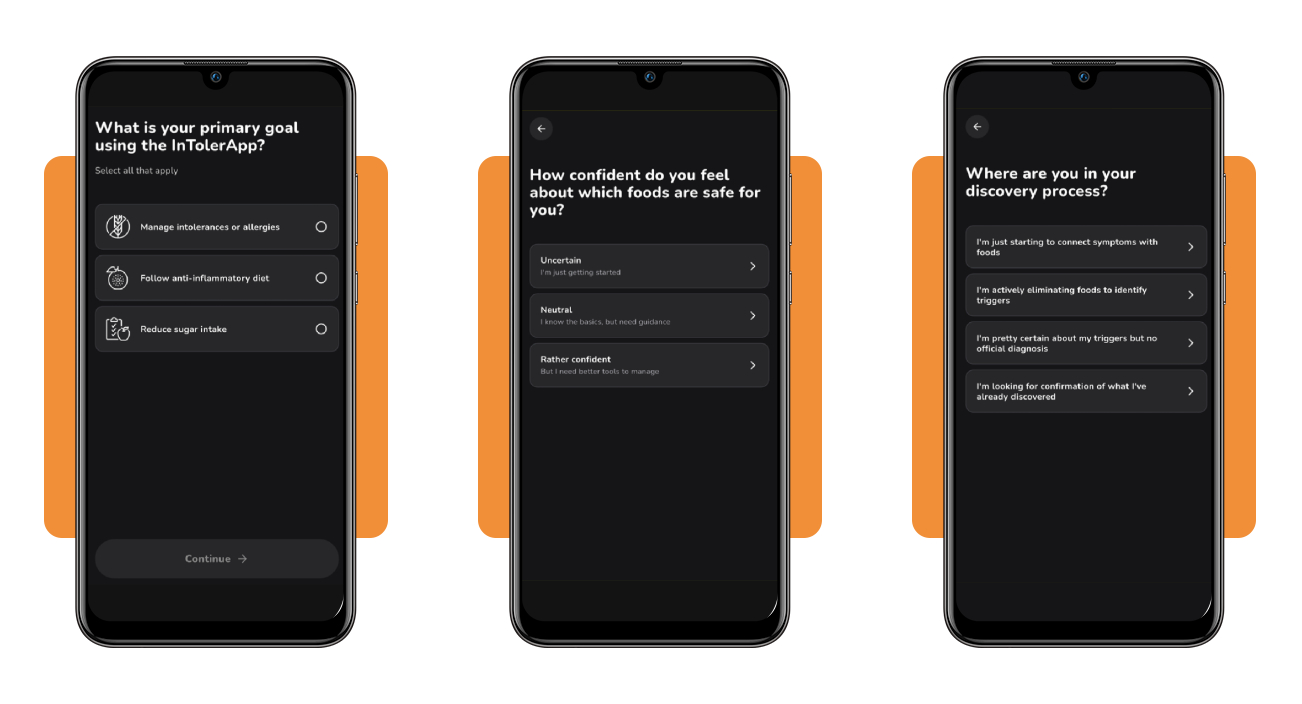
Pick your primary goal on the first question, then tell the app where you stand in your diagnostic journey and how confident you feel about managing your daily food choices.
Select the challenges that frustrate you while you shop and cook, tick every symptom you notice after meals, and answer the closing question about how you discovered your food triggers.
Step 3: select your intolerances and allergies
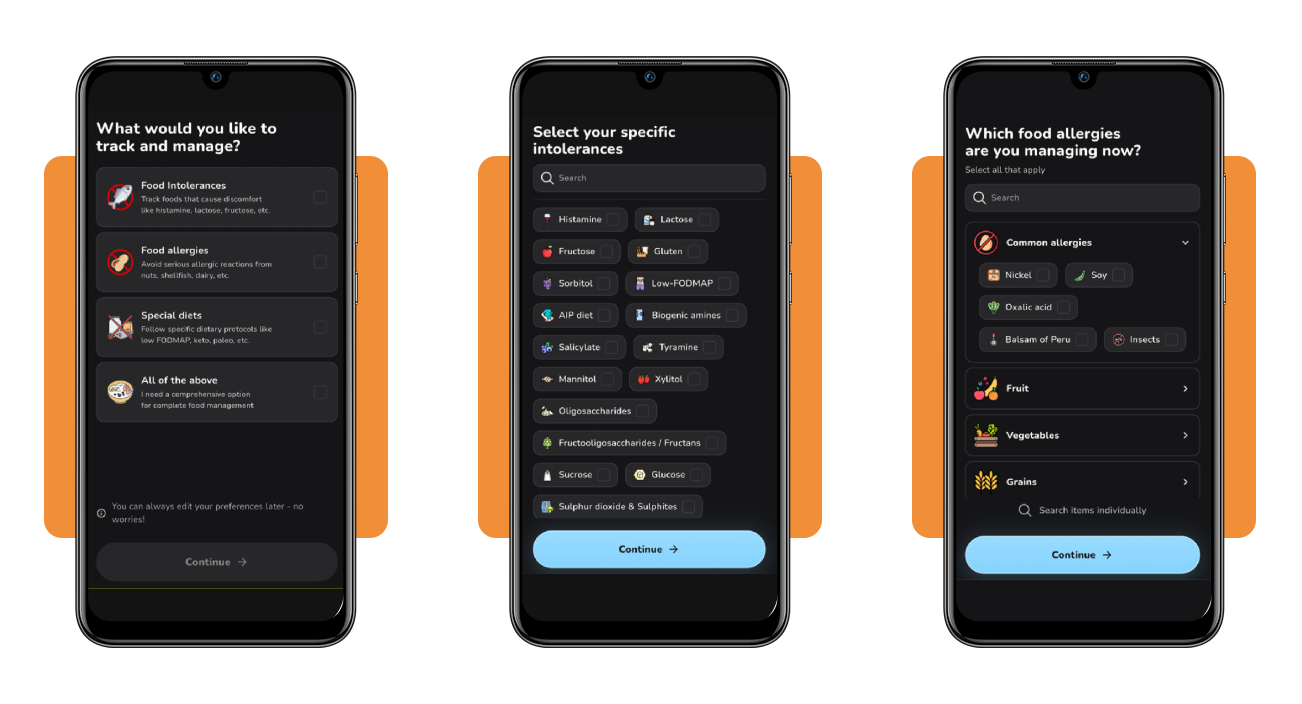
Tell the food intolerance app whether to track intolerances, allergies, special diets, or all of them, then search for your intolerances by name and mark all the ones you manage.
Open the allergy list to select common triggers or browse the fruit, vegetable, and grain categories, pick your dietary form, such as pescetarian or vegetarian, and set your age range.
Step 4: review your profile and complete setup
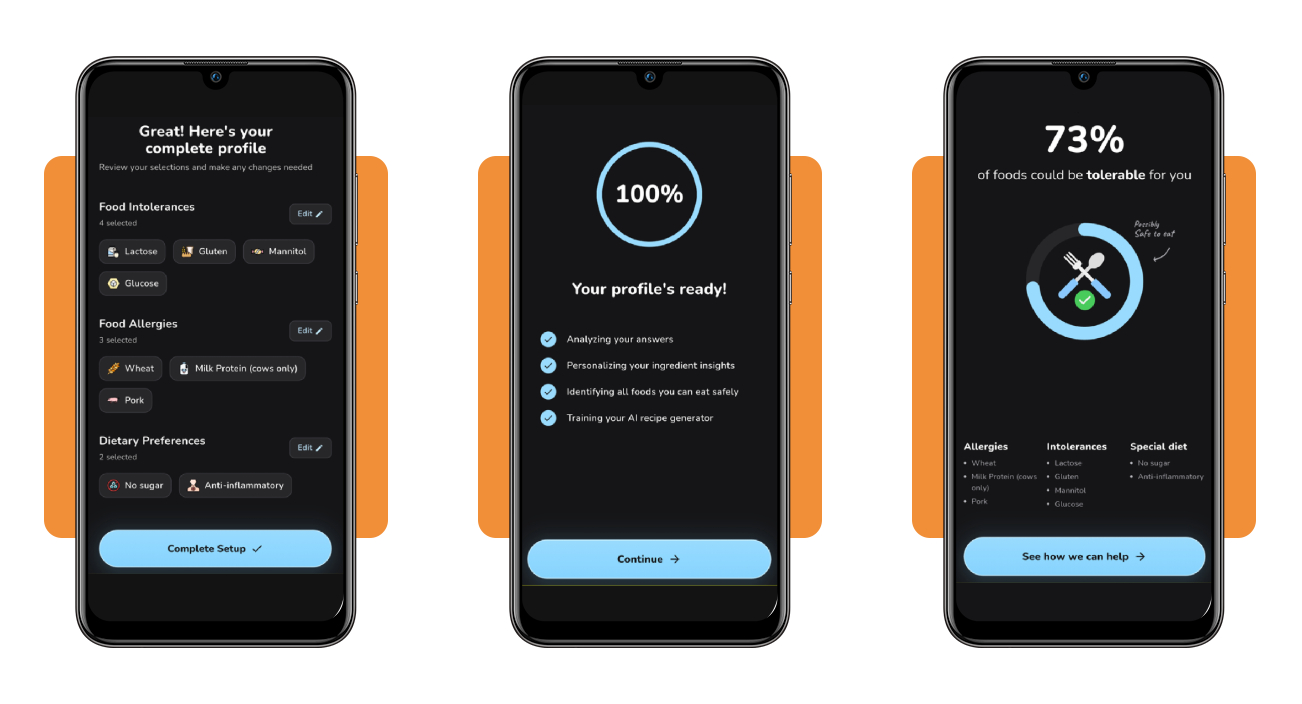
Read the profile summary and tap ‘Edit’ beside any section that needs a correction, from your symptoms to your age range, then press ‘Complete Setup’ when everything’s done.
Let the loading screen finish training your recipe generator, check the share of foods that could be tolerable for you, then choose your usual stores and any optional product categories.
Top telehealth nutritionist platforms
An ingredient scanner flags what’s in your food, while a dietitian figures out why your body reacts the way it does and maps out a plan that keeps your diet balanced and enjoyable.
Telehealth platforms bring those appointments to your home with video visits that fit around your work schedule and connect you with licensed nutrition professionals who practice in your state.
Show your dietitian the profile you built in this food intolerance app, and your triggers, allergies, and diets arrive mapped out, leaving the visit free for solutions and meal ideas.
Nourish makes insurance-covered dietitian visits simple
Nourish connects you with dietitians in all 50 states and bills your health insurance company for covered virtual visits, with a network that spans more than 9,000 licensed professionals.
Enter your coverage details, filter for dietitians who accept your insurance, and book a video visit from your couch, then arrive with questions about the foods that trigger your symptoms.
Fay matches you with a dietitian for your concern
Fay asks about your main health concern, then matches you with a dietitian whose specialty fits your needs, and you can narrow the list by insurance carrier and appointment availability.
The platform works with 700+ insurances and lists specialties such as low FODMAP guidance, a match for digestive symptoms that flare after meals and call for a structured elimination diet.
Berry Street covers food allergies and gut health
Berry Street lists more than 1,800 dietitians and accepts over 1,250 insurance plans, and you can book a video visit with a specialist who treats the conditions behind your symptoms.
A dietitian builds you a tailored menu around your allergies and gut symptoms, and you can check every grocery item on it against your profile in the food intolerance app.
Best options for dining out with food allergies
Packaged food carries allergen warning labels by law, but US restaurant menus follow no such rule, and a dish that looks harmless can hide an ingredient the kitchen never lists.
InTolerApp (Android | iOS) keeps your restrictions in check, and you can pair it with habits that cut risk, like skipping buffets and platters where serving spoons travel between dishes.
Review your triggers in the food intolerance app before choosing a restaurant, and you’ll walk in knowing what to ask the server and what dishes to skip from the menu.
Spot hidden allergens across popular cuisines
Thai and Chinese kitchens use peanuts, tree nuts, soy, shellfish, sesame, and fish sauce in dishes that rarely list them, and every sauce and cooking oil deserves a pointed question.
Italian pesto carries pine nuts and cheese, fresh pasta often contains egg, Mexican mole sauces can hide nuts or seeds, and Indian curries frequently rely on cashew paste and ghee.
Hand restaurant staff a written chef card
Print a chef card from FARE, fill in your allergens and cross-contact concerns, and hand it to your server, who passes it along to the kitchen before any cooking starts.
Copy the allergens, intolerances, and diets saved in the food intolerance app onto the card, and add a note asking the kitchen to treat trace amounts as a serious risk.
Pack epinephrine and your emergency action plan
Carry two epinephrine auto-injectors to every restaurant meal, keep them within reach in your bag or pocket instead of the car, and check their expiration dates before you head out.
Bring your written emergency action plan as well, show your table companions where both items live and how to use them, and call 911 after using epinephrine, as symptoms can return.
4.8/5
Spend your energy on eating, not on decoding
InTolerApp (Android | iOS) can turn your next dinner out into a relaxed Sunday lunch at your mom’s house, with no label puzzles and no second-guessing when the food arrives.
In this article, Insiderbits showed you how to set up your profile in this food intolerance app, book a dietitian, and hand a chef card to your server.
Keep reading Insiderbits for easy meal ideas, shopping know-how, and eating habits that protect your health, giving you more confidence at the stove, the store, and the restaurant.