

An AI call blocker can reduce the number of robocalls and scam calls that reach your phone by identifying known spam numbers and analyzing suspicious call patterns.
RoboKiller (iOS/Android) mixes a regularly updated spam database with machine learning tools, although no service can guarantee that every unwanted call will be blocked.

4.5/5
Find the best AI call blocker app for total phone protection
RoboKiller (iOS/Android) is an AI call blocker built to identify known spam numbers, screen suspicious callers, and stop many robocalls before your phone rings.
The app combines a frequently updated spam database with predictive analytics and audio fingerprinting.
The app itself says this system can eliminate up to 99% of unwanted calls, though no blocker can catch every scam.
With that, unknown callers can also be screened instead of blocked outright.
That’s done because RoboKiller (iOS/Android) can ask for the caller’s name and reason for calling, then show that information so you can decide whether to answer.
Moreover, users can create Safe and Blocked lists, report spam numbers, and adjust how aggressively the app handles calls from numbers outside their contacts.
In case RoboKiller is not enough, you can find another app that helps you to filter telemarketing and potential scams on this Insiderbits guide.
Key features within the Robokiller app
Below we will list three of the main features of the Robokiller app (iOS/Android) that will provide the most help as an AI call blocker.
First of all, Advanced Call Blocking analyzes unrecognized calls and uses AI-powered audio fingerprinting to detect likely spam before the call reaches you.
Then, Call Screening asks unknown callers to identify themselves and explain why they are calling, giving you more context before answering.
Lastly, Answer Bots can redirect spam callers to prerecorded conversations, while spam-text filtering adds another layer of protection against unwanted messages.
In addition, RoboKiller (iOS/Android) offers personal-data monitoring that looks for exposed information on public search sites, extending protection beyond calls and texts.
Step-by-step: how to block spam calls on your phone
RoboKiller (iOS/Android) needs to be configured after installation so it can filter known spam and handle calls from numbers that are not saved in your contacts.
Read the steps below and learn how to do it:
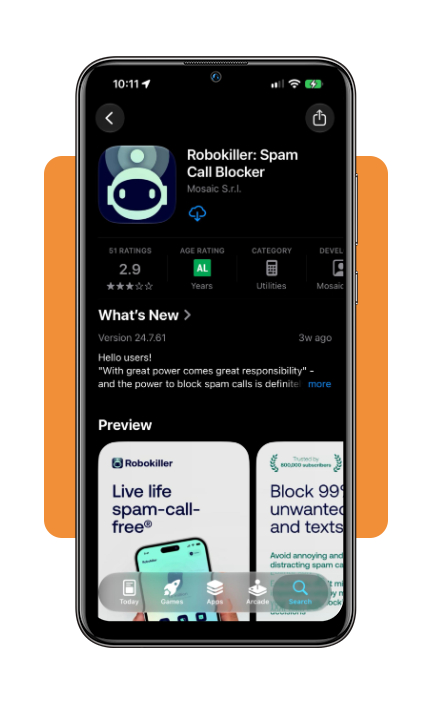
Step 1: open RoboKiller settings
First of all, download RoboKiller (iOS/Android), and answer the questions shown on your screen about how often you get unknown calls, the patterns, and more.
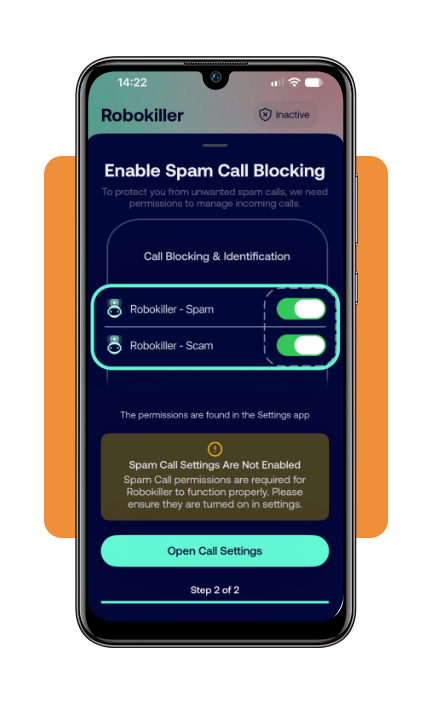
Step 2: enable scam call blocking
After that, you need to enable scam call blocking on the app and share your contacts list.
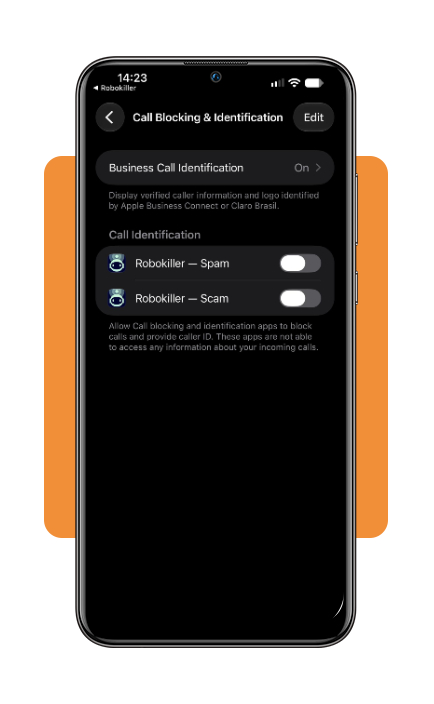
Step 3: enable scam blocking
Now, your smartphone settings will open. Now all you need to do is enable scam blocking through RoboKiller.
Top digital identity protection tools
An AI call blocker can reduce unwanted calls, but broader identity protection tools monitor risks that go beyond your phone number.
LifeLock
LifeLock monitors identity information, dark web exposure, credit activity, and selected financial accounts.
Higher-tier plans also include data broker removal, three-bureau credit monitoring, and identity restoration support.
Depending on the plan, LifeLock can also monitor bank account takeovers, suspicious charges, investment activity, home titles, and phone takeovers.
If identity theft occurs, members can also receive assistance from dedicated restoration specialists and reimbursement for certain eligible losses.
Aura
Aura brings identity monitoring with credit monitoring and digital security tools.
Its service is designed to alert users when personal or financial information may have been exposed or misused.
It also includes features such as three-bureau credit monitoring, financial account alerts, data broker removal, dark web monitoring, antivirus, VPN, and a password manager.
Some plans also include AI-powered scam call and message protection, making Aura broader than a traditional identity-monitoring service.
For better protection, you can combine an AI call blocker with identity monitoring and basic habits, like strong password and regular reviews of financial accounts.
How to avoid phone scams and secure your personal number
An AI call blocker reduces suspicious calls, but it should be combined with basic habits that protect your phone number and personal information.
Consequently, you must not trust caller ID alone because scammers can spoof local government agencies and other familiar organizations to make a call look legitimate.
Also, never provide passwords, verification codes, banking details, or other sensitive information to an unexpected caller.
If the request seems important, hang up and contact the organization through a verified number instead.
Avoid clicking suspicious links in texts or responding to messages that pressure you to act immediately.
The FCC also recommends reviewing your phone’s built-in blocking tools and the protections offered by your mobile carrier.
For another perspective on screening tools, this guide to the best spam call blocker apps covers options designed to identify unknown callers and reduce scam activity.
4.5/5
Keep spam calls from controlling your phone
An AI call blocker like RoboKiller (iOS/Android) can reduce robocalls, screen unknown callers, and give you more control over which numbers are allowed through.
It still works best as part of a broader security routine that includes avoiding suspicious links, protecting verification codes, and checking unexpected requests through official contact channels.
Use call blocking to filter noise, review suspicious numbers before responding, and combine it with identity and account protections so one unwanted call doesn’t become a security problem.
Enjoyed this article? Save Insiderbits to your favorites and discover the most useful tech tips.