
A hotel hotspot that exposes your passwords and a streaming library that locks you out of interesting content both lose their grip once a reliable VPN app reroutes your connection.
In this guide, Insiderbits walks you through Proton VPN, from the kill switch that protects every browsing session on your devices to the location swaps that open up your next watchlist.

4.6/5
Which is the app to change your virtual location and secure internet traffic globally?
Proton VPN (Android | iOS) comes from Proton AG, the company behind Proton Mail, and it sends your phone’s traffic through remote servers while publishing its open-source code.
The free plan comes with unlimited data, zero ads, and servers in Canada, Japan, Mexico, Norway, and 6 other nations, while Plus unlocks 149 countries and over 20,000 fast servers.
A strict no-logs policy keeps this VPN app from recording your browsing history or selling your personal data to advertisers, and that rule covers every tier, free or paid.
Key features within Proton VPN
- Secure Core routing: your traffic travels through 2 servers in privacy-friendly countries before it reaches the open internet, which shields you from network-level attacks;
- NetShield filtering: a DNS filter blocks ads, malware, and trackers before they load, which cleans up the pages you visit and stops websites from following you;
- Tor over VPN: Proton plugs the Tor anonymity network into the app, giving you a built-in route to the privacy-focused corners of the web;
- Multi-device coverage: one Plus subscription protects up to 10 devices at once, including your phone, tablet, laptop, and TV, with no extra accounts to manage.
What a virtual location really changes
A virtual location replaces the IP address websites see with one from the server you connect to, and search results, store pages, and streaming libraries start reflecting that country’s offerings.
Expect your phone’s GPS, billing address, and account region to keep matching your true whereabouts, as the VPN app doesn’t reach past your network traffic.
Browse safely on any public Wi-Fi
Airport lounges, hotel lobbies, and cafes run open networks where strangers can snoop on traffic, and Proton scrambles your data with 256-bit AES encryption before it leaves your phone.
A kill switch cuts off internet access the moment the tunnel drops, and DNS leak protection hides your website lookup requests while your phone hops between hotspots or cellular towers.
Step-by-step: how to change your location address and connect to VPN servers
Changing the country websites see with Proton VPN (Android | iOS) takes a free download, a choice about accounts, and one button that sends your traffic abroad on any device you own.
Expect a system prompt that asks permission to add a VPN configuration before the first tunnel opens, and approve it to let Proton route your data through its global servers.
A small symbol in your phone’s status bar confirms the VPN app is running behind the other apps you open, and it stays visible there until you end the session.
Step 1: download the app and sign up
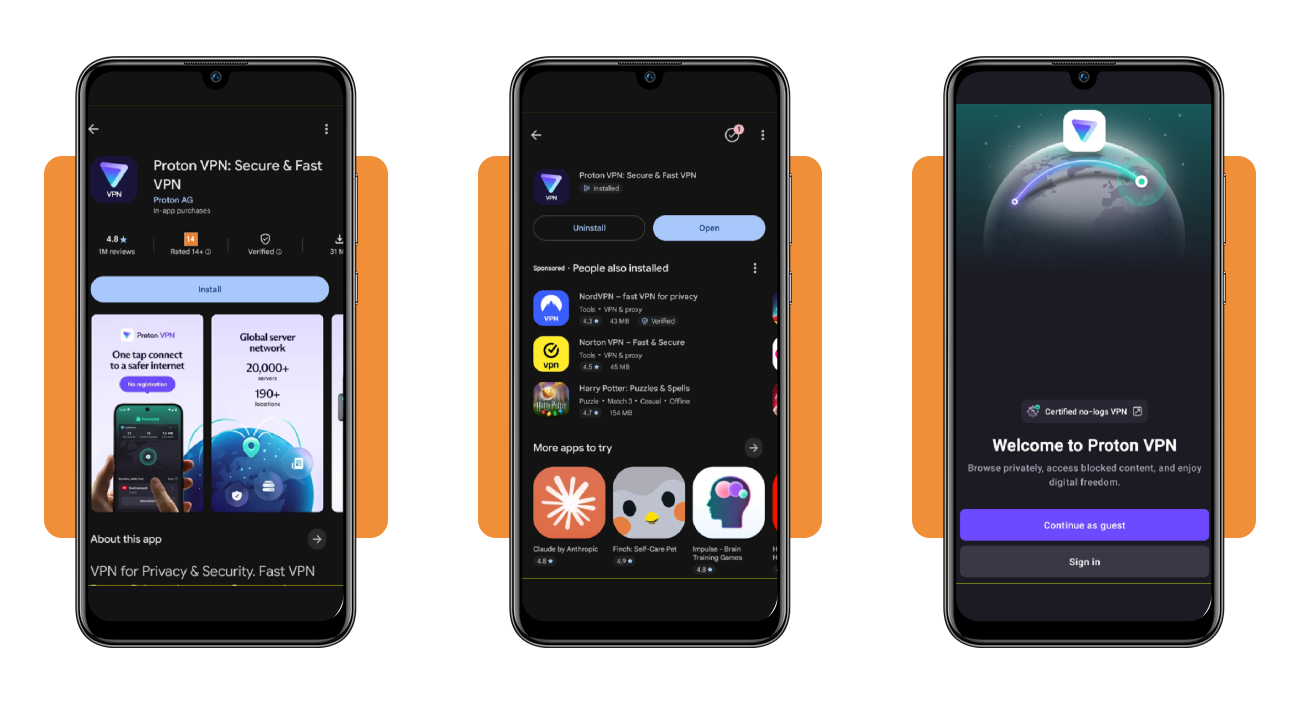
Search for ‘Proton VPN’ in the App Store, which requires iOS 17 or later, or in Google Play, and match the developer name to Proton AG before you download it.
On the welcome screen, tap ‘Sign in’ to join with an account that Proton says needs no personal data, or pick ‘Continue as guest’ to connect with nothing to register.
Step 2: tap ‘Connect’ to join the fastest server
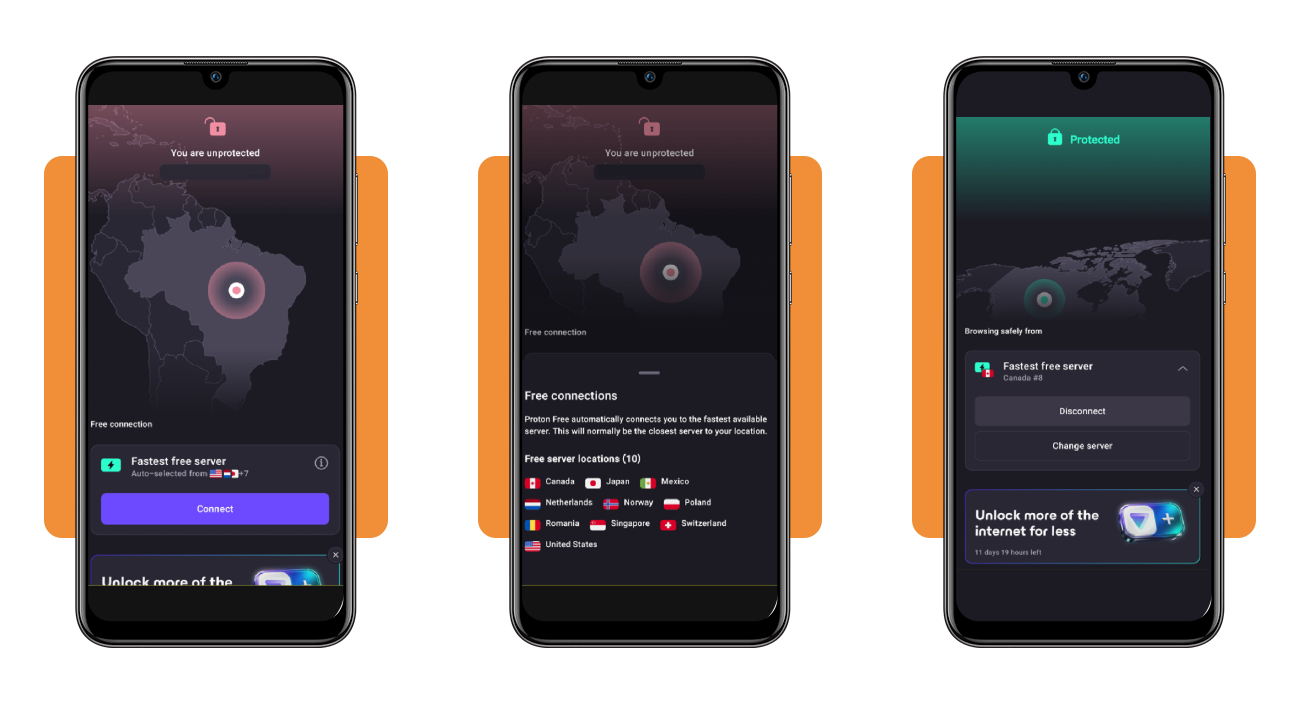
The home screen opens with an open padlock, the words ‘You are unprotected’ and your current country, and a ‘Fastest free server’ card with a ‘Connect’ button below the map.
Once connected, the padlock turns green, the screen reads ‘Protected’, and the card below names your server, such as Canada #8, above a ‘Disconnect’ button that ends the tunnel.
Step 3: switch servers from the ‘countries’ tab
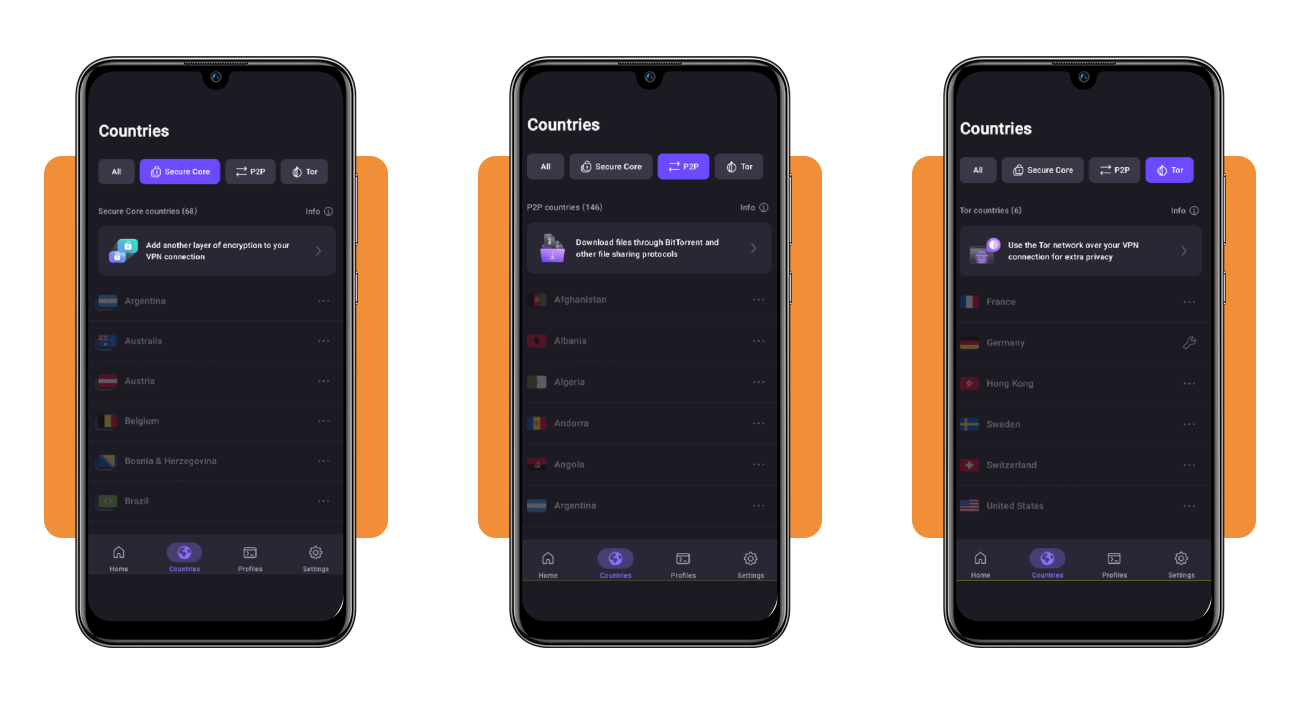
Tap ‘Countries’ to open an alphabetical list that starts with Afghanistan, shows filter chips for ‘All’, ‘Secure Core’, ‘P2P’, and ‘Tor’, and places a three-dot menu beside each country.
Free accounts see the list dimmed, though this VPN app swaps servers at random when you tap ‘Change server’ on the home screen, and the Plus tier lets you tap any country to connect.
Top national cybersecurity platforms
Businesses that store your card number, home address, and work login lose $10.22M per US breach on average, and IBM’s 2025 report says finding and containing one takes 241 days.
Cyber Magazine’s ranking of 10 cybersecurity platforms puts 3 American companies on top, with Palo Alto Networks based in Santa Clara, CrowdStrike in Austin, and Fortinet in Sunnyvale.
Those firms defend the large corporate networks that hold your records and payments, while the VPN app on your phone encrypts the path your own traffic follows to reach them.
Palo Alto Networks leads with AI-driven protection
If your employer or bank runs Palo Alto Networks, 3 product families called Strata, Prisma, and Cortex guard its network, cloud, and endpoints, and Gartner calls the vendor a Leader.
Whenever something odd touches your account, Cortex and Precision AI analyze incoming data, automate tasks, and shrink the gap between a detected attack and a finished response.
CrowdStrike watches every endpoint with one sensor
CrowdStrike builds its Falcon Platform around a lightweight sensor that installs on each managed device, then pairs analytics with its research team’s findings to flag intrusions.
A phone running the Proton VPN app counts as an endpoint, and CrowdStrike protects the ones your IT team enrolls, plus cloud workloads and identities, with AI agents assisting the teams.
Fortinet connects firewalls and cloud into one fabric
When your workplace picks Fortinet, its Security Fabric ties firewalls, endpoints, cloud, and applications, and most products run on FortiOS to share policies and threat intelligence.
FortiGuard Labs’ insight and AI power Fortinet’s detection, and thousands of customers use its firewalls and secure software to shield the systems behind your paycheck and purchases.
Best options for streaming international content
Your favorite series can vanish the moment your plane lands, as catalogs change from country to country and every service checks your connection to decide what shows up on screen.
The Proton VPN app keeps your browsing private for free, but NordVPN, Surfshark, and TotalVPN are also good alternatives for watching content abroad if you want more options.
Read each provider’s streaming terms before you subscribe, then compare server counts, device limits, and refund windows to find the plan that fits how you watch at home and abroad.
NordVPN keeps your home library within reach abroad
NordVPN pitches itself as the way to reach the catalog you pay for at home while traveling, with 7,100+ servers in 225+ locations and the NordLynx protocol built for speed.
Up to 10 devices can run NordVPN at once, apps exist for Android TV and Apple TV, and a router install extends protection to every connected gadget on your network.
Surfshark covers unlimited devices in one plan
A Surfshark plan covers phones, tablets, laptops, and TVs in your household with no device limit, and its 4,500+ RAM-only servers span 100+ countries for you to pick from.
Surfshark’s free trial includes 3 devices, enough to test it beside the VPN app on your phone, and a 30-day refund window protects your payment if playback disappoints you.
TotalVPN keeps streaming simple with one click
TotalVPN encrypts your traffic on a phone, tablet, or PC with 1 click, and it says it has 35+ country locations for geo-restricted content to suit your vacations and work trips.
TotalVPN refunds annual and biannual subscriptions within 30 days and monthly or quarterly ones within 14 days, but renewals bill at the regular rate unless you cancel before renewal day.
4.6/5
Your passport to a borderless internet
With Proton VPN (Android | iOS) on your phone, you can browse from Norway while at home, hop to Japan on vacation, and keep your passwords and searches private in both.
In this guide, Insiderbits taught you how the VPN app moves your location, shields you on hotel hotspots, and pairs with NordVPN, Surfshark, or TotalVPN for travel streaming.
Read more Insiderbits articles and reviews for friendly tips on VPNs and online security, and keep your accounts, your payments, and your family’s phones protected wherever you connect.