
Attendance zones, proof of residency, and vaccination history can stall your child’s eagerness to learn. A public school near your home has a classroom waiting, and one search finds it.
In this guide, Insiderbits pairs the federal district lookup with translation tools and a records checklist, preparing you to walk into registration and leave with your children’s seats confirmed.
Which is the best tool to find school districts and enroll kids in US public schools?
The National Center for Education Statistics, or NCES, runs a free federal directory that covers every school district in the country, and it’s the best place for you to start.
Once you find a public school that fits your child, its profile lists the school’s website and district name, and both lead you toward enrollment forms, deadlines, and contact details.
The listings come from federal school data that states report every year, and NCES neither endorses a school nor vouches for its accreditation, leaving the decision about fit with you.
Search schools by name, address, or district
Type whatever you know into the form, whether that’s a school a neighbor mentioned, your street address or a district name, and the directory lists matching schools with phone numbers.
If nothing shows up, trim your entry to a city, state, or keyword, or enter a ZIP code and stretch the radius to 500 miles while you’re choosing a neighborhood.
Narrow results by grade span and school type
If your child is entering ninth grade, pick 9 in the low-grade row, and the results list shrinks to schools that start there, hiding the elementary and middle schools.
Check the boxes for regular, special education, vocational, or alternative campuses, or switch the type to charter, and the page narrows to the public school options that match your picks.
Compare enrollment size and student-teacher ratios
Every school in the results list carries a total student count, and that number hints at whether your child will join a small community or a campus with crowded hallways.
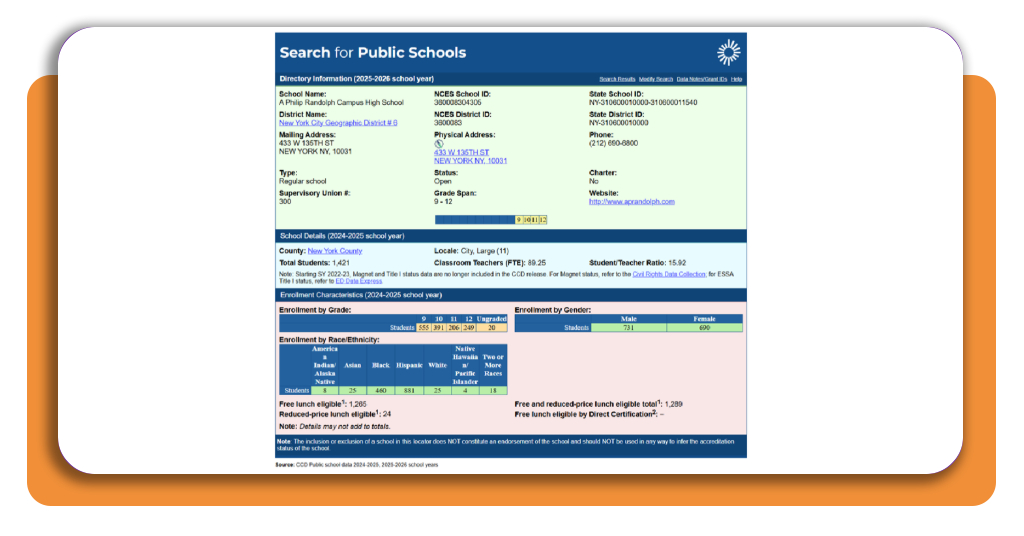
Open a school’s profile to find its classroom teacher count and student teacher ratio, then compare how many students share one teacher at any campus you’re considering.
Step-by-step: how to check school zones and district boundaries
Where you live determines the district that serves your family, and that district draws the lines that point your child toward a neighborhood school with a seat waiting for them.
Officials report district boundaries to the Census Bureau every two years, and NCES publishes them as national map files, meaning a rezoning your district approved may not appear there.
Many districts assign a neighborhood public school by home address, and some accept applications for other campuses, giving you a second route to explore as well.
Step 1: access the NCES website
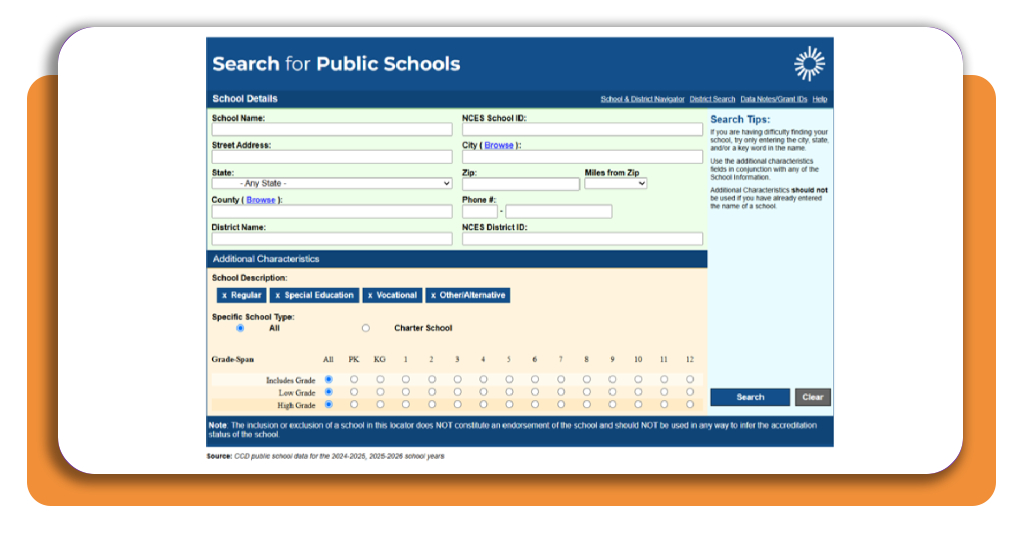
Open the NCES website to find the ‘School Details’ form on the page and look over its boxes for school name, address, city, state, ZIP code, county, and district name before you type.
Scroll to ‘Additional Characteristics’ under the fields to spot the grade span, school description, and school type options, and note the ‘Miles’ from the ZIP box that widens your search.
Step 2: enter your state, city, or zip code
Pick your state from the dropdown menu, type your city or ZIP code into its box, and click the blue ‘Search’ button to bring up the matching schools near you.
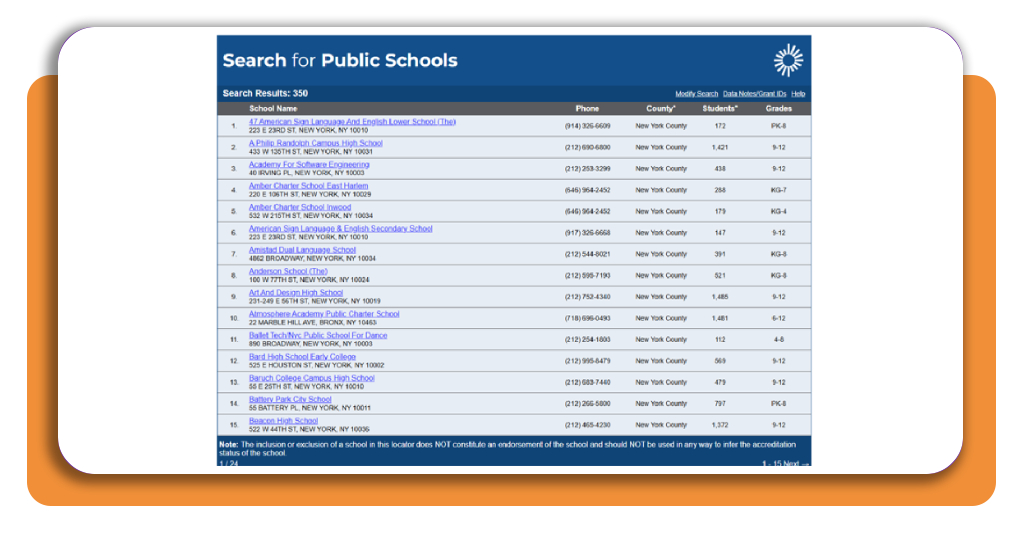
Scan the results columns for address, phone, county, and grades of every public school on the list, then flip pages with the ‘Next’ link until a school catches your eye.
Step 3: open a profile and contact the district
Click on the name of the school you like to open its profile, then look for the district name link near the top and click it to see the district’s listing.
Call the number on the district page, share your address, and ask the staff what zone covers it, what school your child would attend, and if they send boundary maps.
Top document translation tools
Transcripts from abroad need English translations for the registrar, and the forms the district hands you may need your language, meaning you want a tool that works in both directions.
Registrars at a public school will compare your translated copy against the original, and the names, dates, and grades on both pages need to agree down to the last letter.
Translate one page first and read it aloud to a friend or relative who speaks both languages, then run the remaining pages once the wording sounds natural to your ear.
BelinDoc handles scanned documents and PDFs
Photograph or scan your child’s birth certificate and school transcript, upload the file to BelinDoc, and the tool reads the printed text before translating it into the language you pick.
Read BelinDoc’s privacy policy and terms before you upload anything personal, and cover details such as Social Security numbers or addresses since the translation doesn’t need them.
DeepL Documents keeps formatting intact
Upload a Word, PowerPoint, or PDF file to DeepL Documents, and the translated copy comes back with your headings, tables, and column layouts in place, ready to print or email.
If you’re filling out a public school enrollment form, translate the blank copy into your language with DeepL to read all the questions, then answer on the original English copy.
Google Translate supports hundreds of languages
Google Translate covers hundreds of languages, including Haitian Creole, Hmong, and Somali, and you can pick your family’s language from the list or let the tool detect it for you.
Open the Documents tab to upload a Word, PDF, or PowerPoint file, or use the camera mode on your phone to translate a flyer or notice from the school office.
Best options for gathering school enrollment paperwork
Registration goes smoothly when you know who issues every document you need, and the district’s enrollment page or front office can send you the list before you visit in person.
In the famous Plyler v. Doe case, the Supreme Court ruled that a public school can’t deny your child a seat based on immigration status and staff can’t demand a Social Security number.
Federal rules require districts to give parents with limited English an interpreter or translated forms, and the registration office should handle that request without involving your child.
Collect proof of age and residency early
Find your child’s birth certificate or passport to prove age, then pull a lease, utility bill, or mortgage statement that shows your name and the address where your family lives.
If your family lost housing or shares a home with relatives, tell the school office, and federal law lets your child enroll right away while you collect the missing documents.
Track immunization and health records in one place
Request vaccine records from your child’s doctor or the clinic back home, and put every page, including the stamped ones, in one folder where the dates are easy to read.
Ask whether a public school in your state requires a physical or a vision and dental exam, then book the appointment with your pediatrician before the first day of class.
Avoid late or incomplete enrollment forms
Ask the district for its enrollment deadline, and if your child applied to a charter school, expect its document request to arrive after the school offers a seat, not before.
Fill out the Home Language Survey, where your answers about the languages spoken at home decide whether the school tests your child’s English and offers language support services.
Walk into enrollment day with nothing left to chase
Your NCES search found the district’s name and phone number, and one call with your address in hand tells you the zone and school your child will attend.
In this guide, Insiderbits explained how to find your district, translate your documents, and gather every form, making enrollment in a public school feel doable.
Browse more Insiderbits guides for answers to what comes after enrollment, from finding a family doctor to opening a bank account and renting your first home in the US.