Losing access to a social media account can be stressful, especially when it contains photos, messages, and contacts. Hacked account recovery starts with securing your device.
In this Insiderbits guide, learn how to recover a compromised account, strengthen your security, and reduce the risk of another unauthorized login.

4.7/5
App to check for breached accounts and protect your social media
Bitdefender Mobile Security (Android | iOS) is designed to help protect mobile devices against malicious apps, phishing attempts, fraudulent websites, and other online threats.
It can be useful when you’re dealing with a potentially compromised account because securing the device is an important part of preventing another unauthorized login.
Bitdefender (Android | iOS) also can be useful during hacked account recovery by helping you check whether your device has security issues that could compromise your accounts again.
Bitdefender (Android | iOS) also provides security features for Android and iOS devices. However, it does not directly recover a hacked Instagram, Facebook, or other social media account.
Account recovery should always be completed through the affected platform’s official recovery tools.
Key features within Bitdefender Mobile Security
Bitdefender Mobile Security (Android | iOS) includes several tools designed to protect mobile users while they browse, install apps, and interact with websites.
- Web protection: helps identify potentially dangerous websites and phishing attempts;
- Scam detection: can warn users about suspicious links and potentially fraudulent content;
- Security scanning: helps identify security issues on supported mobile devices;
- Account privacy features: can help users monitor certain security-related information;
- Anti-phishing protection: adds another layer of protection when interacting with potentially malicious links.
These tools can help reduce the chances of another compromise, but installing a security app isn’t a substitute for changing a compromised password or recovering an account through its official platform.
Step-by-step: how to recover a compromised account
If you believe someone accessed your social media account, act quickly. The following steps can help you work through the hacked account recovery process while protecting your device.
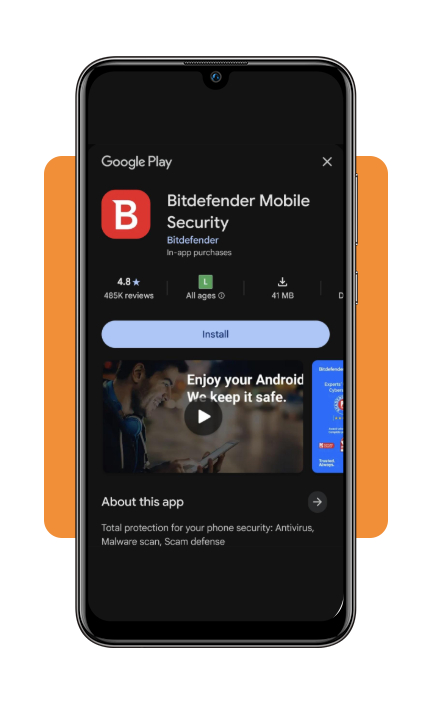
Step 1: download and open Bitdefender Mobile Security
Download Bitdefender Mobile Security from the Google Play Store or Apple App Store.
Open the app and follow the initial setup instructions to begin checking your device for potential security threats.
You’ll need to log in to your Bitdefender account to access the app’s security features. If you don’t have an account, follow the prompts to create one.
Step 2: run a security check
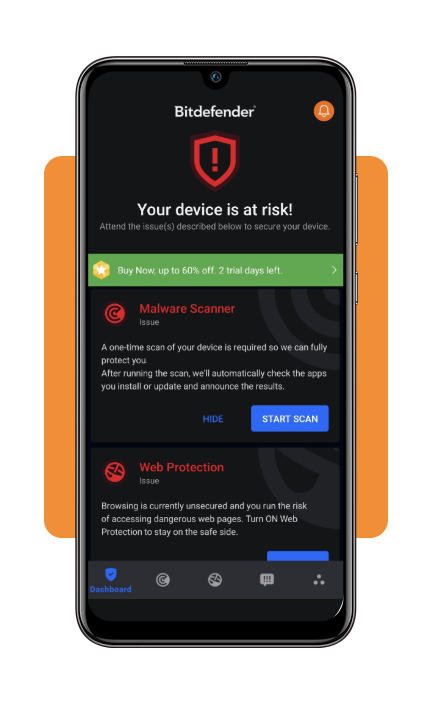
Use the security features available in the app to check your device for suspicious activity or potential threats.
If Bitdefender (Android | iOS) identifies a problem, follow the recommended steps to address it before attempting to recover your social media account.
Step 3: check for phishing threats
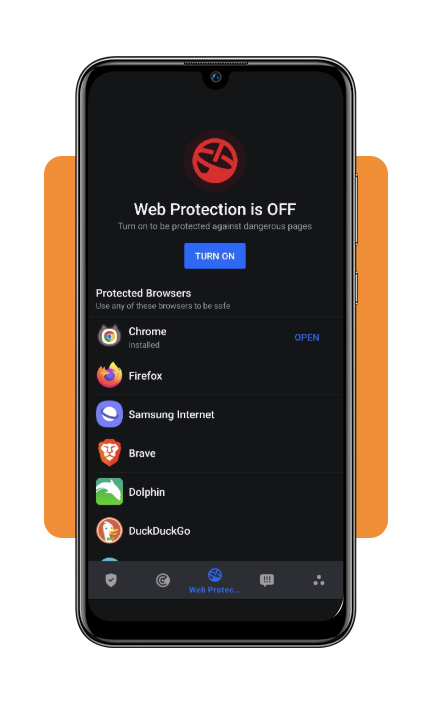
Review Bitdefender’s web protection and security features for warnings about suspicious websites or links.
Avoid entering your social media password on pages reached through unexpected messages, emails, or unfamiliar links.
Step 4: secure your email account
Before recovering the compromised social media account, make sure the email associated with it is secure.
Change the email password and enable two-factor authentication if available. This helps prevent someone from using the email account to reset your social media password again.
Step 5: use the social platform’s official recovery process
Bitdefender (Android | iOS) can help protect your device, but it does not directly recover your social media account.
Go to the official recovery page for Instagram, Facebook, or whichever platform was compromised.
Select the option indicating that you can’t access your account or that it was hacked, then follow the platform’s identity-verification instructions.
Step 6: change your social media password
After regaining access, immediately create a new, unique password.
Don’t reuse the password from the compromised account on other websites or apps. For help creating and managing unique credentials, check our secure password manager app guide.
Step 7: enable two-factor authentication
Turn on two-factor authentication in the account’s security settings.
This adds another verification step when someone attempts to log in, providing an additional layer of protection after hacked account recovery.
Step 8: review active sessions
Check the account’s login activity or active sessions and remove devices you don’t recognize.
Also review the account’s email address, phone number, connected apps, and other security settings for unauthorized changes.
The Cyber Helpline explains that hacked accounts can sometimes be recovered, but the appropriate process depends on the account and platform involved.
You can read its guide to recovering hacked accounts for additional guidance.
Top password managers apps
A password manager can make it easier to use a different password for every online account.
This is particularly useful after an account compromise because reusing the same password across multiple services can expose additional accounts.
Some password managers commonly included in comparison guides are:
- 1Password: focuses on password storage, secure sharing, and account organization;
- Bitwarden: offers password management across multiple platforms and has an open-source approach;
- Dashlane: combines password storage with additional security and monitoring features;
- NordPass: provides password storage and tools for generating stronger credentials.
When choosing a password manager, consider supported devices, encryption practices, account recovery options, two-factor authentication, and the features included in free and paid plans.
You can also compare additional options through this password manager comparison.
Best identity theft protection services
Account hacking and identity theft are related but aren’t the same problem.
Someone taking control of a social media account may have access to private information, while identity theft can involve the misuse of personal information for financial or other fraudulent purposes.
Identity theft protection services may offer features such as identity monitoring, alerts about certain types of suspicious activity, and assistance after potential identity theft.
Some services frequently discussed in identity protection comparisons include:
- Aura: combines identity theft protection with credit and digital security features;
- LifeLock: offers identity theft monitoring and restoration services through Norton;
- IdentityForce: provides identity and credit monitoring features;
- Identity Guard: offers identity monitoring and related protection services.
Features and pricing vary, so compare what each service actually monitors before subscribing. You can review this identity theft protection comparison for additional options.
4.7/5
Protect your account after recovery
Successful hacked account recovery doesn’t end when you regain access. Change compromised passwords, review active sessions, enable two-factor authentication, and check your device for security threats.
Bitdefender Mobile Security (Android | iOS) can help protect your phone against phishing, malicious websites, and other threats, while password managers can make it easier to maintain unique credentials.
Most importantly, use the affected platform’s official recovery process and be skeptical of anyone promising instant account recovery for a fee.