
A bright light low on the horizon could be Venus, a satellite, or a faraway star, and this astronomy app tells you which one the moment you aim your phone upward and read its name.
Insiderbits unpacks Stellarium in this guide, where live planet labels and guided sky tours help you read the constellations overhead and name each dot above your backyard. Keep reading!

4.8/5
Which is the best AR astronomy app?
Stellarium (Android | iOS) turns your phone into a planetarium that follows your gaze across the night sky. Aim it at a twinkle, and this astronomy app names the star, planet, or satellite.
The creator of Stellarium’s open-source desktop release built this mobile edition, and its camera mode lays star names and constellation lines over the sky while the layout stays minimalist.
This app has earned popularity through details like close-up views, where a dot becomes a 3D model with moons, Saturn’s rings cast shadows, and eclipses play out on the moon.
Key features within Stellarium
- Sky cultures: swap the constellation figures for the Blackfoot, Inuit, Navajo, Tukano, or Tupi-Guarani versions and watch familiar stars regroup into new patterns;
- Guided tours: the Summer Constellations tour links Lyra, Cygnus, and Aquila into the Summer Triangle, while the Euahlayi Skies tour explores Aboriginal sky knowledge;
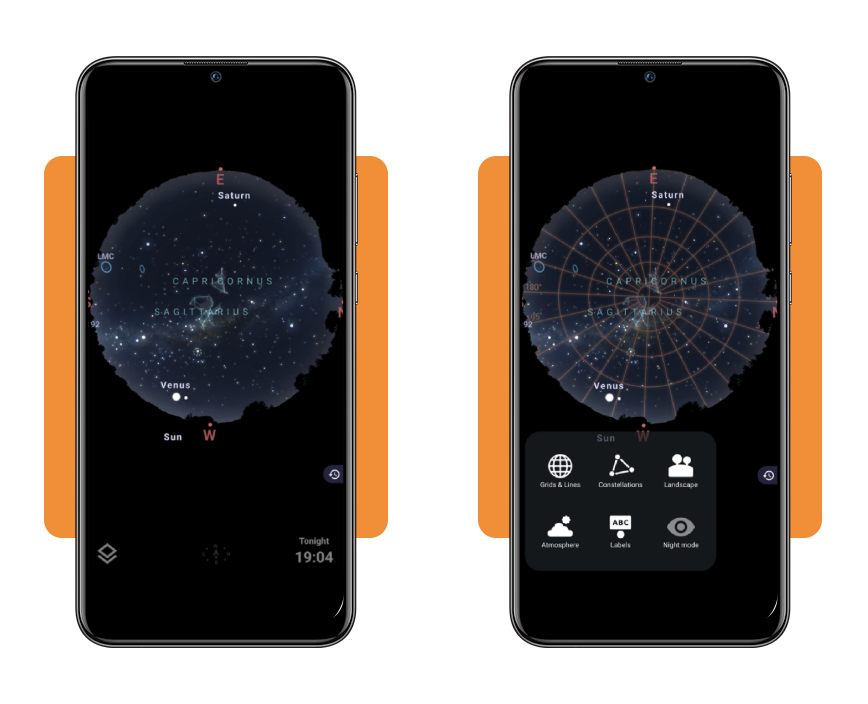
- Grids and lines: toggle an altitude and azimuth grid and read the degree markings showing how high to tilt your phone and which heading to face;
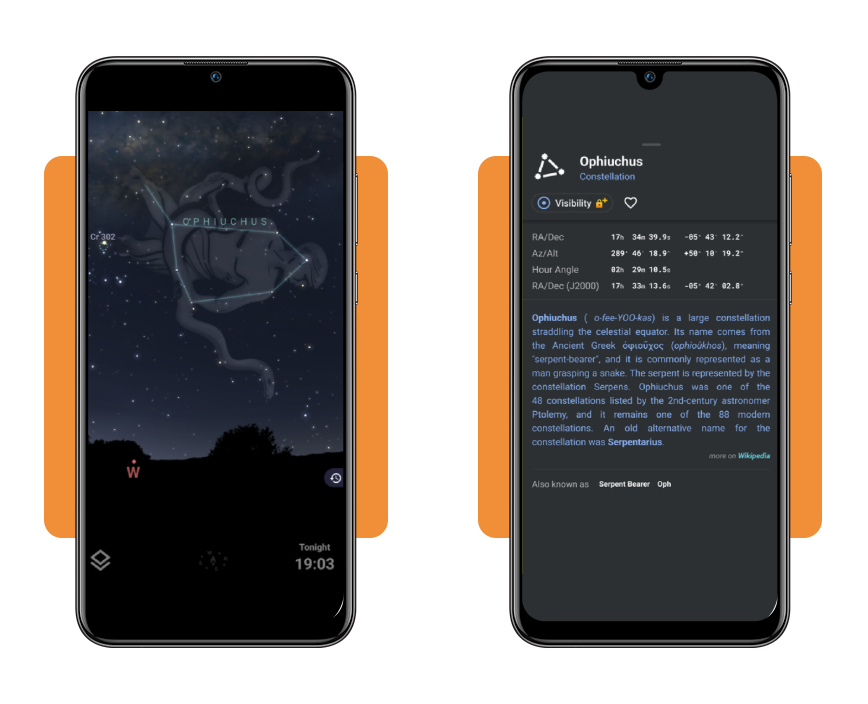
- Object cards: tap a constellation to open a card with its coordinates, a Wikipedia summary, alternate names like Serpent Bearer, and a heart icon for favorites.
Free tools that cover most beginners
Change the date, hour, or location, and the sky rearranges itself to match, complete with sunrise glow, sunset color, and haze that bends the light the way the real atmosphere does.
“Red night mode” tints the screen to protect your dark adaptation, which makes this astronomy app easy to read, and the free version brings a Milky Way band, nebulae, galaxies, and clusters.
What the Plus upgrade adds to your sky
The Plus upgrade extends the sky catalog to magnitude 22 targets, adding over a billion stars, ten thousand asteroids, distant galaxies, and planetary surfaces you can study in HQ.
An offline dataset keeps millions of stars working without a signal, telescope control drives motorized mounts over Wi-Fi, and the “Observing Tools” predict when targets become visible.
Step-by-step: how to identify constellations and planets
Stellarium (Android | iOS) asks for little before it starts naming the sky: a quick download, a charged battery, and a backyard patch beyond the glare of your porch light.
Pick a night when the moon stays low, and this astronomy app fills your screen with named stars, planets, and constellations that follow the turns you make across the lawn.
Your thumb and eyes share the work, with the phone naming whatever you aim at while the real sky overhead confirms each label and trains your eye to spot patterns.
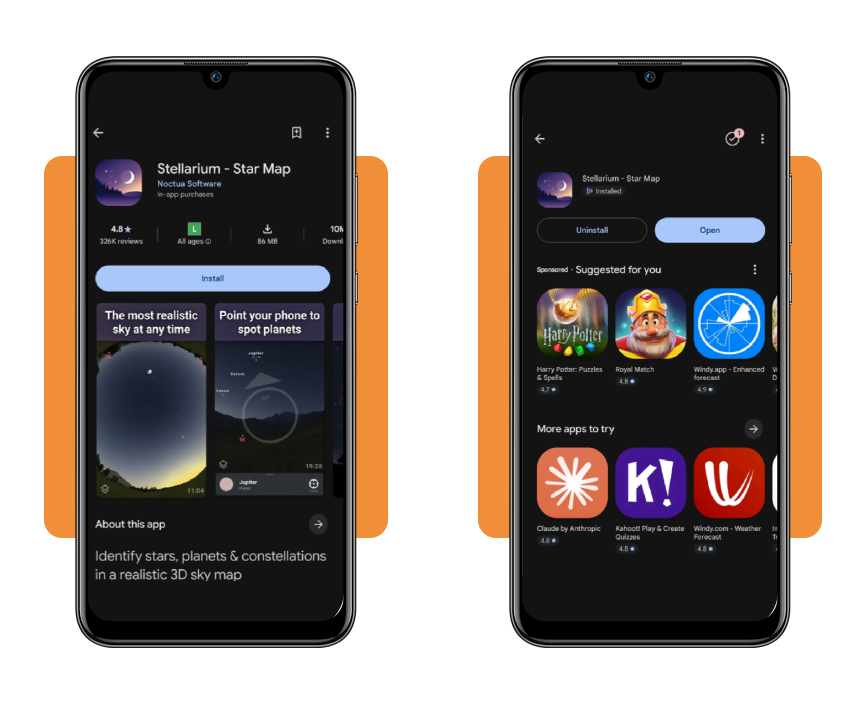
Step 1: download Stellarium on your device
Open the App Store or Google Play, search for ‘Stellarium’, and pick the Star Map listing from Noctua Software, a developer name that keeps lookalike apps out of your way.
Accept the prompts for location and camera access when they appear, which places you under your local sky and anchors every label to the live camera view in your hands.
Step 2: point your phone toward the sky
Hold the phone upright with the screen facing you and the camera aimed at a bright star, then tilt until the labels on screen match the stars you can see.
A compass icon at the bottom center shows your heading, while this astronomy app tracks each turn, and the search icon at the top right finds a planet by name.
Step 3: tap a constellation to learn more
Tap the constellation figure, and a dashed outline marks its boundary, while the bottom panel shows the name and plus and minus buttons for zooming in on the nearby stars.
Planets respond to the same tap, and dragging the bottom panel upward reveals the full entry for Jupiter or Saturn before a downward swipe returns you to the sky map.
Top stargazing apps
Stellarium (Android | iOS) is our top pick for naming what hangs above your head, but the app stores list other stargazing tools that deserve a place on your phone when plans change.
Your own stargazing habits decide which companion earns a second slot on your device, and each option that follows suits a distinct routine for all the evenings you spend outdoors.
Build your sky routine around the astronomy app and add a second tool to your home screen only when a particular night calls for something the main map leaves out.
Sky Tonight – Stargazing Guide
Sky Tonight (Android | iOS) rates each evening with a ‘Stargazing Index’ that tells you whether a drive to a dark field deserves the gas money before you grab your jacket.
A calendar lists upcoming sky events, the camera view labels what you aim at, and ads support the free version, while Premium comes as a lifetime, monthly, or yearly plan.
SkyView® Lite
SkyView® Lite (Android | iOS) works without Wi-Fi, mobile data, or GPS, which turns it into a dependable companion for remote campsites and mountain trails where your signal bars vanish.
“Sky Paths and Sightings” layer trails and tips over the live camera view, a small in-app purchase extends the free version, and this astronomy app handles all your research at home.
Star Walk 2 Plus: Live Sky Map
Star Walk 2 Plus (Android | iOS) opens with a “Visible Tonight” list of planets and stars that rise above your horizon, ready for a tap that opens a card with their details.
“Planet Walk” and quizzes turn sky watching into a game for kids and curious friends, while ads support the free version, and a no-ads purchase removes them from the screen.
Best options for tracking meteor showers
Moonlight can erase half a shower, a cloud bank can erase the rest, and a good tracker spares you from learning that lesson with a stiff neck on cold grass.
Earth plows through a trail of space debris on the same dates every year, and the thickness of that trail decides whether a night delivers fireworks or a few stragglers.
Once a tracker names your night, open the astronomy app, find the constellation a shower radiates from, and drag your lawn chair to face it before the first streak flashes.
NASA Meteor Shower Portal
NASA’s portal draws on a network of low-light cameras that film the night and triangulate each meteor’s path, giving you shower data built on measured trajectories from many stations.
Treat the portal as a reference library for the showers behind the headlines, with orbit details that explain why certain streams return each year and where their dust trails begin.
Global Meteor Network Flux Monitoring
Western University and NASA’s Meteoroid Environment Office run the flux page, which updates daily and shows a ZHR dial for each active shower from cameras spread around the globe.
ZHR counts the meteors a perfect sky would deliver, and the landscape layer in the astronomy app shows how much of that sky your own horizon will hide from you.
American Meteor Society
Skywatchers have fed the American Meteor Society their sightings for over a century, and the organization still treats an observer’s notes like data that deserves a permanent record.
The website gives you two tools: a fireball report form for the bright streaks you spot overhead and a shower calendar that lists the events worth watching from your backyard.
4.8/5
Your backyard just became an observatory
Next time a friend points at a bright dot and asks what it is, Stellarium (Android | iOS) gives you the name, and its rivals cover dark campsites and meteor showers.
In this Insiderbits guide, you saw how to point the phone, tap a constellation, and let the astronomy app name each wandering planet that crosses your backyard sky.
Explore more Insiderbits articles for apps and websites about astronomy that help you explore the night sky, plan stargazing nights, and share them with your family.