
Those car rides where you belt out the chorus deserve a bigger audience. This karaoke app hands you backing tracks, lyrics, and duet partners ready to join your song from anywhere.
Smule turns those solo drives into shared performances, and this Insiderbits guide shows you how to join video duets and train your singing voice until the spotlight lands on you. Read on!

4.5/5
What is the app to turn your phone into a karaoke machine?
Smule (Android | iOS) puts a digital band and a recording studio on your phone, letting you sing over a song’s instrumental track and save your performance as audio or video.
Joining a duet that another singer has started won’t cost you a cent, and a VIP plan unlocks solo recordings plus the karaoke duets and group songs you launch yourself.
Playing your takes back lets you hear where your voice wobbles or rushes the beat, turning the app into your practice room whether you sing for fun or for an audience.
Key features within the Smule app
- Pitch guide: a line of notes moves above the lyrics and lights up with stars when you hit the pitch, helping you stay in tune;
- Audio FX and key changes: effects like reverb and ‘Butterflies’ polish your sound, and you can shift a song’s key until it fits your range;
- Duets with pop stars: tracks from Ed Sheeran, Dua Lipa, Olivia Rodrigo, and Disney favorites let you trade lines with the artist on songs you love;
- Live sessions: hosting or joining a live room lets you sing in real time, chat with the people watching, and team up with other performers.
Over 15 million songs in your pocket
The catalog covers pop, rock, R&B, country, musicals, and classics, and Smule (Android | iOS) adds new tracks as the charts move, giving your karaoke nights fresh material to try out.
Themed collections show up throughout the year, with Halloween picks for spooky nights and birthday songs you can record and send to a friend whose big day is coming up.
A global stage in more than 190 countries
Singers from more than 190 countries post duets on the app, and joining one lets your voice share a track with someone who lives across the ocean and speaks another language.
Your finished duets collect plays, likes, and gifts from listeners, and you can share them on your social accounts with friends and family members who want to hear you sing.
Step-by-step: how to record video and sing duets
In Smule (Android | iOS), a video duet places your camera feed next to the other singer’s clip, and the finished recording plays as one performance you can share like a music video for two.
Plugging in headphones keeps the backing track out of your mic, and that small move separates a muddy karaoke take from one where listeners hear your voice over the music.
Propping your phone at eye level near a window or lamp gives the camera a steady shot with good light, and your face stays in frame as you read along.
Step 1: download Smule and sign up
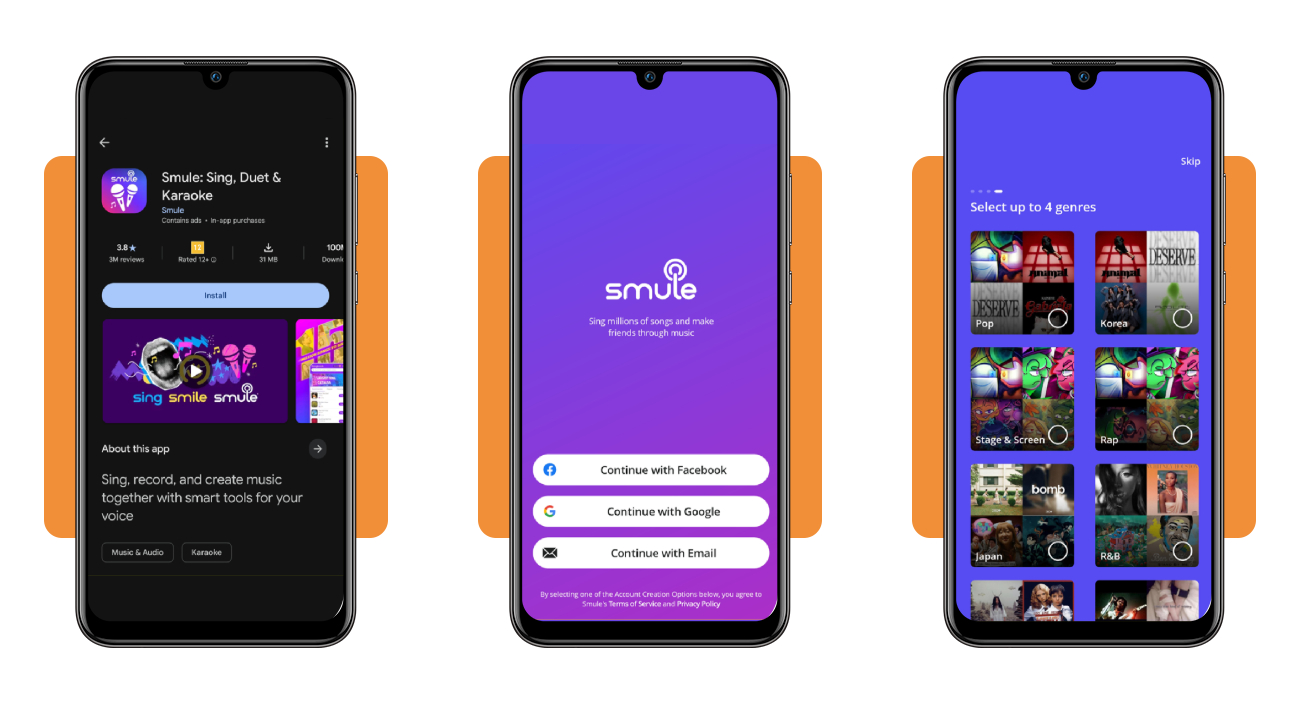
Download Smule from Google Play on Android or the App Store on iOS, or open the web version in your browser, and sign up with Facebook, Google, or an email account.
Pick a username, add a profile photo with the camera icon, and choose up to four genres you enjoy the most, and the app runs a short tutorial on pausing and rewinding.
Step 2: find your song in the Songbook
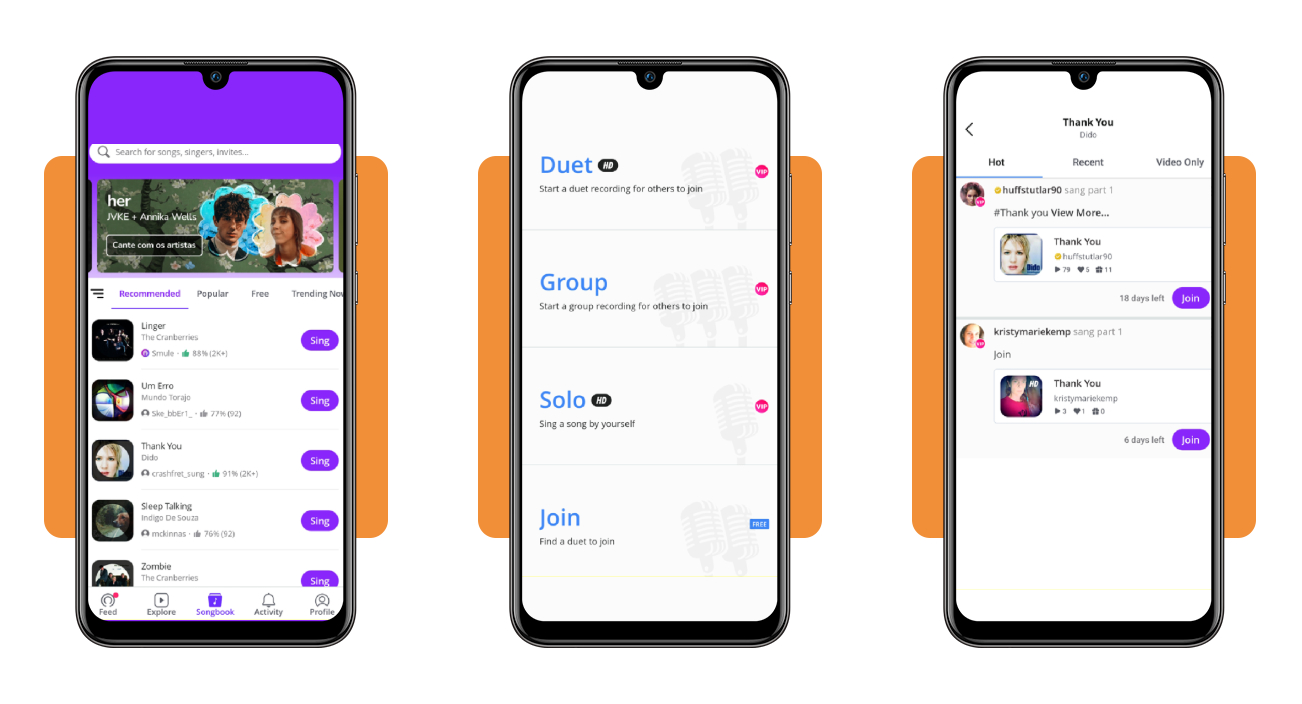
Tap ‘Songbook’ at the bottom of the screen to browse ‘Recommended’, ‘Popular’, ‘Free’ and ‘Trending Now’ tabs, or type a title or artist into the search bar at the top.
Hit ‘Sing’ next to the track you want, and the app shows four ways to perform it, with ‘Duet’, ‘Group’, and ‘Solo’ marked VIP while ‘Join’ stays free for you.
Step 3: join a video duet and sing the full song
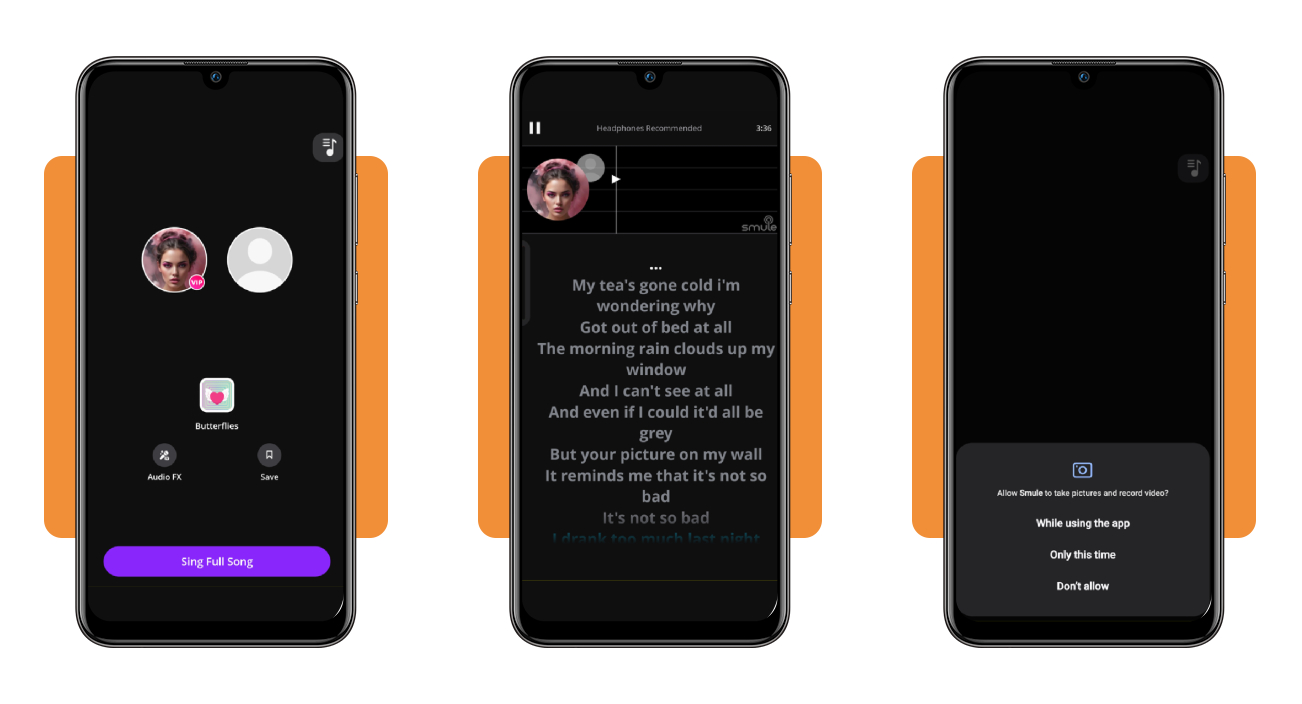
Choosing ‘Join’ opens a list of active duets, and the ‘Video Only’ tab narrows it to performances recorded on camera, showing the days you have left to add your part.
Press ‘Join’ on the clip you like, test the Audio FX presets until your voice sounds right, and tap ‘Sing Full Song’ to start your karaoke take after a countdown.
How to improve your singing
Hearing your own recording back can sting, but the difference between that take and the voice in your head shrinks once you understand what your body does when you sing.
Your lungs push air past two vocal folds that vibrate, and your throat and mouth shape that buzz into notes, with chest voice handling lows and head voice carrying highs.
Blending those two registers smooths out the crack between them, and keeping your neck and jaw loose during karaoke lets the tiny muscles in your voice box do their job.
Find your range and pick songs that fit
Hum a comfortable note and slide down until the sound turns gravelly, then climb until it feels pinched, and match both ends on a piano app to see where your vocal range starts and stops.
Songs that live inside those limits free you to work on tone and timing, while a vocal coach can listen to your voice and show you how to stretch your range without pushing your throat.
Warm up before you grab the mic
Skip the urge to open with your favorite ballad and start with lip trills, blowing air through loose lips on a soft B sound like a motorboat as you glide up and down the scale.
Follow with a bratty ‘nay nay nay’ on five rising notes to find that nasal edge, then make a low creak like a squeaky door and slide it up into a light, airy head voice.
Shake off the nerves and sing with feeling
Nerves make your throat clench, which explains why the note you nail alone in your room vanishes around friends, but a cracked line is part of learning and gives you no reason to stop.
Read the lyrics before you press record and decide what the song means to you, then start your karaoke take at a medium volume to save some power for the chorus and the big moments.
How to boost your phone’s volume
Your phone’s small speaker has to carry the backing track, your duet partner, and your own voice at once, and a quiet setting can bury your performance under the room’s chatter.
Press the volume button while a song plays instead of on the home screen, or you’ll raise the ringer, and check the in-app slider that can hold the audio back.
An equalizer tweak that lifts the mid and high frequencies makes vocals sound crisper and louder at the same level, giving your karaoke night more punch without any extra gear.
Turn up every volume slider in settings
Open ‘Settings’ on your Android phone, tap ‘Sound and vibration’, and choose ‘Volume’, then push the sliders for media, calls, ringtone, notifications, and alarms to the top.
Pressing the volume button and tapping the three dots on the panel that pops up lets you adjust those levels, while iPhone owners can find the ringer slider under ‘Sounds and Haptics’.
Lift the hidden media volume limit
Android phones cap media playback to protect your hearing, and you can lift it by opening the Volume screen in Settings, tapping the three dots, and turning off the Media volume limit.
On an iPhone, open ‘Settings’, go to ‘Sounds and Haptics’, tap ‘Headphone Safety’ and turn off ‘Reduce Loud Audio’, which lets your karaoke backing track play at full strength.
Clear the speakers and ditch the bulky case
Lint and pocket dust pack into the speaker grille and dull your music, and a soft brush or a wooden toothpick can lift that gunk out without harming the tiny parts tucked inside.
Keep liquids and metal tools away from the openings, then slip off the thick case and play a song to test the sound, as a poor fit can muffle the speaker more than you’d expect.
4.5/5
Trade the shower for a worldwide audience
The next time a chorus loops in your head, pull out your phone, join a duet with someone across the world, and hear how your own voice blends with theirs.
In this guide, you saw how Smule (Android | iOS) turns your phone into a karaoke setup, plus the warmups, range checks, and volume fixes that help your recordings sound their best.
Keep browsing Insiderbits for more fun apps that sharpen your talents, from drawing to dancing, and you’ll pick up fresh skills worth showing off at your next big family dinner.