Building basic computer skills can help older adults adapt to today’s digital world, even if they grew up long before smartphones and high-speed internet became commonplace.
These skills can support independence, improve access to healthcare services, make managing finances easier, and help seniors stay connected with friends and family. Read on Insiderbits.

5/5
Which is the app for seniors to learn basic computer and technology skills?
Technology does not have to be confusing or intimidating.
With patient guidance, accessible tools, and step-by-step practice environments tailored specifically to mature learners, seniors can quickly build digital confidence.
Embracing modern devices opens doors to online grocery delivery, video calling with grandchildren, telehealth appointments, and enriching online entertainment, ensuring no one is left behind in the digital age.
For older adults learning to use smartphones, tablets, or computers, educational apps can provide a helpful starting point.
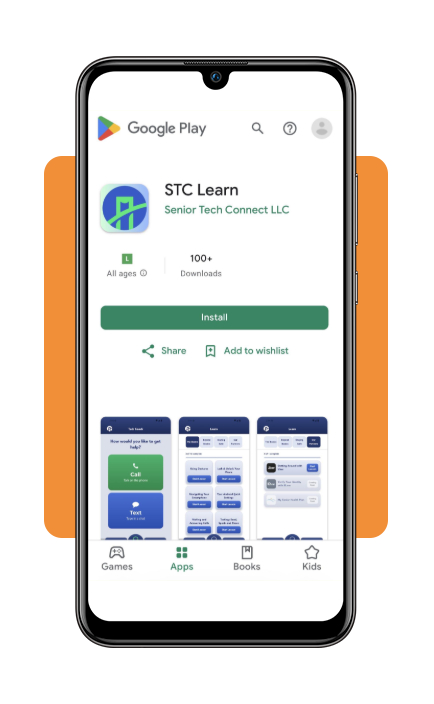
Unlike many apps that move too quickly or assume prior knowledge, STC Learn (iOS | Android) offers step-by-step tutorials in plain language, helping users learn everyday tasks without technical jargon.
The app also provides a low-pressure environment where seniors can practice tapping, swiping, and navigating menus without worrying about accidentally deleting files or making costly mistakes.
Looking for more light digital activities to engage with? Spending time with a memory games app is a way to sharpen hand-eye coordination, build finger dexterity, and boost cognitive agility on a digital screen.
Key features within STC Learn
STC Learn helps older adults build computer skills through simple, step-by-step lessons designed to make everyday technology easier to understand and use.
Risk-free interactive practice lessons
Users learn by performing simulated actions directly within the app.
Whether practicing how to unlock a device, send a text message, search the web, or order groceries online, highlighted visual indicators show exactly where to press, allowing seniors to repeat lessons as often as needed.
24/7 AI tech coach
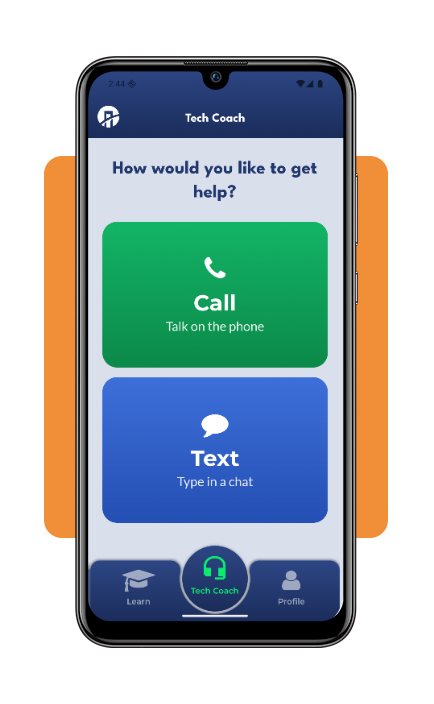
The app includes a built-in virtual assistant designed to answer technology questions at any time of day. Learners can interact via text or voice call, asking questions in everyday language without feeling rushed or judged.
Senior-centric accessibility design
STC Learn features high-contrast visual modes, adjustable large font sizes, bold text options, and uncluttered navigation menus with large buttons to accommodate visual or motor impairments.
Practical real-world focus
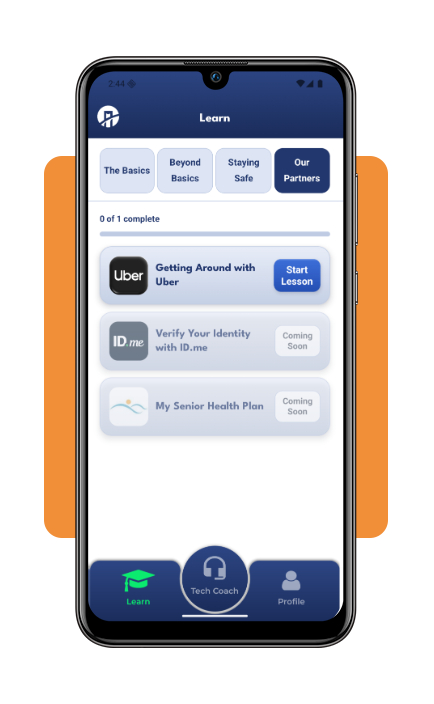
Lessons prioritize functional tasks that improve daily life, such as accessing patient portals, booking rideshare services, managing online passwords, and identifying suspicious text messages.
Step-by-step: how to master computer basics
Building computer skills takes practice, and starting with simple tasks can make learning less intimidating. These steps help older adults gain confidence and become more comfortable with everyday technology:
Step 1: download and launch the app
Install STC Learn on your iOS or Android device, tablet or phone. Open the app and allow necessary basic permissions (such as microphone access for voice-assisted help).
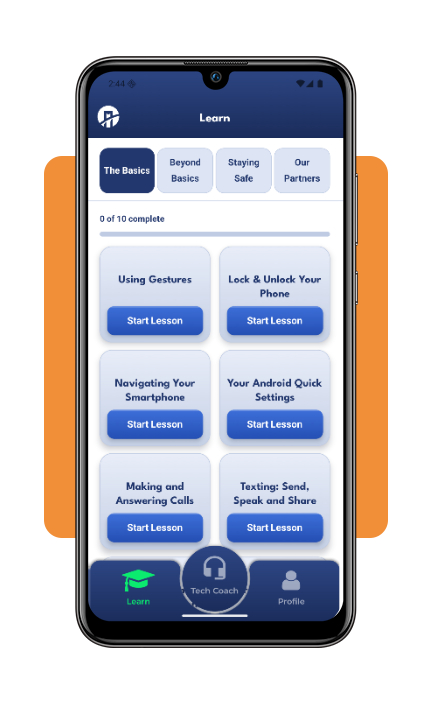
Begin with the app’s foundational gesture modules. Practice tapping buttons, holding down icons, dragging items, and scrolling through lists inside the app’s guided, risk-free simulation environment.
Step 2: master system navigation and home controls
Work through tutorials covering core device navigation—including locating your home screen, opening settings, managing open applications, and adjusting screen brightness and speaker volume.
Step 3: build communication and internet skills
Use the app’s interactive modules to practice typing on an enlarged touch keyboard, sending practice text messages, taking and viewing digital photos, and conducting basic web searches safely.
Step 4: ask questions and review difficult modules
Whenever you encounter an unfamiliar button or icon, use the app’s 24/7 AI Tech Coach or built-in search tool to ask questions in plain language without feeling rushed.
Top computer training programs for older adults
Learning computer skills through in-person classes or live online sessions can be a great option for seniors who prefer hands-on guidance.
These programs offer opportunities to ask questions, practice new tasks with an instructor, and learn at a comfortable pace. Several organizations and platforms offer technology courses specifically for older adults:
Senior Planet by AARP
Senior Planet is a national non-profit program that offers free online and in-person technology classes for adults aged 60 and older.
Their courses cover everything from basic computer operation and iPad fundamentals to online banking, spreadsheet management, and digital photography.
Classes are taught at a comfortable pace by patient instructors who understand senior learning styles.
Osher Lifelong Learning Institutes (OLLI)
Located on university campuses across the United States, OLLI programs provide non-credit educational courses designed specifically for adults aged 50 and older.
Many local OLLI chapters host hands-on technology workshops where university volunteers help seniors master laptops, smartphones, and specialized software applications.
Public libraries and community senior centers
Local public libraries and municipal senior centers are outstanding resources for free, low-stress computer classes.
Many libraries offer one-on-one ‘tech tutor’ drop-in sessions where staff members help seniors set up new laptops, create email accounts, or learn how to borrow free e-books and audiobooks.
Online video platforms
For self-motivated learners who prefer studying from home, online learning platforms feature comprehensive beginner curriculums.
Enrolling in online courses like Udemy basic computer skills course comes with video lectures, downloadable cheat sheets, and self-paced demonstrations that walk beginners through operating system fundamentals.
Best options for setting up cybersecurity protection
As older adults spend more time online, establishing robust digital security measures is essential to protect personal data, bank accounts, and family privacy from cybercriminals who target senior populations.
Implement multi-factor authentication and password managers
Using weak or repeated passwords across multiple websites creates significant security risks. Seniors should adopt secure password manager applications to generate and auto-fill strong passwords.
Enabling Multi-Factor Authentication (MFA)—which sends a one-time code to a mobile phone when logging in—adds a vital secondary layer of security to email and banking accounts.
Install automated antivirus and firewall software
Equipping laptops and desktop computers with antivirus and anti-malware software provides protection against malicious downloads, computer viruses, and unauthorized intrusions without requiring daily manual updates.
Recognize phishing scams and urgent pop-ups
Cybercriminals frequently use fear or urgency to deceive users.
Seniors should learn to recognize common scam warning signs: unexpected emails asking for password resets, pop-up windows claiming your computer is infected with a virus, or text messages demanding immediate payment.
Remember that legitimate financial institutions and government agencies will never ask for sensitive passcodes or payment details via email or unsolicited text messages.
5/5
Building computer skills at any age
Learning computer skills can help older adults stay connected, manage everyday tasks, and access essential online services with greater independence.
With senior-friendly apps, community classes, and basic cybersecurity practices, they can build confidence and make technology a more useful part of daily life.