
The skyrocketing demand for video captions, podcasts, legal recordings, and audio logs has turned transcription gigs into one of the fastest ways to turn spare time into income without requiring a formal college degree.
Join over 1 million freelancers earning from home with weekly payouts via PayPal and Venmo, enjoying flexible hours where you work as much or as little as you want. Read on Insiderbits.

4.3/5
Which is the best app to find transcription gigs online?
Finding consistent, high-paying transcription gigs requires access to a steady marketplace of client requests rather than relying on single-agency platforms with long waiting lists.
Upwork for Freelancers, available for iOS and Android stands out as the premier mobile gateway to access thousands of open transcription projects worldwide.
Many niche transcription websites impose low pay rates and require typing speed tests before allowing new workers to join.
In contrast, open gig platforms let you set your own rates, connect directly with clients, and build long-term relationships with video creators, researchers, and podcast producers.
Through the Upwork transcription jobs catalog, beginners can find entry-level micro-tasks while experienced typists land specialized medical, legal, or multilingual audio projects paying $20 to $40 per hour.
Features available in the Upwork for Freelancers app
The Upwork for Freelancers (iOS | Android) mobile dashboard provides a complete suite of project management tools designed to keep gig workers productive anywhere:
- Instant job alerts: customize push notifications for new transcription gigs as soon as clients publish them, allowing you to submit proposals early;
- In-app messaging and audio calls: communicate directly with clients, receive audio file links, and clarify audio quality requirements within secure project threads;
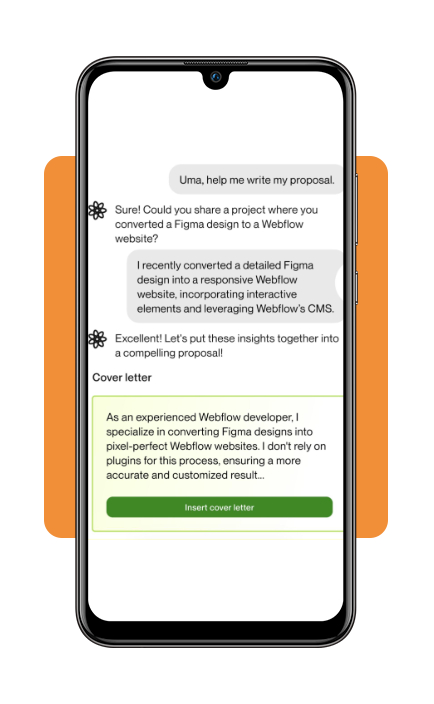
- Mobile proposal submission: write customized cover letters, attach work samples, and submit Connects to bid on hourly or fixed-price contracts;
- Escrow protection and payment tracking: monitor milestone deposits, review pending payments, and track released funds inside your mobile wallet balance;
- Contract management: accept job offers, request milestone releases, and send formal project deliverables straight from your device.
Step-by-step: how to optimize your freelance profile to land transcription jobs
Landing your first paid audio project requires presenting a polished profile that reassures clients of your accuracy and turnaround speed.
Step 1: position your bio around accuracy, speed, and niches
First things first, download the app Upwork for Freelancers to your iOS or Android device.
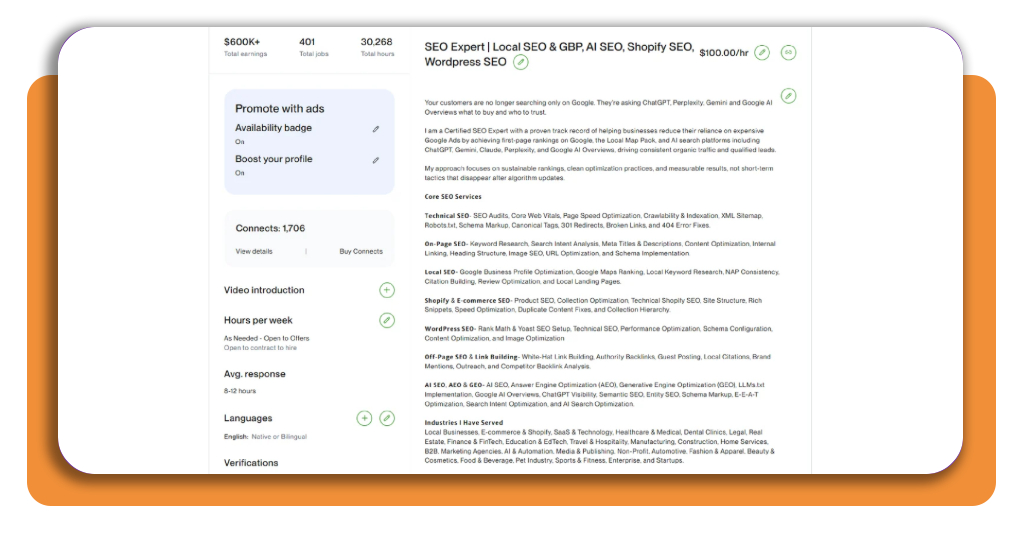
Avoid generic titles like ‘Freelance Assistant.’ Instead, use specific headlines such as ‘Audio & Video Transcriber | 99% Accuracy | Podcast Captions.’
In your bio, explicitly list your typing speed (WPM), software tools, and domain expertise (legal, academic, or medical).
Step 2: upload audio sample transcripts
Create a portfolio section featuring 1-minute audio clips alongside your transcribed text.
Demonstrating your ability to accurately transcribe clear interviews, multi-speaker panels, or accented audio gives clients immediate confidence in your skills.
Step 3: protect your work scope and payment terms
Before accepting custom audio orders outside standard escrow, ensure project scope and turnaround deadlines are legally defined.
Utilize a reliable freelance contract generator to establish clear client expectations and protect your earnings.

Step 4: submit customized proposals
When applying for transcription gigs, mention specific details from the client’s posting.
State your turnaround time, confirm your familiarity with their file format (MP3, WAV, video link), and offer a quick turnaround sample if requested.
Step 5: deliver files to build reviews
Proofread all transcripts carefully using automated grammar checkers and headphone audio loops. Delivering transcripts prior to deadlines earns 5-star ratings, which boosts your profile visibility in search algorithms.

Best digital banking apps to receive global payments
When working with clients across different countries, minimizing currency conversion fees and transfer delays is critical to keeping your gross income high.
| Banking Platform | Best For | Transfer Speed | Supported Currencies | Freelance Features |
| Wise (TransferWise) | Multi-Currency Transfers | Instantto 1 business day | 40+ Currencies | Provides real mid-market exchange rates and local account details (USD, EUR, GBP) for direct client deposits. |
| Revolut | Global Cash Management | Instant between accounts | 30+ Currencies | Features built-in budgeting tools, instant currency exchange, and virtual debit cards for online business expenses. |
| Payoneer | Freelance Marketplace Integration | 1 to 3 business days | 150+ Countries | Direct integration with global freelance platforms like Upwork and Fiverr for low-cost earnings withdrawal. |
| PayPal | Quick Local Payouts | Instant to debit card | 25+ Currencies | Ubiquitous support across gig applications with fast withdrawal to local checking accounts or Venmo balances. |
How to track your freelance income
Managing multiple transcription gigs across different platforms requires disciplined record-keeping to ensure you remain tax-compliant and aware of your true hourly profit.
- Separate business and personal funds: open a dedicated checking account strictly for your freelance earnings and software subscriptions (such as noise-canceling tools or foot pedal hardware);
- Maintain an income and expense log: use dedicated accounting software (QuickBooks Self-Employed, Wave) or a streamlined spreadsheet to record every invoice payout, platform fee deduction, and payout date;
- Set aside tax withholdings: transfer 25% to 30% of every incoming client payout into a separate high-yield savings account to cover quarterly estimated federal and state self-employment taxes;
- Track software deductions: keep digital receipts for home office expenses, high-speed internet bills, professional headphones, and transcription playback software to lower your net taxable income.
4.3/5
Building your earnings with transcription gigs
Building a sustainable income stream through transcription gigs comes down to consistency, efficiency, and leveraging the right digital tools.
Whether your goal is to cover immediate expenses or establish a full-time work-from-home routine, landing rewarding transcription gigs offers one of the most accessible, flexible entryways into the modern remote workforce.
Start by setting up your app profile, testing your typing accuracy, and applying for your first audio assignment today.