
Keeping household tasks organized is a challenge, unless you have a chore tracking app that puts routines in a shared system that children can follow from their own devices.
S’moresUp (iOS/Android) brings chore assignments with reminders, points, rewards, allowances, and planning tools. Read below to learn how to set it up and keep children motivated, making organization easier.

4.2/5
Which is the best chore tracking app for busy families?
When several people share the same household, keeping chores organized can be difficult if the schedule is spread across different places.
However, a good chore tracking app brings those responsibilities into one system that both parents and children can follow.
S’moresUp (iOS/Android) is a chore tracking app made exactly for this type of family organization.
With this app, parents can create household chores, assign them to family members, schedule recurring responsibilities, and let the app send reminders and track completion.
By using S’moresUp (iOS/Android), each family member can create a separate profile, making responsibilities easier to see and manage.
The platform goes beyond a basic task list by connecting chores with points and rewards.
With that, children can earn ‘S’mores’ for completed tasks, while parents control how those points are used within the family reward system.
For busy households, that combination makes the app useful as both a chore organizer and a broader family management tool.
Features in the S’moresUp – Chore Tracker platform
The usefulness of a chore tracking app depends on how much of the routine it can handle after the initial setup.
Thankfully, S’moresUp (iOS/Android)includes several features designed to reduce the amount of manual follow-up parents need to do throughout the week.
Its chore management system supports automatic chore allocation, recurring schedules, reminders, rewards, and penalties.
Also, premium users gain access to advanced scheduling, reward approval, and MoneyWise for
Kids, and daily, weekly, or monthly reports that show how responsibilities are being completed.
The app includes allowance management, where completed chores generate points that parents connect to rewards.
Finally, S’moresUp (iOS/Android) adds a family planner and communication tools alongside the chore system.
That makes it easier to keep appointments, household tasks, and family updates in the same environment instead of managing each one through a separate app.
Step-by-step: how to set up an automated chore chart and allowance system
S’moresUp is a chore tracking app that permits families to assign tasks through recurring routines and then reward completed chores. Read below and learn how to use it:
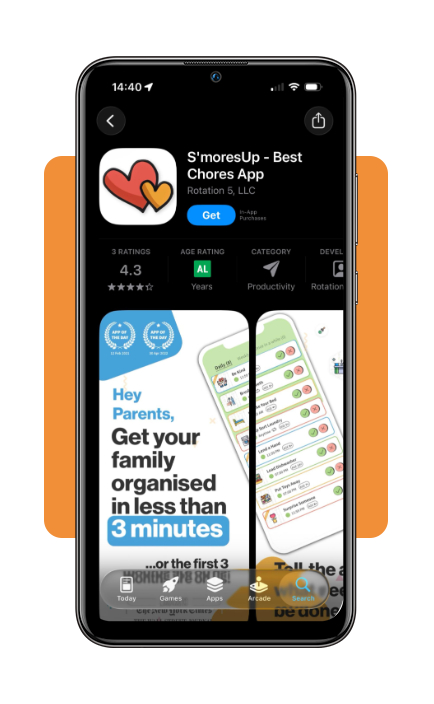
Step 1: download the S’mores app
To begin with, download S’mores (iOS/Android). The app is available for both iOS and Android devices.
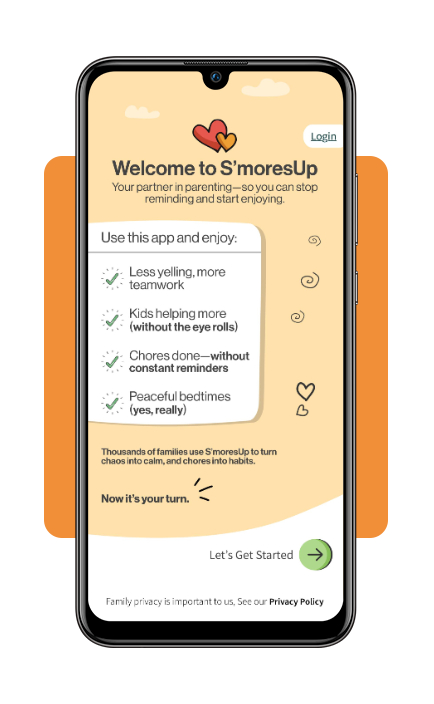
Step 2: create your family profiles
After installing the app, open it to see some of the features. Then, click on ‘Let’s Get Started’.
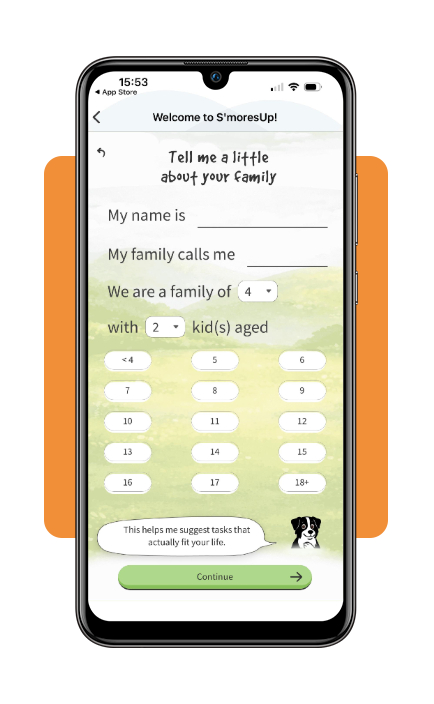
Step 3: information about your family
Now, the S’mores will ask about your name, how many kids you have, and their age.
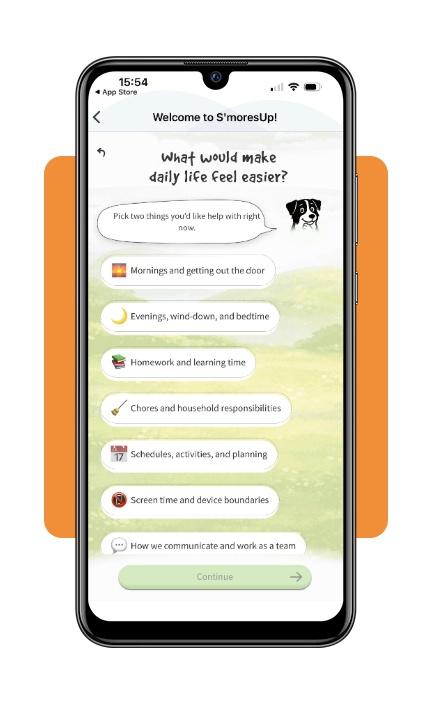
Step 4: set the schedule
The next questions will be about how S’mores (iOS/Android) can help you with and what your family prioritizes the most.
Step 5: start the chores
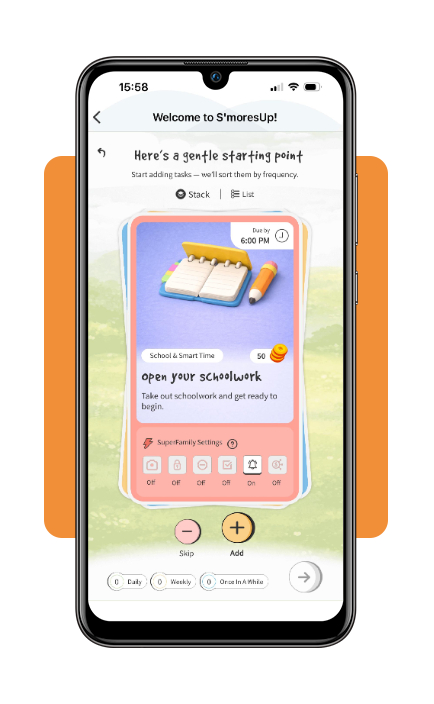
Once you provide all the needed information, S’mores will set up some cards so you can add it for your family to start the chores.
Best reward ideas to keep your children motivated
Rewards are a good idea to keep children motivated and show them how hard work compensates.
But it functions better when children understand what they are working toward and if the goal is achievable.
That said, with a chore tracking app, parents connect completed tasks to points or privileges without making every responsibility depend on money.
Simple rewards like extra screen time, choosing dinner, staying up a little later, picking a family movie, or earning a special activity give children something concrete to work toward.
Additionally, money can be used as part of the system when used selectively.
This type of reward turns chores into an opportunity to introduce good money habits without paying for every basic responsibility.
Another good practice is to separate ordinary household responsibilities from extra jobs that earn an allowance, helping children connect additional work with saving and spending decisions.
Overall, the reward system changes as children grow.
While younger kids may respond well to stickers or small privileges, older children probably prefer allowance increases.
That’s why keeping rewards varied and attainable keeps the routine staying motivating instead of being another obligation.
How to use digital planners to optimize your family budget
A digital planner is a tool that makes upcoming expenses visible, turning family budgeting way easier to handle.
To plan effectively, begin with a monthly overview for recurring bills, subscriptions, savings goals, and major family expenses.
It is recommended using it within a weekly view, where upcoming payments are considered alongside groceries, errands, school needs, and other household costs.
Also, a dedicated budget section then tracks spending categories and savings progress throughout the month.
So checking it once a week makes it easier to spot unusually high spending and adjust discretionary expenses if needed.
The planner also serves as a central place for important household information beyond money.
Furthermore, an emergency contact plan alongside financial and family records can make essential information easier to access
In short, keeping bills and schedules organized together is what makes the planner a companion to the chore tracking app.
4.2/5
Making family routines easier to manage
In this article, Insiderbits showed how a chore tracking app turns household responsibilities into an organized routine with assignments, reminders, rewards, and progress tracking.
S’moresUp (iOS/Android) adds structure to that process, while reward systems and digital planners can extend the same organization.
In the end, the goal is to create a system that children can understand and parents can manage, making chores easier to follow without relying on constant reminders.
Enjoyed this article? Save Insiderbits to your favorites and discover the most useful tech tips.