You turn on the news, and there’s another headline about how gas prices keep climbing across the US. It’s a pain, but what if there was a way you could find cheap gasoline on your phone?
GasBuddy is an app that connects you to local gas stations so you can compare prices before turning the engine on, and in this Insiderbits guide, we’ll show you how to use it. Read ahead!
Related: Best apps to earn discounts at gas stations

4.8/5
Which is the best cheap gasoline app?
The GasBuddy (Android | iOS) platform is a dedicated fuel finder that pulls live price data from millions of stations across the United States and Canada so that drivers can pay less for gas.
A large network of users reports prices throughout the day, which keeps the map always updated. That means you’ll always see current prices while navigating GasBuddy.
Beyond price tracking, the platform rewards loyal users with points, discounts, and perks, turning the search for cheap gasoline into an experience that pays back consistently.
Features available in the GasBuddy app
- Price comparison tool: compare real-time fuel prices from nearby stations instantly, helping you choose the lowest cost option before pulling into a lot;
- Station amenity details: see which stations offer restrooms, food options, and other services alongside fuel prices, giving you context before choosing where to stop;
- Trip planning tools: map fuel prices along a route ahead of a drive, allowing you to budget stops and avoid overpaying at unfamiliar stations.
Earn rewards on every fill-up
Every receipt you upload after a fill-up adds points to your account, and playing quick in-app games unlocks extra bonuses throughout your week.
Those points convert directly into gift cards from retailers you already shop at or straight discounts at the pump, rewarding choices you were making anyway.
Save extra cents with “Flash Deals”
Many participating stations post Flash Deals, offering short-term bonus savings and giving you one more solid reason to stop and fill your tank at that location.
Activating a deal before you pump can add several cents per gallon in savings, stacking neatly alongside rewards points you’ve already earned from past purchases.
Step-by-step: how to find cheap fuel near you
Once you’ve got the GasBuddy (Android | iOS) app installed on your phone, tracking down a lower price at the pump takes only a handful of simple steps to follow.
Your location settings, fuel type preference, and preferred payment method all shape which stations show up first, so setting these correctly saves you real time overall.
Comparing options nearby lets you spot cheap gasoline before you ever even leave your driveway, giving you a clear sense of where each stop leads today.
Step 1: download the app or search online
The first step is to access the App Store or Google Play on your phone, then look for and download “GasBuddy” if you’d rather have quick access to it saved right on your home screen.
Prefer skipping installation? Open your browser and open the GasBuddy website directly. Be sure to bookmark it so you can always have easy access to it when you want to save money.
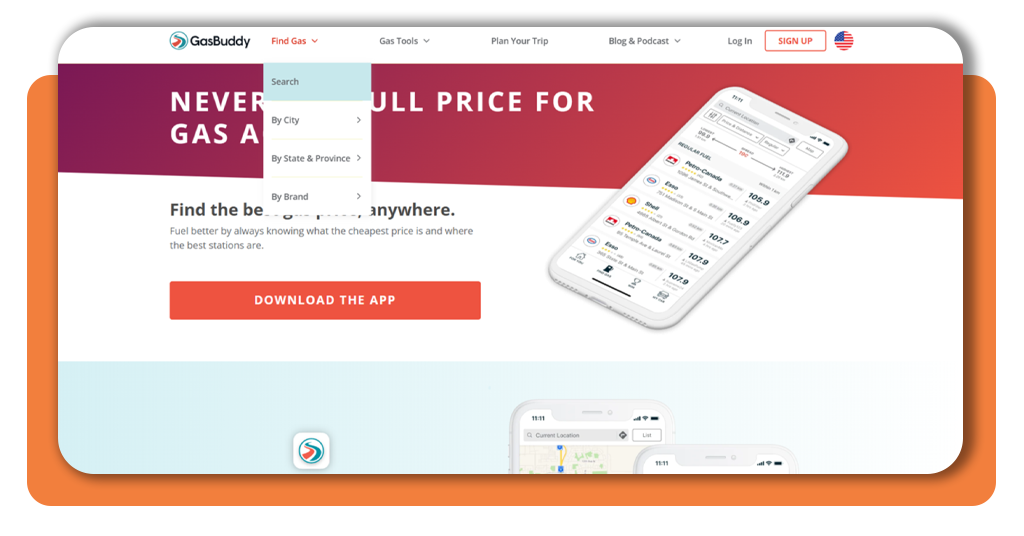
Step 2: search for location, type, and payment
Enter your current location on the website, or let the app detect it automatically if you’re on your phone, then choose which type of fuel your vehicle runs on most days of the week.
Selecting a payment method upfront, whether cash, debit, or credit card, helps filter out stations that don’t support how you prefer to pay once you arrive.
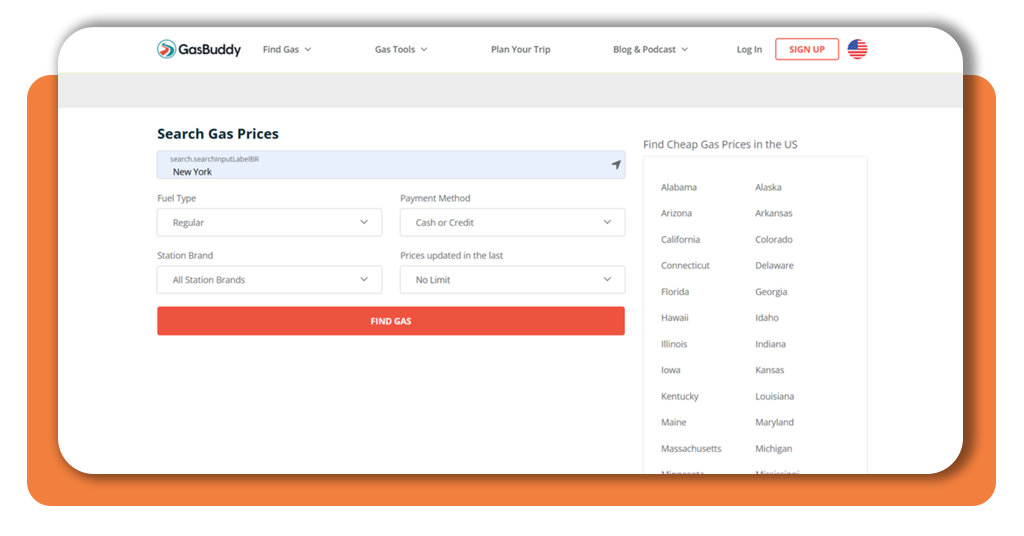
Step 3: browse available gas stations
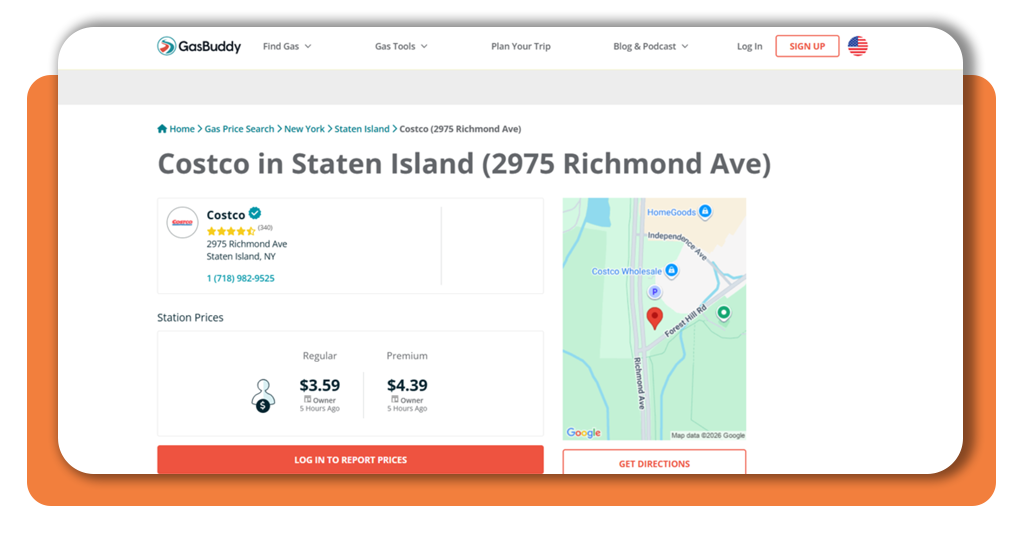
After setting up your filters, hit “Find gas”, and a full list of nearby stations appears ranked right on screen so you can scan prices and details at a glance.
Scrolling slowly through these results makes spotting cheap gasoline fairly simple, letting you weigh distance against price before committing to any single station along your route.
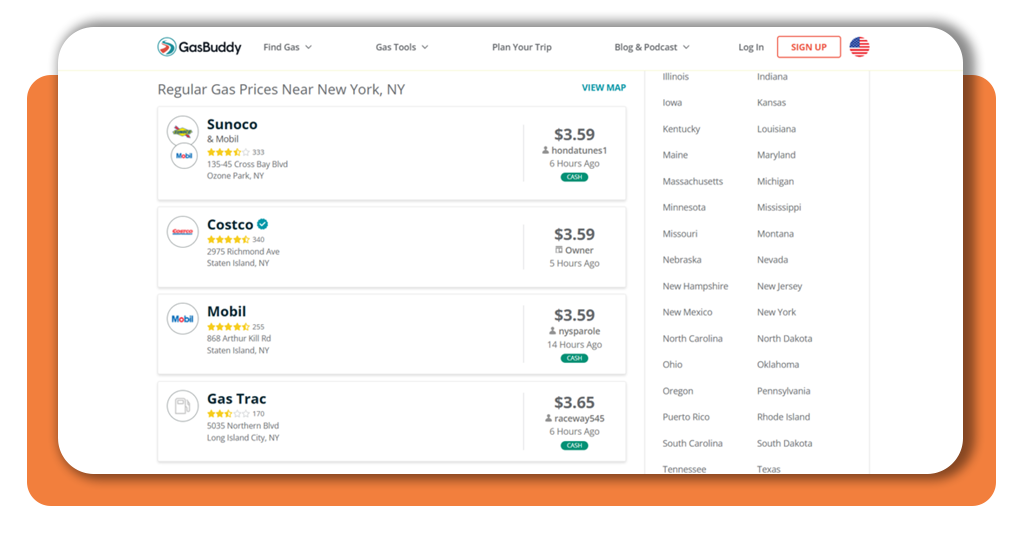
Step 4: check reviews, star rating, and go
Before you commit to a station, take a moment to look at the star rating and recent reviews left by other nearby drivers who stopped there.
Once everything checks out and looks right to you, simply tap the directions button and head straight over to the pump you’ve already picked for today.
Related: Receipt cashback app: your receipts are worth money — claim rewards now
Other interesting apps for drivers
Beyond fuel prices, your daily drive involves plenty of other decisions, from dodging traffic jams to finding parking once you finally reach your destination.
A handful of other apps can round out your toolkit, tackling problems that stretch well beyond what happens at the pump on any given day.
Pairing these with your search for cheap gasoline builds a fuller picture of how you navigate your routine, saving you time, money, and a bit of stress.
Waze for real-time traffic
Waze (Android | iOS) pulls live reports from drivers around you, flagging accidents, road closures, and slowdowns before you ever reach them on your daily commute.
Your route adjusts automatically as conditions shift, rerouting you around trouble spots so you spend less time sitting still and more time actually moving forward.
JustPark for parking made simple
Finding a good parking spot near a busy destination can eat up your patience, especially in unfamiliar areas where every lot seems full or overpriced.
JustPark (Android | iOS) lets you book a space ahead of time, so you arrive knowing exactly where you’re headed instead of circling the block hoping something opens up.
Upside for cash back rewards
Your everyday purchases, from gas to groceries to dinner out, can earn you cash back once you start claiming offers through Upside (Android | iOS).
Combine those offers with your usual search for cheap gasoline, and each stop at the pump starts putting a little something back into your pocket.
How to request a cheap car loan online
Your monthly car payment stacks right on top of every gas fill-up, both pulling from the same budget you’re working hard to protect.
Dealership financing rarely gives you the full picture, while lenders competing for your business online frequently stretch further to win you over.
Handling this search online puts real leverage in your hands, letting you line up better terms and free up more room for cheap gasoline runs down the road.
Check your credit score first
Your credit score determines nearly every loan rate you’ll be offered, so pulling a free copy from your bank or a card issuer gives you a real starting point.
Knowing where you stand before applying anywhere helps you set expectations, and catching any errors on your report early could improve the rate you’re offered later.
Compare rates from multiple lenders
Lenders like Consumers Credit Union and Navy Federal Credit Union often extend competitive rates to borrowers who might not qualify elsewhere, so it pays to check both.
Gathering a few quotes side by side lets you see real differences in APR, giving you leverage to negotiate or simply walk away with the better offer.
Apply and get pre-qualified online
Most lenders let you fill out a short form online to check your rate without any hit to your credit score, which makes this step nearly risk-free.
Once you’re pre-qualified, you’ll see the loan amount and terms you’re likely to receive, freeing up extra room in your budget for cheap gasoline every time you fill up.
Related: Get cash now with instant loan apps – fast and secure
4.8/5
Stop paying whatever the sign says
Finding a lower price at the pump doesn’t take much effort once you know where to look, and your phone already has the tools ready to help.
This Insiderbits guide walked you through GasBuddy, a few other handy apps for your daily drive, and how to line up a cheap gasoline budget with a solid auto loan.
Keep reading other Insiderbits articles for more useful apps that make your daily drive easier, whether you’re tracking traffic, hunting for parking, or just trying to save a few bucks.