
Running a quick errand across town and realizing the only ATM nearby charges $4.50 just to hand you your own money is one of those moments that makes you wonder how many times you’ve just shrugged and paid it without a second thought. A solid ATM finder on your phone could have sent you two blocks over to withdraw for free, and the frustrating part is that option was always there waiting for you to find it.
ATM Fee Saver is an app that maps out nearby ATMs with their fees and withdrawal limits, giving you a full read on every withdrawal before you even leave the house. Insiderbits put this guide together, covering everything from the core features to what the premium upgrade unlocks, so you’ll know what the app has to offer before downloading it. Keep reading, and you’ll have everything you need to start making withdrawal fees a thing of the past.
Related: Flush Public Toilets App: Your Go-To Bathroom Finder

4.5/5
ATM Fee Saver: best ATM finder app
ATM Fee Saver (Android | iOS) is a mobile app built to help you locate nearby ATMs, compare fees, and check withdrawal limits before you commit to a single transaction.
The app works as a reliable ATM finder for anyone who wants to stop paying more than they should every time they need cash out of a machine.
It covers everything from basic ATM searches to curated currency exchange spots and vital travel money tips, all packed into one free app you can pull up anywhere.
Features available in the app
- ATM map with live data: see ATM locations around you with their fees and withdrawal limits displayed upfront, so you know what to expect before walking up to the machine;
- Fee calculator: enter your withdrawal amount and let the app work out exactly how much that transaction will cost you at each available ATM nearby;
- Traveler reviews: read real feedback from other users about specific ATMs, giving you a ground-level perspective on reliability, safety, and overall withdrawal experience;
- Emergency contacts and visa info: access police, ambulance, and fire numbers alongside official visa application links for over dozens of countries around the globe.
Coverage across more than 180 countries
As a dependable ATM finder, the app gives you access to data spanning over 180 countries across Asia, Europe, North America, South America, Africa, and beyond.
Whether you’re withdrawing cash in a familiar city or figuring out your options in a place you’ve never been, the app pulls up relevant ATM information without any friction.
New countries get added to the database on a rolling basis, so the coverage you rely on at home carries over wherever your next destination happens to take you.
Free to use with a premium upgrade
Using this ATM finder costs nothing, and the free version already gives you access to the map, fee data, traveler reviews, and emergency contact information for every supported country.
The $1.99 premium upgrade removes ads and unlocks advanced sorting and filtering options, a global currency converter supporting over 160 currencies, and enhanced ATM comparison tools.
If you withdraw cash with any regularity, the premium features pay for themselves quickly, and the ad-free experience alone makes the upgrade worth considering on a longer trip.
Step-by-step: how to locate fee-free ATMs online
Finding a fee-free ATM used to mean walking up to a machine, checking the screen, and either accepting the charge or moving on to try another one nearby.
Pulling up an ATM finder on your phone before you leave changes that completely, putting the fee information and withdrawal limits right in front of you ahead of time.
ATM Fee Saver (Android | iOS) walks you through everything from setting up your location to pulling up a full list of nearby ATMs sorted by fee, all in one place.
Step 1: download ATM Fee Saver on your phone
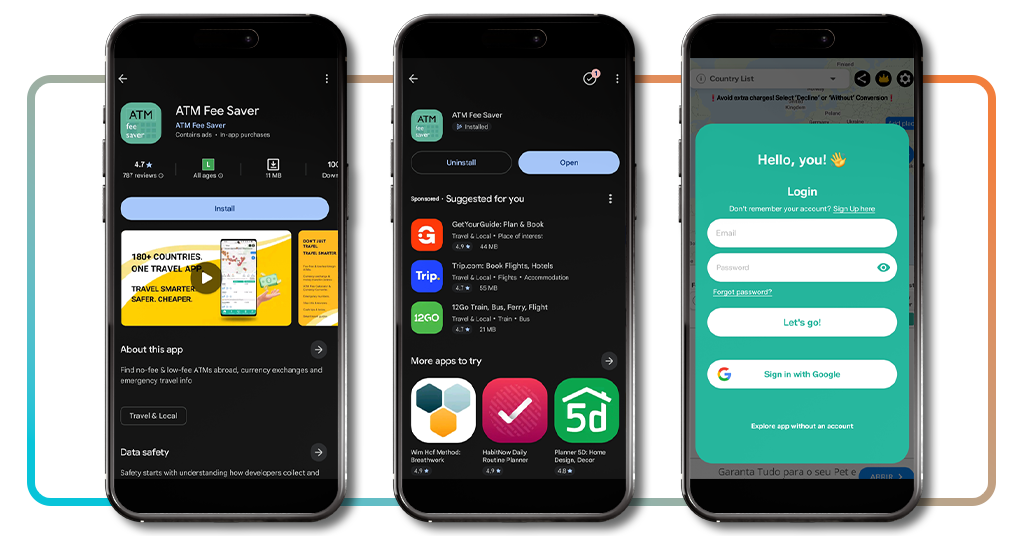
ATM Fee Saver is free to download and available on both Android and iOS, so you can have it ready on your phone in under a minute from either store.
Once it’s installed, you’ll be prompted to either create an account or explore the app without one, which is a solid option if you want to get a feel for it first.
The login screen also gives you a Google sign-in option, making the whole setup process as painless as possible so you can get to the actual ATM search right away.
Step 2: set your country and explore the map
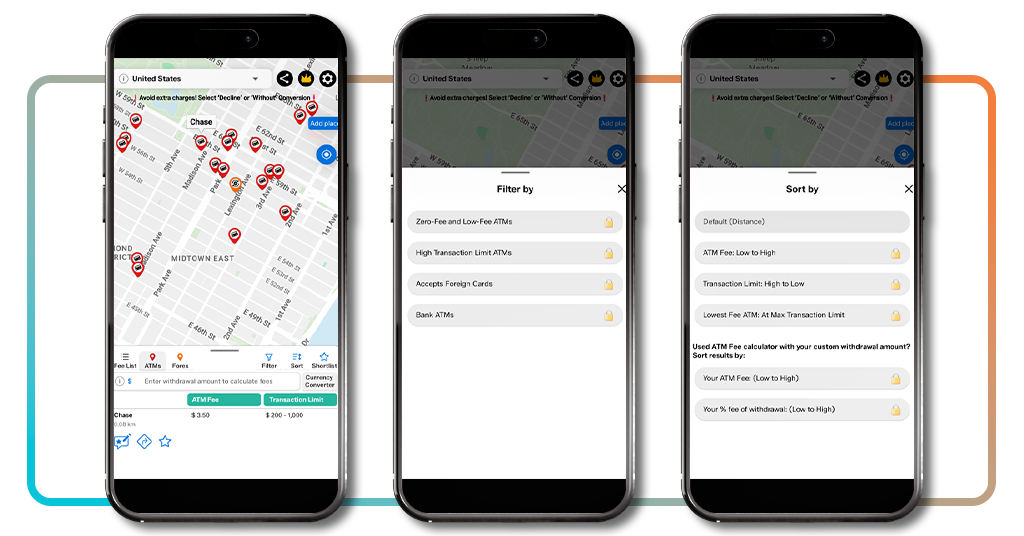
The ATM finder opens straight onto an interactive map with ATM locations pinned around you and a fee list at the bottom showing charges and withdrawal limits for each nearby machine.
Tapping the ‘Filter’ button lets you narrow results down by zero-fee ATMs, high transaction limits, or bank ATMs only, though those options are locked behind the premium upgrade.
The ‘Sort’ panel gives you even more control, letting you order results by lowest fee, highest withdrawal limit, or lowest fee at max transaction limit, all with a single tap to apply.
Step 3: pick the lowest fee ATM near you
The fee list at the bottom of the map screen is where the app’s ATM finder function really delivers, showing you a ranked breakdown of nearby ATMs with their charges and limits.
You can enter a withdrawal amount into the fee calculator to see the exact cost at each ATM, which makes it a lot easier to compare options side by side.
Once you’ve settled on the right ATM, a single tap pulls up navigation so you can head straight there without having to switch between apps or type in an address manually.
Related: Find Wifi Networks Without Password with the Wifi Finder App
Financial operations available at ATMs
ATMs do a lot more than hand out cash, and most people walk past that extra functionality every single time they stop at a machine to make a withdrawal.
Depending on your bank and the ATM network you’re using, you can handle a surprising range of financial tasks right there at the machine without stepping inside a branch.
Knowing which ATMs near you support the full range of these features is where having a solid ATM finder on your phone starts to make a lot of practical sense.
Deposit cash and checks on the go
Most major bank ATMs in the US now accept both cash and check deposits directly at the machine, which saves you a trip to the teller for routine banking tasks.
Cash deposits are processed on the spot, while check deposits go through a short verification window before the funds show up in your account, so timing does matter here.
If you’re depositing regularly, it’s worth checking whether your bank’s ATMs accept envelope-free deposits, since that feature speeds up the whole process at the machine.
Loan payments and bill settlements
Using an ATM finder to locate your bank’s own machines is a practical move when you need to make a loan payment or settle a bill without logging into online banking.
Some bank ATMs let you transfer funds directly toward outstanding loan balances or bill payments, which keeps everything within your account without any third-party platform involved.
Not every ATM in your area will support this, so it’s worth confirming with your bank which specific machines on the network offer full payment functionality before you head out.
Mini statements and spending summaries
Your bank’s ATM finder can point you to the nearest machine that supports mini statements, giving you a quick snapshot of your most recent transactions without needing your banking app.
Most bank ATMs print or display your last five to ten transactions on request, covering everything from recent purchases to transfers and any fees charged to your account.
It’s a useful habit to build into your routine, especially if you want a fast reality check on your spending before making a larger withdrawal or financial decision that same day.
Safety tips for using ATMs
Using an ATM takes about two minutes, but those two minutes are when you’re most exposed to skimming devices, shoulder surfers, and machines that haven’t been properly maintained.
Small things like checking the card slot before you insert your card or standing close to the machine while you transact can genuinely make a difference in keeping your account secure.
Pairing good ATM habits with a reliable ATM finder means you’re not just finding the lowest fee machine nearby, but also the one that gives you the safest withdrawal experience overall.
Always choose bank ATMs over standalone machines
Bank-operated ATMs go through regular maintenance checks and security audits that standalone machines in convenience stores or shopping centers don’t.
Skimming devices are far more commonly found on unbranded standalone ATMs, where there’s less oversight and a longer window for someone to tamper with the hardware undetected.
If you’re traveling and unfamiliar with the area, sticking to ATMs inside or directly outside bank branches is one of the more reliable ways to reduce your exposure to fraud.
Stick to ATMs in well-lit, busy areas
Using an ATM finder to scope out better-positioned machines beforehand means you’re not stuck settling for a poorly lit, isolated option just because it happens to be the closest one.
Poorly lit ATMs in quieter areas give opportunistic individuals a much easier window to observe your PIN entry or approach you after you’ve completed a withdrawal without drawing attention.
Foot traffic around an ATM acts as a natural deterrent, so a machine outside a busy pharmacy or bank entrance is always going to be a safer bet than an isolated one.
Shield your PIN every single time
Covering the keypad with your free hand when entering your PIN is one of those habits that feels unnecessary until the one time it would have actually protected you from a real threat.
Even when you’re using a trusted ATM finder to locate a bank machine in a busy area, overhead skimming cameras can still capture keypad entries if your hand isn’t blocking the view.
Make it a part of every withdrawal regardless of where you are or how familiar the machine looks, because the few seconds it takes are never worth skipping under any circumstances.
Related: Find local events that match your personality (AI social finder)
4.5/5
Find the right atm before it costs you
ATM Fee Saver takes something you do without much thought and gives you the information you need to do it in a way that actually keeps more money in your pocket.
In this Insiderbits guide, you got a full walkthrough of how an ATM finder helps you locate low-fee machines nearby and take control of your withdrawal habits for good.
Keep browsing Insiderbits for more reviews and guides on apps that make everyday financial decisions a little easier and a lot less costly across the board.