
Guessing water parameters and hoping your fish pull through is not ideal, and that constant uncertainty is the reason you need an aquarium manager app watching your tank.
AquaLens turns that uncertainty into answers, and Insiderbits built this guide around every feature packed inside it. Healthier water and no surprises start with what you’re about to read.
Related: Stop Guessing and Start Catching with These Free Fishing GPS Apps

4.5/5
Why use an aquarium manager app?
AquaLens (Android | iOS) works as a photo-based companion for anyone caring for fish, plants, coral, or snails living inside a home tank, revealing diet, temperament, and water needs.
Water testing usually means squinting at color strips under bad lighting and trusting a shaky guess. This aquarium manager app reads results from your camera and saves them.
Freshwater, saltwater, planted, reef, shrimp, breeding, and quarantine setups all fit inside one interface without their histories ever blending together or overwriting each active tank.
Features available in the AquaLens app
- Species identification: point your camera at a fish, plant, coral, or shrimp and get an instant match with full care details, diet, and temperament;
- Water test scanning: photograph a test strip or digital reader and let the app pull exact readings for pH, ammonia, nitrite, and nitrate levels;
- Care reminders: schedule alerts for feeding, water changes, filter cleaning, and dosing cycles so nothing on your daily aquarium routine slips through the cracks;
- Stocking planner: build a wishlist and compare adult size, temperament, group needs, and estimated bioload before you bring home a new tank mate.
Catch problems before they turn serious
Small parameter shifts often go unnoticed until your fish start showing real, visible stress, and that silent gap between drift and symptoms is where lasting tank damage happens.
Predictive alerts study your tank history and flag movement toward unsafe ranges before a small fix turns into a costly emergency, and this aquarium manager app handles it.
Keep every tank record in one place
Water changes, feeding logs, dosing notes, maintenance tasks, livestock updates, and gallery photos all land together inside one timeline instead of notebooks or random phone screenshots.
When a parameter suddenly shifts on you, just scroll back through that same timeline and see exactly what happened around it, instead of guessing from patchy memory alone.
Save time on daily aquarium care
Dosing math, water change percentages, salinity conversions, and daily lighting output calculations used to eat up real time before a single task on your busy tank ever started.
Built-in calculators handle those numbers for you, and completed reminders drop straight into your journal without extra typing because this aquarium manager app tracks the routine.
Related: Pet health insurance: affordable coverage for your pets
Step-by-step: how to monitor water quality using the app
Opening AquaLens (Android | iOS) for the first time drops you straight into a short setup that asks about your exact tank size, temperature, and current cycling status.
Answering those first few questions matters more than it might seem because this aquarium manager app uses every detail you give to shape the advice it builds for you.
Real numbers about your filter, your fish, your plants, and your tank water eventually turn into a clear picture you can read, trust, and put to good use.
Step 1: download the app and set up your profile
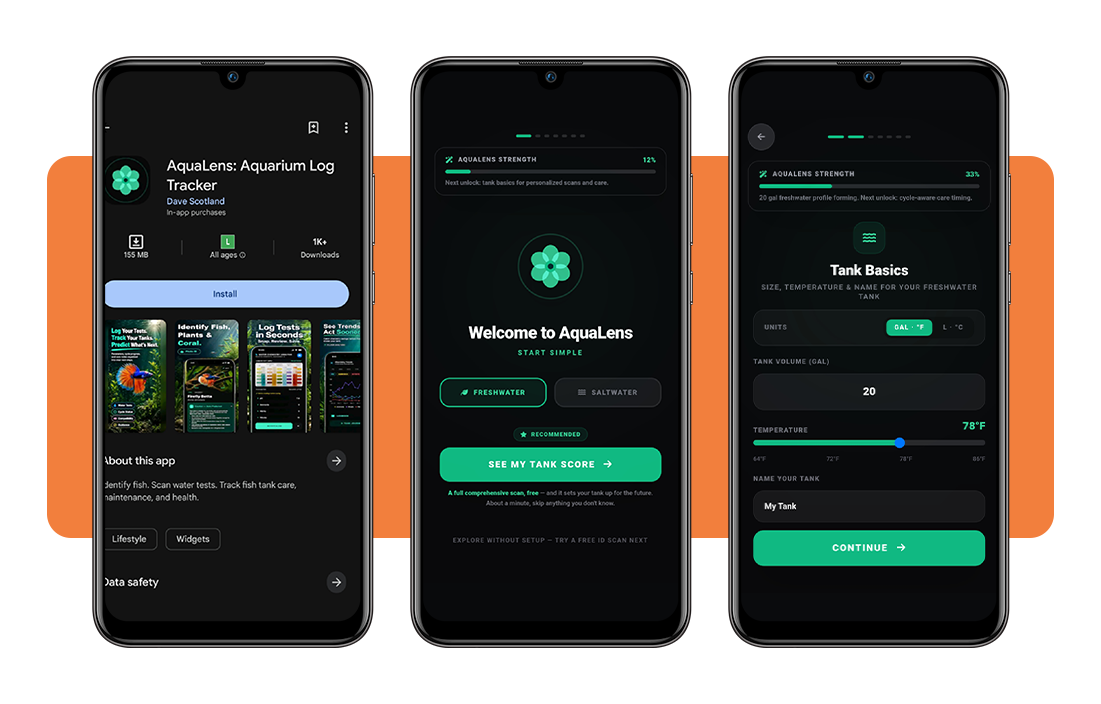
Grab AquaLens for free from the App Store or Google Play, open it up, and pick freshwater or saltwater right away before any other setup question loads on your screen.
From there, you punch in your gallons, slide the temperature to match your heater, and name the tank whatever you like so you can keep track of it.
Step 2: add your residents and equipment
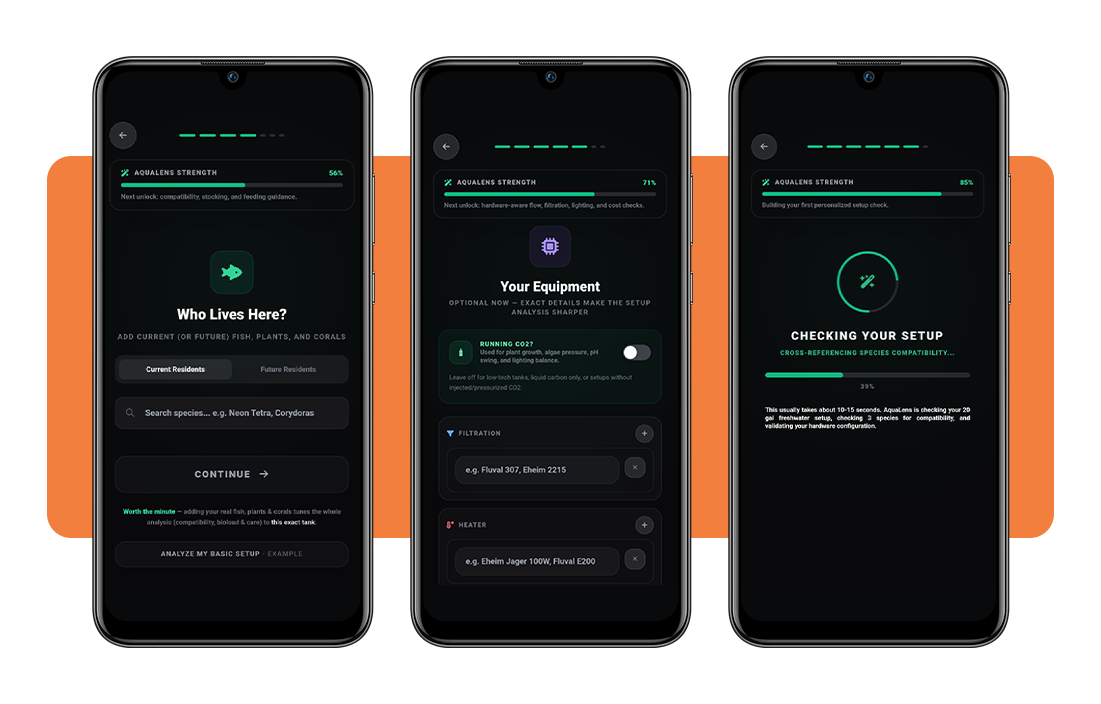
Search for every fish, plant, or coral piece you own, tap ‘Current resident’, and set the exact headcount for each species now living inside your tank.
Punch in your filter model, heater wattage, and light fixture right after that. This aquarium manager app cross-references those specs against your tank volume and stocking.
Step 3: get your personalized tank analysis
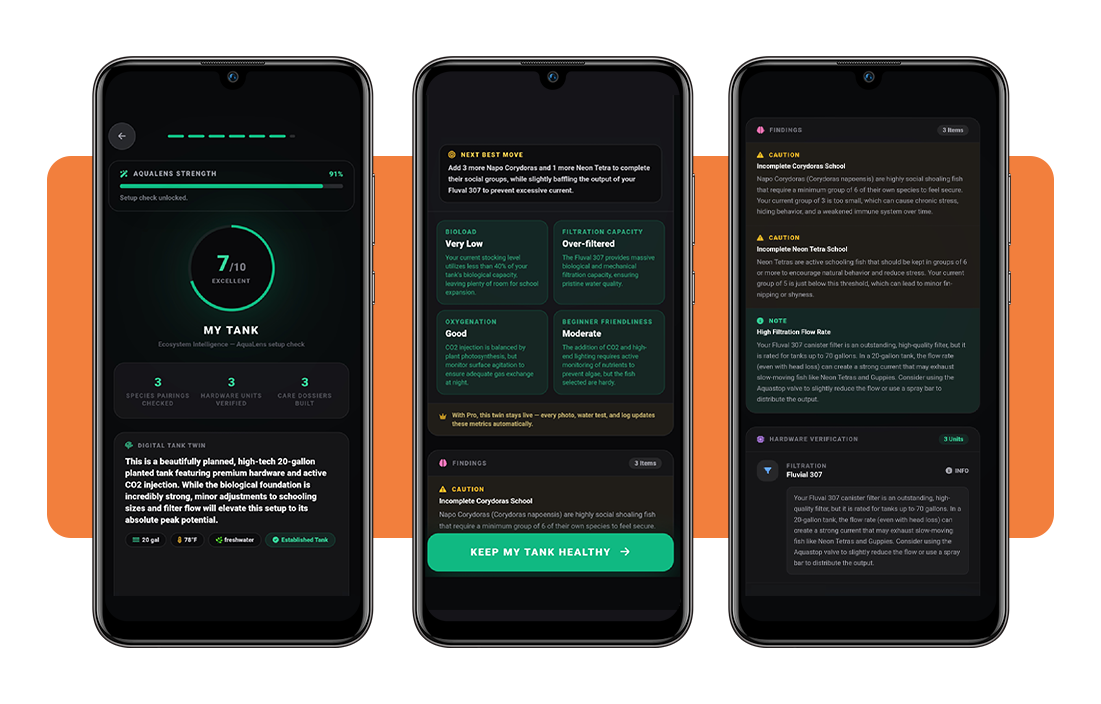
Within a few seconds, the app returns a full-tank score, explaining your bioload, filtration capacity, oxygenation, and how beginner-friendly your current setup looks.
Findings listed right underneath call out real issues, like an incomplete school of fish or a filter pushing too much current, then point you toward one next move.
Step 4: log water tests and track results
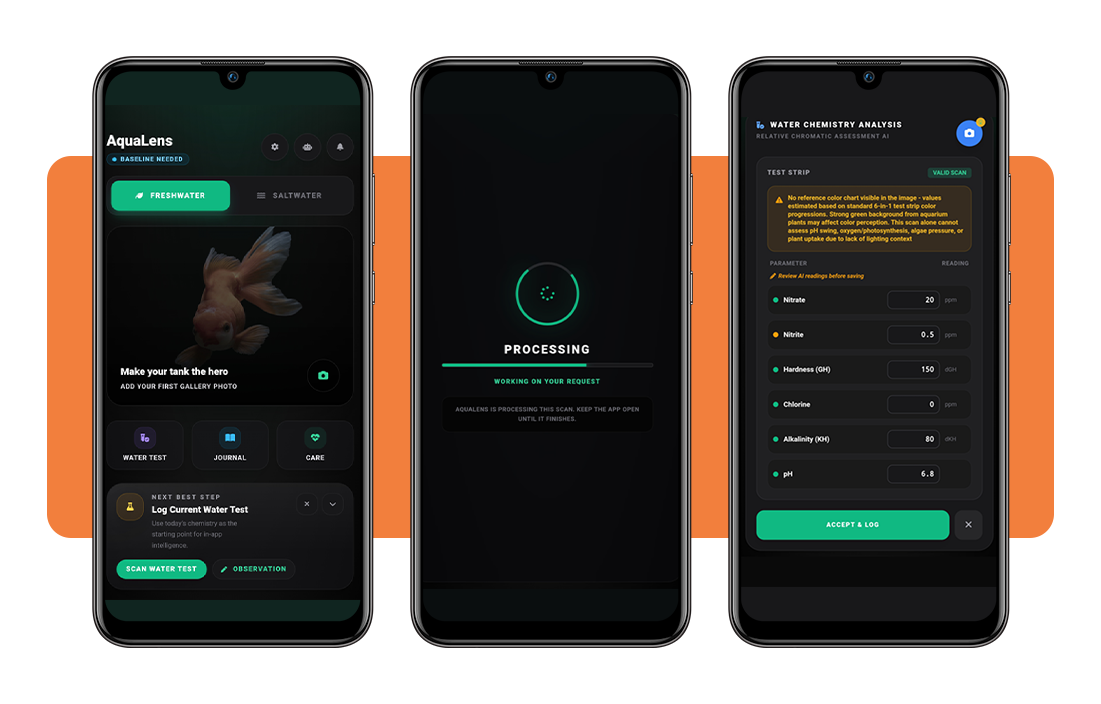
Line your test vial up against the white section of the printed color card, and the app measures the color distance against each reference shade before saving anything.
Every saved reading feeds into the analytics tab, where this aquarium manager app charts your ammonia, nitrite, nitrate, and pH readings across a week, month, or year.
Tips for a healthy tank and app compatibility
Corydoras hiding behind the filter intake for days, a betta ignoring food, and algae creeping across the glass are all small signals that show up long before anything serious happens.
None of those signals mean much all by themselves, but tracking them against your equipment and your last few water changes usually points straight toward the real cause.
That kind of pattern matching is what this aquarium manager app handles best, turning a handful of small warning signs into one clear next move made for you.
Check compatibility before adding new fish
That eye-catching fish at the store might look perfect right up until it grows to twice its current size or turns aggressive toward everything else living in your tank.
Pull up the wishlist tool first, run a quick compatibility check against your current stock, and only bring the new fish home once every pairing comes back safe.
Match your equipment for accurate guidance
Punching in the wrong filter model or a rough heater guess throws off every flow rate and wattage calculation the app builds behind the scenes for your tank.
Swap out a light fixture or upgrade your canister filter, and update that entry so every future recommendation stays tied to the exact gear you own.
Test water on a consistent schedule
Picking one fixed day every week for water testing keeps that habit steady, instead of testing only whenever something inside your tank already looks off.
Set a recurring reminder for that exact day, and this aquarium manager app will nudge you before a busy week pushes the task off your radar.
Log every resident for tailored advice
Skip logging even one or two fish, and feeding portions, dosing suggestions, and compatibility checks all get calculated for a tank that does not fully match your reality.
Add future picks to your wishlist as well, not just your current residents, and every possible compatibility conflict shows up on screen well before you bring that fish home.
Related: Pet sitting for travelers: find the perfect one with this app
4.5/5
Turn tank care into a habit, not a chore
AquaLens (Android | iOS) does far more than watch your water; it names your fish and plants, plans your next stocking move, and answers any questions you may have about your tank.
In this guide, we at Insiderbits showed you how this aquarium manager app blends identification, water testing, a full journal, and personalized guidance into one useful tool.
Read more articles on Insiderbits and learn more about apps and simple resources that can turn everyday pet care into something you genuinely enjoy handling.