
Worried about making a mistake while using mobile banking? A banking protection app can add an extra layer of security to your phone and financial information.
In this Insiderbits guide, we’ll explain how Bitdefender Mobile Security (Android | iOS) can help protect your device, secure banking activity, and reduce the risk of common mobile threats.

4.7/5
Which is the app to protect your mobile banking apps and financial data?
Bitdefender Mobile Security (Android | iOS) is a mobile security app designed to help protect smartphones against online threats. It can scan for potentially dangerous apps, websites, and other security risks.
For people who use banking apps frequently, mobile security can provide an additional layer of protection alongside the bank’s own security features.
A banking protection app shouldn’t replace basic precautions, such as using strong passwords, avoiding suspicious links, and keeping your phone’s operating system updated.
Instead, it can complement these habits by helping identify potential threats before they cause problems.
Key features within Bitdefender Mobile Security
Bitdefender Mobile Security (Android | iOS) includes several tools designed to protect mobile devices from online threats.
Its security features can help identify malicious apps and potentially dangerous websites.
The app also includes web protection designed to warn users about suspicious or fraudulent websites while browsing.
For someone who regularly accesses financial accounts from a smartphone, these features can be especially useful.
The app is available on both major mobile platforms.
A banking protection app can be particularly helpful for users who aren’t comfortable identifying every online threat themselves.
However, no security app can guarantee that every scam or fraudulent message will be blocked.
That’s why combining security software with careful online habits remains important.
Step-by-step: how to secure your phone and prevent mobile banking fraud
Setting up mobile security doesn’t have to be complicated. You can use Bitdefender Mobile Security (Android | iOS) alongside your existing banking apps.
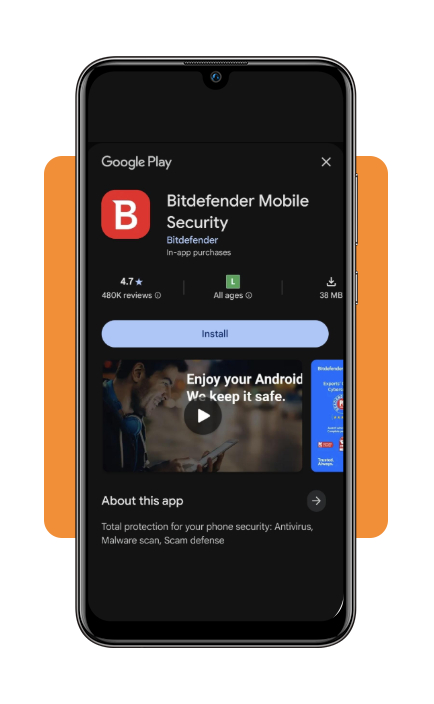
Step 1: download Bitdefender Mobile Security
Download the app from the Google Play Store or Apple App Store.
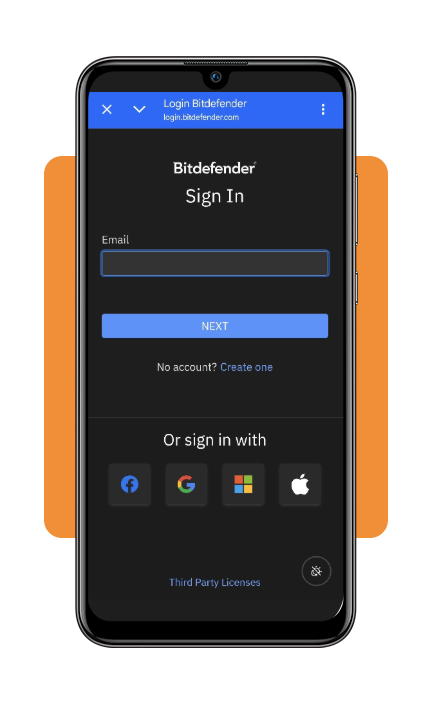
Step 2: open the app and create or access your account
Launch Bitdefender Mobile Security (Android | iOS) and follow the instructions shown on screen.
Depending on the features you want to use, you may need to create or log in to a Bitdefender account.
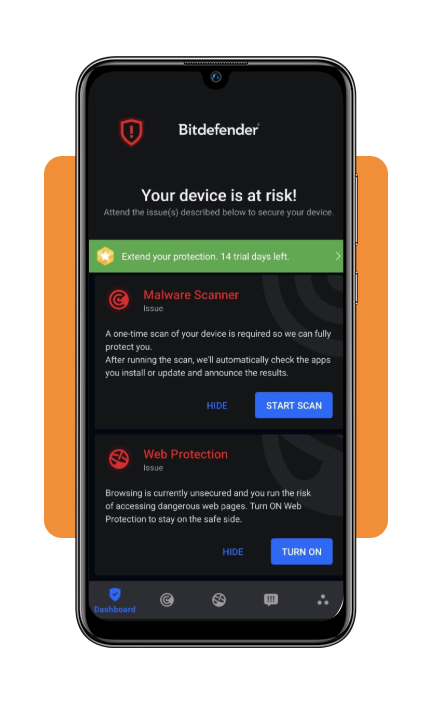
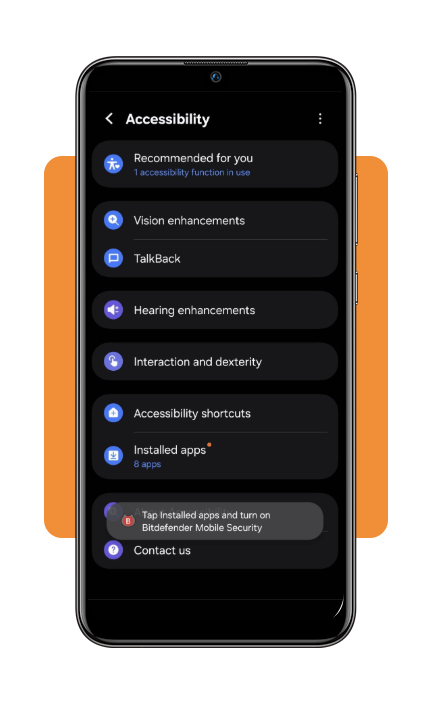
Step 3: allow permission and run a security scan
Allow permission and use the available security tools to check your phone for potential threats.
Review any warnings or recommendations provided by the app.
Step 4: enable web protection
Turn on the available web protection feature if your plan supports it.
This can help identify potentially dangerous websites when you’re browsing on your phone.
Step 5: keep your banking app updated
Open your phone’s app store and check for updates to your banking applications.
Updates can include security improvements and bug fixes.
Step 6: use secure login information
Create strong, unique passwords for your financial accounts.
You can also use a secure password manager to organize your passwords without relying on simple or repeated combinations.
Step 7: avoid suspicious messages and links
Don’t click links in unexpected texts, emails, or social media messages claiming to be from your bank.
Instead, open your banking app directly or type the bank’s official website into your browser.
Step 8: monitor your accounts
Check your bank statements and account activity regularly.
If you notice an unfamiliar transaction, contact your financial institution through its official customer-service channels immediately.
Top secure password managers
A password manager can make it easier to create and store strong, unique passwords.
This can be especially helpful if you have multiple banking, shopping, and financial accounts.
Look for password managers that use strong encryption and offer features such as multi-device synchronization and multifactor authentication.
Before choosing one, compare pricing, security features, device compatibility, and recovery options.
A password manager works alongside a banking protection app, rather than replacing mobile security software.
Best identity theft protection apps
Identity theft protection services can provide another layer of monitoring for people concerned about fraudulent use of their personal information.
Depending on the provider, these services may offer credit monitoring, identity alerts, dark-web monitoring, or assistance after identity theft.
However, features vary significantly between providers.
Before subscribing, check exactly what the service monitors and what assistance is included.
You can compare available options based on coverage, pricing, monitoring features, and cancellation terms.
It’s also important to remember that identity protection cannot prevent every type of fraud.
Good security habits are still essential.
4.7/5
Use mobile banking with greater confidence
Using a banking protection app can make mobile banking feel less intimidating by adding another layer of protection to your smartphone.
Bitdefender Mobile Security (Android | iOS) provides tools designed to detect potential threats, protect against dangerous websites, and improve mobile security.
Still, the safest approach combines technology with good habits.
Keep your phone and banking apps updated, use strong passwords, enable multifactor authentication when available, and avoid unexpected links.
For additional guidance on staying safe while using financial services online, check this Yahoo Finance guide on mobile banking safety.
Finally, remember that a banking protection app is a security tool—not a guarantee against fraud.
Staying alert and checking your financial accounts regularly can help you spot suspicious activity as early as possible.