Every parent knows this: it only takes a few seconds of distraction for a child to push the volume slider all the way up when their favorite song drops or an exciting game moment unfolds. The volume may feel harmless at the moment, but, in reality, it can expose young ears to levels that damage delicate inner structures. The worst is that, unlike a scraped knee, hearing loss does not heal with time.
However, a reliable volume limiter app transforms any pair of headphones into a safer listening setup without expensive hardware replacements, granting you the chance to avoid wasting much time constantly checking or arguing about sound levels. Read below about the Volume Blocker app and discover how parents can set a firm limit aligned with pediatric recommendations and know that the device itself will enforce it.
- Applicazione Volume Booster: Aumenta il volume del telefono
- How to Customize the Volume Button on Android
- Come aumentare il volume del telefono
What’s the best volume limiter app?
When inquiring about the best volume limiter app, the priority is this one: consistent enforcement of safe listening thresholds without requiring constant parental supervision.
The most effective ones operate in the background, locking maximum output at levels aligned with pediatric hearing safety guidelines.
All of that while remaining compatible with streaming platforms, games, smartphones, and video apps your child already uses.
The strong option Insiderbits will explore today is currently available for iOS. You can search the app by the name Volume Blocker and Limiter.
This is one tool that allows parents to define a strict maximum volume cap that cannot be exceeded once activated.
And the best part is that it doesn’t depend on reminders or manual checks, because the app overrides system-level volume controls and prevents spikes beyond the configured decibel threshold.
And what makes this volume limiter app truly effective is its ability to maintain the 85 dB ceiling recommended for extended listening sessions.
Also, any reliable app, like the Volume Blocker and Limiter, enforces this limit automatically, even if the child attempts to raise the volume through physical buttons or on-screen sliders.
Beyond simple caps, the best apps offer parental locking features and persistent background control, ensuring that the volume limit stays in place throughout daily device use.
For parents concerned about long-term hearing health, that invisible safeguard provides peace of mind without requiring new headphones or constant monitoring.
Features available in the app
One of the first steps to take when downloading a volume limiter app is understanding what makes it effective.
This process starts with looking at how deeply it integrates into the device’s audio controls.
Volume Blocker and Limiter, for example, is designed to operate at the system level, which means it actively enforces a predefined maximum output threshold.
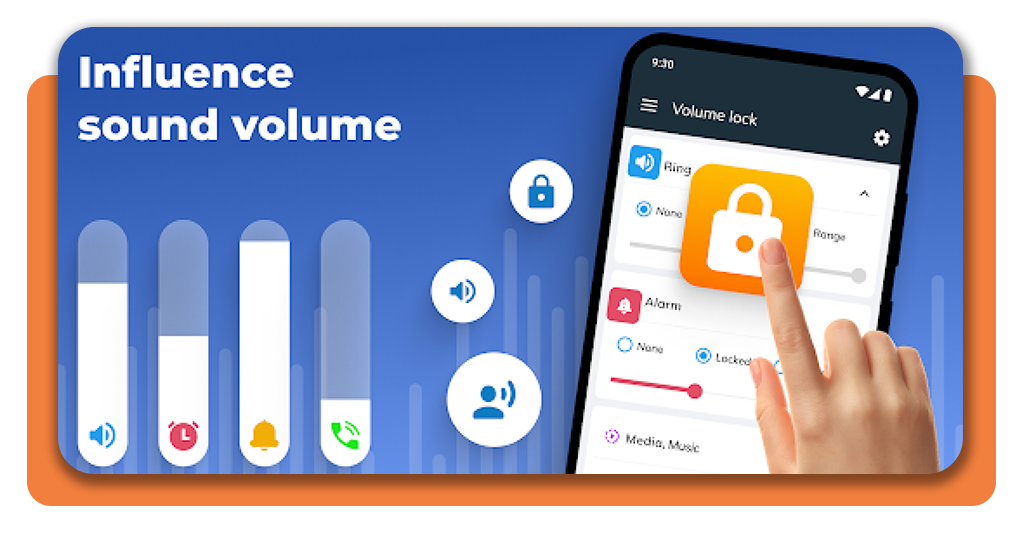
One of its central features is customizable volume caps, which let parents set a precise limit aligned with recommended safe listening levels.
Once configured, the app prevents any increase beyond that ceiling, even if physical volume buttons are pressed repeatedly.
In addition, the volume limiter app includes passcode protection that ensures that the safe limit remains active throughout daily use.
Another valuable feature is background persistence, meaning the limiter continues functioning while other apps run simultaneously.
Therefore, parents don’t need to reopen the app every time a new platform is launched, as the restriction stays active across the entire system.

4.3/5
Step-by-step: how to set up and limit headphone volume using the app
- Fase 1: first of all, download and install Volume Blocker and Limiter from the App Store on your child’s iPhone or iPad;
- Fase 2: open the app immediately after installation and complete the initial setup screen so the limiter can start controlling device audio;
- Fase 3: also, approve the permissions the app requests, confirming that it can manage system volume controls and enforce limits across other apps;
- Passo 4: to test it, plug in the headphones your child uses most often, then play a short audio clip so you can adjust the cap while real sound is playing;
- Passo 5: set the maximum volume limit to a safe level for daily listening, keeping it low enough that the sound stays comfortable without needing extra volume;
- Passo 6: turn on the lock option inside the app, then create a passcode that your child will not guess easily;
- Passo 7: after that, try raising the volume through the physical buttons and the on-screen slider, confirming that the device stops increasing the volume at the limit you set;
- Passo 8: also, open a few common audio sources and repeat the volume test to confirm the cap holds across platforms;
- Passo 9: lastly, leave the limiter active in the background and avoid force-closing it.
4.3/5
Tips for safe listening habits for your kids
As you can see, the volume limiter app is a powerful tool, but long-term hearing protection also depends on habits that shape how children interact with sound.
That’s why the focus of safe listening is about teaching moderation and balance. You won’t solve the problem by eliminating headphones.
Encourage the 60/60 rule, which suggests listening at no more than sixty percent of maximum volume for no longer than sixty minutes at a time before taking a break.
In addition, short pauses allow the ears to recover and reduce cumulative strain during long gaming or streaming sessions.
To ensure comfort, choose well-fitted headphones that sit better and don’t require higher volume to compensate for outside noise.
That’s because when background sounds are blocked effectively, children are less likely to increase output to overpower ambient noise.
In addition, model healthy behavior by keeping your own listening levels moderate and discussing why sound safety matters.
Finally, create screen-free intervals during the day so the ears can rest completely.
Activities like outdoor play or reading bring natural breaks that support auditory health alongside digital well-being.
Why you need to take care of your child’s hearing
In short, protecting your child’s hearing is about preserving a sense that defines communication and learning for decades to come.
Some parents still underestimate noise-related hearing damage, but damage is permanent.
Early exposure to unsafe volume levels can create long-term consequences that may not appear immediately.
Because children’s ears are still developing, even small volume increases can strain the delicate inner-ear cells that convert sound into brain signals.
Consequently, hearing loss in the early years can influence speech development, everyday learning, classroom attention, and social interaction.
Even mild damage may lead to difficulty distinguishing certain sounds.
Taking preventive steps today creates a protective foundation that extends far beyond digital devices.
Remember: safeguarding your child’s hearing now supports clearer communication, stronger learning experiences, and long-term auditory health well into adulthood.
Protect Your Kid’s Hearing: Download This Volume Limiter App – Conclusion
Headphones have become part of childhood. This is a new reality, but a volume limiter app adds a layer of protection, ensuring that excitement never turns into long-term damage.
Il Volume Blocker makes it possible to transform any ordinary pair of headphones into a controlled listening setup without purchasing specialized gear.
So, if your child uses headphones daily, setting a safe volume cap today can protect years of clear hearing ahead.
Small adjustments now create lasting benefits, and a simple app download can serve as a first step toward preserving one of their most important senses.
Correlato: Eccezionali applicazioni educative per bambini
Ti è piaciuto questo articolo? Salvate il blog Insiderbits tra i vostri preferiti per conoscere gli strumenti più recenti, i consigli tecnologici creativi e le scoperte nel campo dell'editing fotografico.